
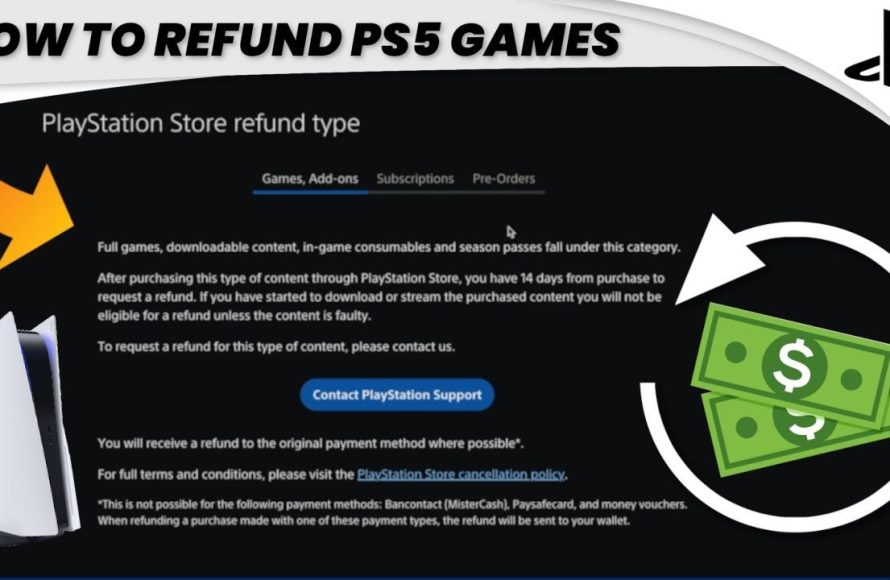
You cannot directly return digital games on your PS5 through the console. Refunds for digital purchases typically require contacting PlayStation Support and meeting specific eligibility criteria.
Purchased a game that isn’t quite what you expected on your PlayStation 5? We’ve all been there. Figuring out how to return games on ps5 can feel a little tricky. The good news is, there are paths to explore if you’re seeking a refund.
Navigating the process involves understanding Sony’s policies and knowing where to seek help. While a simple button push on your console isn’t the answer, options do exist. Let’s explore the key steps for a potential refund.

How to Return Games on PS5: A Simple Guide
So, you bought a game for your PlayStation 5 and, for whatever reason, it’s just not working out. Maybe it’s not what you expected, or maybe it’s just not your cup of tea. Don’t worry, you’re not stuck with it! Returning games is sometimes possible, and this guide will walk you through the process. It’s not always as easy as returning a shirt you bought online, but knowing the rules and options can save you some frustration.
Understanding the PSN Refund Policy
The first thing you need to know is that PlayStation Network (PSN), the digital store where you buy games online, has a specific refund policy. It’s not like a regular store where you can usually return things within 30 days without too much trouble. PSN’s policy is a bit more strict, and it’s important to understand it before you even think about a return. The main thing to remember is that once you’ve started downloading or streaming a game, you generally lose your right to a refund unless there is an issue with the game itself, like a technical problem preventing you from playing.
The 14-Day Rule
The key rule is the 14-day window. If you haven’t started downloading or streaming the game, you have 14 days from the purchase date to request a refund. This means if you buy a game but your plans change, you have a little bit of time to change your mind. However, again, the moment the game starts to download or stream, that refund window closes unless the game has a major technical fault.
Exceptions to the Rule
There are exceptions to the “no refund after download” rule. For instance, if the game you bought is faulty, has technical problems that make it unplayable, or the game description is significantly different from the actual product, you might be eligible for a refund even after downloading. But, this requires some proof and you’ll need to contact PlayStation support.
Returning Physical PS5 Games
Now, what about those games you buy at a store, the ones that come in a box with a disc? Returning these games is a different story, and it depends entirely on the store where you bought them. Each retailer has its own return policy, so there’s no one-size-fits-all answer. Let’s look at some common situations.
Big Retail Store Policies
Stores like Best Buy, Walmart, and Target all have their own rules for returns. Typically, they have a set period, often 30 days, where you can return an item. However, they often have specific rules about opened software, like video games. Many of these stores won’t accept returns on opened games unless they are defective. Here’s a general idea of what to expect from some popular retailers:
- Best Buy: Often allows returns of unopened games within a certain window. Opened games can usually only be returned if defective.
- Walmart: Similar to Best Buy, they may allow returns on unopened games within their return window, but opened games are usually only refundable if defective.
- Target: Like the others, Target usually accepts unopened games within their set return window, but opened games might be more tricky unless there’s a defect.
It’s crucial to check the specific store’s website or ask a staff member about their specific game return policy before making a purchase, especially if you’re unsure about the game. It’s better to be informed beforehand.
Smaller Game Stores and Online Retailers
Smaller, independent game stores might have their own specific policies which could vary widely. Some may be more lenient, while others could be more strict. If you’re buying from an online retailer other than the official PlayStation store, such as Amazon, their return policies will govern the process, and it’s again important to check their policies before purchasing. Typically, online retailers treat games similarly to other software, with returns usually only available for unopened items.
How to Request a Digital Refund from PSN
So, you think you’re eligible for a digital game refund from PSN. How do you actually request one? Let’s walk through the steps.
Step 1: Contacting PlayStation Support
The first step is to contact PlayStation Support. You cannot just return a game through your console. You have to reach out to them directly. You can do this in a few ways:
- Through the PlayStation Website: You can go to the official PlayStation support website, find the support section, and start a chat with a support agent or submit a request through their forms.
- Through Phone Support: Sometimes, you can find a phone number to contact their support team directly if you prefer talking to someone over the phone. Availability of phone support may depend on your region.
- Through PSN Chat: Depending on your region you may be able to chat with a customer service representative from the PSN Chat application.
The best way to begin is by navigating to the support page on the PlayStation website. Once there, look for the options to contact support and pick the one that fits best for your situation.
Step 2: Providing Necessary Information
When you contact PlayStation Support, be ready to give them all the details about your game purchase. They will need information such as:
- Your PSN Account Information: Be ready to provide the email address or username associated with your PlayStation account.
- The Game’s Name: Clearly tell them the name of the game you want to return.
- The Purchase Date: Let them know the exact date when you bought the game.
- Your Reason for Return: Be honest and clear about why you want to return the game. If it is defective, explain the technical issues you’re facing. If it’s not what you expected, tell them that.
Having this information ready will help the support agent process your request much faster.
Step 3: Waiting for a Decision
After you give all the needed details, the support agent will review your request. This can take a little time, so be patient. They might need to check if the game was downloaded, and what the specific reason is for the return. If your refund request fits with their policy and you haven’t started downloading/streaming or if your game is defective, they’ll usually let you know whether or not you are approved. If your refund is approved, they will also let you know how long it’ll take to get the money back into your PSN wallet, or to your original method of payment.
Step 4: Receiving the Refund
Once your refund is approved, you’ll typically receive the money back to your original method of payment or your PSN wallet. The processing time will vary, but they will usually give you an estimate of how long it’s going to take. It can take anywhere from a few days to a week, or sometimes a bit longer if they are handling a lot of requests. Keep an eye on your bank account or your PSN wallet to see the refund has been processed. You can check your wallet balance on the PSN console through Settings or on the PSN website.
Tips for a Successful Game Return
To increase your chances of successfully returning a game, follow some key tips:
Check Return Policies Before Buying
The best approach is always prevention. Before buying any game, digital or physical, check the return policy. Look at the store’s website, ask the staff, or read the terms of service of digital providers. Knowing the rules before you buy can save you from surprises later.
Act Quickly
If you have purchased a game that is not what you wanted, or you think you might return it, act quickly. The 14-day window for digital games is quite strict, and many physical stores have similar return windows. The sooner you try to return something the more likely it is you’ll still have the option open. Don’t wait until the last minute.
Keep Your Receipts and Packaging
If you bought a physical copy of the game, keep the receipt and any packaging materials. Some stores may not accept returns without the original receipt and the game’s case in good condition. Making sure to save them can help you a lot.
Be Honest and Polite
When dealing with customer service representatives, whether it is from PSN or a physical store, always be honest and polite. Explain your situation clearly, but also be calm and respectful. Being polite can make the whole process go a lot more smoothly.
Understand Exceptions
Familiarize yourself with the exceptions to the typical refund rules. If your game is defective, or the description didn’t match the actual product, these are good reasons for trying to return a game, even if you’ve already downloaded it. If you face a real technical issue or have a game that is fundamentally flawed, make sure to articulate this clearly to the customer support representative.
Common Reasons for Returning a Game
Understanding why people return games can also help you in your decisions. Here are some common reasons why players might want to return a game:
Game Didn’t Meet Expectations
Sometimes a game just doesn’t live up to the hype. Maybe it’s not as fun as you thought it would be, or it doesn’t play the way you expected. This is one of the most common reasons why people look to return games.
Game is Defective or Glitchy
If a game has a lot of bugs or technical glitches that make it difficult or impossible to play, this is a valid reason to ask for a refund. No one should pay for a game that is broken.
Accidental Purchase
Sometimes, a purchase is accidental. Maybe you clicked the wrong button, or someone else in your family bought something you didn’t want. This can happen, and if it’s within the return period, it may be possible to get a refund.
The Game is Too Difficult
Sometimes, a game is just too challenging. While many games are hard, some can be exceedingly so, and can stop you from having fun with it. If the game is frustrating to the point that you aren’t enjoying it, you might want to consider returning it.
Change of Mind
Sometimes, you just change your mind. Maybe you were excited about a game, but you lost interest or realized it wasn’t for you. If it’s within the return period and you haven’t downloaded the game yet, you might be able to get a refund.
Alternative to Returning
Before you give up on a game completely, there are other things you can do instead of returning it. Sometimes a little more time or searching can make the difference.
Looking for Game Guides
If you are finding a game too difficult, it’s worth looking for guides and tutorials on the Internet. There are thousands of guides, tips, and tricks available, and you might just be missing a key part of the game. Sometimes a little extra help can make a game a lot more enjoyable.
Trying Again Later
Sometimes we just need to be in the right mood for a game. Instead of immediately returning it, you could try playing it again in a few days or a week. You might find you enjoy it more after some time has passed.
Trading with Friends
If the game is physical, you could trade it with a friend. Maybe they’ll like it more, and you can both try out something new. This way, you can both save some money.
Reselling the Game
If you can’t return it and you just don’t want it anymore, you could try selling the game online or at a store that buys used games. It won’t get you back the original price you paid but it’s better than having a game you’ll never play.
Understanding the nuances of returning games on PS5 can save you both time and money. Always check those return policies, and when you need to, follow the correct procedures to make the process as smooth as it can be. Knowing what to do and what to expect is key.
How to request a refund for a PS5 game?
Final Thoughts
To return games on PS5, you must generally do it through the retailer where you bought the game. Policies differ, so check their specific return guidelines. This usually means ensuring the game is unopened and you have the receipt.
Digital games bought directly from the PlayStation Store often have strict no-refund policies. However, sometimes you can request a refund through their support channels. ‘how to return games on ps5’ often means checking retailer policies first, because it is usually not from PSN itself.

