
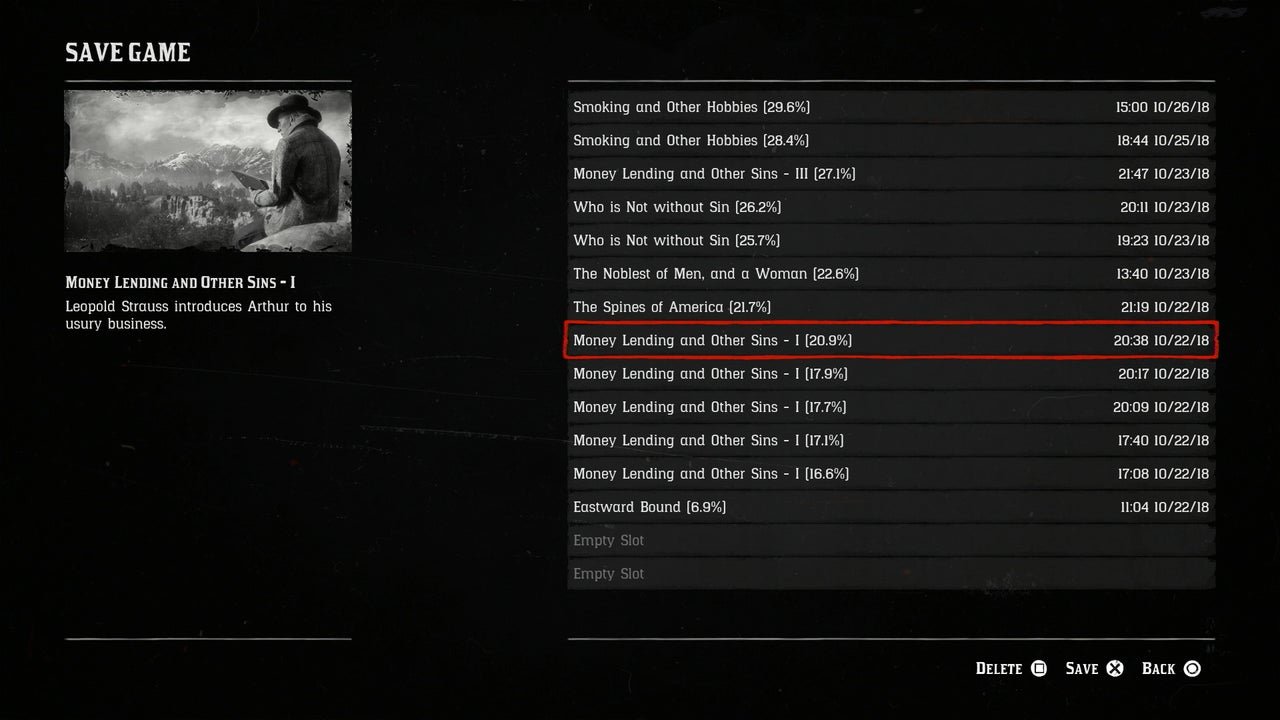
Saving your game in Red Dead Redemption is done automatically through the game’s autosave system, or you can manually save by accessing the in-game menu and selecting the ‘Save’ option.
Have you ever felt that knot of dread when a game crashes, and you realize you haven’t saved for hours? In Red Dead Redemption, that doesn’t have to happen. Knowing how to save game on red dead redemption is essential for progressing and enjoying the game without fear of losing your hard-earned progress.
The game helps you by automatically saving at key moments, so your progress won’t go completely lost. You should still use the manual save function whenever you want because it provides extra assurance. It’s a quick process once you know how!

How to Save Game on Red Dead Redemption
Red Dead Redemption, whether you’re exploring the vast open world of the original or the stunning details of Red Dead Redemption 2, offers a rich and immersive experience. However, all that exploring, story progression, and hard-earned loot can disappear in a flash if you don’t know how to properly save your game! Losing hours of gameplay is frustrating, so let’s dive into the different ways you can save your progress in the Red Dead Redemption series.
Understanding the Basics of Saving
Before we get into the specifics, it’s important to understand the different kinds of saving in Red Dead Redemption. There are primarily two ways to save: manual saves and autosaves. Manual saves, as the name suggests, are when you intentionally tell the game to save your progress. Autosaves are done automatically by the game at certain points, like after a mission or when you reach a significant location.
Why Manual Saves are Important
While autosaves are helpful, they aren’t always reliable for every situation. Imagine completing a tricky mission, and then making a few risky choices that don’t turn out the way you want them to. If you rely on an autosave, you might be stuck with that outcome. That’s where manual saves become crucial, providing a way for you to go back to a point before making those choices.
Saving Your Game in Red Dead Redemption (Original)
The original Red Dead Redemption has a slightly different saving system than its sequel, so it’s helpful to understand its quirks.
Manual Saving in Red Dead Redemption
In the original game, you can’t just save whenever you want. To perform a manual save, you need to locate a bed. Beds are found in safe houses you have bought or in hotel rooms in the towns. Once you have access to one, follow these steps:
- Go to the bed inside the safehouse or hotel room.
- You’ll see a prompt on the screen to “Sleep.”
- Press the button shown (usually a face button on your controller).
- When you choose sleep, the game will present you with the “Save Game” option.
- Select that, and the game will save your progress to a save slot.
It’s important to note that using the “Sleep” function is the only way to make a manual save in Red Dead Redemption. Be sure to find a bed when you have made significant progress or are in a safe area. When starting the game after the saving it, you’ll need to choose which save game you wish to load, or continue with the autosave.
Autosaving in Red Dead Redemption
The original Red Dead Redemption also uses autosaves, but not as frequently as in later games. Autosaves generally occur:
- After you have completed a mission or a story objective.
- After a significant point in the main story.
- When you reach a safehouse after long riding.
Keep an eye out on the bottom left of the screen sometimes to see a little “save” icon. Be mindful that the game uses only one autosave slot and that can be easily overwritten with a new autosave. That’s why doing manual saves is always important, so that your important progress won’t be overwritten with new game data.
Saving Your Game in Red Dead Redemption 2
Red Dead Redemption 2 offers a more forgiving saving system than the original game, allowing more control over when and how you save your progress. Saving is crucial as the game is very big and has many possibilities, and you don’t want to lose your progress because of a simple mistake.
Manual Saving in Red Dead Redemption 2
You have the ability to create manual saves whenever you want in RDR2, but you need to access the menu. Here’s a step-by-step guide:
- Press the designated button to open the main menu. This is usually the “Option” button or “Menu” button on your controller, or “Esc” key on the PC.
- Navigate to the “Story” tab or a similar option within the menu.
- You’ll see an option that says “Save Game.” Select that.
- The game will show you a list of save slots. If you don’t have any, select the “New Save” option. If you have some already, choose a new slot to create a fresh save or select an existing save to overwrite.
- The game will save the current game progress to the selected slot.
It is a good idea to create multiple manual save slots, especially when making big decisions or about to begin challenging missions. Having different slots let you roll back the story to your desired point if you mess up somewhere in the game, or the story takes a turn that you don’t like.
Autosaving in Red Dead Redemption 2
Red Dead Redemption 2 does frequent autosaves to ensure you don’t lose too much progress. The game usually autosaves:
- After the completion of missions or objectives.
- When you enter a new location.
- When starting or leaving camp.
- When fast traveling
- When you start hunting legendary animals
- When you buy an item from a store.
- At various points during significant parts of the game.
As with the first game, an icon will appear on screen, usually in the bottom corner, to signify an autosave. Keep in mind that the autosave is only for 1 save slot, so be sure to always do manual saves so that you can go back to the game whenever you want.
Quick Saving in Red Dead Redemption 2
Unlike the first game, RDR2 has a form of ‘Quick Save.’ It’s not a traditional quick save that allows you to save and reload instantly with one button press, but it creates a unique manual save, which is helpful. Here’s how it works:
- Go to the main menu by pressing the designated button on your controller or the “Esc” key on the PC.
- Go to “Story” tab from the main menu.
- You’ll see an option called “Quick Save.” Select it to create a temporary save.
The game will create a separate file called Quick Save. However, once you load this quick save, the quick save slot gets replaced by your current gameplay, so this can’t be used as a normal save game.
Tips for Smart Saving
To make the most of the saving system in Red Dead Redemption, here are some tips to help ensure your progress is safe:
Save Often
It’s always better to save too often than not enough. Get into the habit of creating a manual save every time you complete a mission, purchase something important, or are about to start something risky. Making a manual save every 20 to 30 minutes can be a good plan. That way, if you die or things go wrong, you won’t have to redo too much.
Use Multiple Save Slots
The game allows for multiple save slots, which is very useful. Utilize them to create backups. For example, you can keep a main save, then create a new save every time you start a new game chapter. This gives you plenty of opportunities to go back to your desired point.
Pay Attention to Autosaves
Knowing when autosaves happen helps you decide if a manual save is needed. If you have just finished a mission, then you can let the autosave do its work. But If you are about to enter a town that has a lot of enemies, its best to make a manual save first, in case something bad happen.
Don’t Rely Solely on Autosaves
Autosaves are helpful but should never be your only saving method. They are prone to being overwritten by the game when you continue your progress. So, if you are about to make a huge choice, then make a manual save and then continue.
Consider Different Scenarios
Think about scenarios in the game that could require a rollback. For example, if you plan on hunting a specific type of animal, save before you start. If the hunt doesn’t go as planned, you can return to your save and start the hunt again.
Manage Your Save Files
Over time, you may accumulate a large number of save files. Regularly review and delete old save games, especially if you no longer need to go back to them. This will help keep your save list clean and make finding your desired save files easier.
Dealing with Save Game Issues
Sometimes, you might encounter issues with saving your progress. Here are some common problems and their fixes.
Game Crashing During Save
If the game crashes while saving, it could indicate that there’s a problem with the game files, or there’s an issue with your console or PC. Try the following:
- Close the game completely and relaunch it.
- Restart your console or PC.
- If the problem persists, verify the game file integrity, (if you are playing the game on PC) or uninstall and reinstall the game if necessary.
Corrupted Save Files
Corrupted save files can happen occasionally and they usually make the save file unusable. Unfortunately, you can’t repair the save file, but there are ways to prevent it. You may want to try to load other saves, or start a new game, and always make sure you do manual saves and keep your console turned off safely. To help prevent corrupted save files, it is a good idea to:
- Close the game properly every time.
- Don’t force stop the game when it’s saving.
- Make manual saves frequently.
Slow Saving Time
Slow saving times can be a problem if you have too many save files. Delete the old save files, and it should solve the slow save problem. If the save times are still slow, make sure your console and the game are updated to the latest versions.
Lost Save Files
Sometimes, save files seem to vanish. This could be due to corrupted data. Check to make sure the save files are actually gone. Always back up your save files (if your game platform allows it), and be sure that you have saved your progress in the right save slot.
Using these tips and understanding how the saving system works in both Red Dead Redemption games should help you make sure your progress is always safe. Don’t forget to explore the world, enjoy the story, and, most importantly, save often.
Red Dead Redemption 2: How to Save Your Game
Final Thoughts
To save your progress in Red Dead Redemption, use the in-game menu. Access it and select the “Story” option, then pick a save slot. The game also autosaves frequently, providing backup. Remember to save manually.
Manual saving is important to prevent loss of progress if you face unexpected problems. Auto save is useful. However, it is not always reliable, particularly if you do not play consistently. Therefore, learning how to save game on red dead redemption manually is key to avoiding frustrating setbacks.

