
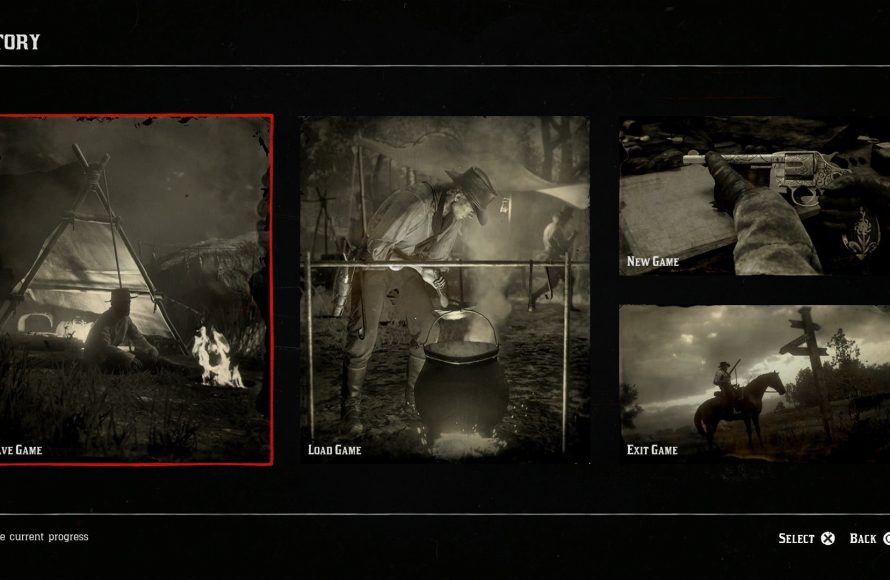
To save game red dead redemption 2, you must either progress through the story to reach auto-save points, or manually save by accessing the game’s pause menu and selecting the ‘save’ option.
Losing hours of progress in Red Dead Redemption 2 can be frustrating. Many players often wonder how to save game red dead redemption 2 properly. Knowing the various save methods can help you avoid this unfortunate scenario.
The game utilizes a convenient auto-save system. However, you should not always rely on it alone. Manual saves provide a more reliable way to ensure you keep your progress. Understanding both methods is essential to enjoying this open-world experience fully.

How to Save Game Red Dead Redemption 2
Red Dead Redemption 2 is a big game with lots to see and do. It’s super important to save your progress so you don’t lose all that hard work! There are a few different ways to save your game, and knowing them all will help you keep your adventures safe. Let’s explore how to make sure your progress in Red Dead Redemption 2 is saved.
Understanding Auto-Save in Red Dead Redemption 2
The game has a handy auto-save feature. This means the game saves your progress automatically without you having to do anything special. It usually saves when you finish a mission, reach a certain point in the story, or even just after a little while of playing. You’ll notice a small spinning icon in the lower-right corner of the screen when the game is saving. While this is super useful, it’s good to know exactly when and how it saves, so you don’t rely solely on this.
When Does Auto-Save Happen?
The auto-save feature is pretty smart but it doesn’t save every single thing you do. It generally saves:
- After you complete a mission or a main objective.
- When you travel to a new location, like entering a new town.
- After you do something important with your camp.
- Regularly while playing the game.
However, be aware that the game doesn’t save everything immediately. If you’re doing a lot of smaller tasks like hunting or fishing, and something goes wrong, you might have to go back a bit. Therefore, it’s important not to only rely on auto-save.
Why Not to Rely Solely on Auto-Save
Auto-save is helpful, but it isn’t perfect. For example, if you do a long hunt and get a lot of good pelts, but then die before the game auto-saves, you might lose all those pelts. Or if you accidentally start a fight with the law and are killed, you could lose your progress and maybe some cash! That’s why it’s really good to know how to manually save your game too.
Manual Saving: Taking Control of Your Game
Manual saving lets you choose when and where to save. This gives you a lot more control over your progress and it will make sure you never lose valuable time and resources. Learning to use manual saves is key to a smooth gaming experience. Here is how you can do it:
How to Manually Save the Game
Manually saving your game is very simple to do. Here’s the method you need to follow:
- Pause the game: Press the ‘Options’ button (on PlayStation) or the ‘Start’ button (on Xbox). This will pause your gameplay and open the main menu.
- Navigate to ‘Story’: Use the directional buttons or analog stick to move through the menu options. Look for ‘Story’ and select it.
- Select ‘Save Game’: Once you’ve selected ‘Story’, you’ll see options like ‘Load Game’ and ‘Save Game’. Select ‘Save Game’.
- Choose a save slot: You will be shown a list of available save slots. If this is the first time you’re manually saving, there may not be any previous saves yet. If you have previous manual saves, they will show up here. Choose an empty slot or select an existing one to overwrite it.
- Confirm the Save: After choosing a slot, press the confirmation button. This will save your game.
Managing Your Save Slots
Red Dead Redemption 2 gives you a number of save slots, which is very helpful. Having multiple save slots lets you:
- Go back to earlier points in the game if you need to.
- Keep different playthroughs of the game separate if you are playing with more than one style.
- Make sure that if one save gets corrupt, you have a backup.
It’s a great habit to use different save slots. For instance, you could have one save at the beginning of a chapter and then another before a big mission. This way, if you make a choice that you end up not liking, you can easily go back to an earlier save.
Tips for Efficient Saving
Knowing how to save is one thing, but doing it efficiently is what will really keep your game safe. Here are some tips that can help:
Save Frequently
It is best not to rely only on auto-save, make sure you are frequently saving manually. This is the number one rule to avoiding losing hours of progress. Whenever you do anything significant, like completing a mission, making a big purchase, or finding some rare items, take a moment to save manually. If you are about to enter a risky area, making a manual save is also a good choice.
Save Before Important Decisions
Red Dead Redemption 2 has a lot of choices that can affect the story and how other characters react to you. Before you make any decision that you might not be sure about, make a manual save. This way you can go back and change things if you do not like the outcome of your decision.
Save at the Beginning of Chapters
The story is broken into different chapters. Saving at the start of each chapter helps you to easily return to that point if you want to replay that section or want to try a different approach. This is useful for getting a better understanding of different ways the story could play out.
Avoid Saving During Missions
While you are in the middle of a mission, it’s not a good idea to manually save. The game’s system might not like that and can cause errors. It is best to finish the mission and then manually save your game right after, or let the auto-save take care of it.
Understanding Game Save File Locations
Sometimes you might want to back up your game saves, or you might be trying to transfer them to another device. Knowing where your save files are located can help with these things.
Where Save Files Are Stored
The location of your save files is different depending on what device you are playing on:
- PlayStation 4 and PlayStation 5: Saves are stored in your PlayStation’s system storage. You can access them through the PlayStation’s settings menu.
- Xbox One and Xbox Series X/S: Saves are saved on the Xbox console storage, and they are also backed up on the Xbox Cloud.
- PC: The game save files are normally located in the following folder: ‘Documents\Rockstar Games\Red Dead Redemption 2\Profiles’. Inside, you’ll find a folder with a name that contains numbers and letters, that is the folder that contains your save files.
Backing up your Saves
It’s a good idea to make backups of your save files. This protects you if something happens to your device or if the game files are corrupted. Here’s how to do that, depending on your device:
- PlayStation: You can use a USB storage device to copy your saves. You can do this by going to ‘Settings’, then ‘Application Saved Data Management’.
- Xbox: Xbox generally stores your saves automatically in the cloud. However, if you have an external hard drive connected to the console, you can also copy the files there as an extra measure.
- PC: You can just copy the save file folder onto an external hard drive or to a different location on your computer.
Troubleshooting Common Saving Issues
Even with auto and manual saves, sometimes you might have issues with your save games. Here are a few common problems and how to fix them:
Save Game Errors
Sometimes, the game might show an error when you try to save or load a game. This can be caused by many things, such as corrupted game files, low storage space, or issues with your console or computer. Here’s what you can try:
- Restart the game or your device: This can fix some temporary issues. Make sure to close the game fully, not just putting it to sleep.
- Make sure you have enough storage space: If your device is almost full, it might not have enough space to save the game. Delete any unnecessary files.
- Check your game files for corruption: On PC, you can use the Rockstar Games Launcher to verify your files. For PlayStation or Xbox you can search in the system menus to check for corrupted game data.
- Update the game: If your game is outdated, it can sometimes cause saving issues. Make sure that you have the latest updates installed.
- Reinstall the game: If nothing else works, you might have to reinstall the game completely. This is a last resort option, and you might want to backup your save games before doing this.
Lost Game Saves
Losing your game saves can be a really frustrating experience. If this happens, try this:
- Check your save locations: Check to see if the saves are in the proper location where they are stored on your device.
- Restore from backups: If you have made previous backups, this is the best time to use them.
- Check Cloud Storage: If you are using a PlayStation or Xbox, make sure to check the cloud storage.
Corrupted Save Files
A corrupted save file might not be usable anymore. It can cause crashes or loading errors. If this happens, you need to:
- Try loading a previous save: If you have made multiple saves, try loading an earlier save.
- Delete the corrupted save: Delete the corrupted save and see if the other saves work correctly.
By understanding how to save your game in Red Dead Redemption 2 and what to do if something goes wrong, you’ll have a better and safer experience. Remember, saving often and in different save slots is key to keep your hard work. Remember to save before making big story choices, and make manual saves frequently!
Red Dead Redemption 2: How to Save Your Game
Final Thoughts
To save your progress in Red Dead Redemption 2, use the in-game menu. Navigate to the “Story” section and choose “Save Game.” You can also auto-save but manual saves provide more control. It is crucial to understand how to save game red dead redemption 2 effectively.
Remember to save often, especially after completing missions or significant achievements. This prevents loss of progress if something happens. The autosave feature is very useful, but manual saves remain most important.
Always save your game, do not take the risk of not saving it. Choose the option that suits you and make your experience more enjoyable. So remember how to save game red dead redemption 2 when you play.

