
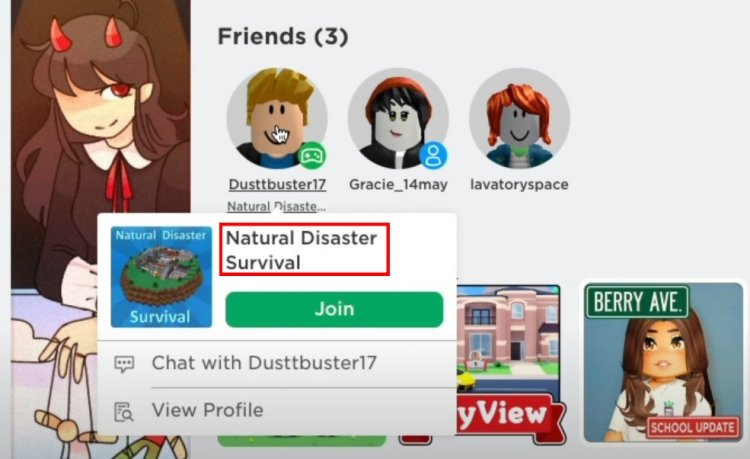
To see what game someone is playing on Roblox, check their profile. Their current game will be listed under their username.
Ever wondered what your friends are up to on Roblox? Maybe you’re keen to join in the fun, or just curious about their gaming choices. Understanding how to see what game someone is playing on Roblox is easier than you think. We’ve all been there; wanting to connect with others and play the same game. Let’s explore the simple steps to find out which Roblox world your friend is exploring.

How to See What Game Someone is Playing on Roblox
Ever wondered what awesome Roblox adventure your friend is having? It’s super common to want to join the fun, and luckily, Roblox has ways for you to see what game your buddies are playing. Let’s dive into the different methods you can use to keep tabs on your friends’ Roblox activities. We will explore how to do this on both the Roblox website and the Roblox app.
Checking Through the Roblox Website
The Roblox website is a great place to start when you want to know what game someone is playing. It’s easy to navigate and provides a lot of information about your friends. Here’s how you can use it:
Navigating to Your Friends List
First, you’ll need to get to your friends list. Here’s how:
- Open your web browser (like Chrome, Safari, or Firefox).
- Go to the official Roblox website, www.roblox.com.
- Log in to your Roblox account using your username and password.
- Look at the left side of the screen or the navigation bar. You’ll see a section that says “Friends”. Click on it.
You’ll now be looking at a list of all your Roblox buddies!
Finding Your Friend’s Game
Now that you’re on your friends list, let’s pinpoint what game they are in:
- Browse through your list of friends. You will see that some of them may be online and some offline. The name of the game, if they are currently playing one, will appear right below their username.
- If you see the word “In Game” followed by a game’s title, that is the game they’re currently playing!
- If a friend is not playing any game, it will show the text like “Online” or “Last seen (time)”, which means they are either in menu, offline, or not in any game.
It’s that simple! The website keeps the information updated in real time. So as soon as a friend joins a new game, it’ll show up on your list.
Tip: If you can’t see a friend’s game, make sure that they are online, and that they have not set their privacy settings to hide their activity. We’ll discuss that more in the privacy settings section later.
Using the Roblox App to Check Game Activity
If you prefer using the Roblox app on your phone or tablet, that’s perfectly fine too! The process is quite similar to the website.
Accessing Your Friends in the App
Let’s get into how you view your friends through the app:
- Open the Roblox app on your device.
- Log in to your Roblox account if you haven’t already.
- Look for the “Friends” option. This is often located in the bottom navigation bar or within the menu (usually depicted as three horizontal lines, or similar symbol).
- Tap on “Friends.” You will see a list of your friends.
Finding the Game Your Friend is Playing
Now it’s time to see their game activity:
- Just like the website, the Roblox app shows which of your friends are online and what game they’re playing right beneath their username.
- If your friend is in a game, you will see the words “Playing” and then the name of the game.
- If they are not in game, you will see “Online” or “Last seen (time)”.
The app refreshes the game information dynamically. You will see changes as soon as your friend switches to a new game.
Understanding Privacy Settings
Sometimes, you may not see what game your friend is playing. This can be because of their privacy settings. Roblox gives its users a good amount of control over who sees their activities.
Why You Might Not See a Friend’s Game
If a friend’s game information is not showing, here are a few reasons why:
- Privacy Settings: Your friend might have set their privacy settings to “Friends” or “No one” for “Who can see my inventory”, “Who can see my activity”, “Who can see my play status”, etc.
This means that only friends (or nobody) can see their game activity. If you are not friends with them, then you will not see their game activity. - Offline Mode: If they appear to be offline, even if you know they were recently online, this could be because they’ve closed the app or website or they have selected to be appear offline to other users on the platform.
In this case, you won’t see their current game activity because Roblox won’t show that information for offline users. - In Menu: if a user is in the Roblox menu or in the game hub of a game, it will not show them as “Playing” on the friends list, and they will be marked as online instead.
How to Adjust Your Own Privacy Settings
If you would like to control who sees your game activities, you can change your privacy settings. Here is how:
- Go to the Roblox website or app.
- Find the settings icon (usually a gear icon). Click on it.
- Select the option “Privacy”.
- Here you’ll find the different privacy options which you can customize as you desire. You can change who can see the following:
- Who can message you
- Who can chat with you in the app
- Who can see your inventory
- Who can see your activity
- Who can join you in experiences
Adjust these settings to your liking. If you want everyone to see your game activity, you will have to select “Everyone” for “Who can see my activity” and “Who can see my play status”. If you only want your friends to see, then select “Friends”. If you don’t want anyone to see your activity, select “No one”.
Remember, it is important to be respectful of other peoples’ privacy preferences. If someone chooses not to share their game activity, that is their choice.
Joining a Friend’s Game
Now that you know how to see what your friend is playing, you might want to join them. Here’s how you can do that:
Joining from the Website
If you are using the Roblox website:
- Go to your “Friends” list as explained above.
- Find the friend that is currently in a game.
- If their “Playing” status is visible you will see a green “Join” button right next to it. Click this button to join your friend’s game.
Joining from the App
If you are using the Roblox app:
- Go to your “Friends” list in the app.
- Find the friend you want to join.
- Look for the green “Join” button right next to the game they are playing, and tap it to join them.
Please Note: Sometimes, due to different server capacities or the user’s server preference the “Join” button might not be visible even if they are playing the game. If you do not see the “Join” button, it could mean that the server that your friend is playing on is currently full.
Alternative Methods to Figure Out What Game Someone is Playing
While the friends list is the most reliable way to see a game activity, there are other hints you can pick up on to figure out what someone may be playing. However, these are not 100% accurate all of the time, and should be taken with a grain of salt.
Using Roblox Group Activity
If you and your friend are both in the same Roblox group, you can check the group’s activity feed to see if you can pick up clues about what game they might be playing. Group activities usually show when someone has joined a game, or created a game. However, not everyone chooses to enable these types of activities.
- Navigate to the “Groups” section of the website or app.
- Select the group that you and your friend are both members of.
- Look at the feed for recent activity, if available.
Asking Directly
Sometimes the simplest solution is the best! You can just ask your friend directly what they are playing. Open a private message with your friend and ask them the game’s name. This way there is no ambiguity about what they are playing.
Using Third Party Websites (Use with Caution!)
You might find third-party websites that claim to tell you what someone is playing on Roblox. However, it is important to be very careful about using such sites. They often don’t work, and they can also be harmful. These types of websites might try to steal your information or introduce viruses to your device. It’s safest to use only the official Roblox website and the app.
Important: Avoid entering your Roblox login information on any website that is not roblox.com. Always be cautious about the security of your account!
Troubleshooting Common Problems
Sometimes things don’t go smoothly. Here are some common problems and how to deal with them:
Can’t See Game Activity
- Check Privacy Settings: Ask your friend to review their privacy settings. If it’s a game activity privacy issue, ask them to change who can view that setting.
- Confirm Friendship: Make sure you are actually friends with them on Roblox.
- Check for Updates: Make sure both your Roblox app and website browser are running on the latest version. Sometimes old software can cause glitches.
Join Button Doesn’t Appear
- Full Server: The server your friend is playing on might be full. Try again later, or they can join a server that’s not full.
- Restricted Join: Some games have restricted access, especially private servers. Your friend would need to invite you to that particular server.
Remember that Roblox is constantly updating, so some features may change or move around. The methods we’ve discussed, though, are usually pretty reliable.
Tracking your friends’ game adventures is simple using the methods explained above. With a little practice, you’ll be able to keep up with your buddies and join in the fun in no time.
How to find out what game someone is playing in Roblox (Outdated)
Final Thoughts
You can usually see a friend’s current Roblox game on their profile. Check the “Currently in Game” section. If they have privacy settings enabled, this might not be visible. Sometimes, joining their game through the “Join Game” button is another option.
These simple methods offer a quick way to know where your friends are. Knowing ‘how to see what game someone is playing on roblox’ can significantly improve your gaming experience, allowing you to play together seamlessly.

