
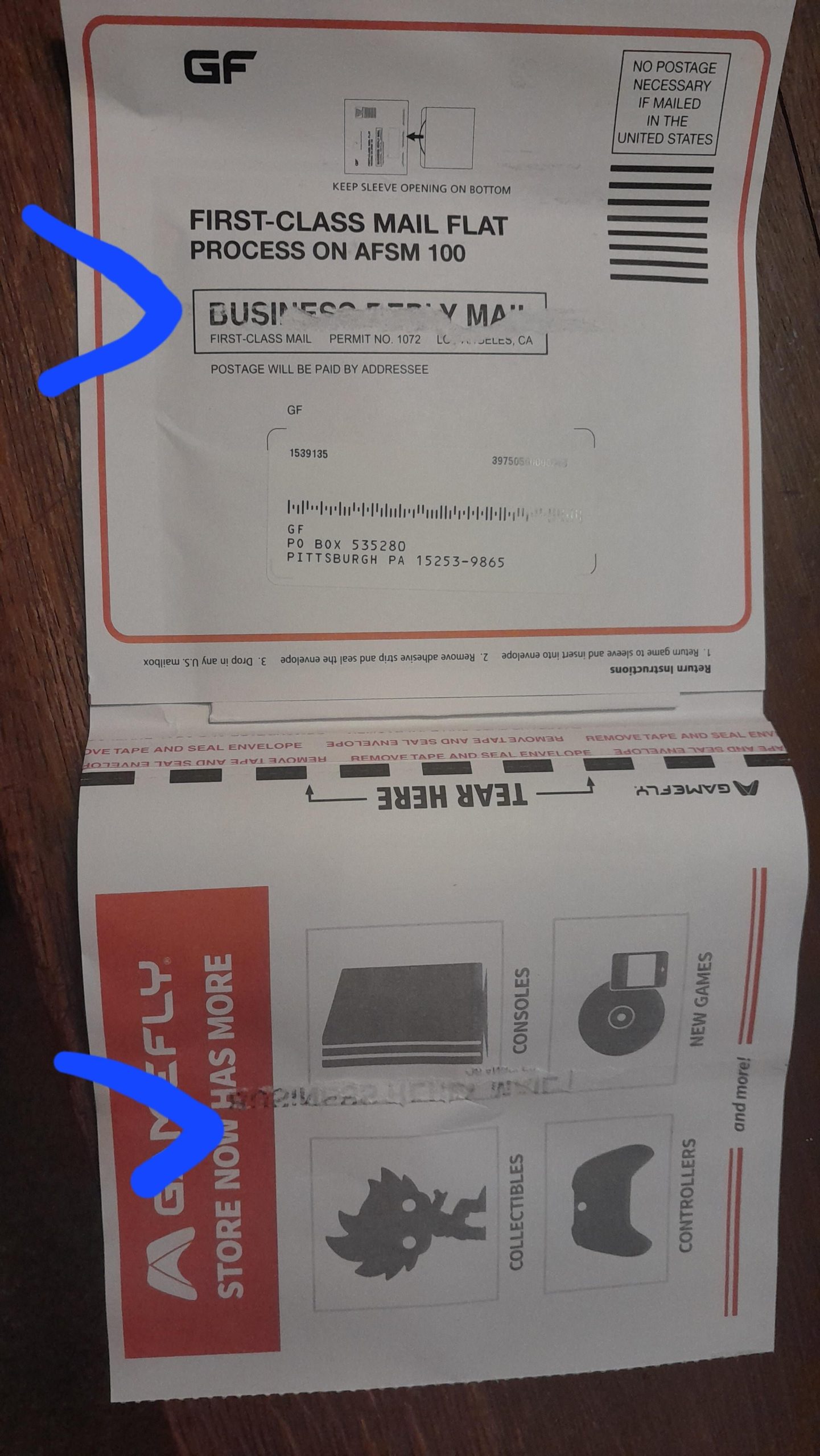
Gamefly provides a prepaid mailer; simply place the game in the case, insert it into the mailer, and drop it off at any USPS location to send gamefly games back.
Struggling with the return process after a gaming binge? It’s common to wonder how to send Gamefly games back efficiently. We’ve all been there, wanting to dive into the next title without any hassle.
The process is designed to be easy, however, sometimes we all need a quick reminder or a little guidance to make sure we get it right. Let’s make sure you have a seamless experience and continue playing without delays.

How to Send GameFly Games Back
So, you’ve had your fun exploring new worlds, racing across tracks, or saving the galaxy with your GameFly rentals, and now it’s time to send them back! Don’t worry, it’s a simple process. This guide will walk you through every step, making sure your games get back to GameFly safely and quickly so you can get your next game in the mail. It’s like returning a library book, but way more exciting!
Preparing Your Game for Return
Before you even think about heading to the mailbox, let’s make sure your game is ready for its journey back to GameFly. This part is super important, so pay close attention!
Checking for Damage
First things first, take a good look at the game case and the disc itself. Is the case cracked or broken? Is the disc scratched or damaged? If you find any problems, it’s a good idea to let GameFly know before you send it back. This helps avoid any confusion about who caused the damage. You can usually contact them through their website or app, and they’re pretty helpful. Here’s a checklist:
- Case Check: Look for cracks, dents, or broken hinges.
- Disc Check: Inspect for scratches, smudges, or other damage.
- Manual Check: If there was a manual included, make sure it’s still there and in good shape.
Cleaning Your Game
A little bit of cleaning goes a long way! Use a soft, lint-free cloth to wipe the disc. Avoid using water or harsh chemicals, as they can damage the disc. Just a gentle wipe to remove fingerprints and smudges will do the trick. Think of it like shining your shoes before you go out – a little care makes a big difference.
Making Sure You Have the Right Case
It might sound silly, but double-check you’re putting the correct disc in the correct case. Imagine sending back a sports game when you were actually supposed to return a puzzle game! That would delay you getting your next adventure. So take that extra second to ensure the game matches the case label.
Using the GameFly Return Envelope
GameFly sends you their games in a special envelope, and it’s the same envelope you’ll use to send them back. It’s like a magic pouch that brings games to and from your home. Let’s explore this magic pouch.
Finding the Return Label
Each GameFly envelope has a pre-printed return label. It usually has GameFly’s address and a special barcode. Make sure this label is still clear and hasn’t been damaged or torn. If the label is damaged, you should contact GameFly. A readable label ensures the post office knows where to send your game.
Properly Sealing the Envelope
Once you’ve popped the game back inside, seal the envelope tightly. Most of these envelopes have a peel-and-stick strip, kind of like an extra sticky bandage. Press it down firmly to make sure it’s secure. You don’t want your game falling out on its way back to GameFly! This step is very important, just like closing a box properly before shipping it.
Understanding Return Timeframes
GameFly has some simple rules about how long you can keep the games, and they have timeframes for when they expect you to return them. These timeframes are important to understand to keep your account in good standing. Let’s learn more about this.
General Rental Periods
Typically, you can keep your GameFly rentals for as long as you want, but the sooner you return a game, the sooner GameFly will send you the next game on your list. They don’t have set due dates, like a library, but if you hold onto a game for too long, they might not be able to send you more. It’s a give-and-take process! Think of it like borrowing toys from a friend, you want to return them so your friend can play and also so they can let you borrow other toys too.
Avoiding Delays
The best way to avoid any delays in getting new games is to send back your rentals soon after you’re done playing them. The faster you return a game, the faster you will receive your next game. GameFly can start the process of sending you a new game as soon as they get the previous one back. This simple process helps you play more games and not wait too long.
What Happens if I Keep a Game Too Long?
While they don’t have specific late fees, if you hold on to a game for a very long time, GameFly might consider it a purchase. This means you will be charged for the game. GameFly typically informs you about these kinds of situations, so just keep an eye on your account. It’s best to return the games in a reasonable amount of time to avoid any extra costs. You don’t want to pay for a game when you’re just renting it.
Dropping Off Your Game at the Post Office
Okay, so you’ve got your game safely packed in its return envelope. Now, let’s talk about getting it back to GameFly.
Where to Mail It
You can drop your GameFly return envelope into any mailbox that accepts US Postal Service mail, or you can take it to a local post office. Just make sure it’s a place where the USPS collects mail. It’s pretty straightforward. Look for the familiar blue mailboxes or your friendly post office.
How to Make Sure it Gets Picked Up
To make sure your envelope gets picked up, drop it in the mailbox before the last pick-up time for that location. Each post office and mailbox has specific pick-up times. Usually, the time is posted on the mailbox or on the post office door. If you drop it off after the pick-up time, it might not get collected until the next day, which can cause delays.
Getting Proof of Shipment (Optional)
If you’re worried about your game getting lost, or just want some extra peace of mind, you can go to the post office and ask them to scan your envelope. This will give you a receipt showing that you’ve sent it. This isn’t required, but some people like having that extra confirmation. It’s a bit like a tracking number but not as detailed. If you are going to do this, you may need to purchase postage for the package.
Troubleshooting Common Issues
Sometimes things don’t go exactly as planned, and you might run into a small problem while returning your GameFly game. Don’t worry; most issues are easy to fix. Let’s talk about some of the common ones.
Lost Return Envelope
If you can’t find your return envelope, don’t panic. You can contact GameFly, and they will usually send you a new one. They understand that these things sometimes happen. Just let them know, and they’ll assist you. It’s like getting a new library card if you lose yours.
Damaged Return Label
If the pre-printed label on the envelope is damaged or no longer readable, contact GameFly right away. Don’t try to make your own label because that might cause issues with your account or with the game getting back to them. GameFly is the only source that can help get a replacement label.
Game Not Showing as Returned
Sometimes, it might take a day or two for GameFly to show that they’ve received your returned game. If it’s been more than a few days, and your account isn’t showing the return, it’s worth contacting GameFly’s customer service. They can help you figure out what’s going on. Keep the proof of shipment receipt if you got one, since that will be helpful if they ask.
Maintaining Your GameFly Account
A smooth GameFly experience depends on maintaining your account and following their rules. Here are some quick tips to ensure you always have a good experience.
Keeping Your Queue Updated
Your queue is a list of games you want to rent. Make sure your list is updated regularly. This helps GameFly know what games you want to get, so they can send you the perfect next rental. Think of it like your personalized wish list for games.
Communication with GameFly
If you ever have any problems or questions, don’t hesitate to contact GameFly. They have a customer support team that’s there to help. They are your best resource for anything related to your subscription. You can often find answers on their website, or you can contact them via email or phone.
Following Guidelines
GameFly has simple guidelines for using their service, and it’s helpful to follow these to keep everything running smoothly. Following their rules is like following the rules at the playground – they make the experience better for everyone. These rules might include things about the return process, how long you keep games, and so on.
Tips for a Great GameFly Experience
Here are a few extra tips to make the most of your GameFly membership:
- Read the Game Descriptions: Before adding a game to your queue, read the description. This helps make sure it’s something you’ll actually enjoy playing. It’s like reading the book jacket before you borrow it from the library.
- Check Out the Pre-Owned Section: GameFly sometimes sells pre-owned games at a discount. If you loved a game, this could be a great way to own it permanently.
- Be Patient: Sometimes, the game you want might be on hold, and it might take a little while to receive it. However, they always try to get you your games as quickly as they can.
- Consider the Mobile App: The GameFly mobile app makes managing your account super easy and convenient. You can update your queue, track your returns, and even find new games. It’s like having your game store right in your pocket.
By following these tips, you can have an awesome time with GameFly. Remember, returning games is a key part of their service, and by understanding the process, you’ll have a smooth and fun experience.
Sending your GameFly games back is very straightforward once you know the steps. By preparing your games properly, using the provided envelopes, and understanding the timeframes, you’ll have no problem at all managing your rentals and getting new games. Remember, GameFly is there to help, so don’t hesitate to contact them if you need assistance. Happy gaming!
How To Self Return A Rental With Gamefly
Final Thoughts
To send GameFly games back, place the disc in its original case. Then, slide the case into the prepaid mailer envelope. Make sure the address label shows clearly.
Next, seal the envelope securely. Lastly, drop the package at any USPS location. Following these simple steps completes how to send gamefly games back efficiently.

