
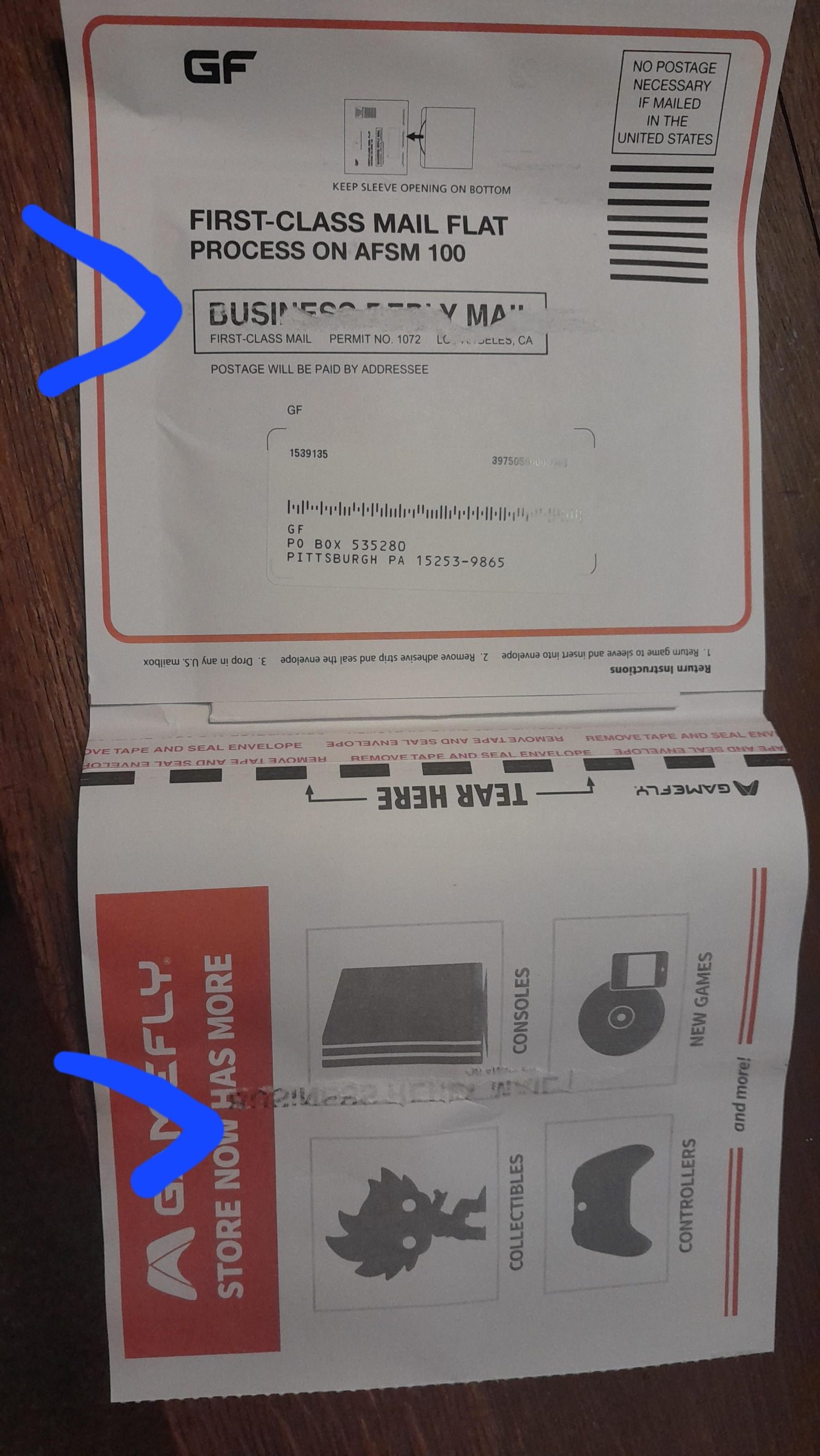
To send games back to Gamefly, place the game in the provided return envelope, seal it securely, and then drop it off at any USPS mailbox.
Gamefly is a great way to play many video games without buying them all. But eventually, you will need to send them back. Wondering how to send games back to Gamefly? It is a very simple process.
The company provides pre-paid envelopes for your returns. You just place the game back in it. Sealing the envelope is very important to keep the disc protected during shipping.
Once the game is safely in the mail, you will soon be able to get your next one. This simple process helps you keep the games coming.

How to Send Games Back to GameFly
Alright gamers, so you’ve had your fun exploring new worlds, conquering challenges, and maybe even racking up some high scores. Now, it’s time to send those games back to GameFly so you can get your next adventure! Don’t worry, it’s super easy, and we’re going to walk you through it step-by-step. Think of it like returning a library book – but way cooler because you got to play awesome games. This guide will cover everything you need to know about returning your games quickly and without any problems.
Understanding the GameFly Return Process
Before you start packing up those game discs, let’s understand how the whole GameFly return system works. GameFly uses a mail-based system. They send games to you in special red envelopes, and when you are done, you use the same envelope to send the games back. It is super simple once you understand the basic steps. The entire cycle goes like this:
- Game Arrival: You receive a game in a prepaid envelope through the mail.
- Game Play: You play the game as much as you like (within your membership plan).
- Return Process: When you’re done, you put the game back in the same envelope and return it.
- Next Game: GameFly receives your return, and they send you the next game on your list.
This means that you don’t need to worry about printing shipping labels or using other packages. GameFly makes it very convenient. The key is using the provided mailer correctly. Let’s dive into the specifics of returning your games.
Preparing Your Game for Return
Okay, let’s make sure you’re ready to send that game back. Here’s what you need to do before you drop it in the mail:
Checking for Damage
First things first, before packing the game back up, you should look closely at the game disc. Make sure it doesn’t have any scratches or cracks that might have happened during your play time. If you notice any significant damage, it’s important to let GameFly know. They might have special instructions for you. Don’t worry if there are a few small fingerprints; they’re probably more concerned with more serious damage. Also, look for any damage to the game case itself. Check for cracks or broken hinges. Keeping the game in good shape helps you avoid potential fees and allows other gamers to enjoy it too.
Ensuring All Contents Are Included
Double check that you’re returning everything that came with the game. This includes the game disc and any instruction manuals or booklets. Some games also include inserts with special codes or advertisements. While these bonus materials are less critical to the game’s functionality, it’s best to include them. Having everything in the case ready to go makes things easier for GameFly when they get it back, and it prevents any delays in your next game shipment. Here’s a quick checklist:
- Game disc(s)
- Instruction manual or booklet
- Any other inserts or promotional materials
Packing Your Game
Now it’s time to put that game back into the red envelope. This part is super easy if you do it right. The key is to make sure everything is in the right place so that nothing gets damaged or lost in transit.
Using the Correct Red Envelope
GameFly ships games in special red envelopes. These are specifically designed to protect the games during shipping. The envelopes are made of sturdy material and have a secure closure mechanism. Make sure to use the same envelope the game arrived in. Each envelope has a special barcode that helps GameFly track its journey. Using a different envelope might lead to issues with your return and it might be delayed in processing. The mailer is designed to fit the game case perfectly.
Properly Placing the Game in the Envelope
When putting the game back in the red envelope, slide the game case so it is centered. Make sure the opening of the case is facing the end of the envelope. You’ll notice the envelope has a flap on one side and adhesive on the other. Do not try to force it if the game case is not oriented correctly. Make sure that it slides in easily and smoothly. This will keep it safe while it travels to GameFly.
Sealing the Envelope Correctly
The red envelope has a special adhesive strip to help you seal it properly. Once your game is safely inside, simply peel off the protective layer on the adhesive. Then press the flap down firmly and make sure it is sealed all the way. Don’t forget this important step because a loose flap might cause the game to fall out during transit. If the adhesive doesn’t stick well, use a piece of tape to seal it extra securely. It’s always better to be safe than sorry when it comes to making sure your games arrive back safely.
Sending the Game Back
You’ve checked the game, packed it, and sealed the envelope. Now you’re ready to send it back. It’s a bit like sending a letter but with the confidence that you’ll soon get a new game to play!
Dropping the Envelope in the Mail
You don’t need to go to the post office for this. GameFly’s red envelopes have pre-paid postage. You can simply put it in your mailbox or any USPS (United States Postal Service) mail collection box. Make sure that the return address label is clearly visible. GameFly has already printed the address in advance. This will ensure it goes to the correct destination without any issues. Just drop it in and that’s it!
Understanding Return Times
How long it takes for GameFly to receive your returned game depends on where you live and how quickly the mail is moving. In most cases, it might take 2-5 business days. Keep in mind that weekends and holidays might affect the transit time. Once GameFly receives your game, they update your account and start sending your next game. So, the sooner you return a game, the sooner you’ll get to play another!
What Happens After You Send Back a Game?
You’ve mailed the game, and now the waiting game starts. Here’s what happens on GameFly’s end:
GameFly Receiving and Processing Your Return
Once GameFly gets your returned game, they carefully check everything. First, they scan the special barcode on the envelope. Then, they make sure the game disc is there and that it is in good condition. Once the game passes inspection, GameFly updates your account and prepares your next game for shipping.
Game Queues and Game Selection
When you signed up for GameFly, you made a list of the games you want to play. This is your “queue.” Once you send a game back, GameFly looks at your queue and sends you the next available game. Sometimes, if a game is super popular or not available at the time, GameFly might have to skip it in line. Don’t worry! They’ll keep it in your queue, and send it to you later. It’s a good idea to keep your queue updated. That way you always have a backup plan if a game is out of stock.
Tracking Your Returns
You can also keep track of your returned games by logging into your GameFly account. Your account should show you when they received the games. This helps you stay updated on the process and confirm that everything is working correctly.
Tips for a Smooth Return Process
Here are some extra helpful tips to make your GameFly returns even easier:
Returning Games Promptly
It’s best to return games as soon as you are finished playing them. The faster you send a game back, the faster you will receive the next one on your list. Plus, it also gives other gamers a chance to play the game and helps you get the most out of your GameFly membership.
Keeping Your Queue Up-to-Date
Your GameFly queue is like a wishlist. You can add, remove, and change the order of games at any time. Keep this updated so that GameFly knows exactly what games you want to play and they can process it without delay. You will have new games on time! It’s also a good idea to add different kinds of games to your queue, so you’ll always have something to look forward to.
Protecting Games During Play
While you’re enjoying your games, try to take care of them. Keep the discs away from direct sunlight and heat. Store them safely in their cases when you’re not playing. Avoid putting the game where it can easily be scratched or damaged. A little care goes a long way in keeping games in good condition, not just for you, but also for the next player.
Contacting GameFly Customer Support
If you have any issues with returning games, don’t hesitate to contact GameFly’s customer support. They have various ways to get in touch, such as email, and phone. Whether you have a damaged game to report, need help with the return process, or have questions about your queue, they’re there to help! They are very friendly and always ready to assist.
Common Mistakes to Avoid
Even though returning games is straightforward, there are some common mistakes people make. Avoiding these mistakes will ensure a smooth process and keep your GameFly experience great. Here are a few things to watch out for:
Forgetting to Include All Contents
One of the common errors is that people forget to include all the parts that the game came with. Always double-check that the game disc, manual, and any other inserts are in the case before you place it in the red envelope. Missing contents can delay your next game shipment.
Using the Wrong Envelope
Always use the red envelope provided by GameFly. Other envelopes can cause issues with tracking and lead to processing delays. Make sure to use the mailer that the game was sent to you in. Do not try to put it in any other mailer.
Improper Sealing of the Envelope
Make sure you seal the envelope completely by peeling off the adhesive and pressing it closed firmly. Leaving an unsealed envelope is risky. The game can fall out, causing problems with the return. If the adhesive doesn’t stick, use clear tape to secure it. Make sure to tape it well.
Not Updating the Game Queue
If you don’t update your queue, you may receive the same game multiple times. Regularly adding new games and prioritizing the games you want to play is the key. This will make sure that GameFly always sends you new games from your queue in the order you want to receive them. Always remember that it’s your wishlist and you are in charge!
Delaying the Return
Waiting too long before sending a game back can also cause delays in getting new games. Return games as soon as you finish playing to make sure the game cycle is always going and you will always have something to play. Quick returns make sure you maximize your GameFly membership.
Following these guidelines and tips will ensure that returning games to GameFly is simple and stress-free, allowing you to spend more time playing and enjoying your gaming adventures.
How To Self Return A Rental With Gamefly
Final Thoughts
To send games back to GameFly, simply place them in the provided return envelope. Ensure the disc is secure inside the case. Seal the envelope firmly.
Then, drop the envelope off at any USPS location. Always remember to return games promptly so you can get your next selections. Understanding how to send games back to GameFly is essential for enjoying this service.

