
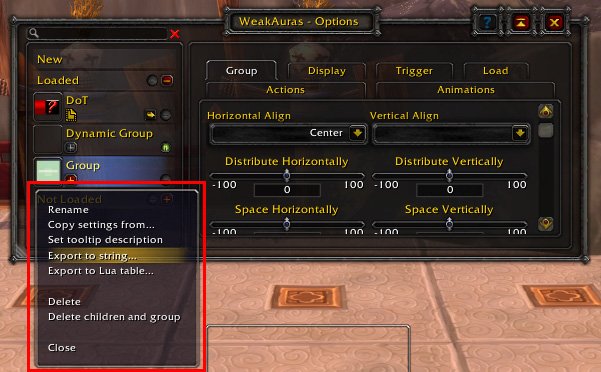
To share a WeakAura in game, copy the import string from the WeakAuras interface and paste it into chat or another sharing platform.
Want to share that perfect visual aid you crafted? It’s easier than you might think. Learning how to share WeakAura in game allows you to effortlessly pass along custom alerts, timers, and other helpful interfaces to friends or guildmates. This will make your raids and dungeons much more coordinated.
It’s all about the import string. Just grab this code and send it through the game chat or whatever method you prefer for sharing. Now your friends will benefit from your work.

How to Share WeakAuras In-Game: A Complete Guide
Sharing your awesome WeakAuras in World of Warcraft can feel like giving a secret power to your friends! These helpful displays can show you important things during a fight, like when to use a special move or how much health your friend has left. But how do you actually give these custom helpers to someone else? Don’t worry, it’s not as complicated as it might seem. We are going to walk through the entire process, so you can quickly share your creations with your raid team, guildmates, or anyone who needs a little extra help.
Understanding WeakAuras
Before we dive into sharing, let’s make sure we understand what WeakAuras are. Think of WeakAuras as little building blocks that you can arrange on your screen. Each block is programmed to show you specific information, like when a spell is ready or when you need to move away from a bad spot on the ground. Players use them to improve their game and make the game easier to play.
Why Use WeakAuras?
- Visual Cues: Instead of looking at tiny numbers or icons, WeakAuras can show you big, colorful displays.
- Customization: You can change how everything looks, making it exactly how you want it.
- Improved Gameplay: By giving you important information in real-time, they help you play better.
Types of Information WeakAuras Can Display
WeakAuras can display all sorts of information, which is pretty useful:
- Spell Cooldowns: See when your special moves are ready to use again.
- Buffs and Debuffs: Know exactly what is making you stronger or weaker.
- Health and Mana: Keep an eye on yours and your teammates’ resources.
- Boss Mechanics: See important warnings for boss fights.
The Simple String Method
The easiest and most common way to share WeakAuras is through something called a “string.” A string is like a special code that contains all the information about your WeakAura. Don’t worry; you don’t have to understand the code itself. You just need to copy it and paste it into the game. We’ll see how to do this in a moment.
Exporting Your WeakAura as a String
Here’s how to grab that special string from the game:
- Open World of Warcraft and type
/wato open the WeakAuras interface. - Find the specific WeakAura you want to share in the list.
- Click on the WeakAura to select it.
- On the right side of the window, you’ll see a button labeled “Export.” Click it.
- A new window will pop up containing a large block of text, that’s your string. Click the “Copy to Clipboard” button.
Sharing the String
Now that you have the string, you can share it. You can share it by pasting it:
- Directly into the chat box with a friend who is online in the game.
- In your guild or raid chat if you’re sharing with a large group.
- In a Discord channel if you use that to talk to your guild members.
- In a document, email, or text message.
Importing a String
If someone sends you a WeakAura string, here is how you import it into your game:
- Copy the string that the person has sent you.
- Open World of Warcraft and type
/wato open the WeakAuras interface. - Click the “Import” button at the bottom of the WeakAuras window.
- A small text box will appear. Paste the string in this box.
- Click “Import” again.
- The new WeakAura will now appear in your list. You can then enable or disable it.
Important Note: Make sure the string is copied entirely or your WeakAura will not work. If there is even one character missing or an extra space, it will cause an error. When you are copying, make sure you copy all of it.
Sharing Groups of WeakAuras
Sometimes you might want to share several WeakAuras at once. Instead of sharing each one separately, you can group them and share that group. This makes it easier to pass around collections of helpful displays, for example if you are sharing WeakAura displays for your whole raid team.
Creating a Group
To make a group of WeakAuras:
- Open the WeakAuras interface by typing
/wa. - Click the “New” button.
- Select “Group” from the options, then give the group a good name.
- Drag and drop WeakAuras into the group, you can also find and select them and change their group in the options.
Sharing a Group String
Sharing a group is done the same way as single WeakAuras:
- Select your group from the list in the WeakAuras window.
- Click “Export.”
- Copy the string and share it just like you would a single WeakAura string.
Importing a Group String
Importing a group is exactly the same as a single WeakAura:
- Copy the group string that you received.
- Open the WeakAuras interface.
- Click “Import” and paste the string.
- Click the “Import” button. All the WeakAuras from the group will now appear in your list.
Advanced Sharing: Using Wago.io
For more advanced sharing, especially if you want to share with the wider WoW community, you can use a website called Wago.io. Wago.io is a popular site where players upload, share, and find WeakAuras. It’s like a huge library of WeakAuras, for everyone to use.
Creating an Account on Wago.io
To use Wago.io, you first need an account:
- Go to the website wago.io.
- Click the “Sign up” button and follow the instructions.
Uploading Your WeakAuras to Wago.io
Once you have an account, you can upload your WeakAuras:
- In the game, export your WeakAura as a string, as explained earlier.
- Go back to Wago.io.
- Click the “Upload” button.
- Choose a good category for your WeakAura.
- Give your WeakAura a descriptive name and add some notes about what it does.
- Paste your WeakAura string into the “Import String” box.
- Click “Submit.”
Pro Tip: Adding a picture of your WeakAura in action is good for the viewers to understand the purpose of your WeakAura. It can encourage people to use it.
Finding and Importing WeakAuras from Wago.io
You can find other peoples WeakAuras as well in Wago.io. Here’s how to do it:
- Use the search feature to find what you are looking for.
- Look through the search results and find something useful to you.
- On the WeakAura page, you will find the import string. Copy this string.
- Go to World of Warcraft and open the WeakAuras interface.
- Click the “Import” button and paste the string.
Troubleshooting
Sometimes things do not go smoothly, here are some things to keep in mind:
Error Messages
If you get an error while importing, it means the string has been changed. Double-check that you copied the string correctly. It’s a good idea to use the “Copy to Clipboard” feature rather than manually highlighting the string.
WeakAura Not Displaying Correctly
If a WeakAura is not working properly, make sure all the settings are right. Check the “Load” tab in the WeakAura settings. Sometimes, WeakAuras are made for specific classes, specializations, or in a specific situation and might not work in other situations.
Outdated WeakAuras
World of Warcraft is always changing, which means some WeakAuras can get outdated and might not work with the new updates. Keep your WeakAuras updated from Wago.io, or if you downloaded from another source, try to download from a new updated version of the WeakAura.
Conflicts
Sometimes, WeakAuras can conflict with each other, especially if they use the same events or try to show similar information. Try disabling some WeakAuras to find the source of the problem.
Best Practices for Sharing WeakAuras
When you’re sharing WeakAuras, here are some things to keep in mind:
- Include Notes: Explain what your WeakAura does and how to use it.
- Stay Organized: Use groups to combine WeakAuras that have a common use.
- Keep It Simple: Try not to make complex WeakAuras that are too confusing for the people that are using it.
- Test It: Make sure your WeakAura works the way it is supposed to.
- Be Helpful: When sharing on Wago.io be active with the community, answer questions and provide support.
Sharing WeakAuras in World of Warcraft is a great way to help your friends, improve your raid team’s game, and make gameplay more enjoyable for everyone. By understanding the string method, using groups, and exploring websites like Wago.io, you can easily share your displays and benefit from other players amazing work. So, get out there and make some awesome WeakAuras and share the fun with your friends!
How to export/import weak auras
Final Thoughts
Sharing your crafted WeakAuras is simple. You copy the export string. Then paste it into chat. The other player clicks the string to import.
This straightforward method enables quick weakaura sharing. Friends and guildmates can easily benefit.
Thus, how to share weakaura in game involves copying and pasting the provided string. This method promotes easy sharing of your custom WeakAuras.

