
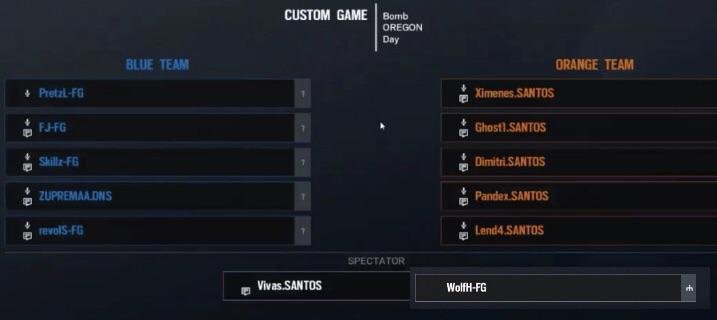
To spectate a Siege custom game, you must be invited by the host or join a lobby with spectator slots open. Once in the lobby, choose the “Spectator” option before the game starts.
Ever wanted to watch your friends battle it out in Rainbow Six Siege without being in the thick of the action? Figuring out how to spectate siege custom game can initially seem a little tricky, but it’s actually pretty straightforward once you know the steps.
This short guide will provide a clear and concise explanation on how you can jump into a custom game as a spectator and enjoy the show. It only takes a few steps and you will be watching matches soon enough.

How to Spectate Siege Custom Games
Want to watch your friends battle it out in Rainbow Six Siege, but you’re not in the mood to play? Or maybe you’re a coach, a content creator, or just someone who loves to analyze gameplay? Spectating custom games in Siege is the answer! It lets you observe the action from all angles without actually being in the thick of it. It’s a fantastic way to learn strategies, scout for opponents, or simply enjoy the game in a different way. This guide will show you everything you need to know about how to spectate Siege custom games.
Understanding the Spectator Role
First, let’s understand what being a spectator means in Rainbow Six Siege. Unlike a player, a spectator doesn’t control any operator. Instead, you are a virtual camera person who can freely fly around the map and observe from different perspectives. You have access to various camera feeds, including the player’s viewpoint, a free-roam camera, and even an overview of the entire map. This allows you to get a complete picture of the match.
Key Abilities of a Spectator
- Free Roam Camera: You can move around the map freely, without being confined to any player or location. This allows you to get a bird’s-eye view of the action or focus on specific areas of interest.
- Player Viewpoints: Switch between individual players’ views to see exactly what they see. This is great for understanding their strategies and decision-making process.
- Overhead Map View: A top-down view of the map, showing player locations and objectives. This gives a broader perspective of the entire match.
- Cycle through Players: A quick way to jump from one player’s view to another, making sure you don’t miss any critical moment.
Setting Up a Custom Game for Spectating
Before you can spectate, you need a custom game set up. The good news is that you don’t have to be a player to create a custom match. You can join a session as a spectator from the start or be invited after the match starts.
Creating a Custom Game
If you are setting up the game, here’s how you do it:
- Go to the “Play” Menu: From the main menu, select the “Play” option.
- Choose “Custom Game”: Next, choose “Custom Game” from the play menu.
- Select “Create New”: Click “Create New” to start setting up your match parameters.
- Configure Game Settings: Now, customize settings, such as the map, game mode (Bomb, Secure Area, Hostage), game rules (round time, overtime, etc.), and the number of players.
- Add Players and Spectators: Here, you can invite players and add spectator slots. It’s important to have spectator slots already configured, so spectators can join later.
- Start the Game: Once everything is set, click the “Start Game” button.
Joining as a Spectator
If a friend or someone has already set up a game, you can join it as a spectator:
- Go to “Play”: Go to the “Play” menu, just like when creating a game.
- Choose “Custom Game”: Select “Custom Game” again.
- Select “Join”: Choose “Join” option instead of “Create”.
- Find Game: A list of active custom games will appear. Select the game you want to join (make sure your friend has invited you if the match is private).
- Join as Spectator: If there’s an open spectator slot, the game will let you join as a spectator automatically. If the game is full, it will prevent you from joining.
The Spectator Interface
Once you’re in the custom game as a spectator, you’ll see a slightly different interface compared to regular gameplay. Here’s what you need to know:
Understanding the HUD
The Spectator HUD provides essential information:
- Player List: This is usually on the side of the screen, listing all the players in the match. You can select a player’s name to switch to their perspective.
- Team Scores: The top of the HUD displays the current score for each team.
- Timer: The round timer is displayed so you can track the match’s progress.
Controlling the Camera
Moving around the map and changing perspectives is easy once you know the controls. These might vary slightly based on your platform (PC, PlayStation, Xbox), but the general idea is the same.
PC Controls
- Movement: Use the W, A, S, and D keys to move the camera freely when in the free cam mode.
- Up and Down: The “Spacebar” and “Left Ctrl” keys usually move the camera up and down, respectively.
- Switch Players: Use the number keys (1, 2, 3, etc.) or the mouse wheel to switch between player perspectives.
- Cycle Teams: There might be keys dedicated to switching between team views.
- Toggle Map View: Usually, the “M” key or a similar button brings up the overhead map view.
Console Controls
- Movement: Use the left analog stick to move the free cam.
- Up and Down: The right analog stick often controls camera height.
- Switch Players: The D-pad or bumper buttons are used to switch between player perspectives.
- Cycle Teams: Buttons can often switch between the teams.
- Toggle Map View: Look for the designated button on your controller to open the map view.
Tips for Effective Spectating
Spectating isn’t just about watching; it’s about actively observing and analyzing. Here are some tips for getting the most out of your spectating experience:
Focus on the Action
It can be easy to get lost in the freedom of free cam mode. While it is great for overall context, try to focus on the core gameplay. Track the main action areas and watch how players engage in those zones. Look at how they approach taking over an objective or defending it. Pay close attention to where players position themselves and how they communicate. Good team work is easy to spot if you know what to look for!
Learn From the Players
When watching from a player’s point of view, focus on their decision-making process. Why did they peek that angle? How did they react to enemy fire? This type of analysis can help you see the game from a new angle. Every player has different strategies and playstyles, which are great to learn from. When you learn these strategies, you can start applying them to your own gameplay. Remember the best way to get better at the game is by learning from those who are already great!
Utilize the Overhead View
The overhead map view is a fantastic way to get the big picture. It helps you see the positioning of all players on the field, how the map is being controlled, and where the key engagements are taking place. This view lets you see entire team’s strategy in action, and identify patterns and rotations of teams and operators.
Practice Different Camera Angles
Don’t just stick to one view. Try jumping between free cam, individual player viewpoints, and the overhead map. Doing this can help provide a well-rounded view of the match. Switching camera angles is like using different tools in a toolbox; they all contribute to a better understanding. The different camera views will give you a better overall perspective on the match.
Experiment with Custom Games
Try creating custom games yourself. This will let you control all the settings and lets you try out new rules. Experimenting in this way allows you to get a deeper insight into game mechanics and team strategy.
Advanced Spectating Techniques
Once you’ve got the basics down, you can move onto a bit more advanced techniques. These ideas will help you not just watch the game, but really understand it at a higher level.
Analyzing Operator Choices
Pay attention to what operators players choose. Think about the reason behind each choice. Why did the player choose Ash over Hibana, or Castle over Smoke? Each operator has special abilities that impact the game. Try to analyze how these selections can influence the match’s outcome. This is important when learning how to draft and come up with effective team compositions.
Studying Team Formations
Effective teams usually have well-structured formations when they attack and defend. As a spectator, look for patterns in their formations. Do they group together or spread out? How do they divide roles between the team? Are they using a ‘turtle’ strategy by staying in a single location, or are they making rotations to different angles? Knowing team formation helps you see the strategy of the game and how well each team is playing.
Note Taking
To get the most out of your observations, take notes while you watch. Jot down the strategies that work, as well as the mistakes players make. This is especially useful if you are trying to improve your own skills, or you are coaching a team. You can also write down the locations on maps where key engagements tend to happen. These notes can then be reviewed to solidify everything you are learning about the match.
Using Spectating for Coaching
If you’re coaching a team, spectating is an amazing tool. You can observe your players during live matches. You can also study the gameplay of other successful teams. This helps you provide specific feedback to your players. By spectating, coaches can identify areas where their team is struggling and where they can improve. This leads to faster improvement and better performance.
Troubleshooting Common Issues
Sometimes you might run into issues when trying to spectate. Here are some common problems and ways to fix them:
Game Not Appearing in the Join List
If you can’t see the custom game in the join list, it could be due to a few reasons:
- Game is Full: The game may be full of players or the spectator slots are taken. If this is the case, you will have to wait for a slot to open.
- Private Game: If the host has set the game to private, you must be invited by them. Check with the host to ensure that you’ve been invited.
- Connection Issues: A slow or unstable internet connection can also prevent you from seeing games. Double check your internet connection and restart the router if necessary.
Stuck on Loading Screen
Sometimes, you might get stuck on the loading screen when trying to join as a spectator. Here’s what to do:
- Restart the Game: Try closing the game and reopening it. Then try to join the match again. This can resolve errors and get you back into the game.
- Check for Updates: Ensure your game is up to date with the latest patch. These updates fix bugs and issues.
- Check Server Status: The server may be down or under maintenance. Check the official Rainbow Six Siege status website.
Camera Issues
If you’re having problems with camera controls, try the following:
- Verify Controls: Revisit the camera controls for your platform. Ensure you are using the right controls.
- Controller Issues: If you’re using a controller, try a different one. The controller may have issues that prevent you from moving the camera.
- Game Settings: Double-check the game settings. See if there is anything that changes camera functionality.
Making the Most of Spectating in Siege
Spectating in Rainbow Six Siege is more than just watching—it’s a learning experience. By using the tools and techniques outlined in this guide, you can gain a deeper understanding of the game and improve your gameplay. Whether you’re a content creator, a coach, or just a fan of the game, spectating custom games is an enjoyable and helpful way to experience Siege.
Spectating Custom Games With Commentary
Final Thoughts
To spectate a Siege custom game, first ensure you’re part of the match lobby. The host must then designate you as a spectator. Once that’s complete, you’ll automatically view the game.
‘how to spectate siege custom game’ involves this simple procedure. You can switch between player views using designated keys. Following these steps ensures a seamless spectating experience.

