
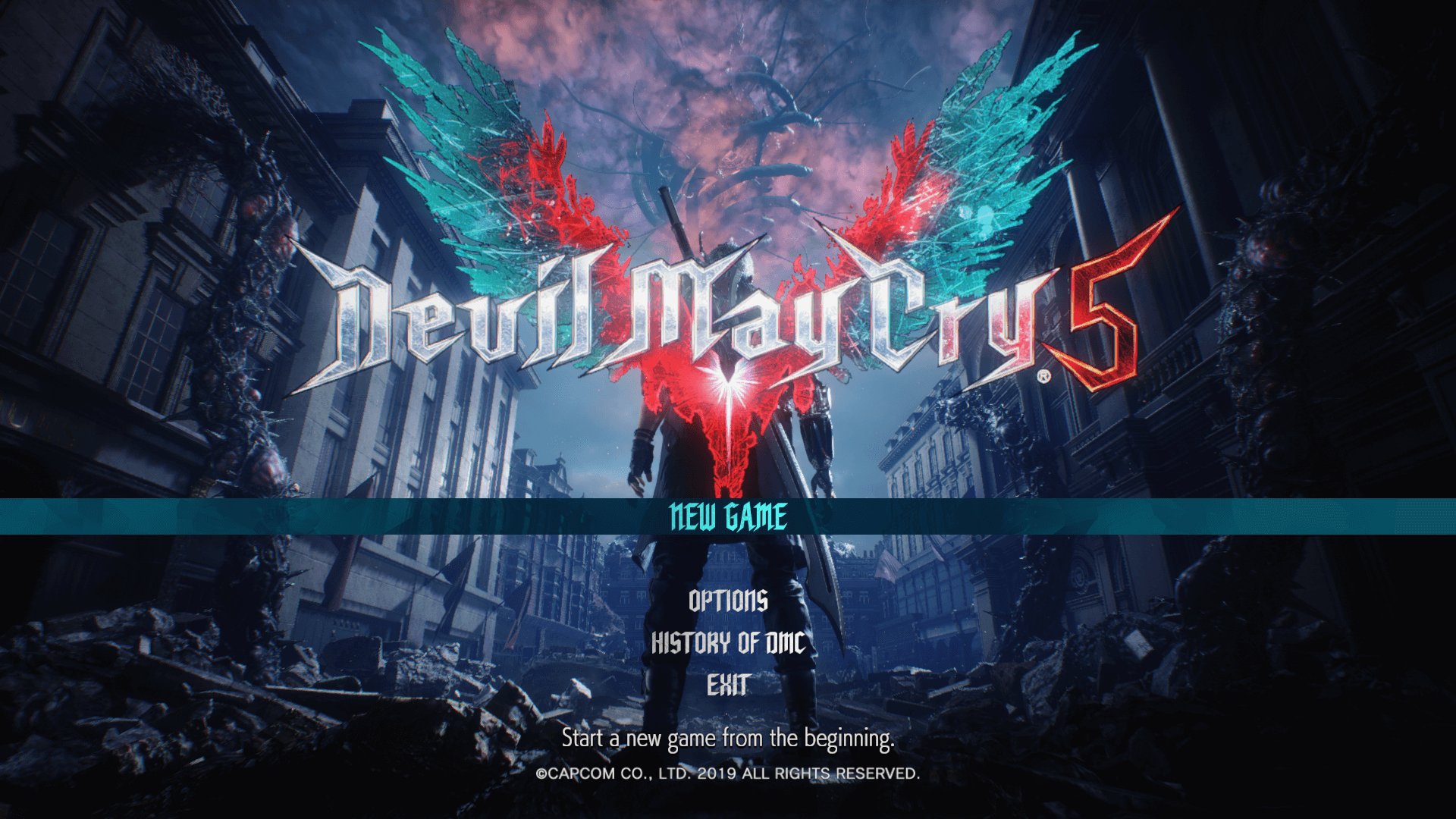
To start a new game in DMC5, select ‘New Game’ from the main menu, then choose your desired difficulty.
Ready to dive into the demon-slaying action of Devil May Cry 5? Many players wonder how to start a new game in DMC5, and it’s actually quite simple. This guide quickly covers exactly what you need to do to begin a fresh playthrough.
Navigating the game’s initial menu is key. Once you are at the title screen, you’ll see several options presented to you. Pick the one that starts your adventure.

How to Start a New Game in DMC5
Okay, so you’re ready to jump into the stylish, demon-slaying world of Devil May Cry 5 (DMC5)! That’s awesome! Whether you’re a returning veteran or a fresh-faced newbie, starting a new game is your first step into this action-packed adventure. But where do you even begin? Don’t worry; we’ve got you covered. This guide will walk you through everything you need to know, making sure you’re slicing and dicing demons like a pro in no time.
Choosing Your Difficulty
Before you start blasting away, you’ll need to pick a difficulty level. This is super important because it affects how tough the game will be. Let’s break down the options:
Human
This is the easiest mode, perfect for first-timers or anyone who just wants to enjoy the story without too much challenge. Enemies are weaker, and you’ll have more health. Think of it like a fun stroll through a demon-infested park.
Devil Hunter
This is the standard difficulty, and it offers a good balance between challenge and fun. If you’ve played action games before, this is a great place to start. You’ll face tougher enemies, but it shouldn’t be too overwhelming.
Son of Sparda
Now things get serious. This difficulty is for players who know their stuff. Enemies hit harder and are smarter. You’ll need to use all the skills in your arsenal to make it through. If you’re looking for a real test, this is it.
Dante Must Die
As the name suggests, this mode is brutal. Enemies are super powerful, and they’ll show no mercy. Only very skilled players should even think about trying this one on their first go. It’s generally unlocked after beating the game on Son of Sparda.
Heaven or Hell
This mode is unique. Both you and the enemies die in one hit. It’s all about precision and strategy. It’s fun for a change of pace but definitely not recommended for your initial playthrough. You also need to beat the game on certain difficulty to get this.
Hell and Hell
This is where only true pros play. You die with one hit, but enemies are also as tough as they are in ‘Dante Must Die’ mode. It is the most challenging mode in the game and requires immense skills. It is also unlocked after beating the game on certain difficulty.
Recommendation: For your first time playing, we highly suggest starting on either “Human” if you’re very new to action games or “Devil Hunter” if you have some experience. You can always change the difficulty later, so don’t worry about making a perfect pick right away.
Consider these key differences when deciding on the difficulty level:
- Enemy Strength and Health: How much damage enemies do and how many hits they can take.
- Enemy Aggression: How often and how aggressively enemies attack you.
- Player Health: How much damage you can take before you get knocked out.
- Enemy Placement: The number and type of enemies you will encounter in any area.
Navigating the Main Menu
Alright, you’ve chosen your difficulty! Now, let’s look at the main menu. Here’s what you need to know:
- New Game: This is the option you need to select to start your adventure. Clicking on this will take you to the difficulty selection screen if you have not selected it in the starting.
- Load Game: Here you can load a saved game to continue your progress. Once you start playing and have saved the game.
- Mission Select: Allows you to go back to any mission you have previously completed, especially if you want to complete some achievements, or get better rating on particular mission.
- Bloody Palace: This is an arena mode where you fight waves of enemies. It’s great for practicing and testing your skills.
- Gallery: This is where you can look at concept art, listen to music, or review cutscenes.
- Training: Here you can practice the moves and combat mechanics with various character.
- Options: You can change all the settings like audio, visual or gameplay from here.
You have to choose ‘New Game’ and then the difficulty you want.
Choosing Your Character and Initial Story Setup
DMC5 has three main characters that you get to play as throughout the story: Nero, Dante, and V. You will be able to play them sequentially as the game story progresses. In the first mission, you will play as Nero. You start by playing through a prologue mission where you will learn the basic control and some cool moves. You will also get a tutorial on how to play the game.
At the start of the game, you do not have direct control of choosing a character, you will start with Nero. Each character has its own unique play style, weapons and abilities, which you will get as story progresses. Let’s learn a bit about them.
Nero
Nero is our energetic young devil hunter, and he uses his sword, the Red Queen, along with his special Devil Breaker arms. These arms give him unique abilities, like punching enemies really hard or freezing them. Nero’s playstyle focuses on fast, aggressive attacks.
Dante
Dante is the legendary demon hunter and half-demon son of Sparda. Dante is an expert with many types of weapons: swords, pistols, shotguns, and more. His fighting style is very flexible, and he can switch between different styles like trickster for mobility or swordsmaster for close combat.
V
V is a mysterious character who fights using his familiars, Griffon, Shadow, and Nightmare. V is more of a strategic character, he stays away from the battle field and commands his demon friends to attack for him. V’s play style focuses on planning and controlling the battlefield.
Important note: The story of DMC5 is told through interweaving narratives between these three characters. You’ll switch between them as you progress through the game. This unique way of storytelling makes the game more interesting and engaging, allowing you to see the story from different viewpoints.
Understanding the User Interface (UI)
Before you start any action, understanding the user interface is very important. Let’s see the key elements of the interface:
- Health Bar: This indicates how much damage you can take before you are defeated. It is usually located on the top left of the screen and is shown as a green bar.
- Devil Trigger Gauge (DT Gauge): This gauge fills as you fight and allows you to use your Devil Trigger, which increases your power. It is usually located below the health bar. When the bar fills, it flashes to indicate that you can use the DT power.
- Style Rank: This is located at the right corner of the screen, it measures your performance in combat. The better and more stylish your combat, the higher your rank goes, going from D to SSS. Try to maintain a good rank as much as possible.
- Mission Information: On the top of the screen you will see name of the mission and also the current mission objective.
- Weapon Selection: You’ll see an indicator of your currently selected weapons.
- Devil Breakers (For Nero): For Nero, you will see the list of Devil Breakers that he is currently carrying on his arm, with the selected one indicated clearly.
Basic Controls and Movement
Let’s get you moving like a true devil hunter! DMC5 has a smooth control scheme that, with practice, will help you get through every mission like a breeze. Here’s the basic control that you need to know:
- Movement: Use the left analog stick to move your character.
- Jump: Press the X or A button (depending on your console or PC) to jump.
- Attack: Press the Square or X button (depending on your console or PC) to do melee attack. Press Triangle or Y to use ranged attacks.
- Lock-on: Press the right trigger or right mouse button to lock onto an enemy. Locking on helps you keep track of the enemy you want to attack and use special moves.
- Devil Trigger: When your DT gauge is full, press L3+R3 to activate Devil Trigger. This makes you more powerful for a limited time.
- Switch Weapons: Use the D-pad to switch between weapons. For Nero, use the left D-pad to switch between the devil breakers he has on hand.
These are some of the basic controls that will help you get started, but there are lots of combination you can use with these to make combos, which will be covered later on.
Initial Gameplay Tips for Beginners
Okay, you’re finally in the game! Here are some quick tips to help you out when you first start playing:
- Practice the Basic Moves: Before jumping into fights, get a feel for movement, attacking, and jumping. Try out different attacks and see how they work.
- Learn to Lock-On: Locking on to enemies will help you focus on the main threat and execute precise attacks.
- Don’t be Afraid to Experiment: Try out different weapons and abilities to see what style suits you best. The tutorial mission is a great place for trying things out without worrying about losing.
- Use Your Devil Trigger: Don’t forget to use your Devil Trigger when you are in a tight spot or you need to deal some heavy damage.
- Pay Attention to the Tutorial Prompts: The game will give you a lot of tips and tricks along the way, especially at the beginning. Make sure you read the tutorial text as it comes up.
- Observe Enemy Attack Patterns: Each enemy has different types of attack patterns. By observing them you can counter them, and avoid taking damage.
- Utilize the Training Mode: Before starting the main mission, try the training mode to understand the movesets of the character you play, especially with characters like Dante who have many different options.
Saving Your Progress
Make sure you save your game regularly so that you don’t lose any progress. You have to make save when you finish the mission. The game will also give auto save option, but it is always good to make a manual save. You can save your progress using the following ways:
- Mission Completion: The game automatically saves when you finish each mission.
- Main Menu: You can also save your progress by going to the main menu and selecting “Save Game”. This is helpful if you want to stop playing halfway through a mission.
Important note: If you exit the game before reaching the mission end or manually saving, you will lose your progress. So save regularly after each mission and if you are taking a break during a mission, go to the main menu and save the game.
Adjusting Game Settings for the Best Experience
Every player has their own preference, you might want to tweak the settings to make your gameplay better and more comfortable. DMC5 offers several setting option that you can use to adjust your experience. Here are some key settings you might consider changing:
Graphics
Adjust screen resolution, textures, shadows, and other graphical options. If you are running the game on lower-end system you may want to lower the graphic settings to make sure that you get consistent fps. While on a high end system you might choose the maximum graphic settings to experience the game in its full glory.
Audio
Adjust the volume levels for music, sound effects, and voice acting. You can set different sound settings according to your liking.
Gameplay
Change controls, difficulty, vibration feedback, and HUD display. You might want to change the controls to your comfortable settings, while also changing the setting according to your experience.
Accessibility
Modify subtitles, color blind settings, and other accessibility options to make the game more usable and suitable for you.
Recommendation: Spend some time exploring the different settings and adjusting them to your preference. This can significantly affect your enjoyment of the game.
So, there you have it! Everything you need to know to start a new game in DMC5. Now, go forth, and slay some demons in style. Remember to experiment with different characters, weapons, and moves. Most importantly, have fun! The world of Devil May Cry 5 awaits, so are you ready to become a legendary demon hunter?
DMC5 – Replacing/Swapping Your Save File【Tutorial】
Final Thoughts
To begin a fresh Devil May Cry 5 adventure, select “Start Game” from the main menu. This presents difficulty options; choose your preferred setting. Then, a new game saveslot appears. You then progress through the initial missions.
Selecting “New Game” provides a similar method to how to start a new game in dmc5. Ensure you choose a new save spot to avoid overwriting current progress. The game then launches the introductory story sections.

