
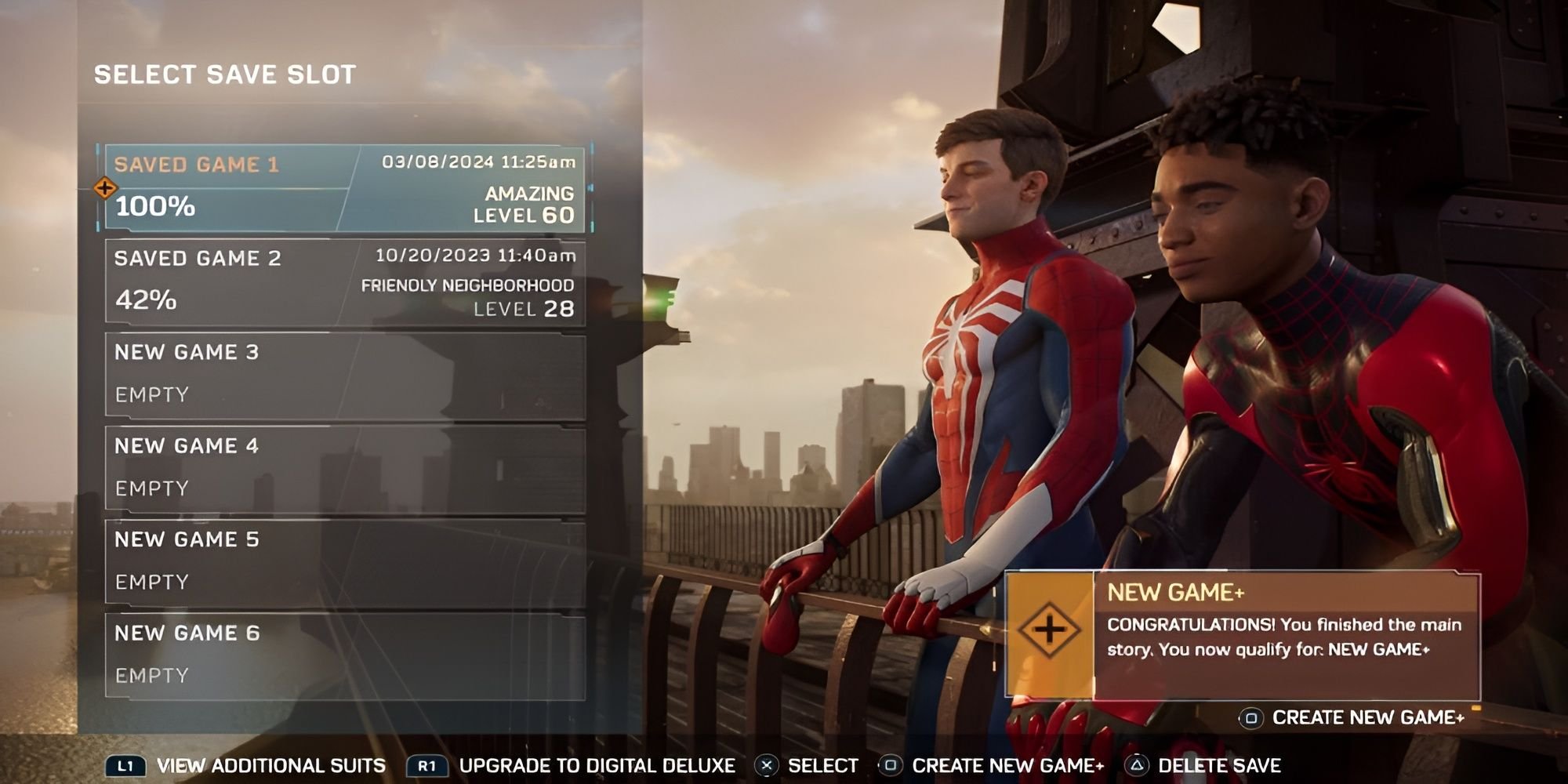
To start new game plus in Spider-Man 2, finish the main story first, then select “New Game +” from the main menu.
Ready to swing through the city again? You finished the main story of Spider-Man 2 and now you’re itching for a replay with all your gear. Many players are asking about how to start new game plus spider man 2, and luckily the process is simple.
It’s a great way to experience the story again, now with all your powers and gadgets. Just complete the game’s main story, then you will see the option on the start screen. This allows you to take on challenges once more, at your own pace.

How to Start New Game Plus in Spider-Man 2
So, you swung through the streets of New York, defeated all the bad guys, and finished the amazing story of Spider-Man 2? That’s fantastic! But what if you want to do it all again, with all your cool gadgets and powers? That’s where New Game Plus comes in! It lets you replay the game with everything you’ve already earned. Let’s dive into how to get started with New Game Plus in Spider-Man 2, step by step.
What Exactly is New Game Plus?
Before we get to the “how,” let’s make sure we all understand what New Game Plus actually is. Think of it like a super-powered replay button. When you start a New Game Plus, you get to keep most of the things you worked so hard to get in your first play-through. This includes:
- All your Spider-suits (Yes, even those awesome ones!)
- All your gadgets and their upgrades
- All your skills and abilities for both Peter and Miles
- Tech Parts, Rare Tech Parts, and City Tokens
- Any collected resources
You basically start the game again with a HUGE advantage. This means you can focus on different things, like experimenting with different suits, trying out new skills, or just enjoying the story again with your favorite abilities. It’s not just the story again though; you get some new goodies along the way.
Why Would You Want to Play New Game Plus?
Okay, you finished the game, so why jump back in? Here are some pretty good reasons:
- Try Different Suits and Combos: With all your suits available from the start, you can really mix and match outfits with your moves. You can look super cool while you fight crime!
- Experiment with Skills: See how different skills work together. Maybe you didn’t use a specific ability much in your first play through. Now’s the time to really dig in!
- Complete Side Missions and Activities: You can now focus more on completing all the side missions and activities that you might have missed before.
- Get All the Trophies: If you’re a trophy hunter, New Game Plus lets you get any trophies you didn’t earn the first time.
- Relive the Story: Sometimes you just want to experience the story again, but this time you feel like a super-powered Spider-Person!
- New Difficulty Modes: New Game Plus gives you an option to make the game more challenging if you like!
Difficulty Choices in New Game Plus
Spider-Man 2’s New Game Plus mode lets you pick from different difficulties. You can choose the same difficulty you played through the first time or crank things up a notch to make the game more challenging. This adds replayability, allowing you to tailor the game’s challenge to your liking.
- Friendly Neighborhood: This is the easiest mode, great for people who just want to swing around and enjoy the story.
- Amazing: This is the normal mode, a balanced experience for most players.
- Spectacular: This mode offers a good challenge for experienced players.
- Ultimate: This is the hardest mode. It will really test your skills and reflexes!
The Step-by-Step Guide to Starting New Game Plus
Alright, let’s get to the good stuff. Here’s how you can get into your New Game Plus:
Step 1: Finish the Main Story
Before you can start New Game Plus, you MUST finish the main story campaign of Spider-Man 2. This means defeating all the big bosses, completing all the story missions, and seeing the credits roll. Make sure you’ve seen everything to the very end! You’ll know you’re done when the game returns you to free-roam New York.
Step 2: Go to the Main Menu
After you complete the story, go back to the main menu. This is the same menu you see when you first start the game. You’ll see options like “Continue,” “New Game,” and “Load Game.”
Step 3: Choose ‘New Game+’
In the main menu, you will see the option of ‘New Game+.’ Click on it. If you do not see this option, that means you did not complete the main story. If you have completed it, but still don’t see this option, you might need to update your game.
Step 4: Select Your Save File
The game will then ask you to choose a save file. Make sure to select the save file that you want to use for your New Game Plus playthrough. This is the file where you finished the main story, so all your stuff will be carried over. Double check, to ensure you have the right save file selected.
Step 5: Select Your Difficulty
After selecting the save file, the game will ask you to choose a difficulty setting for your New Game Plus play-through. You can keep the same difficulty as before or increase the challenge. Pick the one that suits you.
Step 6: Start Your New Adventure!
After selecting the difficulty, you are ready to go! Click “Start” or the equivalent option, and the game will start over from the beginning of the story. But this time, you’ll have all your hard-earned powers, gadgets, and suits ready to use! Enjoy your new playthrough!
What is New in New Game Plus?
Besides carrying over your gear, New Game Plus has some extra things to enjoy. These additions make the replay feel fresh and exciting. Let’s take a look:
Suit Styles
One of the most exciting things about New Game Plus is that it adds new Suit Styles. These aren’t new suits, but rather cool variations on the ones you already have. It’s a great way to give your favorite suit a new look. Suit styles can be purchased with the rare tech parts.
Golden Gadget Upgrades
With New Game Plus, there are even more upgrades you can get for your gadgets. These are called Golden Gadget Upgrades. These will make your gadgets even more powerful and more efficient. To acquire these upgrades, players must complete the base set of upgrades for each gadget, unlocking the ability to purchase its golden variant.
Mission Replay
One exciting feature added to New Game Plus is Mission Replay. This lets you replay any mission from the main story you choose. This is great if you want to experience a favorite story moment, experiment with skills, or just like to relive some cool action sequences.
Additional Difficulty Options
As previously mentioned, if you felt the standard difficulty wasn’t challenging enough you can test your skills with higher difficulties. This makes the game even more challenging and rewarding.
Things to Remember Before Starting New Game Plus
Before you hit that “New Game Plus” button, keep these things in mind:
- Complete everything you want in your first play through: If there are side missions, suits, or other things you would like to achieve before starting the New Game Plus, make sure you complete those before selecting New Game Plus in the menu.
- Resources: Don’t worry about the Tech Parts and other stuff; they will all be carried over into your New Game Plus playthrough.
- Progress: Your story progress will reset, but all your progression will be transferred.
- No turning back: Once you start New Game Plus, you can’t go back to your old save file with the story unfinished. So, be sure you’re ready.
Tips for Your New Game Plus Playthrough
Now that you know how to start New Game Plus and what to expect, here are a few tips to make your experience even better:
- Experiment with different suits: Try different suit powers in different situations. Some may work better for you, and some may make you feel like a stylish superhero.
- Play with the new Gadget upgrades: Now that you have powerful gadgets, see how you can include them into your fighting style.
- Try out new skills: Don’t be afraid to try out different skills that you may have overlooked during your first play-through.
- Don’t forget side missions: While you have all your amazing powers, don’t neglect the side missions. Some of them are pretty good and give good rewards.
- Have fun!: Most importantly, enjoy the experience! Spider-Man 2 is a really fun game, and New Game Plus is a great way to experience it all over again.
Troubleshooting Common Issues
Sometimes things don’t always go as planned, so let’s cover some common problems people have with New Game Plus in Spider-Man 2 and how to deal with them:
New Game Plus Option Doesn’t Appear
Problem: The ‘New Game+’ option isn’t showing up in the main menu.
Solution: This is the most common issue. Make sure you have completed the main story campaign, and that you have credits to roll on the screen, and have the free roam experience after that. If the issue still persists, make sure your game is updated to the latest version.
Progress Not Saving
Problem: You’re playing New Game Plus, but progress isn’t saving.
Solution: Make sure you have sufficient space on your console’s storage. Check if the game has permission to write to storage. Try saving manually from the pause menu regularly.
Suits or Skills Not Carried Over
Problem: Your suits, skills, or other stuff are not present in your New Game Plus.
Solution: Be sure you select the correct save file when you’re beginning your New Game Plus playthrough. Also, double check if you are not mistaking them for your previous save file.
New Game Plus in Spider-Man 2 is an amazing way to replay one of the best superhero games out there. You get to experience all the fun again, but this time you have all your powers, gadgets, and favorite suits from the very beginning. It’s a great way to try out new things, see what you missed, and just enjoy the game again. So, go ahead, jump in, and swing back into action!
Marvel Spiderman 2 – New Game+ How to Start new game plus
Final Thoughts
To begin New Game Plus in Spider-Man 2, you must first complete the main story. Then, from the main menu, select “New Game.” You will then see the option to choose New Game Plus.
Selecting this will let you start with your previously earned suits and abilities. Remember, a complete playthrough is a must before accessing the feature. That’s how to start new game plus spider man 2.

