
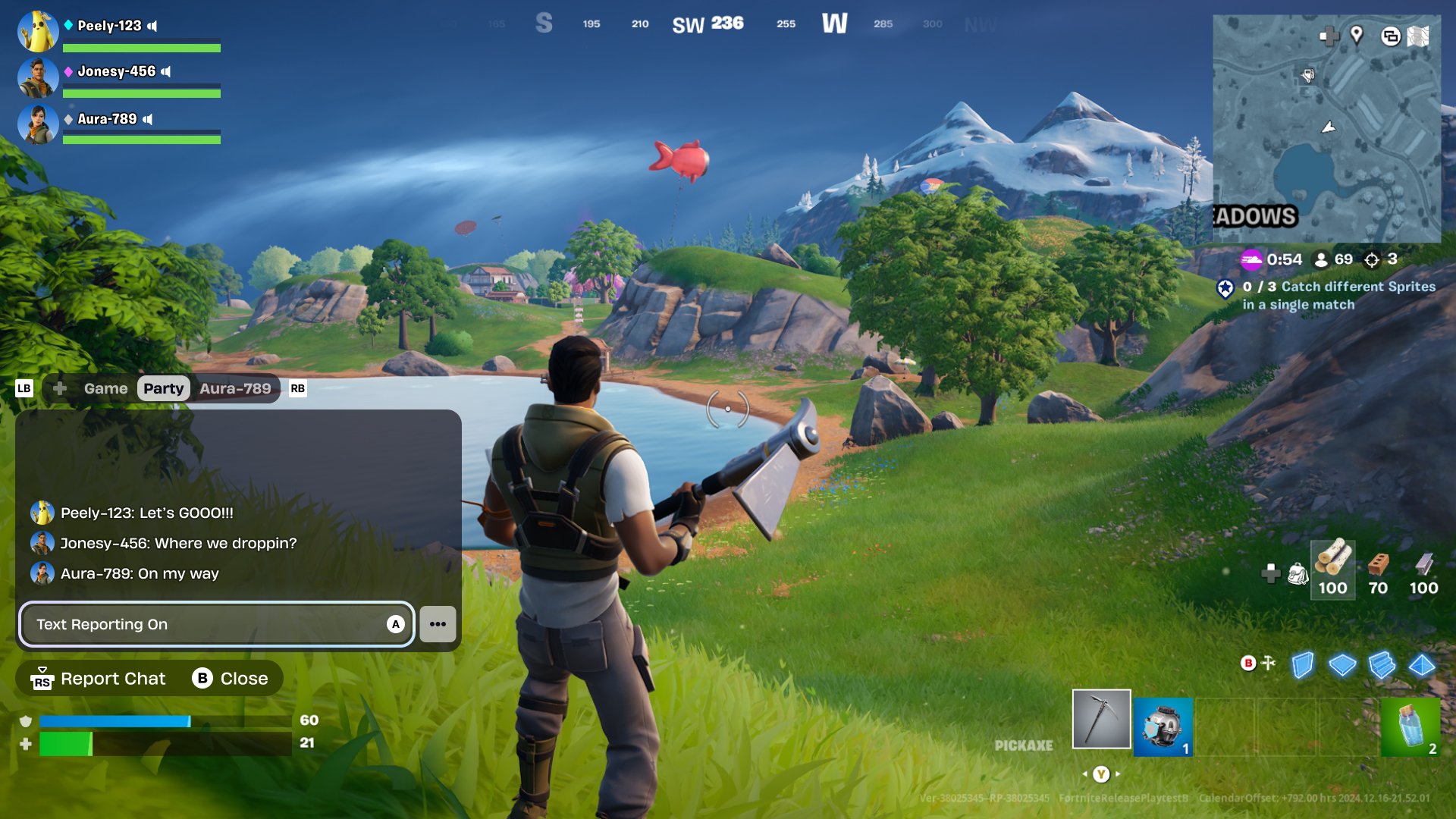
To use in game chat Fortnite, press and hold the designated push-to-talk key (usually ‘Y’ on PC, right on D-pad on console) or enable voice chat in settings; your voice will be transmitted while held or always, based on your selection.
Ever find yourself needing to quickly coordinate with your squad in Fortnite? Or maybe you want to give a heads up about that sneaky player building a tower? Knowing how to use in game chat Fortnite is essential for smooth team play and communication.
It can be a game changer when you can quickly tell your teammate there’s an enemy coming from the left, instead of relying solely on pings. This guide will show you how to enable voice chat, and quickly use it when you need it most during intense matches.

How to Use In-Game Chat in Fortnite
Fortnite is super fun, right? But sometimes, you need to talk to your teammates to plan a great attack or just to say “hi!” That’s where in-game chat comes in. It’s like having a walkie-talkie built right into the game. Let’s explore all the ways you can use in-game chat to become a real Fortnite pro.
Understanding Voice Chat in Fortnite
Voice chat lets you talk to other players using your microphone. It’s the fastest way to share information and make strategies. Imagine trying to explain a sneaky plan using only emotes! Voice chat makes everything much easier and more effective.
How to Enable Voice Chat
Before you can start chatting, you need to make sure voice chat is turned on. It’s usually on by default, but sometimes you might need to check. Here’s how:
- First, go to the main menu by pressing the ‘ESC’ key if you are using PC or ‘Options’ button in console.
- Look for the settings icon, it looks like a gear, and click or select it.
- Go to the ‘Audio’ tab.
- Find the ‘Voice Chat’ section.
- Make sure ‘Voice Chat’ is set to ‘On’. If it says ‘Off’, then click it to turn it ‘On’.
- You can also adjust the ‘Voice Chat Input Device’ to make sure it uses the correct microphone, like your headset or computer microphone.
Once you have done these steps, you should be ready to talk!
Push-to-Talk vs. Open Mic
Fortnite gives you two options for using your microphone. These are important to understand because they change how you chat.
- Push-to-Talk: This is like using a walkie-talkie. You need to press a key or button to talk. When you are not pressing the button, your microphone is off. It helps keep the game quiet for everyone, because background noises will not be transmitted. It’s a good idea if you have a lot of background noise, like dogs barking or siblings chatting.
- Open Mic: This means your microphone is always on. Whatever your microphone picks up, like you talking, or coughing, it will transmit to other teammates. This is good for fast talking, but it can also let others hear things you don’t want them to, like someone walking into your room, so you need to keep it in a quiet place.
To choose between Push-to-Talk and Open Mic, go back to the Audio settings. You’ll see a ‘Voice Chat Input Mode’ setting. You can pick ‘Open Mic’ or ‘Push To Talk’. If you choose ‘Push To Talk,’ you also need to choose the button that activates your mic, which you can adjust in the ‘Keybinds’ section of the settings tab.
Troubleshooting Voice Chat Issues
Sometimes, voice chat doesn’t work. Don’t worry, it happens to the best of us! Here are some things to check:
- Check Your Microphone: Make sure your microphone is plugged in correctly and is not muted. Make sure you have chosen the correct microphone in the ‘Audio’ settings in the ‘Voice Chat Input Device’ option.
- Check Your Internet: A bad internet connection can sometimes cause problems. If you are having trouble, try restarting your router and modem.
- Fortnite Updates: Sometimes game updates can cause problems. Check if your game is updated to the latest version. Also keep your drivers updated.
- Restart the Game: Sometimes, just restarting Fortnite can help. Close the game completely and open it again.
If you’re still having trouble, you might have to look for help on the official Fortnite forums or reach out to their support team.
Using Text Chat in Fortnite
Sometimes you can’t or don’t want to use your voice. That’s okay! Fortnite also has a text chat option. It lets you type messages to your teammates. This is great for sending quick messages or if you are in a noisy environment and can’t use your microphone.
How to Access Text Chat
Opening the text chat is really simple:
- In the game, press the ‘Enter’ key on your keyboard (if using a PC).
- If you are using a game console, it will depend on which console you are using, but it will be very easy to find in the controls, for example in the Playstation press the ‘Touchpad’ and in the Xbox press ‘View’ button to access the Text Chat.
- A box will pop up at the bottom left of your screen.
- Type your message in the box.
- Press ‘Enter’ again to send your message.
Understanding Text Chat Channels
Fortnite lets you send messages to different chat channels, making sure your messages are seen by who they need to be. Here are the main types of text chat channels:
- Team Chat: This is the most common one. Messages you send in team chat are only seen by your teammates in your squad. It’s a great way to talk strategy and work together.
- Party Chat: This chat is for everyone in your party before you get into a game. People use it to invite their friends and talk when getting ready to start a game.
- Game Chat: This is for all players in the game. You won’t use this a lot, unless you have a reason to message everyone in the match.
Tips for Using Text Chat
Here are some tips to use text chat effectively:
- Keep it Short: In the heat of battle, no one has time to read long stories. Use short, clear messages to get your point across quickly.
- Use Proper Words: Text chat is helpful, but writing can sometimes sound rude. Use complete sentences and please avoid all caps, as it sometimes can be interpreted as yelling.
- Be Respectful: Always be nice to your teammates. No one likes being yelled at. Treat people how you would like to be treated.
Best Practices for Communication
Talking to your teammates can make a huge difference in your Fortnite games. Here are some best practices to keep in mind when using in-game chat:
Clear Communication
Clear communication is the most important part of talking in Fortnite. Here are a few tips to be clear when you talk:
- Give Specific Information: Instead of saying “There’s an enemy over there”, try “There’s an enemy in the blue building, north side.” The more information, the better.
- Use Compass Directions: Fortnite has a compass at the top of the screen. Use north, south, east, and west to tell your teammates where you are and what’s going on around you.
- Call Out Loot: If you find great loot, let your teammates know. For example, you can say “I found a legendary shotgun by the tree.”
- Use Pings: Fortnite has a great ping system! You can ping locations or items. This gives your teammates a clear visual, plus it is always helpful, as it will mark the location in the game.
Being a Good Teammate
Being a good teammate is as important as being a good player. Here’s how to be a good team player using voice and text chat:
- Stay Positive: Nobody likes a player that is always complaining. Try to keep a positive attitude, even when things aren’t going your way. If you make a mistake, say sorry, and move on to the next game.
- Encourage Your Teammates: A little encouragement can go a long way. If your teammate gets a good shot or a great elimination, give them props.
- Don’t Yell: Yelling into the mic can be distracting and annoying. Try to stay calm, even when you are excited.
- Be Forgiving: Everyone makes mistakes. If your teammate makes a bad play, don’t get mad. Be forgiving.
Using Chat Strategically
You can use chat to make smarter plays in Fortnite. Here’s how:
- Coordinate Attacks: Use chat to plan when to attack. “I’m gonna rush in from the left, you come in from the right!”
- Call Out Enemy Locations: If you see an enemy, let your teammates know before they walk into trouble.
- Share Resources: Let your teammates know if you need a specific resource or if you have extra to share.
- Plan Your Next Move: When you’re safe, use chat to talk about where you will move to next.
Common Chat Mistakes to Avoid
Just like there are best practices, there are also things to avoid. Here are some common chat mistakes that players make:
Talking Too Much
It might seem like a good idea to talk constantly to your teammates, but it’s not. If you talk too much, it can cover up important sounds like enemy footsteps and gunshots. Talk when it is important and relevant. Not to share every detail of what you see or what you are doing.
Spamming the Chat
Don’t spam the chat with the same messages over and over. It clogs up the chat and distracts your teammates. Keep the messages to the point.
Using Offensive Language
It’s important to be respectful to everyone, even when you’re upset. Do not use offensive words, or bad language, because it makes the game less enjoyable for everyone. Epic Games has rules against these behaviors and you can be banned from the game if you do that.
Ignoring Your Teammates
If your teammates are trying to talk to you, make sure you listen to them. Ignoring your teammates is not only rude, but it can also make you lose the game. Try to be responsive and helpful to your team.
By understanding and using in-game chat effectively, you will become a better Fortnite player. Remember to be clear, respectful, and always ready to talk to your teammates, because it will lead to more wins, and more fun!
How To Turn On Fortnite Voice Chat – Full Guide
Final Thoughts
In short, using voice chat in Fortnite requires enabling the feature in settings. You can also use text chat, typing messages to your squad. Remember to check your audio input and output device selections.
To effectively use chat, utilize push-to-talk or open mic options based on preference. Knowing how to use in game chat fortnite is vital for team communication, strategy and coordinating plays. Effective communication is key.

