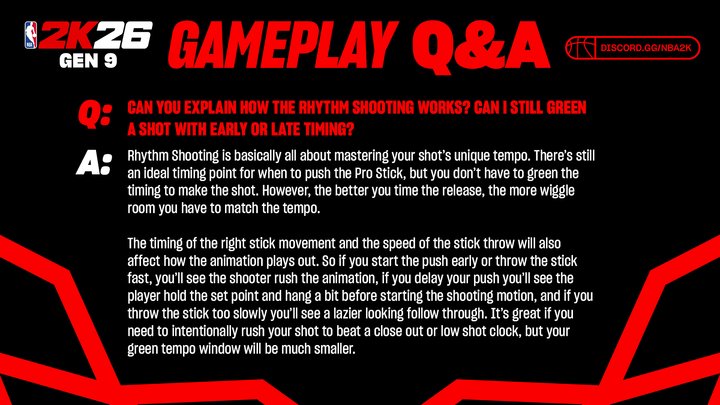
To use pro stick rhythm shooting in NBA 2K26 for more greens, focus on releasing the stick at the shot meter’s apex. Practice your timing with each player’s unique animation to consistently hit the green window.
Want to drain more shots in NBA 2K26? It all comes down to perfecting your release with the Pro Stick. The secret isn’t just about aiming, it’s about timing and rhythm.
This guide shows you how to use pro stick rhythm shooting in NBA 2K26 for more greens. We’ll cover how to improve your timing to significantly increase your shooting percentage. Get ready to light it up from beyond the arc!

How to Use Pro Stick Rhythm Shooting in NBA 2K26 for More Greens
Pro Stick rhythm shooting in NBA 2K26 is a skill that can significantly improve your scoring. Mastering it allows for precise shot timing and a higher chance of hitting green releases.
This guide will provide a comprehensive breakdown of how to use the Pro Stick effectively. We’ll cover everything from understanding the mechanics to advanced techniques.
Understanding Pro Stick Rhythm Shooting
Pro Stick rhythm shooting differs significantly from button shooting. It requires you to move the Pro Stick in a specific way to emulate a player’s real-life shooting motion.
Success hinges on timing and accuracy. Practicing the rhythm associated with each player’s shot is key to consistent green releases.
Setting Up Your Controls
First, you need to ensure your controller settings are correct. Go to the controller settings menu in NBA 2K26.
Make sure your “Shot Meter” is set to “On” or “Pro Stick Only”. “Pro Stick Only” is recommended for dedicated rhythm shooters.
Also, check the “Shot Timing” setting. “Timing” is crucial for Pro Stick shooting, so experiment to find what works best for you.
The Basic Mechanics
The core mechanic involves moving the Pro Stick down and then up in a fluid motion. The speed and direction of your upward flick dictates shot power and arc.
Properly timing the release at the apex of the shot animation is vital for hitting greens. Different players have different shooting animations, so practice each player’s timing.
Practicing Your Release
Head to the Gatorade Training Facility to practice. Free Throw practice is a great starting point to hone your timing.
Focus on achieving a smooth, consistent rhythm with each shot. Pay close attention to the visual cues of the shot meter.
Don’t just watch the meter. Watch your player’s release point.
Understanding Shot Feedback
After each shot, pay attention to the feedback. The game provides visual cues regarding your release timing.
Early, late, slightly early, slightly late, and green are the common outcomes. Adjust your timing accordingly after each shot attempt.
Focus on consistency rather than just aiming for greens immediately. Consistent releases lead to more greens over time.
Mastering Different Shot Types
The Pro Stick offers various shooting options. These include jump shots, fades, floaters, and hop steps.
Jump Shots
For regular jump shots, flick the Pro Stick straight down and then straight up. Aim for a smooth, fluid motion.
The speed of the flick determines the shot power. Practice controlling the power for different distances.
Fadeaways
For fadeaways, hold the right trigger (or your console equivalent) and then flick the Pro Stick in the desired direction of the fade. Timing is essential.
Different fadeaway directions may require different timing. Experiment to find what works best for each direction.
Floaters
To perform a floater, drive towards the basket and then gently flick the Pro Stick upwards. Control the power to avoid overshooting.
Floaters are effective against taller defenders. Use them strategically in the paint.
Hop Steps
For a hop step, tap the square button (PlayStation) or X button (Xbox) while driving and then shoot with the Pro Stick. The hop step creates space for a shot.
Mastering hop steps adds versatility to your offensive game. Combine them with various shooting motions for unpredictable attacks.
Advanced Techniques
Once you’ve grasped the basics, you can explore advanced techniques. These include using shot aiming and player-specific shot styles.
Shot Aiming
Shot aiming is an advanced feature. It lets you adjust the shot trajectory mid-air for more accuracy.
To use shot aiming, hold the Pro Stick slightly to the left or right while shooting. Adjust the direction based on the aiming feedback.
Practicing shot aiming can significantly improve your shot percentage. It’s especially useful for contested shots.
Player-Specific Shot Styles
Each player in NBA 2K26 has a unique shooting animation. Pay attention to these styles to maximize your shooting potential.
Some players have quicker releases, while others have slower, more deliberate releases. Adapt your timing accordingly.
Researching real-life player tendencies can also help. Understanding their shot preferences translates to better in-game execution.
Utilizing Hot Zones
Hot Zones are areas on the court where a player shoots particularly well. Take advantage of these zones to increase your chances of scoring.
A player’s hot zones are displayed in the player card and on the court during gameplay. Knowing where your players excel can be a game changer.
Prioritize shots from your player’s hot zones. This strategy improves your overall scoring efficiency.
Badges That Enhance Pro Stick Shooting
Several badges can enhance your Pro Stick shooting abilities. These badges provide bonuses to your shooting attributes.
Dead Eye
The Dead Eye badge reduces the penalty for shooting with a defender closing out. This is essential for contested shots.
Green Machine
Green Machine increases your chances of hitting consecutive green releases. This badge is perfect for rhythm shooters.
Hot Zone Hunter
Hot Zone Hunter provides a significant boost when shooting from your hot zones. This badge amplifies the benefits of shooting from these areas.
Catch & Shoot
Catch & Shoot boosts your shooting percentage after receiving a pass. This badge complements a team-oriented playstyle.
Volume Shooter
Volume Shooter gives a small boost to shot percentage as the game goes on. This is for players who take a lot of shots.
Agent 3
This badge gives a boost to shots taken from behind the three-point line while moving.
Experiment with different badge combinations to find what suits your playstyle best. Badges can drastically impact your shooting performance.
Practice Drills for Improvement
Consistent practice is crucial for mastering Pro Stick rhythm shooting. Incorporate these drills into your training routine.
Free Throw Frenzy
Practice free throws repeatedly to perfect your timing. This is the foundation of consistent shooting.
Spot-Up Shooting
Choose different spots on the court and practice shooting from those locations. Focus on replicating your timing from each spot.
Moving Shots
Practice shooting while moving to simulate in-game scenarios. This is important for shooting off the dribble.
Contested Shots
Have a teammate or the CPU contest your shots during practice. This helps you get comfortable shooting under pressure.
Scrimmages
Participate in scrimmages to apply your skills in a game setting. This will help you identify areas for improvement.
Troubleshooting Common Issues
Even with practice, you might encounter issues with Pro Stick shooting. Here are some common problems and their solutions.
Inconsistent Release Timing
If your release timing is inconsistent, focus on developing a smooth, fluid motion. Break down your shooting motion into smaller steps.
Record your gameplay and analyze your shooting form. Identify any inconsistencies and correct them.
Low Shot Percentage
If your shot percentage is low, analyze your shot selection. Avoid taking heavily contested shots.
Focus on creating open looks for yourself. Utilize screens and pick-and-rolls to get open.
Trouble with Different Shot Types
If you’re struggling with specific shot types, dedicate extra practice time to those shots. Isolate the mechanics and master them individually.
Watch videos of professional players using those shots. Analyze their technique and apply it to your game.
Adapting to Different Game Modes
The effectiveness of Pro Stick shooting can vary depending on the game mode. Adjust your strategy accordingly.
MyCAREER
In MyCAREER, focus on upgrading your shooting attributes and earning relevant badges. This will maximize your shooting potential.
Utilize your created player’s strengths. Play to their hot zones and exploit their best shooting abilities.
MyTEAM
In MyTEAM, build a team with players who complement your playstyle. Choose players with high shooting attributes and appropriate badges.
Experiment with different team compositions to find what works best for you. Synergy between players is crucial for success.
Online Play
In online play, expect more intense competition. Practice shooting under pressure to prepare for these scenarios.
Utilize defensive strategies to create open looks for your teammates. Teamwork is essential for success in online play.
Staying Updated with Patch Changes
NBA 2K is constantly updated with patch changes that can affect gameplay. Stay informed about these changes to adjust your strategy.
Follow NBA 2K news and community forums for updates. Be aware of any changes to shooting mechanics or badge effectiveness.
Adapting to patch changes is crucial for maintaining a competitive edge. Stay flexible and willing to adjust your playstyle.
The Mental Game
Shooting is also a mental game. Stay confident and avoid getting discouraged by missed shots.
Visualize successful shots before each game. This helps build confidence and improve your focus.
Learn to manage your emotions during gameplay. Avoid letting frustration affect your decision-making.
Pro Stick Shooting vs. Button Shooting
While Pro Stick shooting offers more control, button shooting can be simpler. Understanding the differences is crucial.
Pro Stick allows for shot aiming and more nuanced control. Button shooting relies on timing alone.
Experiment with both methods to see which suits you best. Ultimately, the best method is the one you’re most comfortable with.
NBA 2K26 Shooting Settings Deep Dive
Fine-tuning your settings is an often overlooked aspect of improving your shooting. Let’s dive into the crucial settings and how they impact Pro Stick rhythm shooting.
Shot Meter: On or Off?
Many players debate whether to have the shot meter on or off.
Shot Meter On: Provides visual feedback on your timing, making it easier to learn.
Shot Meter Off: Offers a slight boost to your shooting attributes, rewarding you for mastering the timing without visual aids.
For beginners, keeping the shot meter on is recommended. As you become more skilled, consider turning it off for the attribute boost.
Shot Timing: Real Player % vs. Timing
This setting dictates how your shots are affected by your player’s attributes versus your release timing.
Real Player %: Heavily relies on player attributes, making timing less crucial.
Timing: Places more emphasis on your release timing, rewarding precise rhythm.
For Pro Stick rhythm shooting, the “Timing” setting is generally preferred. It allows you to capitalize on your skill.
Shot Feedback: On or Off?
This setting controls whether you receive feedback after each shot regarding your release timing.
Shot Feedback On: Provides valuable information for adjusting your timing.
Shot Feedback Off: Removes the distraction, allowing you to focus solely on your rhythm.
Keeping shot feedback on during practice sessions is beneficial. Turn it off during games once you’re comfortable.
Maximizing Your Player Build for Pro Stick Shooting
Your player build plays a significant role in your shooting success. Certain builds are better suited for Pro Stick rhythm shooting than others.
Prioritizing Shooting Attributes
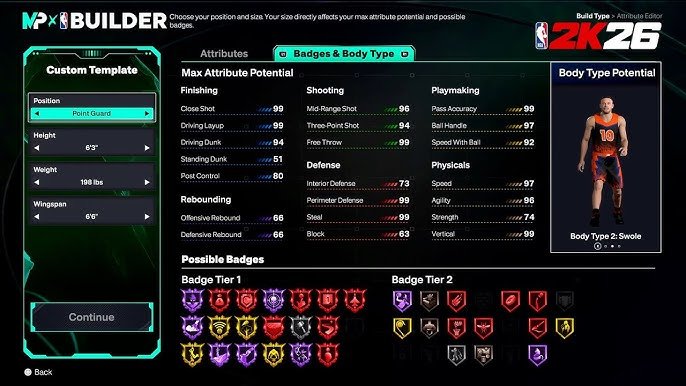
When creating your player, prioritize attributes like three-point shooting, mid-range shooting, and free throw shooting. These attributes directly impact your shooting ability.
Also, consider attributes like ball handling and speed with ball. These attributes help you create space for shots.
Choosing the Right Archetype
Different archetypes excel in different areas. Choose an archetype that complements your desired playstyle and shooting strengths.
For example, a Sharpshooter archetype is ideal for three-point shooting. A Playmaker archetype can create opportunities for open shots.
Badge Selection Based on Build
Your badge selection should align with your player build and playstyle. Choose badges that enhance your strengths and compensate for your weaknesses.
For example, a player with high three-point shooting should prioritize badges like Hot Zone Hunter and Green Machine. A player with lower shooting attributes should focus on badges like Catch & Shoot and Deadeye.
The Importance of Practice in MyCOURT
MyCOURT provides a personalized space to hone your skills. Utilize it effectively to improve your Pro Stick rhythm shooting.
Customize your practice drills to focus on specific areas of improvement. Practice shooting from different locations on the court.
Experiment with different shot types and techniques. MyCOURT is the perfect place to develop your skills without pressure.
Analyzing Pro Player Gameplay
Watching professional NBA 2K players can provide valuable insights into Pro Stick rhythm shooting. Analyze their techniques and strategies.
Pay attention to their timing, shot selection, and movement patterns. Try to emulate their techniques in your own gameplay.
Many professional players stream their gameplay online. This provides a great opportunity to learn from the best.
NBA 2K26 Shot Meter & How to Green More Shots
Final Thoughts
how to use pro stick rhythm shooting in NBA 2K26 for more greens involves practice. Focus on timing your release perfectly at the peak of your jump shot animation. This must become second nature.
Pay attention to your player’s shooting tendencies and animations. Different players have different release timings. It requires adapting your rhythm.
Ultimately, improving your green percentage with the Pro Stick comes down to consistent practice. Dedicate time to learning player animations, mastering timing, and understanding how to use pro stick rhythm shooting in NBA 2K26 for more greens.