
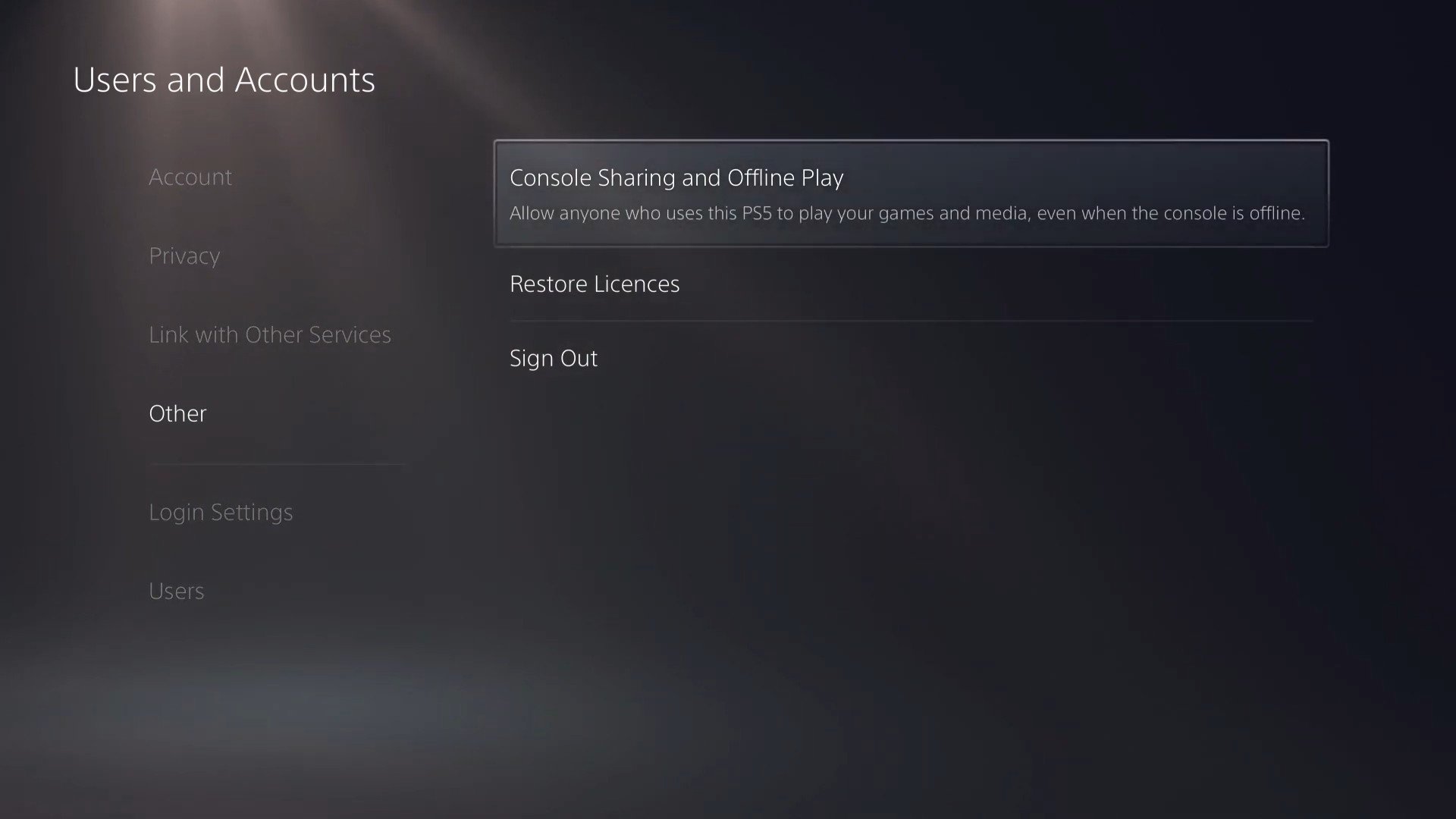
Yes, game sharing is allowed on PS5 through the console sharing and offline play feature, which lets you share your games with one other console.
Ever wondered if you could share your PlayStation 5 digital game collection with a friend or family member? Many players ask “is game sharing allowed on PS5?”, and it’s a valid question. The good news is that Sony has a system for this.
You can activate the “Console Sharing and Offline Play” feature on your account. This lets you share your digital library with one other designated console.

Is Game Sharing Allowed on PS5?
Okay, let’s dive deep into a question that’s on many PlayStation 5 gamers’ minds: “Can I share my games with my friends and family?” The simple answer is yes, but it’s not as straightforward as handing over a disc or popping in a cartridge. PlayStation has a feature called “Console Sharing and Offline Play” which lets you share your digital games, but it comes with some rules and limitations. Let’s explore all the details to make sure you understand exactly how it works.
How Console Sharing and Offline Play Works
The key to sharing on the PS5 is understanding how primary and secondary consoles operate within the PlayStation Network (PSN). When you sign into your PS5, you’re designating it as your “primary” console. This is important because your primary console can be used by anyone, even if they aren’t logged in to your account, to play your games. This is how sharing between family members or friends living under the same roof becomes possible.
Setting Up Your Primary PS5 Console
To activate your PS5 as your primary console, you will need to go to the Settings Menu. Here’s a step-by-step guide:
- Power on your PlayStation 5 console and log into your PlayStation Network (PSN) account.
- From the main menu, navigate to the settings, which is represented by the gear icon.
- Scroll down to “Users and Accounts” and then select it.
- Select “Other” from the options listed.
- Then select “Console Sharing and Offline Play”.
- Now choose the “Enable” option. If the function is already enabled, the button will say “Disable” and you’re all set!
If you have a second PS5 and would like to access your game library on that system you will need to make sure your main PS5 is enabled for console sharing and offline play. You can have one primary console at a time. If you try to activate a new system as your primary console, your current console will lose its primary status. That means only you, when logged in to your account can play your games on the previous primary system.
How Secondary Consoles Access Games
A secondary console is any console where your PSN account isn’t designated as the primary. On these consoles, you can still play your digital games, but you need to be logged into your PSN account. Here’s the catch: If your main internet connection goes down, you won’t be able to start most of your games on a secondary console, which is why the primary console feature is so valuable.
Who Can Play Your Shared Games?
The ability to share games depends on your console’s primary status, and which user is playing. Let’s look at several common situations.
Sharing with Family Members on a Primary Console
If your PS5 is set as your primary console, anyone who has a user profile on that console can access and play your digital games, and all users on the system can access your PlayStation Plus benefits such as online multiplayer. This means you and your family can all play your games even when you’re not signed in. It’s important to understand that the user has access to all games within your PSN library.
Sharing With Friends or Family on a Secondary Console
If your friend or family member has a PS5 that is not set as your primary console, they can still play your games. They would have to log into your PSN account on their system. But, remember, you can’t play on your secondary console while someone else is playing your games on a different console using your account. Also, your friend’s account will not gain access to all of your digital games, instead you would have to start the game on your profile on their machine, and they would need to play under your PSN profile, instead of their own.
This method is commonly used to share with friends on another console. However, it means you will need to share your username and password, which raises security and privacy concerns. This method also becomes a hassle because you cannot play on your system while they are playing on your profile on their system.
Playing on Your Account on Any Console
Of course, you can always log into your PSN account on any PS5 console and download and play your games. This is true, regardless of if that system is set as your primary console or not. However, the restriction comes with only one account being able to access games simultaneously.
Limitations and Considerations When Sharing Games
While console sharing is great, there are limitations that you need to know before sharing your games.
Simultaneous Play Restrictions
The most important limitation is that you can’t play the same game simultaneously on two different consoles. If you try to play a game on your secondary console while someone else is playing the same game on your primary console, you’ll be kicked out. This restriction also applies to friends who might be logged into your account on a console that is not your primary console, only one player can play a given game on an account at any given time.
It is also not possible for two players to log into the same PSN account on different systems simultaneously, this will result in a disconnect for one of the players.
Internet Connection Requirements
You must have an active internet connection to download and authenticate your digital games. While your primary console does not need an internet connection after a game has been authenticated, your secondary consoles will need to be connected to the internet to play any of your games. If you’re trying to play a game on a secondary console without an internet connection, it will not work.
Security and Privacy Concerns
Sharing your PSN login information with others is risky. If you share your username and password, that individual could potentially make purchases on your account, or access other personal information. Always make sure you trust the people you share your login information with, and remember to change your password after you are done sharing games with that user.
Consider creating a secondary account for the purposes of game sharing, this account will still gain access to the games on your main library, but will be isolated from your main profile, and would not have access to your saved game data, unless those profiles are uploaded to the cloud via PS Plus.
Is Game Sharing the Same as Physical Disc Sharing?
Console sharing on PS5 is only applicable to digital games bought on the PlayStation Network. It’s not the same as sharing physical game discs. With discs, you can easily hand them to anyone and they can play on any console. This isn’t the same with digital titles where access is tied to your account and console activation. While you can share game discs, they will not work without the disc being inserted into the disc drive.
You also cannot share a game that you have downloaded and a friend has bought, each of you must buy the game separately. To play the disc version of a title, your friend must have a physical disc of their own.
Can You Share PlayStation Plus Benefits?
The great news is that the benefits of a PlayStation Plus membership can also be shared. Here’s how:
Sharing PlayStation Plus on a Primary Console
When you set your console as your primary PS5, all users on that console benefit from your PlayStation Plus membership. This means they can access online multiplayer, get the monthly free games, and use cloud storage, even if they don’t have their own PlayStation Plus subscription. This is extremely convenient for families sharing a console, as only the primary account holder has to pay for the service.
PlayStation Plus Benefits on Secondary Consoles
If you are using a secondary console, you must sign into your account on the system to benefit from the PlayStation Plus membership, also this method will prevent another user on another console from using your account on another system at the same time.
If you’re sharing your profile so a friend can play your games, they will benefit from your PS Plus service, but remember that they will need to play under your account and will be unable to use their own PSN account.
Best Practices for Sharing Games on PS5
To make the most of game sharing and avoid any issues, here are some best practices:
- Trust Your Sharing Partners: Only share your account information with people you trust. Avoid sharing your login details with strangers.
- Change Your Password Regularly: If you’re sharing your account often, it’s a good idea to change your password regularly to keep your account secure.
- Manage Your Primary Console Settings: Be aware of which console is set as your primary console. Remember to change your primary console if you want to share with someone else.
- Be Aware of Simultaneous Play Limits: Always keep in mind that only one person can play a digital game purchased by a single account at a time.
- Communicate with Sharing Partners: Talk with the friends or family members you are sharing with to make sure you are clear on how to use shared games without problems.
Game sharing on the PlayStation 5 is a useful and convenient feature, but it’s essential to understand the rules and limitations so you can make the most of it. This will allow you to share games with your family and friends while maintaining your account’s security and preventing any misunderstandings.
How to GameShare on PS5 – OverSimplified (2024)
Final Thoughts
Game sharing on PS5 is possible through the console sharing and offline play feature. You can share your games with one other console. This requires activating console sharing and offline play on your primary console.
You must remember that the ‘is game sharing allowed on ps5’ question has a simple answer. Yes, it is, but with limitations. It is vital to manage your accounts appropriately for sharing. Game sharing offers a cost-effective way to enjoy titles.

