
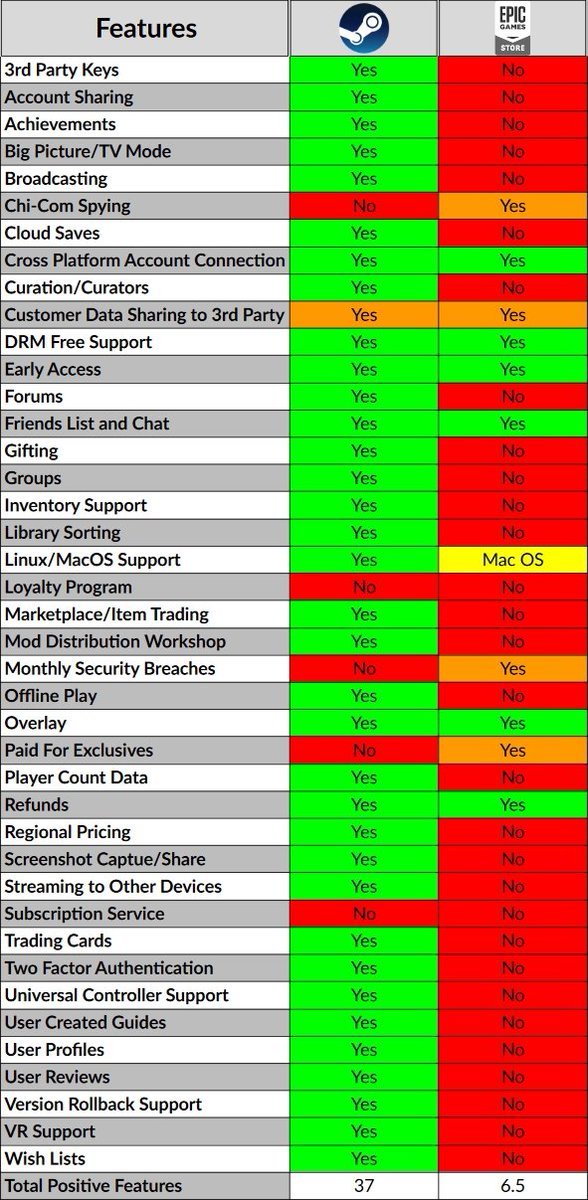
No, modding with Epic Games is not the same as Steam. The process differs significantly due to platform architecture and support.
Ever wondered if modifying games on different platforms is a carbon copy experience? Specifically, is modding with Epic Games the same as Steam? It’s a common question for gamers who enjoy customizing their play. The truth is, while both offer games, the approach to modding varies quite a bit.
This difference comes from the way each platform is built and how they integrate mod support. It’s not a simple matter of just moving files around. Therefore, understanding these nuances is key to successful modding.

Is Modding with Epic Games the Same as Steam?
So, you love video games, and you especially love making them your own with mods! That’s awesome! If you’re used to modding games on Steam, you might be wondering if things work the same way on the Epic Games Store. The short answer is, well, it’s complicated. While both platforms let you play games, their approach to mods is quite different. Let’s dive into the details to see what these differences are.
Understanding the Basics: How Mods Work
Before we get into the nitty-gritty, let’s talk a bit about what mods actually are. Mods are like little add-ons or changes made to video games. Players can use them to add new characters, items, levels, or even change how the game looks and feels. They’re created by other players who enjoy tweaking their favorite games. Think of them like custom LEGO creations, but for video games! Sometimes mods are officially supported by the game makers, and other times, players have to get a bit creative.
Steam’s Approach to Modding: A Workshop Wonderland
Steam has a special place called the Steam Workshop. It’s like a giant library for mods. Here’s what makes it special:
- Easy to Find: The Steam Workshop is built right into the Steam app. When you are on a game’s page that has workshop support, you can simply click the workshop and explore all the different mods available.
- Easy to Install: When you find a mod you like, you usually just click a “Subscribe” button. Steam automatically downloads the mod and puts it where it needs to go. It’s like magic!
- Official and Unofficial Mods: The Workshop supports both official mods that are endorsed by the game’s developers and unofficial ones created by players.
- Rating and Feedback: Players can rate mods and leave comments. This helps you find the best and most helpful mods, and gives creators helpful information on how they can improve their creations.
- Automatic Updates: When a mod is updated, Steam can usually automatically download the newest version, keeping everything up-to-date.
Steam Workshop: A Closer Look
The Steam Workshop simplifies the modding experience greatly. You don’t have to go hunting all over the internet for mods or worry about installing them in the right place. Everything is managed for you within the Steam application. This ease of use makes modding much more accessible for the average player.
Epic Games Store and Modding: A Different Story
Now, let’s talk about the Epic Games Store. Unlike Steam, the Epic Games Store doesn’t have a built-in Workshop. This means modding on the Epic Games Store is often handled differently. Here are some key points:
- No Central Hub: There isn’t a central place within the Epic Games Store to find and install mods.
- Manual Installation: You usually have to find mods on other websites, such as Nexus Mods or the modding community for specific game and download them manually.
- More Work Involved: After downloading a mod, you often need to copy or move files to the game’s folder, which can be a bit tricky.
- No Automatic Updates: Mods you download outside the Epic Games Store might not update automatically. You will need to check for new versions and download them yourself.
- Developer Support Varies: Some games on the Epic Games Store do have developer-provided tools and instructions for modding, but there isn’t a standard.
The Impact of No Central Modding System
The lack of a central system for mods on the Epic Games Store can make modding more challenging for some players. It means you need to be more comfortable with finding your game files and dealing with downloads from different places. While it’s not as simple as Steam’s one-click method, many gamers still find great mods for Epic Games Store titles. It simply requires a bit more effort.
The Technical Differences: What’s Happening Behind the Scenes
Let’s take a peek at what is happening on a technical level that makes modding on these two platforms different. On Steam, the workshop utilizes Steam’s internal systems for distributing and managing mod files. This includes using the Steam Cloud or game specific directory structure to install mods correctly in a way the game can then recognize and use.
File Structure and Compatibility
When a mod is installed via the Steam Workshop, the system places the mod files into the correct location. Steam then communicates with the game so it uses those files. This makes the process seamless for the user. On the other hand, with Epic Games Store, since there isn’t a standardized system, players often need to find the game files and place the mod files into the appropriate directories. This could vary between games. Some games might require you to make sure a folder exists, and put the files there, other games could have specific folder naming conventions and these could change between different mods for even the same game. This means it can be more error prone and more complex for people who are not as technically adept.
Version Control and Updates
Steam’s workshop offers automatic updates, which means when a mod creator makes changes or fixes to the mod, the user often does not need to do anything to get these updates. The Steam platform will automatically update the mod for them. For mods on the Epic Games store, these updates are often handled manually. Meaning the user will have to go to the place where they downloaded the original mod, check if there is an update available, download the update and then replace their old mod files with the new ones. These systems do make Steam’s workshop more user friendly in regards to how it handles updates.
Game-Specific Mod Support: How it Varies
It’s important to recognize that the level of mod support depends greatly on individual games, not just the store they are sold on. Some games on the Epic Games Store are specifically designed to allow for modding, with developer-made tools and clear instructions. Similarly, some games on Steam have no workshop support. Here’s a look at some examples.
Games With Good Mod Support on Epic Games Store
Some games on the Epic Games Store have good mod support, often with specific instructions and tools provided by developers. Games such as the “Borderlands” series, “Satisfactory”, “Snowrunner” and “Mechwarrior 5” have a variety of mods available from a variety of different sources. These games often have great communities dedicated to creating and sharing mods for these games that are available online.
Games With Good Mod Support on Steam
Steam games that have very good mod support are very popular and often come to mind when thinking of games with great modding communities. Some of the games with the strongest support on Steam include, “Skyrim”, “Fallout 4”, “Civilization V and VI” and “Cities: Skylines”. These games often have the best modding communities that are very large, and very skilled in creating fantastic mods that enhance the game play experience for many players.
Games Without Mod Support
It is important to recognize that there are many games on both Steam and the Epic Games Store that do not officially support modding. This is usually due to a decision made by the game developers or technical limitations of the game. In these cases, modding can be extremely difficult or impossible. Some games also have a very limited capacity to be modded, which means that even though the game can technically be modded, there will not be many mods available due to the game structure or development choices.
The Community Aspect of Modding
Modding isn’t just about changing the game itself; it’s also about community. The communities that spring up around modding are very important for the development and use of mods. Here are some points about this:
- Online Forums: Online forums are where modders and users discuss their experiences, share new mods, and provide help.
- Dedicated Websites: Websites like Nexus Mods host many mods for various games, and are a great resource for finding and downloading them.
- YouTube Tutorials: Many content creators make videos showing players how to install and use specific mods.
- Discord Servers: Game specific Discord servers often have channels dedicated to modding and can be a great source of real time information and help.
Finding Help and Resources
Regardless of whether you are on Steam or the Epic Games Store, finding a game’s community hub is one of the best ways to begin your modding journey. You will often find information on how to install mods, what the most popular mods are and also find support when trying to install and use the mods themselves.
Modding Tools and Software
Aside from the method of getting mods themselves, modding usually requires some tools and software. Many games have “modding kits” that are given by the developers. These modding kits often include tools that help mod creators in generating new assets, coding changes or testing their mods.
Game-Specific Tools
The developer-provided modding kits are often the most powerful tools for modding a game. They are often the only method of modifying games in a complex way. These mod kits will often include editors that allow for asset modification, and scripting tools that can be used to change and adjust game mechanics.
General Modding Tools
There are many third party modding tools that can be used with a variety of games. Many text editors are often used for editing coding and scripting data for games. Image editing software can be used for creating new art assets for games. The use of general tools is also important for more complex modding situations.
The Future of Modding on Epic Games Store
While the Epic Games Store doesn’t currently have a built-in mod workshop like Steam, it’s important to remember the platform is always growing and changing. The developers might add new tools and features in the future. As the Epic Games Store continues to grow in popularity, player demand for integrated mod support may well lead to some changes in this area. Whether a system like Steam’s workshop is created, or if a unique system is developed will be seen in time. But for the moment, modding on the Epic Games Store will continue to rely on a manual process.
In short, while Steam and the Epic Games Store both offer fantastic games, their approach to modding is quite different. Steam’s Workshop makes modding a breeze with its built-in features, while the Epic Games Store requires a more hands-on approach. However, with the right information and some patience, you can still enjoy a huge number of amazing mods for games on both platforms. Ultimately, whether you prefer Steam’s Workshop or are happy to manually install mods for Epic Games Store games comes down to personal preference.
How to Launch Epic Games from Steam (Updated Version)
Final Thoughts
Modding differs significantly between Epic Games and Steam. Steam Workshop provides a centralized platform for easy mod access and management. Epic Games Store often lacks this integrated system, requiring manual mod installation. The process for installing mods can be more complicated.
Therefore, modding experiences on these two platforms are not identical. Is moding with epic games the same as steam? The clear answer is no, it often involves manual file handling, which contrasts with Steam’s user-friendly experience.

