
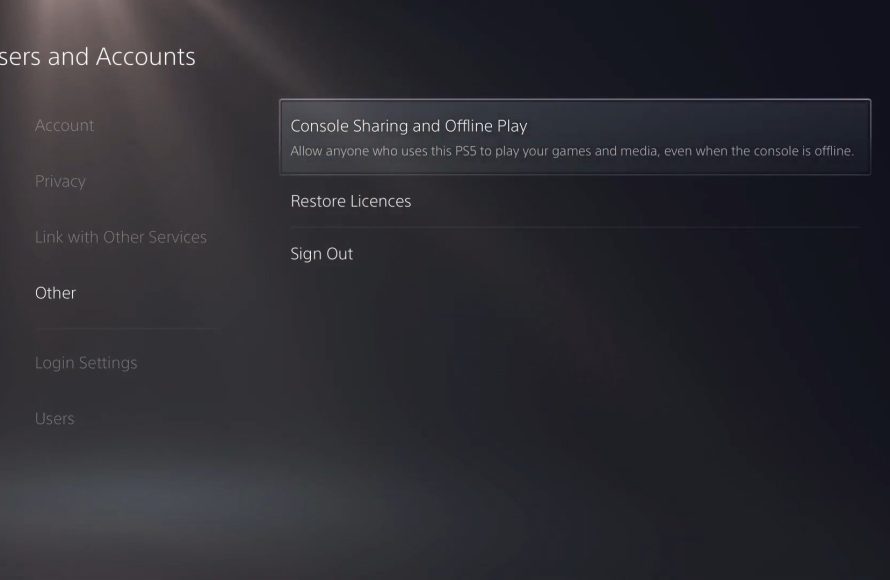
Yes, game sharing on PS5 is possible through the Console Sharing and Offline Play feature.
Wondering if you can share your PlayStation 5 games with a friend or family member? The question, “is there game sharing on PS5” comes up often. This feature lets you share your digital library with another account on a different console, under certain conditions.
It’s a nice way to let others try games you own without buying it again. This feature is simple to set up.

Is There Game Sharing on PS5? Exploring PlayStation’s Game Sharing Feature
So, you’ve got a PlayStation 5 and a bunch of awesome games. Maybe your best friend wants to try that new adventure game, or your little brother is begging to play the racing game you just downloaded. The big question pops up: can you share your games on the PS5? The simple answer is yes, but it’s not exactly like handing over a disc. It’s a bit more techy than that. Let’s dive into the details of how game sharing works on the PS5, and all the important stuff you need to know.
How PS5 Game Sharing Works: The Basics
PlayStation doesn’t call it “game sharing”. The official term is “Console Sharing and Offline Play”. This system allows you to share your digital games and PlayStation Plus benefits with another person on a different PS5 console. It works through a system of primary and secondary accounts on different consoles.
Primary Console: The Home Base
Think of your primary console as your main PS5. Your account is primarily linked to this console. When you have set a console as your primary, then any other account which is using that particular console is able to play your games and access your PlayStation plus benefits, even if you’re not signed in. It’s like giving your friends a key to your game library at home.
- Any account on your primary PS5 can play your digital games.
- Other accounts on your primary console can access your PlayStation Plus benefits (like online multiplayer and free monthly games).
- You can only designate one PS5 as your primary console at a time.
Secondary Console: Sharing the Fun Elsewhere
A secondary console is any other PS5 you use that is not your primary one. When you sign in to a secondary console, you can still access all of your games and benefits, but you need to be logged in to your account. Your games won’t be playable for others on the secondary console, they can only be accessed by your own user profile. It’s like taking your games with you when you visit a friend’s house, but you’re still in control.
- You can play your digital games while logged into your account on a secondary PS5.
- Only you can access your PlayStation Plus benefits on a secondary console.
- You can use multiple secondary consoles.
Setting Up Console Sharing: A Step-by-Step Guide
Setting up game sharing on your PS5 is not very hard. Follow these steps to correctly enable it:
On your Primary PS5 (The One You’re Sharing From):
- Go to Settings: From the PS5 home screen, find the “Settings” icon (it looks like a gear) and select it.
- Navigate to Users and Accounts: Scroll down and choose “Users and Accounts.”
- Select Other: Go to the “Other” option.
- Choose Console Sharing and Offline Play: This is where you manage game sharing settings.
- Enable Console Sharing and Offline Play: If it’s disabled, select “Enable.” If you have another console set as your primary, you need to disable it on that console before you can enable it on the new one.
On the Secondary PS5 (The One You’re Sharing To):
- Log in with your Account: On the secondary console, sign in using the PlayStation Network account you want to share games from.
- That’s It! You don’t need to set anything else on the secondary console. You can now access your games and play them from this console while being logged in.
Important Details to Remember About PS5 Game Sharing
While the process is simple, there are certain things you should know about game sharing on the PS5.
Account Limits
- You can only have one primary console assigned to your account at a time.
- If you’re switching your primary console, you will need to deactivate it on the other console, before activating it on a new one. This is important and sometimes people skip this and then things won’t work as expected.
Online and Offline Access
Here’s where it can get a little confusing:
- Primary Console: Games can be played offline on the primary console by any account.
- Secondary Console: You can play your games online while being logged in. You’ll need to be connected to the internet to confirm your game licenses.
- Offline on Secondary Console: You can play your games offline for a short period on a secondary console as well, but the console does need to be online periodically to check and reconfirm the game licenses.
PlayStation Plus Benefits
PlayStation Plus is not shared in the same manner as games. Here’s how it works:
- Primary Console: Any account on your primary console benefits from your PS Plus subscription (online multiplayer access, monthly games, etc.)
- Secondary Console: Only you, the account with the PS Plus subscription, benefits on any secondary console.
Sharing Digital Games Only
This system applies only to digital games you purchase from the PlayStation Store. You cannot “share” physical disc games through this feature.
- Only downloaded games can be shared
- Disc version games can’t be shared
Why Game Sharing is Useful
Game sharing provides a number of benefits to players.
- Saving Money: If you have family or friends who want to play a game, you only have to purchase the digital copy of the game once. You can share it to your primary console for others to enjoy.
- Trying Before Buying: If your friend purchases a game that you are unsure about, you can try it on your primary console before deciding to buy it.
- Convenience: You can have access to your entire digital library on your own console. You won’t need to search or organize multiple discs and boxes.
Limitations and Considerations of PS5 Game Sharing
It’s not all perfect, there are some things you need to consider before sharing games
Potential Conflicts
If you are playing a game on your secondary console, and someone on your primary console also tries to play the same game, you could have issues or your gameplay might get interrupted. Only one account can access a game at a time.
- Only one person can play any game on their accounts at one time.
- If your primary console is being used by another person playing the game that you want to access on your secondary console, you will get an error.
Sharing with Strangers
Sharing your games with family and trusted friends is a great use of this feature, but you should never share your account with strangers. Doing so can potentially risk your personal information and your PlayStation account. It’s a big security risk.
- Sharing your account with strangers can make your account vulnerable.
- Avoid sharing your details with anyone you don’t trust.
Internet Connection
While games on your primary console can be played offline, your games on any secondary console need to periodically connect online to confirm your account and licenses. An unreliable internet connection can be troublesome.
- Game license checks need an internet connection
- An unstable connection may cause issues.
Game-Specific Restrictions
Rarely, some games might have specific restrictions on game sharing. It’s always a good idea to check if any limitations apply.
- Some games may have sharing limitations
- Always check for any game-specific sharing information.
Troubleshooting Common PS5 Game Sharing Issues
Sometimes things don’t go as planned. Here are some fixes for common game sharing problems:
Can’t Play a Shared Game
- Check Primary Console: Make sure that your primary console is correctly enabled.
- Sign In/Out: Try signing out of your account on the secondary console and then signing back in.
- Internet Connection: Ensure you have a stable internet connection to verify the game license.
PlayStation Plus Benefits Not Working
- Verify Subscription: Double-check your PlayStation Plus subscription status.
- Primary Console Only: Make sure that the account that is using your primary console to access the benefits has set that console as it’s primary PS5.
Deactivating Primary Console
- From the Source: If you want to switch primary console you need to deactivate your account from that primary console.
- On Web Browser: You can also deactivate all consoles on the website for PlayStation, but you can only do this once every six months.
Alternatives to PS5 Game Sharing
If the game sharing method isn’t convenient for your situation, here are some alternatives:
Physical Copies
You can buy physical copies of games and lend them to others. But you still have to physically give the disc to that person. This also will not work if someone doesn’t have access to your console at home.
- You need to purchase a physical game for this
- You have to give the disc to the other person physically.
PlayStation Network Accounts
You can let someone sign in with your PlayStation Network account on their console (at your own risk!). Please note that this is not recommended as it could expose your account to security risks.
- You would need to share your sign-in details.
- This method is not very secure.
Game sharing on the PS5 is a fantastic way to allow others to enjoy the games you have purchased. It’s important to remember the primary and secondary system to make the most of the feature. Always prioritize your account’s security and remember to only share your account with people that you trust. By following these guidelines, you can make the most of PS5 game sharing and save some money.
How to GameShare on PS5 – OverSimplified (2024)
Final Thoughts
Game sharing on PS5 exists through the console sharing and offline play feature. You can share digital games with another player on one console while you play on your account on another. This requires activating console sharing and offline play settings.
However, both players cannot play the same shared game simultaneously. ‘Is there game sharing on PS5’ is a common query; the answer is yes, but with limitations. Understand how it works before enabling it.

