
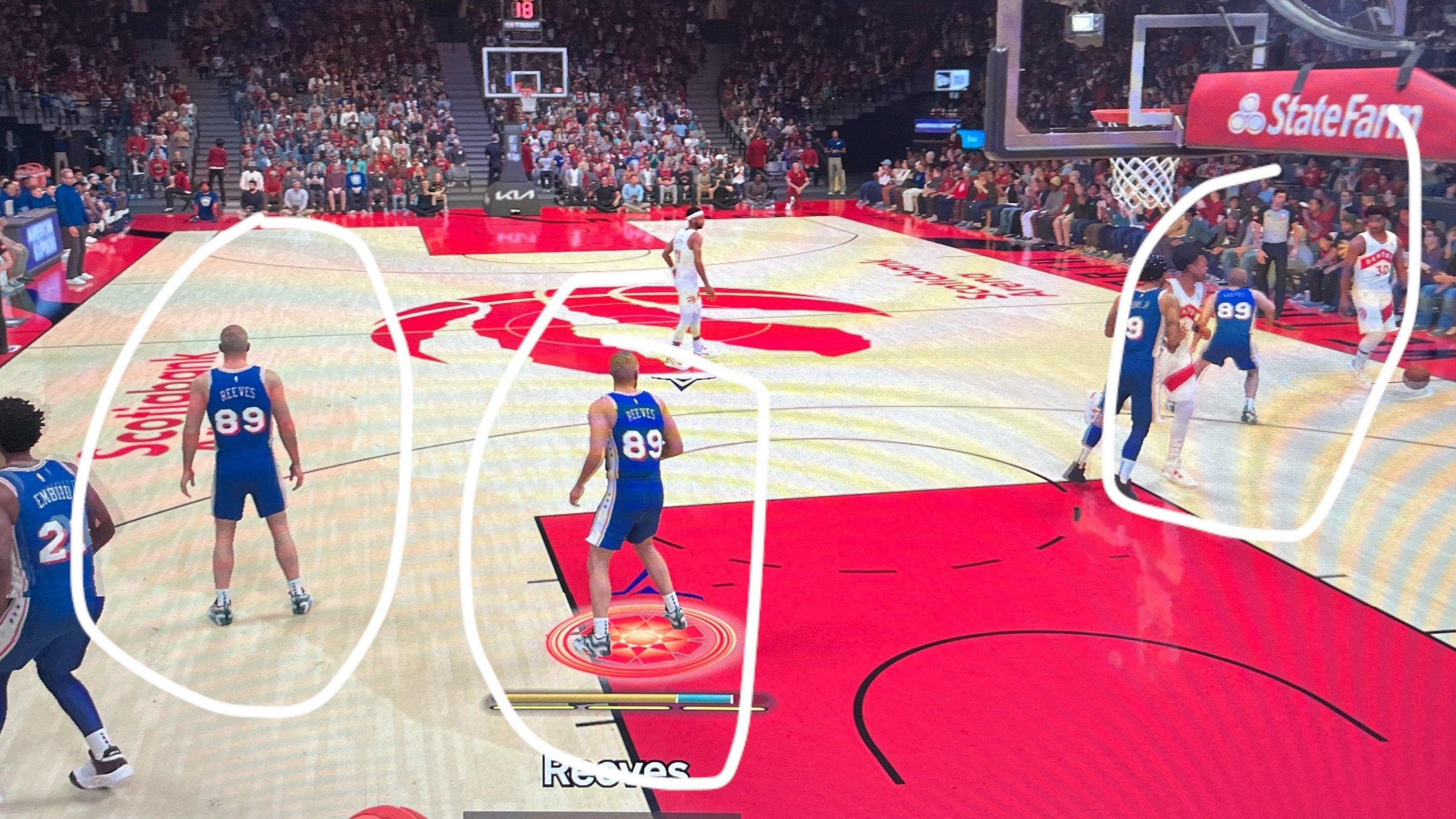
NBA 2K25 bug tracking involves player reports, internal testing, and developer fixes.
Frustration with glitches in a game is common. We’re diving into the often-unseen side of game development with an NBA 2K25 bug tracking overview. This crucial process ensures a smoother gameplay experience for everyone.
We’ll explore how 2K Games identifies, addresses, and resolves these pesky issues. Understanding the bug tracking process gives you an idea of the work involved behind game updates.

NBA 2K25 Bug Tracking Overview
Okay, gamers, let’s talk about something that’s super important for any video game, especially one as big as NBA 2K25: bugs! Yep, those pesky little problems that can make your game act weird or even crash. We all hate them, but they are a part of game development. Tracking these bugs and squashing them is a huge job, and it’s something the developers are always working on. This article will take you through how they find and fix these bugs in NBA 2K25, so you can understand what’s going on behind the scenes.
Why Bug Tracking Matters in NBA 2K25
You might be thinking, “Why do we even need to know about this?” Well, understanding bug tracking helps us understand the game better and why sometimes things go wrong. Think of it like this: you’re building a Lego castle. You have all these amazing pieces, but sometimes, a piece might not fit right, or it might fall off. That’s kind of like a bug in a video game. Bug tracking helps developers find these “loose Lego pieces” and fix them so the whole castle (or game) is solid and fun to play.
The Impact of Bugs on Gameplay
Bugs can make playing NBA 2K25 really frustrating. Imagine you’re about to make the winning shot, but suddenly, your player glitches and the ball goes flying out of bounds. Or maybe the game freezes right before you earn a big reward. These are all caused by bugs, and they can really ruin the experience. Here are a few common ways that bugs can affect your game:
- Gameplay Issues: Players move strangely, shots don’t go in when they should, the ball disappears, and other weird things during actual games.
- User Interface Problems: Menus don’t show up correctly, text is missing, buttons don’t work, making it hard to navigate the game.
- Stability Issues: The game crashes, freezes, or has loading problems, stopping you from even playing.
- Mode-Specific Bugs: Bugs that happen only in specific game modes, like MyCAREER or MyTEAM, messing with those parts of the game.
- Visual Glitches: Weird things happening with the graphics, like characters looking strange or textures that don’t load properly, breaking the immersion.
How NBA 2K25 Developers Find Bugs
So, how do the people who make the game actually find these bugs? They use a variety of methods, and it’s a lot like being a detective.
Internal Testing
First, the developers have a team of testers who play the game all day long (lucky!). These testers try every single feature of the game and try to break it in any way they can. They’re not just playing for fun; they’re looking for problems on purpose. They’re like the game’s first line of defense against bugs.
- Dedicated QA Teams: These people spend their time systematically going through all game features, trying to find anything that doesn’t work as it should.
- Various Play Styles: They test using many different ways of playing the game – going fast, going slow, doing specific moves, making it more likely to trigger a bug.
- Detailed Reporting: When testers find a bug, they write a detailed report, including exactly what they were doing when the bug happened, and how they can do it again. This information helps developers a lot to fix the bug.
Automated Testing
Some bugs are so tiny that people might not notice them right away. That’s where automated testing comes in. This involves using special software that plays the game by itself and looks for specific types of problems. It’s like having a robot helper that’s always on the lookout for trouble.
- Scripts and Bots: Special programs simulate players and game actions, running through tests non-stop and checking for errors.
- Performance Monitoring: These automated tests check how fast and smoothly the game runs on different systems and under pressure, seeing if it struggles with certain situations.
- Data Collection: Automated tests track lots of data, finding performance problems and errors that may not be noticeable during regular human testing.
User Feedback
Once the game is out, the developers also rely on you, the players! When you report a bug, the developers take that seriously. This is often the way to uncover the most rare bugs as these situations are almost impossible to reproduce in testing scenarios. This type of information is priceless.
- In-Game Reporting Tools: NBA 2K25 often has a way for you to report issues right from the game menu, so it’s very easy to share information.
- Community Forums and Social Media: Developers watch what people are saying on places like Reddit, Twitter, and 2K forums, looking for players that have found bugs.
- Support Tickets: If a bug is affecting you a lot, you can send a detailed report using support tickets, which the developers use to fix the bug.
The Bug Tracking Process: From Discovery to Fix
Okay, so a bug is found. What happens next? It’s a process that involves a few steps, and here’s how it usually goes:
Bug Logging
When a bug is found, it gets a special entry in a bug tracking system. This is like a big list where all the bugs are kept. Each bug gets a unique code or number, kind of like a serial number, which makes it easy to track each issue separately. They record all of the most important details like:
- Description: A clear explanation of what the bug is and how it affects the game.
- Steps to Reproduce: How to make the bug happen again, which is very useful for developers to fix it.
- Severity: How bad the bug is, such as a tiny graphic problem or a game crashing bug.
- Platform/Environment: Which system the bug is happening on, like Xbox, PlayStation, or PC.
Bug Prioritization
Not all bugs are created equal. Some bugs are tiny and might not bother too many players, while others can make the game unplayable. The developers need to decide which bugs are most important to fix first. They usually use a ranking system that goes something like this:
- Critical: These are major problems like game crashes or making some modes unplayable, and these bugs get fixed first.
- High: These are still bad, such as game-breaking bugs or progression problems, that need fixing soon.
- Medium: These are problems that should be fixed but don’t make it impossible to play, like a small graphic issues.
- Low: These are the smallest bugs, like little visual problems, and they usually get fixed after all the important bugs are fixed.
Bug Assignment
Once a bug is prioritized, it gets assigned to a specific developer or team of developers. This is like giving the detective a case to solve. The developers need to understand the bug well and then work on fixing it.
- Specialization: Different developers are good at different things, so bugs get assigned based on the developer’s expertise.
- Team Collaboration: If a bug affects many parts of the game, it will likely get assigned to multiple developers and be a team effort.
Bug Fixing
Now comes the hard part – fixing the bug! The developers need to figure out what’s causing the problem. This might involve looking at lines of computer code, testing different solutions, and making sure the fix doesn’t create new bugs. This is a really important part of the process.
- Code Analysis: Developers look at the game’s code, to find out what exactly caused the bug to happen.
- Testing Fixes: Once a fix is made, the developers test it thoroughly in their own environment, to make sure the bug is gone and no new problems are there.
- Code Review: Other developers double-check the bug fix to be sure it is good, and not causing any problems.
Bug Verification
After the bug is fixed, it goes back to the testers, who check if the fix actually works and if there are no new problems. If it’s good, the bug gets marked as “resolved.”
- Regression Testing: This is where testers check old parts of the game after the bug fix is added. They make sure no new bugs are introduced during the fixing process.
- Confirmation: Testers make sure the bug is gone for good, and that the fix is safe to release to players.
Release and Monitoring
Finally, the bug fix gets added to a new update or patch for the game. The developers still keep an eye out to see if the problem shows up again, and they keep watching player feedback. It’s all a continuous cycle of find, fix, test, repeat!
- Game Updates and Patches: The fixed bugs are added to new updates or patches, that players download to get the changes to the game.
- Player Feedback: Developers keep watching player’s comments and reports to see if a bug is fixed properly and if any new bugs have shown up.
Common Types of Bugs in NBA 2K25
It helps to know the kinds of bugs that players often find in NBA 2K games. Here are a few types to keep an eye out for:
Graphical Issues
Sometimes, things in the game don’t look right. This can include:
- Texture Problems: Missing textures, so player uniforms or courts look blurry or are not visible.
- Animation Glitches: Players move in strange ways, or the basketball might do weird things in the air.
- Clipping: Things going through other things, like a player’s arm going into a wall or a crowd.
- Lighting Issues: The game looks too bright or dark, or there are shadows that appear strange.
Gameplay Bugs
These are bugs that mess with how you play the game:
- AI Issues: Computer-controlled players do strange things, like not passing the ball or getting stuck in places.
- Shooting Bugs: Shots that should go in, don’t, and it’s all because of the game.
- Movement Problems: Players get stuck in place, they cannot move, or their controls don’t respond.
- Physics Problems: The ball acts funny, and bounces or spins in a strange way.
User Interface (UI) Bugs
These problems make it hard to navigate the game’s menus or read things correctly.
- Missing Text: Important words or numbers disappear, making it hard to use the menus.
- Button Issues: Buttons don’t work or don’t do the right thing when they are pressed.
- Layout Problems: Menus or screens show up in a bad way, so parts of the text or graphics cannot be seen properly.
Stability Issues
These can be the worst, because they stop you from even playing the game.
- Crashes: The game closes without any warning, sending you back to the main screen of the platform.
- Freezes: The game stops moving, and you might have to start the whole process again.
- Loading Problems: The game gets stuck at a loading screen, and won’t start playing.
How Players Can Help With Bug Tracking
You might feel like bugs are only the developer’s responsibility, but you actually play a vital role in all of this. Here’s how you can help:
Report Bugs Properly
If you find a bug, make sure you report it clearly and with as much detail as possible. Here are a few things that will really help:
- Be Specific: Explain exactly what was happening in the game when the bug showed up. What game mode were you playing? What were your players doing?
- Steps to Reproduce: Explain the steps you took to cause the bug. If you can, explain how to make the bug happen again.
- Include Platform: Explain which system you are using to play the game, like Xbox, PlayStation or PC.
- Add Screenshots or Videos: If you can take a picture or a short video of the bug, it helps the developers a lot.
Use In-Game Reporting Tools
If the game has a bug reporting option, use that first, as it sends important information to the developers when you make a report. This is usually the easiest and most direct way to report a bug.
Be Patient
Fixing bugs takes time. Game developers cannot fix every bug instantly, so be patient while they work to make the game better. Sometimes they need to solve bigger problems first, before fixing smaller ones. Keep reporting bugs, and don’t give up.
By understanding the process of bug tracking in NBA 2K25, we can all better understand the game and also contribute to improving its quality. Remember, the game development team is always working to make the game better, and your patience and help are very important! These bugs can make the game frustrating, but knowing how they are tracked, helps make the game better for everyone. Thanks for taking the time to understand how the team is making this game.
5 SECRET Settings That You NEED To Use In NBA 2K25
Final Thoughts
Effective NBA 2K25 bug tracking involves player feedback and developer monitoring. This identifies issues quickly for patches. They prioritize game-breaking bugs first and then work down the list.
The development teams uses detailed logs to identify problems and track their causes. Regular updates address issues found by the community and internal testing.
This NBA 2K25 bug tracking overview shows commitment to game quality. Player experience remains important for the team. They constantly seek to improve it.

