
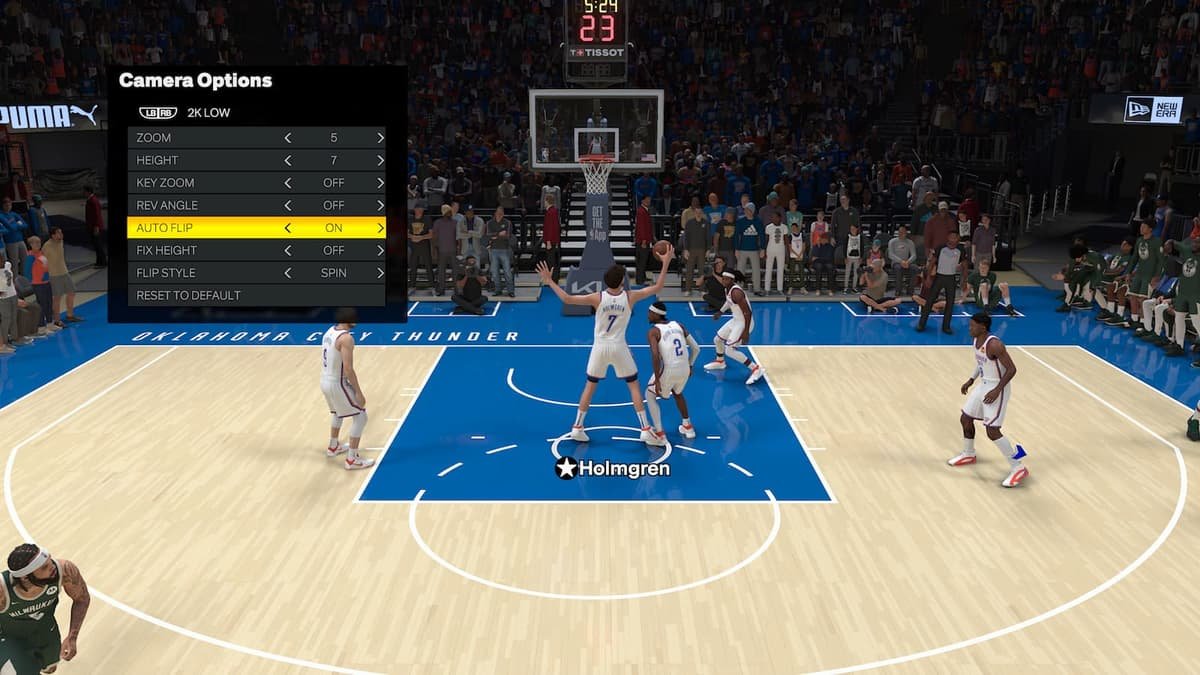
The available NBA 2K25 camera angles include the default 2K view, broadcast, sideline, and various customisable options, letting players adjust perspectives.
Finding the right view in NBA 2K games is vital for your gameplay. How you see the court can greatly impact your performance. This is especially true with the upcoming release where adjustments in NBA 2K25 camera angles will be crucial.
Different camera options offer unique advantages. A broader view helps with court awareness, while a closer view might improve dribbling control. Experiment with various options to find what works for your style of play.

NBA 2K25 Camera Angles: Finding Your Perfect View
Hey there, basketball fans! Getting the right view in NBA 2K25 is super important. It’s like having the perfect seat at a real game – it can make all the difference! The camera angle you pick can really change how you play, whether you like to see the whole court or get up close and personal with your favorite players. Let’s dive into all the different camera choices in NBA 2K25 and figure out which one will make you the king (or queen!) of the court.
Default Camera: The Familiar Friend
The default camera is what most players see when they first start playing NBA 2K25. It’s the classic view, kind of like watching a game on TV. It follows the action pretty smoothly, letting you see a good chunk of the court. This angle is great for beginners because it gives you a nice overview of the game. You can see where all your players are and how they’re moving. It’s not too zoomed in, and it’s not too far out, making it a good starting point for everyone.
It is important to understand, while the default camera angle is great for starting, you may want to change your view once you get more comfortable with the game. There are many options to try out, and they each offer unique advantages.
The 2K Camera: A Closer Look
If you want to feel like you’re right there on the court, the 2K camera angle is for you. This view puts you closer to the player you are controlling. It feels like you’re following right behind them. This perspective gives you a better feel for ball handling and moving in tight spaces. Players who like to dribble a lot and do fancy moves often prefer the 2K camera. It makes it easier to see the ball and helps with your timing when doing crossovers and other dribble moves.
The 2K camera is great for focusing on individual plays and players, but it does come with the drawback of not seeing the whole court at once. You’ll need to be more aware of your surroundings since it is a more zoomed in viewpoint.
Broadcast Camera: Feel the TV Experience
The Broadcast camera aims to replicate the look of a real televised NBA game. This view is farther back than the 2K camera and is angled so that you can see more of the playing field. This angle is suitable for players that like to set up plays, as it provides a wide view of all the players and their positions on the court. It’s easier to see passing lanes, and it helps to plan your next move more effectively. If you want a perspective that’s similar to what you would see when watching a basketball game on TV, the Broadcast camera is your choice.
The broadcast view is not optimal for those who like to dribble and do tricks because it is more distanced. However, if you enjoy moving the ball around, making strategic passes, and setting up team plays, then this angle is perfect.
The Drive Camera: Fast-Paced Action
For players who want to feel every bit of the speed and the rush of the action, the Drive camera is a solid pick. This angle is very close to the player, and it also moves with them so it allows you to really experience the action as you drive to the basket. With the Drive camera, you can feel all the momentum of the action and it can make your game feel more exciting. If you love fast breaks, then the drive camera might become your go to option.
Keep in mind, the Drive camera can be pretty intense and may make it harder to keep track of your teammates. It’s really great for feeling the speed, but it takes some getting used to.
The Sideline Camera: A Unique Perspective
The Sideline camera offers a unique view of the game, making it seem as though you’re sitting right on the sidelines. This angle can be great for a change of pace and can offer some really cool perspectives. The sideline camera is more of an overhead shot and it provides a different look at plays, helping you understand spacing and positioning of players in different spots. If you are looking for a unique view to change it up from the norm, the sideline camera could be fun to use.
While it provides an interesting view, this camera angle can be challenging to play with. It can be hard to keep track of the ball sometimes, especially during very quick transitions. It is great for experimenting, but not the best for serious competitive gameplay. It can be interesting to see a replay of a game from the sideline perspective however.
Custom Camera Angles: Making it Your Own
One of the best features of NBA 2K25 is the ability to customize your camera angle. You can adjust height, zoom, and even the angle. This feature is amazing because it lets you create a view that works just for you. Once you’ve played around with some of the pre-set cameras, start to adjust different settings to find your sweet spot. Maybe you like the height of the broadcast camera but you like the zoom of the 2K camera, you can get that perfect custom angle.
How to Adjust Custom Camera Settings
Changing your camera in NBA 2K25 is easy. Here’s a simple guide:
- Pause the game.
- Go to Options and then choose “Camera.”
- Now you can select a pre-set camera or select “Custom Camera.”
- Once you are on the “Custom Camera” screen, you can change height, zoom, angle, and many other options until you find the perfect view.
- Be sure to save your custom settings when you are satisfied with your view.
Key Settings to Play Around With
- Height: This setting controls how high the camera is off the court. A higher camera gives you a better overall view, while a lower one puts you closer to the action.
- Zoom: The zoom setting controls how close or far the camera is from the action. A zoomed-in view is better for dribbling, while a zoomed-out view is good for seeing the whole court.
- Angle: Changing the angle can shift the perspective of the camera. It can help give you a better angle for passes and shooting or make the game more exciting.
- Flip: Some players like to have the camera on the opposite side of the court. Flip lets you change the camera orientation.
Finding What Works for You
The best camera angle for you is all about personal preference and how you like to play. It’s a good idea to try different views to see which one feels most comfortable for you. Consider what type of plays you make and how you like to control the ball. Some players prefer a wide view, while others want to feel like they are in the game, closer to the player.
There’s no right or wrong answer, so don’t be afraid to test all of the settings. Take some time in practice mode to see what fits your style the best. It might take some time, but once you find the right camera angle for you, it will make a big difference in your game.
Tips for Choosing Your Ideal Camera Angle
- Consider Your Playstyle: If you enjoy running fast breaks, try the Drive camera or a zoomed-in view. If you like to set up plays with a lot of passing, then the Broadcast camera or a wide, zoomed-out custom view is a good option.
- Experiment with Different Angles: Don’t be afraid to try new things. Test each of the pre-set camera angles to get a feel for the different options.
- Use Practice Mode: The best place to adjust your camera is in practice mode. Here, you can test your settings without the pressure of a real game.
- Adjust As Needed: Your preference may change. Continue to test different angles and make adjustments as your skills improve.
- Talk To Other Players: Check out what camera angles other players like. They might have some good advice for you.
Camera Angles and Game Modes
Keep in mind that different game modes might make you want to adjust your camera settings. For example, in MyCAREER you may want a different camera angle than you would for online play or playing with friends. MyCAREER is all about the single-player experience, where you are focused on controlling one player, so you may like a more zoomed-in perspective such as the 2K or Drive view. In online games, however, you may prefer a view like the broadcast view, so that you can see the whole court and be aware of all players.
Always test different angles for different game types. Take note of the setting you prefer in each mode for optimal results. You can also use multiple different custom camera settings, so you can switch easily as needed when you change game modes.
Advanced Tips: Fine-Tuning Your View
After you are comfortable with your basic camera settings, you might want to go deeper. You can make minor changes to really fine-tune your view for optimal results. Many players adjust how fast the camera switches or rotates to better track the ball or their player on the court. Little tweaks can make a big difference in how smooth the game feels.
Camera Shake and Speed
These are additional setting that can be helpful to adjust when you get more comfortable with the game. Camera shake refers to the slight movement of the camera during fast plays or hard impacts. Some players love camera shake for the extra realism and excitement, while others find that the movement is too distracting. It is all about personal preference, so test it out for yourself. Similarly, the speed with which the camera moves can also impact your experience. Find a speed that lets you track the action well without making you feel motion sick.
Staying Updated with NBA 2K25
NBA 2K25 might get updates that change the camera settings or add new ones. Always keep up with what the game developers are doing by checking in on official updates. Keeping up with new features will help you get the most out of the game.
In the end, the perfect camera angle is the one that makes you the best player. Experiment, adjust, and find what you like! With the right perspective, you can really bring your A-game to the court in NBA 2K25. So go out there and explore all your options! Now it’s time to get back to the game and practice those dribbles and perfect those shots.
Best UNDERUSED Camera Angles You Must Try In NBA 2K25!
Final Thoughts
Ultimately, choosing the right perspective significantly impacts gameplay. Players should experiment to find what suits their style best. The various choices in NBA 2K25 camera angles offer a personalized experience.
Some prefer the broadcast view for its realism, while others favor the 2K camera for its strategic advantage. It all comes down to individual preference, impacting your success on the court. Therefore, understanding and adapting to diverse NBA 2K25 camera angles will give you an edge.

