
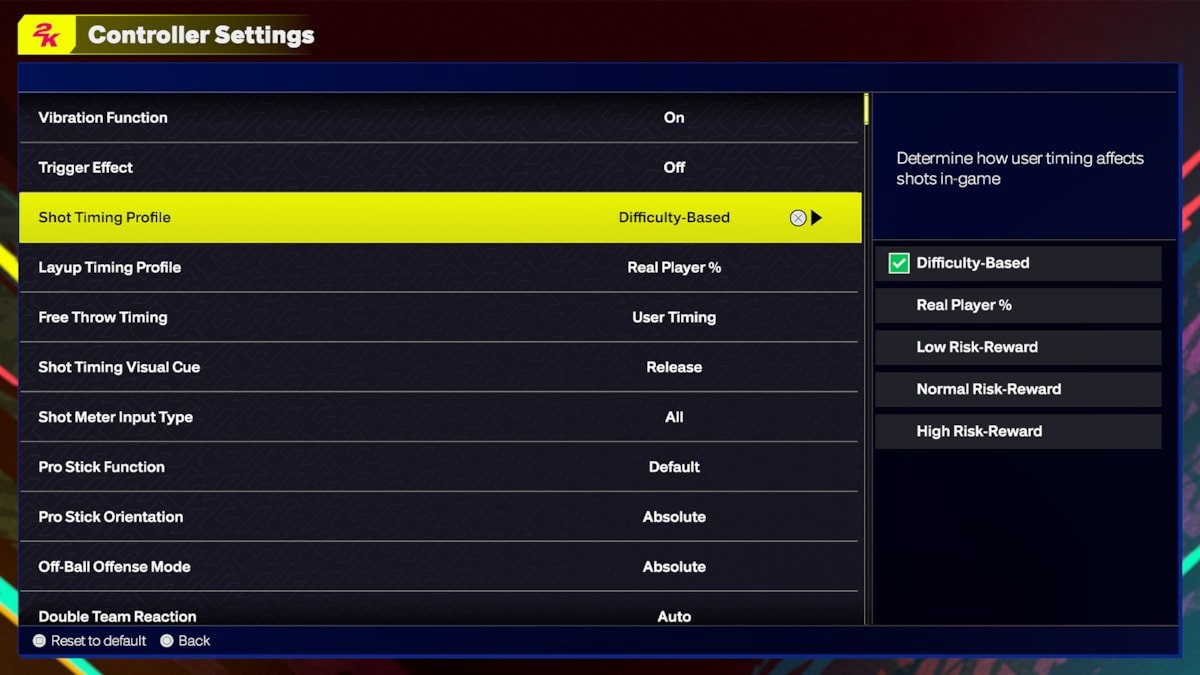
NBA 2K25 control adjustments primarily involve tweaking settings for shooting, dribbling, and defensive movements to better match your playstyle.
Tired of losing games because your jump shots feel off or your dribbling isn’t sharp enough? NBA 2K25 control adjustments can be the key to improving your game. Many players struggle to find the perfect controller setup, but fortunately, 2K provides a range of customizable options to tailor your experience. Finding these settings and dialing them in to your style can significantly impact your on-court performance and enjoyment of the game.

NBA 2K25 Control Adjustments: Getting the Feel Right
So, you’re excited about NBA 2K25, right? We all are! But one thing that can make or break your game is how well you handle the controls. It doesn’t matter if you are a seasoned pro or a brand new player, getting your hands comfortable with the controller is super important. NBA 2K25, like past games, will have many options for how you move your players, shoot, dribble, and defend. This article breaks down all the ways you can tweak those controls and get them feeling just right for you.
Understanding the Basics
Before diving into the complex stuff, let’s make sure we are all on the same page. NBA 2K games use a pretty standard control scheme, but there are nuances. We’re talking about the sticks, the buttons, and how they all work together. You’ll be using your left stick to move your player around the court. This is the main way you will be directing your character on screen. The right stick is for fancier moves, like dribbling and shooting, or defending with specific hand placements. The face buttons (like X, Square, Circle, Triangle on PlayStation or A, X, B, Y on Xbox) will trigger actions like passing, shooting, and calling for timeouts. Then you’ve got the shoulder buttons and triggers which often control modifiers like turbo, or calling plays.
Default Controls: A Good Starting Point
NBA 2K25 will come with a default control scheme already in place. This is a good place for many players to begin their journey. It is generally pretty easy to pick up and learn, and the game will guide you in the opening tutorials and matches. These basic layouts make sense for most players. Don’t think that you have to change everything at first. It is better to get the feeling for the game and then decide what you might want to change. The default layout will generally have passing on a face button, shooting on the square or X button, dribbling through the right stick, using the triggers to run, and so on. Remember, the default is just that—a starting point. If it works for you, great! If not, that’s ok too, because you can change it.
Diving into Customizable Controls
Here’s where it gets interesting. NBA 2K25 will most likely offer many ways to customize your controls. This is great news because no two players are exactly alike. What one person finds comfortable and easy to use, another player might not like at all. This is also very important if you have a disability or just prefer to play using a different button setup. Let’s take a look at the different areas we’ll be able to tweak.
Primary Controller Customization Options
The game usually has a section in settings where you can go to change your controller. This section includes many different ways to customize the gameplay. Here are some of the options you may see:
- Button Mapping: This allows you to change what each face button, shoulder button, and trigger does. Want to pass with the right bumper instead of a face button? No problem. Want to shoot with L1? You can do that too. You get to pick and chose what each button will do for you in the game. This can greatly affect the comfort of play.
- Stick Sensitivity: The sensitivity of the sticks can be changed. This affects how quickly your player reacts to your movements on the sticks. Some people like a very sensitive stick that responds to even the smallest movement. Other players prefer to have less sensitivity because it gives them more control when they are trying to do a specific action with the stick.
- Turbo Button: Usually you hold down one of the triggers or buttons to make your player move faster, we call this turbo. You can change the button it is assigned to. Or, some games also let you change whether you have to hold the button down or just press it once to make the player run faster. Some players like to tap it to start running and tap it again to stop running, others prefer to hold the button down all the time.
- Vibration Settings: Don’t like the controller vibrating? You can turn that down, or off. This can help if the vibration feels like it gets in your way, or maybe you don’t want to make a lot of noise when you play.
- Shot Meter Adjustments You may be able to change the way the shot meter works to better suit your own preferences. Some players like a bigger shot meter while others prefer to see nothing at all.
- Custom Control Profiles Most games allow you to save different control schemes in different profiles. This allows different people to play using the controller with their own custom settings.
Advanced Control Tweaks
Beyond the basic stuff, there are other things we might be able to tweak:
- Dribbling Controls The way the right stick works for dribbling can often be changed to make it easier for the player. Some players might like to use a specific flick of the stick to do a crossover dribble, while others might like to have more control of the dribble with less flicking motions.
- Passing Styles There are usually more than one way to pass the ball. You can select if you would like to pass to the closest player, pass to a certain type of player, or pass in a specific direction.
- Defensive Controls Do you prefer to steal or poke the ball? Do you prefer to keep your hands up on defense or play in a more active defensive position? You might be able to make these changes in the settings.
Why Bother Adjusting Controls?
You might be wondering, “Why not just stick with the default controls?” It is ok to stick with the default, if you like them. However, personalizing your controls has many benefits:
- Comfort: The most important reason to tweak your controls is your comfort. If your fingers are stretched to reach a certain button, you might be slower or make mistakes. Changing the button to something you can reach easily will make it more comfortable to play.
- Improved Performance: When your controls feel natural, your game improves. You’ll be able to react faster, dribble more smoothly, and shoot more accurately.
- Personal Preference: Some players have specific preferences. If you like a specific setup from a past game, you can replicate that layout in the new game.
- Accessibility: Players who have limited use of their hands, can use different controls to play the game. Making changes to the controls to suit your needs is very important for accessibility.
Finding Your Perfect Setup: Tips and Tricks
So, how do you find that perfect control layout? Here’s a step-by-step guide:
Start with the Basics
Don’t make too many changes all at once. Start by tweaking just one or two things. For example, maybe move the turbo button, or change the sensitivity on the left stick. Play a few games or go into training mode, and see how these changes feel. Then after a couple of games, you can go back and change another control, if necessary.
Experiment
Don’t be afraid to try different setups. The game isn’t going to break if you make the wrong changes. If you make some changes and you don’t like them, you can always revert back to the default controls. If you try something new and you like it, it can be a big benefit to your game. Sometimes you have to experiment a bit before you find the best control layout for you.
Use Training Mode
Training mode is a safe space where you can test out changes and get used to them. It is a great place to spend some time making adjustments without losing a game in the process. You can try out your changes against an AI player that is set to easy or normal, until you get comfortable with the new settings.
Listen to Your Body
If your hand is hurting, or something is hard to do, you need to change something. There is no benefit to hurting yourself while playing video games. You should always be as comfortable as possible, while playing a game. That is why the custom controller settings are very helpful.
Check Online Communities
Visit forums and other online spaces where people talk about the game. You can learn what other people have done to help improve their gameplay. This can help you see new ideas and also provide solutions to problems you may be having with controls in the game. You can also ask a question to people that have been playing the game longer than you and get some helpful answers about your control settings.
Specific Control Considerations
Different roles in a game will benefit from different kinds of control settings. Here are a few things to consider when changing your controls for a specific role:
Point Guards
Point Guards need quick reactions and nimble fingers. They spend a lot of time dribbling and passing. If you prefer to play the point guard, you may want to set the controls for passing to be easy to use. The right stick needs to be precise for dribbling, so sensitivity is important to get right. You also will need to be able to change direction quickly, so getting the right left stick sensitivity is also important.
Shooting Guards
Shooting guards spend a lot of time shooting the ball. If you enjoy playing as a shooter, you will need to practice with the shooting button assigned to a comfortable position. You might also want to make sure the shot meter settings are set up in a way that you can see it and make accurate shots from all distances.
Forwards
Forwards are all-around players. They need to be able to rebound, pass, shoot, and play defense. Because they are so versatile, they will need a comfortable button layout for all of those actions. Having your passing, shooting, rebounding, and defensive buttons accessible on the controller is very important for these positions.
Centers
Centers are the bruisers in the game. They need to have good rebounding and defensive skills. Centers spend a lot of time playing around the rim. So you will need to have good control of your movements when going for a rebound or setting up a pick and roll. Your defensive moves need to be assigned to a button you can get to quickly and easily.
The Importance of Consistency
Once you find a setup you like, try to stick with it. Changing your controls all the time will mean you are always re-learning and never fully getting used to one layout. You need to give yourself time to get comfortable with the controls. Muscle memory is very important in sports games, and consistency will help you improve a lot.
Adjusting your NBA 2K25 controls is not just about making the game easier; it is about making it yours. It is about creating a connection between your fingers and the game so that you can play your very best. Don’t be afraid to experiment, have fun, and find the perfect settings for your own play style.
BEST SETTINGS, TIPS and TRICKS on NBA 2K25 (NEW SHOT TIMING PROFILE)
Final Thoughts
Adjusting to NBA 2K25’s controls needs practice for optimal gameplay. We encourage players to experiment with the new settings to improve their skills. Fine-tuning these settings greatly impacts performance.
Understanding the new layouts will give a competitive advantage. Players should familiarize themselves with button changes and stick sensitivity options. NBA 2K25 control adjustments are crucial for success.

