
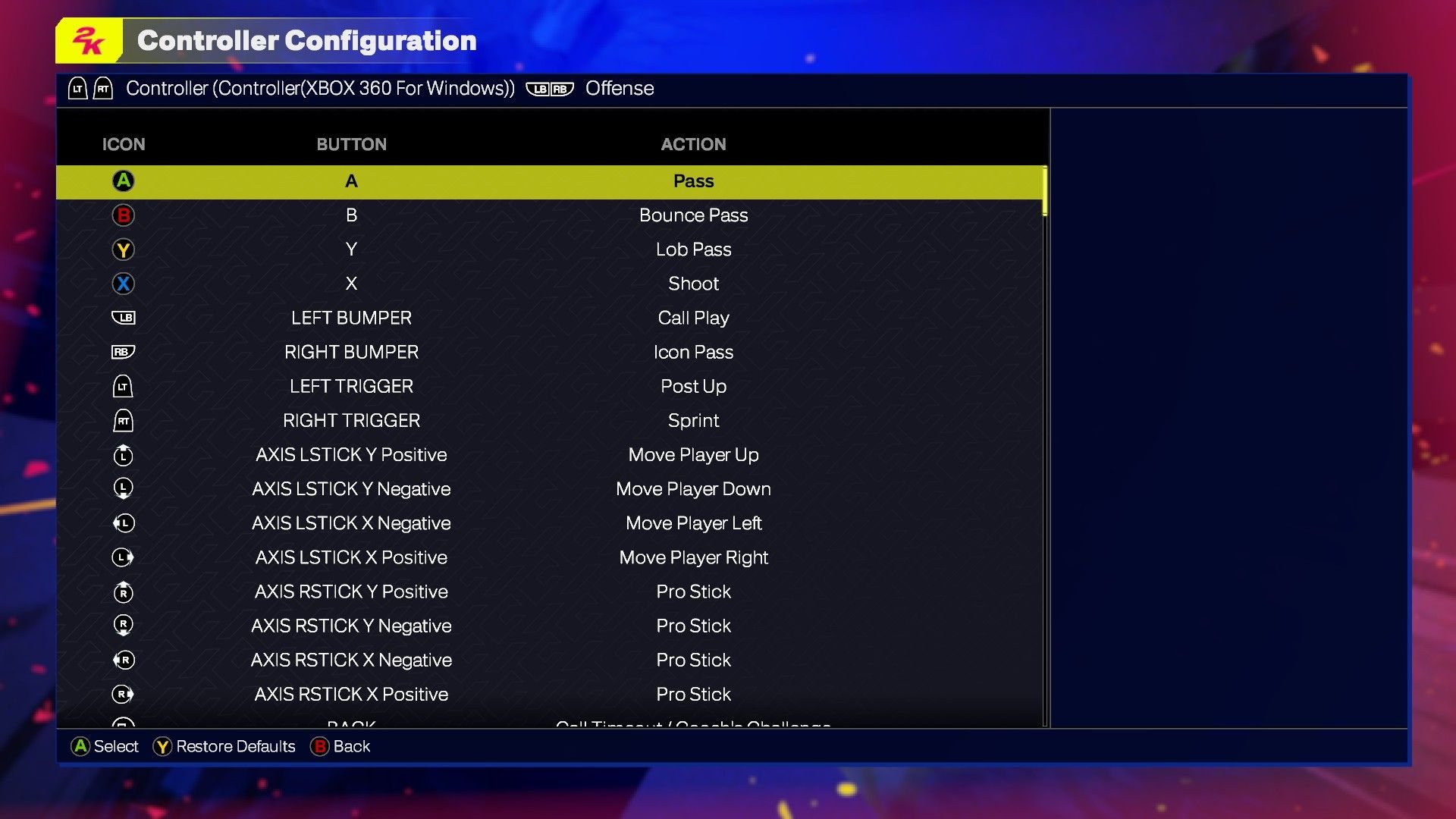
The NBA 2K25 control layout utilizes a standard gamepad configuration with button mapping for dribbling, passing, shooting, and defensive actions.
Getting a grip on the court in NBA 2K25? The way you control your player significantly impacts your gameplay. This guide explores the fundamental mechanics of the NBA 2K25 control layout, helping you get comfortable with the game.
Understanding the button assignments for both offense and defense is crucial to your success. We’ll break down the key controls for movement, passing, shooting, and other actions.

NBA 2K25 Control Layout: Your Guide to the Court
Okay, basketball fans, let’s talk about getting good at NBA 2K25! A big part of becoming a virtual baller is understanding the game’s controls. It’s like learning to ride a bike; at first, it might feel wobbly, but with practice, you’ll be zooming around the court like a pro. We’re going to break down all the different ways to move, shoot, pass, and defend so you can step onto the digital court with confidence. Get ready to learn everything you need to know about the NBA 2K25 control layout, so you can dominate the competition!
Basic Movement and Ball Handling
Before we dive into fancy moves, let’s get the basics down. Moving your player around the court is super important, and thankfully, it’s pretty easy. Your left stick controls your player’s movement in any direction, like walking with a joystick. Want to run fast? Just hold down the R2 or RT button while you move. This is your “sprint” button. Don’t use it too much, or your player might get tired! Think of the left stick as your feet and the right stick as your hands. We use the right stick to do a bunch of things, from dribbling moves to flashy shots. A simple tap of the right stick can make your player do a cross-over or a behind-the-back dribble. Practice moving around with the left stick and tap the right stick in different directions to get a feel for the ball handling moves. These are the bread and butter of controlling your player.
Dribbling Controls
Dribbling is how you keep the ball moving and away from defenders. In NBA 2K25, you can execute different dribble moves to create space for your shot or get past defenders. Here are some dribbling controls you’ll want to learn:
- Moving the Right Stick: Quick taps or slight movements of the right stick, in various directions, will trigger crossover, behind-the-back, and hesitation dribbles. Experiment with different directions to see what moves your player performs.
- Right Stick + Turbo Button (R2/RT): Using these together will give you faster and more explosive dribbling moves. When held it activates a speed boost, so use it sparingly for best results.
- Hold R2/RT while Moving: This allows you to run with the ball, use this for fast breaks.
Dribbling is not just about fancy moves; it’s about control and rhythm. Practice moving the ball back and forth between your hands. It is important to keep your eye on your player and the defender at all times.
Shooting: Making it Rain!
Now, for the most exciting part: scoring! In NBA 2K25, the shooting system is easy to understand, but it requires some practice to master. There are two main ways to shoot:
- Using the Square/X Button: Tap the button to start the shooting motion and release it to shoot. The timing is key to get a “perfect” release. A shooting meter appears to help.
- Using the Right Stick: Moving the Right Stick up or down starts the shot, and releasing the stick determines the release point. This allows for more advanced control, you can even create fade away jumpers, using this method.
The goal is to release the button/stick when the meter is in the green zone, or at the peak of the shot animation. The green zone can be easier or harder to hit, depending on the player’s shooting ability, so practice with different players. It’s important to be in a good shooting position, meaning you’re not too close to a defender and not moving too fast. Make sure you understand the different types of shots.
Types of Shots
Understanding the types of shots available in NBA 2K25 is crucial to scoring from different spots on the court:
- Jump Shot: The most common shot type. It involves jumping in the air and shooting the ball toward the hoop. The distance to the basket, your player’s skill and the timing of the release are most important to hit this shot.
- Layup: When you’re very close to the basket, you can perform a layup. When moving towards the basket while holding R2/RT (sprint), simply press the square button or move the right stick to perform a layup.
- Dunk: A powerful shot near the basket where the player slams the ball directly into the hoop. Hold R2/RT while running to the basket and tap square/X to perform a dunk.
- Fadeaway: To make a fade away shot, move the right stick away from the basket while pressing the shooting button/using the right stick to shoot.
- Three-Point Shot: These are longer shots made from beyond the three-point line. They are worth three points.
Each type of shot requires a slightly different technique and has different timing. Practice each shot type in the practice mode to get comfortable.
Passing: Sharing is Caring
Basketball is a team sport, and passing is super important. You can’t win by hogging the ball. Luckily, NBA 2K25 has a bunch of different passing options:
- X/A Button: Tap this to perform a normal pass to the nearest open teammate. It’s the most basic, but crucial for moving the ball around the court.
- Circle/B Button: This is a bounce pass. It’s a pass that hits the floor before going to your teammate. This is useful when defenders are blocking the direct line to your target.
- Triangle/Y Button: This is a lob pass, used to make passes over defenders who are trying to intercept the ball. This can lead to easy baskets.
- R1/RB Button + Icon Pass: When you hold down the R1 or RB button, icons will appear above your teammates’ heads, and then select the teammate you want to pass to by pressing the assigned button. This is the most accurate type of passing.
Knowing when to pass and which type to use is key to a good offense. Practice passing to different teammates at different spots on the court.
Defense: Shutting Down the Offense
Defense is just as important as offense. In NBA 2K25, there are a couple things you need to be good at on the defensive end.
- Left Stick: Use this to move your defender around to stay in front of the player with the ball.
- L2/LT Button: This button locks you into a defensive stance, helping you stay in front of your opponent and get into a better position. Use it to mirror the offensive player’s movements.
- Square/X Button: Use this to attempt a steal. But be careful! Reaching too much can result in a foul.
- Triangle/Y Button: Use this to jump to block a shot. Good timing is key, but don’t jump too early, or the player with the ball will fake you out and have an open lane to the basket.
- Circle/B Button: Use this to rebound, when the ball bounces off the rim. Try to box out your opponent, this means getting in between them and the basket and not letting them jump for the rebound.
- R2/RT button + Left stick: This allows you to quickly cut off a player’s path. Use it to quickly intercept the player and stop the fast break.
Playing defense is all about positioning, timing, and predicting your opponent’s moves. Remember to use L2/LT to stay in front of the player with the ball.
Advanced Moves
Once you’ve mastered the basics, you can try some of the more advanced moves in NBA 2K25. These take practice, but can give you an edge over your opponents. These are not required to play the game, but they can be useful for advanced players.
Post Moves
When you are playing with your back to the basket, you are in the post. These moves are used with the left and right stick, while holding L2/LT. The right stick controls the moves, like a step back or a turn around jumper.
Alley-Oops
You can attempt an alley-oop pass by pressing Triangle/Y twice, while in the air. It is best used on a fast break, when a teammate is open near the basket. This is a flashy pass that can lead to easy dunks.
Signature Moves
Each player has signature dribbling moves, shots and celebrations. Learning those signature moves can help a player get better with the player they play with the most. For example, Lebron James has his signature fade away jumper that no one can replicate.
Control Customization
If you don’t like the default controls, you can change them in the game’s settings. This allows you to set controls that you find comfortable. You can change what each button does, so you can play the way you want to. Experiment with different setups to find what works best for you. Everyone has their own preference when it comes to what buttons they like, and this feature helps you play better and more comfortably.
Practice Makes Perfect
The most important part about getting good at the control layout is to practice. Head to the practice mode and drill with your favourite player, or start a MyCareer game to practice in live gameplay. Try using the controller settings you want and get used to playing with them. The more you practice, the more natural the control layout will become. Don’t expect to be a pro overnight. The game is designed for you to get better each time you play it.
Understanding the NBA 2K25 control layout is a huge step toward becoming a better player. While it might seem like a lot to learn at first, with some practice and patience, you’ll be able to perform any move you can imagine. Just keep playing, experimenting with different control combinations, and soon enough you’ll be creating highlight-reel plays, just like your favorite NBA stars.
NBA 2K25 Shooting Tips: Best Controller Settings Visual Cues #nba2k25 #2k25
Final Thoughts
NBA 2K25’s control layout aims for intuitive gameplay. Players will find the familiar dribbling, shooting, and passing mechanics are refined and easier to execute. This year’s adjustments focus on responsiveness.
The defensive controls also received attention. Stealing and blocking feel more precise. The game presents a more balanced interaction.
Ultimately, understanding the core features of NBA 2K25 control layout is vital. Players must practice using the modified controls to get the best results. These changes provide an improved on-court experience for everyone.

