
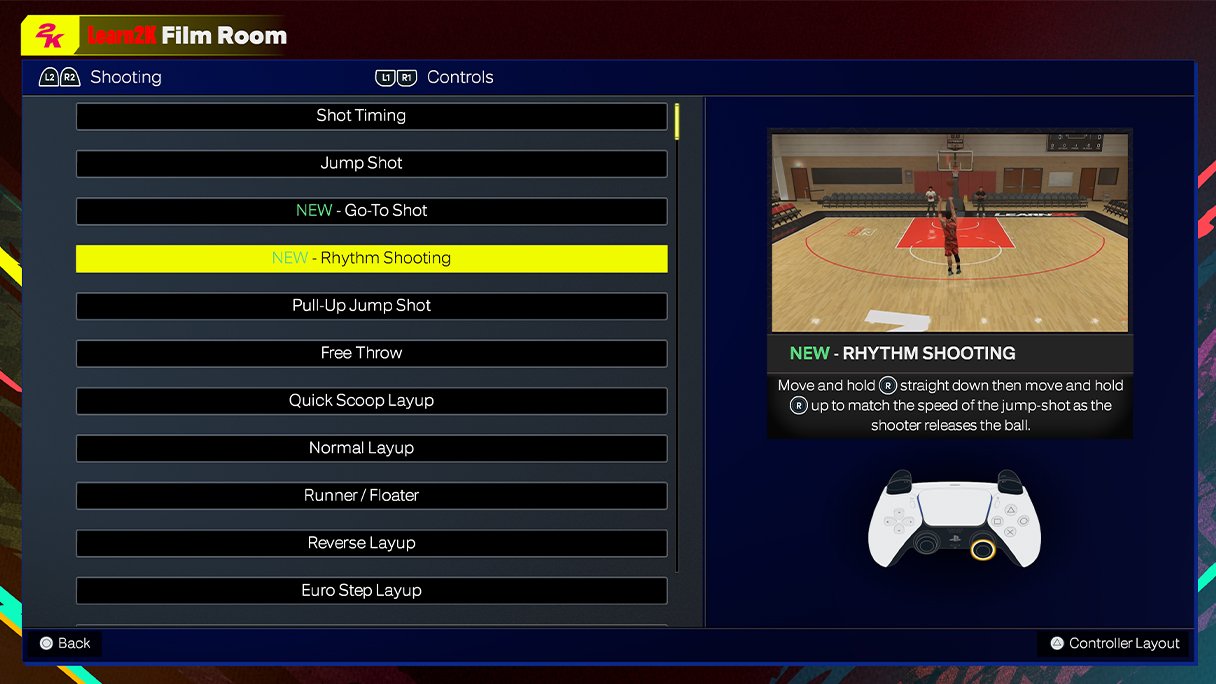
NBA 2K25’s control scheme largely remains consistent with previous installments, featuring familiar button layouts for dribbling, shooting, and passing, with minor refinements for responsiveness.
Ready to dive into the court action in NBA 2K25? You’re probably curious about how to actually play the game. The good news is that the core mechanics you’ve grown used to in past 2K games are largely still in place.
Let’s explore the specifics of the NBA 2K25 control scheme details. We will help you understand the nuances of moving your players, performing crossovers, and sinking those crucial shots. Get ready to dominate the digital hardwood!

NBA 2K25 Control Scheme Details
Get ready to jump back on the court with NBA 2K25! Whether you’re a seasoned pro or a fresh rookie, understanding the controls is key to dominating the game. This year, 2K25 is bringing some tweaks and refinements to how you handle your players, making it even more important to get a grip on the basics and master the advanced moves. Let’s break down everything you need to know about the NBA 2K25 control scheme.
Basic Movement and Ball Handling
Moving around the court is the first thing you’ll do, so getting comfortable with it is vital. Here’s how you’ll be moving your player:
- Left Stick/D-pad: This is your bread and butter. Use it to move your player in any direction. Pushing the stick harder makes your player run, while lighter touches allow for more precise movement. If you are using a controller with a D-Pad, then this will also work for you for navigation in the menu and other game selections.
- Turbo/Sprint Button (Usually R2 or RT): Hold this down to run faster, but be careful because your player will tire quickly if you sprint too much. Think of it like a boost of energy.
Now, let’s talk about how to handle the ball:
- Right Stick: This is your dribbling magic wand. Flick it in different directions to perform crossovers, behind-the-backs, and other flashy dribble moves. The directions and timing of your flicks determine what kind of move you will make. Experiment to see the variety of ways to handle the ball.
- Dribble Button (Usually R1 or RB): Tap this to do a basic dribble. Use it in combination with left stick movement to keep the ball safe from defenders and make basic change of direction with the ball.
- Protect Ball/Post Up Button (Usually L2 or LT): Hold this down while dribbling to protect the ball from defenders or to post up against your defender in the paint.
Advanced Dribbling Techniques
Once you’ve got the basics down, its time to spice up your dribble moves. NBA 2K25 offers a rich suite of dribbling moves to help you create space and beat your defender one on one. These are key moves that will take your game to the next level.
- Hesitation Moves: These quick stops and starts can throw off your defender’s timing. Usually performed by tapping the turbo button and changing direction.
- Spin Moves: The classic spin move lets you quickly change direction while protecting the ball. Usually performed by moving the right stick in a circle.
- Step Backs: Create separation by quickly stepping back from your defender. usually performed by flicking the right stick down and back.
- Size-Up Moves: Use these moves to make your player look like he will be driving in a specific way and then change direction quickly. Use the right stick and quick left stick movements.
Shooting Mechanics
Scoring points is the name of the game, so learning how to shoot is incredibly important. NBA 2K25 has a few ways to get your shot off.
- Shoot Button (Usually Square/X Button): Press this to take a jump shot. How long you hold the button determines the shot’s power. You need to release the button at the perfect time for the perfect shot.
- Shot Meter: A little bar will appear on the side or under your player. The goal is to release the shoot button when the bar is in the highlighted section (usually green or white). This means you’ve released the ball with the right timing.
- Layup/Dunk Button (Usually Square/X Button while driving to the basket): This will allow you to perform a layup or dunk. Usually, if you are further from the basket, your player will perform a layup. If you are closer to the basket, you can perform a dunk. Your player’s dunk rating and momentum will factor into the dunk animation that you will see.
- Shot Stick: Instead of the button, you can use the right stick to shoot. Push it down to start the shot, then flick up to release it.
Shooting Tips
The shooting mechanics can take some time to learn and master, so its important to understand what can help you get better at shooting in 2K25.
- Green Release: You’ll see a small green flash or hear a little “click” when your shot release is perfect. This means your shot is most likely to go in.
- Open Shots: Shooting when you are open is much better than shooting while contested. Try to create space for an open shot.
- Player Ratings: Each player has different shooting stats, so some players are better at shooting than others. Look at these ratings when choosing a player to use for scoring.
- Practice: The best way to get better at shooting is to practice often. Try to learn the timing of each players’ shooting animation.
Passing the Ball
Passing is how you move the ball around and create scoring opportunities for your team. Here’s how you can pass in NBA 2K25.
- Pass Button (Usually X/A Button): Tap to make a regular pass to a teammate. The direction will be determined by which direction you are facing.
- Icon Passing Button (Usually Triangle/Y Button): Press this button then select a player by pressing the corresponding button on your controller to pass to that specific player.
- Lob Pass Button (Usually Triangle/Y Button + Right Stick Up): Use this to throw a lob pass. Great for alley-oops or getting the ball over a defender.
- Bounce Pass Button (Usually Circle/B Button): Use this to bounce the pass on the floor. Good when there are defenders in the passing lane.
Advanced Passing Strategies
There are various advanced passing strategies that can be used to make your team even better on offense. Passing can make it easier to score by moving the ball around and catching the defense off guard. Here are some strategies to use to improve your passing:
- Pick and Roll/Pop: Use screen actions to get an open teammate for a score. Good passers can read the defense well and make the right decision.
- Extra Pass: Look for an extra pass after you get the ball. Usually, an open teammate is waiting for the ball on the perimeter.
- Fast Breaks: When you get the rebound on defense, try to quickly pass the ball to teammates sprinting on offense for an easy score.
- Passing Lanes: Use smart angles to pass the ball around defenders and get it to open players.
Defensive Controls
Defense is just as important as offense. Here’s how to play tough on that side of the court in 2K25.
- Move with Left Stick/D-pad: Move your player to stay in front of your opponent. Try to anticipate where the player with the ball will move.
- Defensive Stance Button (Usually L2 or LT): Hold down this button to get into a defensive stance. This helps you stay in front of your opponent and play better defense.
- Steal Button (Usually Square/X Button): Tap to try to steal the ball. Timing is everything. If your timing is off, you will get a foul called on you.
- Block/Rebound Button (Usually Triangle/Y Button): Jump to try and block a shot or grab a rebound. Your timing is key to successfully doing this.
- Hands Up Button (Usually Right Stick Up): Use this to put your hands up in the air to contest shots. This helps you put more pressure on the shooter.
Defensive Techniques
Playing good defense is essential to winning basketball games. There are various defensive tactics that you can use in the game.
- On-Ball Defense: Stay close to your opponent and use the defensive stance to move with them. Try to force them to the baseline or into the help defender.
- Off-Ball Defense: This is when you do not have the player with the ball, so you must position yourself in the best place. Try to make sure you are close enough to help if your teammates need it.
- Help Defense: When a player gets beaten on defense, the other teammates help to stop the player with the ball. Usually, this includes picking up the player and double teaming or simply getting in the way of the player.
- Rebounding: This is when you grab the ball after a missed shot. Positioning yourself for the rebound is important. Knowing how to box out the other player is essential.
Playcalling and Strategies
NBA 2K25 gives you the power to call plays, just like a real coach. This can make your offense much better when you have good play calling.
- Playcalling Menu (Usually Left on D-Pad): Press this to open the play calling menu during the game. This will bring up a number of different plays.
- Choose a Play: Use your controller to navigate the menu and choose a play that fits the situation.
- Adjust Settings: You can change your offensive and defensive strategies in the pause menu. This includes setting up your defensive schemes and making substitutions.
Tips For Play Calling
Play calling is a very important aspect of basketball and can have a huge impact on your game. Some tips that you should know about play calling:
- Understand Plays: Learn what each play is designed to do and who it’s best for. Certain plays are specifically designed for certain players.
- Adapt to the Game: Call different plays depending on the flow of the game. You should not do the same play over and over.
- Utilize Timeouts: If the other team is on a run, try using a timeout to stop their momentum. This can also help you strategize and call plays that will be effective.
Special Moves and Signature Skills
Players in NBA 2K25 have unique skills that can be triggered with specific button combinations. These can have a huge impact on the game when used at the right time.
- Signature Moves: Some players have moves that are unique to them. These moves are like special powers. Try to look for these for each of the players you use.
- Skill Points: Use skill points to upgrade your players and make them more effective.
- Badges: Players also have badges that can be useful in certain situations. These badges can make the player better at shooting, rebounding, passing, or defending.
Mastering Special Moves
Understanding and utilizing your players special moves will take your game to the next level. Every player has specific abilities that they can use, and using these at the right time is key to victory.
- Learn Each Player: Experiment with different players to see what their special moves are and how to activate them.
- Practice in Training: Use the training mode to get comfortable with the timing and execution of signature moves.
- Strategic Usage: Use special moves at the right time in a game to make them more impactful. Don’t just throw them out there randomly.
Controller Settings
NBA 2K25 allows you to customize your controls for better gameplay experience. Changing these settings can be useful in how you play the game. You can change these settings in the main menu.
- Button Mapping: Change which buttons do what action. This can be useful if you do not like where specific buttons are located.
- Controller Vibration: Turn on or off controller vibration. Some people like the vibration for gameplay while others do not like it.
- Shot Meter Type: Change the visual style of the shot meter. Some players like different styles of the shot meter compared to others.
Tips for New Players
If you’re new to the game, it might feel overwhelming at first. Here are a few tips to help you get started.
- Start with Practice Mode: Spend some time in the training mode to get a feel for the controls. This is the best place to try different things without a lot of pressure.
- Play Simple Games: Don’t try to do too much at first. Focus on the basics like moving, passing, and shooting.
- Watch Tutorials: There are a lot of helpful videos online that can teach you more about the game. Look for some to guide you.
- Be Patient: It takes time to learn the game, so don’t get discouraged if you don’t win every game right away. It takes time to be good at the game.
Remember, practice makes perfect. The more you play, the better you will get at understanding the controls and becoming a champion on the court! With these details in mind, you should be better prepared to dominate the court in NBA 2K25!
NBA 2K25 Shooting Tips: Best Controller Settings Visual Cues #nba2k25 #2k25
Final Thoughts
NBA 2K25 control scheme details refine the core gameplay experience. Players will find familiar buttons with slight tweaks for better responsiveness. New animations and moves are tied to specific button combinations.
Understanding these changes is key to competing at a high level. The updated controls make it more important than ever to practice and adapt. Practice will help you execute more advanced techniques.
Ultimately, paying attention to the NBA 2K25 control scheme details allows you to maximize your gameplay. Learning the nuances of each button press will set you apart on the court.

