
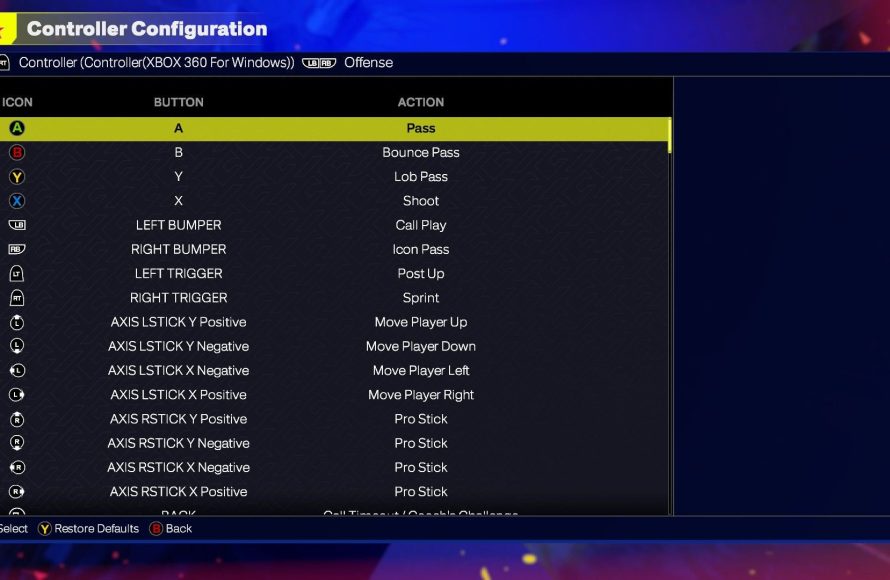
The NBA 2K25 control scheme guide details how to perform various in-game actions, like shooting, passing, dribbling, and defending, using different controller buttons and stick movements.
Jumping into NBA 2K25 and feeling overwhelmed by the controls? You’re not alone! Many players find the initial learning curve a bit steep. This NBA 2K25 control scheme guide is designed to help you quickly get familiar with the button layouts.
We will explain the basic moves and advanced techniques so you can dominate the court. Knowing how each button functions is crucial for success in the game. This guide will get you playing like a pro in no time.

NBA 2K25 Control Scheme Guide: Your Path to Court Domination
Welcome, future NBA stars! Getting a handle on the controls in NBA 2K25 is like learning the secret handshake to basketball greatness. It’s not just about knowing what button does what; it’s about making those moves second nature, so you can focus on outsmarting your opponents and making those amazing plays. Let’s jump into the details of how to take control and become a hoops legend!
Basic Movement and Ball Handling
First things first, let’s talk about moving your player. The left stick is your best friend here. It’s what you’ll use to guide your player around the court. Think of it like the steering wheel on a car – tilt it the way you want to go. But it’s not just about walking!
Dribbling Essentials
Dribbling is how you keep the ball safe and set up your moves. The right stick is your dribbling magic wand. Flick it in different directions to perform all kinds of dribble moves, from simple crossovers to fancy behind-the-backs. Here’s a quick guide:
- Right Stick Left/Right: Crossover dribble, shifting the ball from one hand to the other.
- Right Stick Up: A between-the-legs dribble, a tricky move to keep defenders guessing.
- Right Stick Down: A retreat dribble, creating space for a shot or pass.
- Right Stick Combinations: Combining flicks and holds on the right stick allows for more complex moves, such as a hesitation or a spin. Practice these to become a dribbling wizard!
The left trigger (L2 on PlayStation, LT on Xbox) is also very important, this is the modifier button. Holding this while moving lets you dribble in a more controlled way which is great for making a move quickly. It also engages the ‘post’ game when you’re near the basket, so learn how to use that to your advantage as well!
Passing: Connecting with Your Teammates
Basketball is a team game, and good passing is essential. Here’s a look at your passing options:
- X/A Button: This is your bread-and-butter pass button. A simple press sends a pass to the teammate nearest your player.
- Circle/B Button: Use this for a bounce pass, great for getting the ball around defenders.
- Triangle/Y Button: This button performs a lob pass, useful for sending the ball high to a teammate near the basket. This is good for an alley-oop play if you see the opportunity.
- Right Bumper/RB Button (Hold): This engages the icon passing system, meaning a symbol pops up above each of your teammates’ heads, using this while also pressing the face button that matches the player means you can pass to that specific teammate.
Practice mixing up your passes. Don’t just use the same one all the time or your opponents will pick up on your patterns. Think about which pass is best for the situation. Sometimes a quick pass is what you need to move the ball, sometimes a lob is what’s required to send your teammate to a good position!
Shooting: Scoring Those Baskets
Of course, you’re here to score, right? Here’s the lowdown on shooting:
Jump Shots and Layups
- Square/X Button (Tap): Tapping the shoot button will make your player go for a jumpshot. How good your shot is, depends on the timing of your shot.
- Square/X Button (Hold): Holding the button will perform a layup. Depending on the context, you can change your layup by also holding the left stick in a direction.
- Shot Meter: When you take a jumpshot, a shot meter will pop up. Your goal is to stop your shot when the meter hits the top. If you get the timing perfect, your shot will be a lot more accurate.
Dunking
There’s nothing quite as exciting as a dunk. It’s a showstopper! To dunk, you’ll need a clear path to the basket and momentum. Holding the right trigger (R2 on PlayStation, RT on Xbox) while driving toward the hoop engages your dunking ability. Use the right stick for different types of dunks. For instance, pulling down on the right stick will execute a powerful slam.
Shot Timing is Key
No matter the shot type, timing is critical. Watch your player’s animation and release the shoot button at the peak of the jump. This is where practice comes in. Head into the practice modes and get used to the feel of your player’s release. Every player has a different release point, so it’s important to learn the timing for the players you are using most.
Defense: Protecting the Paint
A great offense is only half the game. You also need a great defense! Here’s how you control your player on defense:
Moving and Positioning
- Left Stick: Use the left stick to move your player and stay in front of the offensive player. Good positioning is key to stopping your opponent from getting to the basket.
- Left Trigger/L2/LT: Holding this will make your player get into a defensive stance. This lets you shuffle side-to-side quickly while keeping your hands up.
Stealing and Blocking
- Square/X Button: This button attempts a steal, when near the player with the ball. Time it wisely, as you could end up fouling if you’re too aggressive.
- Triangle/Y Button: Use this to try to block a shot. Timing is everything, jump too early or too late and you will not block the shot, and you can leave your player open to a basket.
Rebounding
After a shot is taken, the battle for the rebound begins! When the ball is in the air, you have to move into a position that will allow you to try to get the rebound. Pressing the triangle/Y button while jumping at the right time can help you to get the rebound and prevent the opposition from getting another shot attempt.
Advanced Controls: Taking Your Game to the Next Level
Once you’ve mastered the basics, it’s time to explore some advanced controls. These will give you a competitive edge and add more creativity to your game:
Pick and Roll
The pick and roll is a common play where one player sets a screen for the ball handler, and then moves to the basket. To execute this, you’ll need to press the L1/LB button when playing on offense, this calls for a player to set the screen. Once they do so, you can use the left stick to decide where to go. If you pass the ball to the player setting the screen, he can now roll to the basket.
Post Moves
When your player is close to the basket with their back to the hoop, you can execute post moves. Holding L2/LT puts you into a post stance. From here, use the right stick to make moves like spins, hooks and fades.
Alley-Oops
For a really great play, try an alley-oop! Pass to a player going to the basket by pressing the triangle/Y button when your teammate is heading towards the basket. This is a tough one to master, but really fun when you get it right.
Signature Moves
Each player in NBA 2K25 has their own unique moves that you can perform. These are tied to their specific player animations. Check them out in the player menus to learn some of these great moves. Using them makes the game very fun.
Controller Layouts and Customization
The default control scheme is a good starting point, but you can adjust it to fit your playing style. NBA 2K25 allows you to customize the controls, this means that you can assign actions to different buttons. You can do this in the controller settings menu.
Choosing a Layout
There are a couple of preset control schemes in the game that you can choose from. They are not that different from each other, but the different layout may suit you better. Check out the control layout options and choose the one that you prefer.
Customizing Your Controls
If you don’t like the preset controller layouts you can fully customise your buttons. Go into the settings menu in the game, from here you can view the controls. By clicking on a button, you can assign a new action for the button to perform.
Practice Makes Perfect
The best way to get good at NBA 2K25 is to practice! The game has a practice mode where you can work on all the different controls. You can also play through scrimmage games to improve, and play through the various game modes to get a sense of how the game works.
Don’t get discouraged if you don’t get it right away. It takes time to build your skills and to learn the moves. Keep practising and you will become a NBA 2K25 master!
There you have it! The complete guide to your controls in NBA 2K25. Knowing these will help you to take control of your game. It doesn’t just stop here though, keep learning the moves and keep practising and you will become a basketball master!
How to Dribble on NBA 2K25: Blow Out Dribble 2K25 Controls Guide #nba2k25 #2k25
Final Thoughts
This NBA 2K25 control scheme guide offers key insights into navigating the game. Understanding the basics, like dribbling and shooting, is crucial for success. Practice modes help you refine these skills quickly.
Remember that timing your moves is important and can provide a great competitive edge. This knowledge helps you improve your overall gameplay.
Therefore, this NBA 2K25 control scheme guide gives you a foundation. With practice, you will become very skilled on the virtual court and dominate any opponent.

