
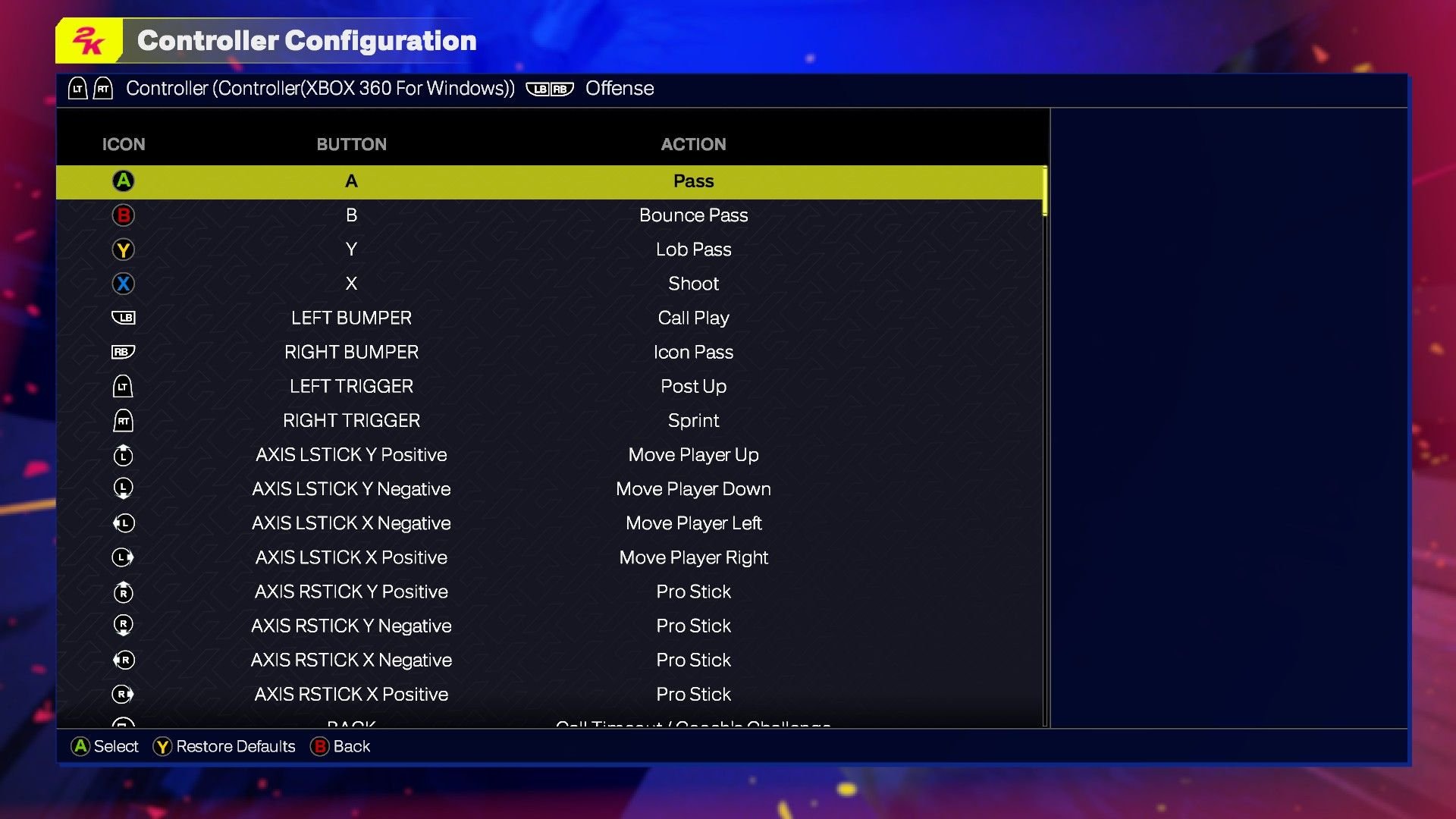
The NBA 2K25 control schemes primarily utilize the controller’s buttons, triggers, and analog sticks for movement, dribbling, shooting, and defensive actions, with variations depending on the chosen gameplay style.
The court is calling, and you are about to step onto it in NBA 2K25. Feeling prepared? The key to success in this game lies in your ability to handle the controls. Understanding the different aspects of NBA 2K25 control schemes will make or break your game.
We’ll quickly go through the essentials that will help you become more comfortable navigating the digital court. You will be able to easily execute all those fancy dunks and precise three-pointers that you admire from the pros. This guide will help improve your game.

NBA 2K25 Control Schemes: A Deep Dive
Getting good at NBA 2K25 means understanding the controls. It’s like learning the alphabet before you can read a book! This game has a lot of moves, from simple passes to fancy dunks. Knowing how to do them is key to winning. Let’s explore all the ways you can handle your player on the court.
Basic Movement and Ball Handling
Before you try any crazy crossovers, you need to know how to move around. The left stick is your best friend here. Push it in any direction to make your player run. The faster you push, the faster they go. This seems simple, but mastering quick movements is very important. You also need to get familiar with the ball handling moves. This includes dribbling and protecting the ball.
Dribbling Essentials
Dribbling keeps the ball in your control. Here’s how:
- Basic Dribble: Just tap the right trigger (R2 on PlayStation, RT on Xbox) while moving. This will get you started with standard dribbling. You can’t move properly without this essential movement.
- Crossover: Flick the right stick left or right to quickly change the ball from one hand to the other while moving. Doing it right can make defenders lose their balance.
- Behind-the-back Dribble: Flick the right stick down and then quickly either left or right to do a behind-the-back move.
- Hesitation Dribble: Tap the right stick in a direction without moving left stick to do a little fake to trick defenders.
- Spin Move: Circle the right stick to spin. This moves you past the defense quickly. It’s also a nice way to look stylish.
Protecting the Ball
Protecting the ball from defenders is also a key skill. Here are some important controls:
- Protect Ball: Hold the left trigger (L2 on PlayStation, LT on Xbox) while dribbling to protect the ball when being pressured by defender.
- Post Up: When near the basket, use the left trigger (L2 on PlayStation, LT on Xbox) to get into post position. From this position, you can do different moves to score.
Passing the Ball
Passing is a critical part of any basketball game. Smart passing can make scoring much easier. In NBA 2K25, you have multiple ways to pass the ball.
Basic Passing
The most important passes are the basic ones:
- Standard Pass: Press the pass button (X on PlayStation, A on Xbox) to pass the ball to the closest teammate.
- Icon Passing: Hold down the pass button. This will show icons over each of your teammates. Press the button that matches with the player you want to pass to. This gives you very specific control on where the ball goes.
Advanced Passing
There are also more complex passes you can use:
- Bounce Pass: Press circle (O on PlayStation, B on Xbox) to bounce the ball off the floor to a teammate, which is helpful to avoid interceptions and reach to players in difficult positions.
- Lob Pass: Press the triangle button (△ on PlayStation, Y on Xbox) to throw the ball higher over defenders to a teammate. This is very useful when passing to a player who is running to the basket.
- Fake Pass: Press the pass button twice to trick the defender. This can give you a little window to pass to the teammate for an easy score.
Shooting Mechanics
Making baskets is the goal of the game! NBA 2K25 gives you lots of control over how you shoot. Different shots have different control styles.
Jump Shots
Jump shots are a big part of basketball. Here’s how to make them:
- Basic Jump Shot: Press and hold the square button (□ on PlayStation, X on Xbox). Release when the meter is at its highest point. Releasing at the perfect moment results in a great chance to score.
- Shot Stick Aiming: Instead of using the button, you can use the right stick. Pull the right stick down to start the shot. Then, move the stick to adjust the direction. This gives you even more precision.
- Layups: When you’re close to the basket, you can use the square button (□ on PlayStation, X on Xbox) to do a layup. Use the left stick to choose which side of the hoop to lay up on.
- Floaters: When driving towards the basket tap the square button (□ on PlayStation, X on Xbox), this type of shot is mostly to avoid taller defenders.
Dunks
Dunks are fun and effective ways to score. Here’s how to perform them:
- Basic Dunk: When running towards the basket press the right stick down while holding the right trigger (R2 on PlayStation, RT on Xbox) to start dunking.
- Fancy Dunks: You can do different dunks by holding the right stick in different directions while pressing R2/RT. Experiment to find your favorite dunk.
Defensive Moves
Defense is just as important as offense in NBA 2K25. Here’s how to play strong defense:
Basic Defense
These actions are vital to stopping the other team:
- Movement: Use the left stick to move your defender and stay in front of the player with the ball.
- Intense D: Holding the left trigger (L2 on PlayStation, LT on Xbox) puts your player in a defensive stance.
Stealing and Blocking
These are great skills to get the ball back:
- Steal: Press the square button (□ on PlayStation, X on Xbox) to try and steal the ball from the other player. Time it correctly. If you try too much, you will get a foul.
- Block: Press the triangle button (△ on PlayStation, Y on Xbox) to jump and try to block a shot. This is an excellent way to stop points.
- Swat: While guarding on the low post, press the square button (□ on PlayStation, X on Xbox) to swat the ball from opponent.
Special Moves
Beyond basic moves, NBA 2K25 allows for a lot of special moves. These can give you an edge over your opponent.
Signature Moves
Many players have unique moves from real life:
- Signature Styles: When using different players, you can see some of their signature moves by moving the right stick.
- Dribble Combos: String dribble moves to create space for a shot or drive to the basket.
Playcalling
Good teams execute their plans well. You can control plays in the game:
- Quick Plays: Use the left direction pad to call up plays on the fly. This is good for using specific strategy quickly.
- Full Playbook: Pressing the left direction pad and the right button will open a menu for your team’s complete play options.
Advanced Control Tips
Now you know the basics. Let’s see how to play at the best level:
Practice Makes Perfect
The best way to get better at NBA 2K25 is practice. Spend time in practice mode to master your favorite moves. Try using the controller settings to get more comfortable.
Controller Settings
NBA 2K25 allows for controller customization. Here are some key options:
- Shot Meter: Choose if you want it on or off, and if you do, the way you want it.
- Camera Angle: Select the camera angle that feels best for you.
- Vibration: Decide how much controller feedback you want.
Using Visual Cues
The game offers visual cues to help your game:
- Shot Feedback: Pay attention to the feedback after a shot. It helps you learn what you did right or wrong.
- Defensive Indicators: Watch for visual alerts that tell you the position of the player, so you can react accordingly.
Understanding the controls in NBA 2K25 is the beginning to doing well in the game. It takes time to learn and a lot of practice to perfect it, but the results are worth the effort. With this guide, you’ll now be ready to master the court and have a lot more fun in the process.
NBA 2K25 Beginner Tips and Tricks- How To Get Wins ASAP!
Final Thoughts
In summary, the anticipated NBA 2K25 control schemes present a familiar yet potentially refined experience for players. Gamers should expect minor tweaks to existing button layouts. They will likely need to adapt to any new features and mechanics.
Expect a learning curve when using new controls. Players must dedicate time to practice and perfect their game. The exact specifications of NBA 2K25 control schemes are still under wraps.

