
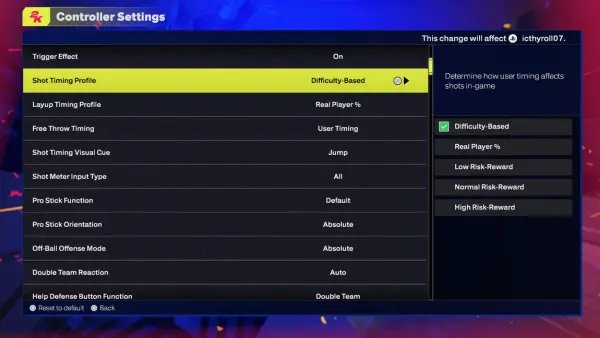
The NBA 2K25 difficulty configuration overview allows players to adjust gameplay challenges with sliders that affect opponent AI, user skill influence, and gameplay speed.
Have you ever felt the frustration of a game that’s either too easy or unfairly hard? We understand that precise gameplay balance can be elusive. That’s why understanding the intricacies of the NBA 2K25 difficulty configuration overview is key to enjoying your experience.
The game provides a great level of control over how challenging or relaxed you like things. Adjusting settings means you craft the experience you want for yourself.

NBA 2K25 Difficulty Configuration Overview
Ready to step onto the virtual court in NBA 2K25? Whether you’re a seasoned pro or just starting out, the game’s difficulty settings can make or break your experience. Getting the settings right is super important because it affects how much fun you’ll have. If it’s too easy, you might get bored, but if it’s too hard, you might get frustrated. Let’s dive deep into how you can tweak the game’s difficulty to fit your play style and skill level. We’ll look at all the ways you can control how the game challenges you and how to find that sweet spot for maximum enjoyment.
Understanding the Core Difficulty Levels
NBA 2K25 offers a range of preset difficulty levels, each designed to cater to different skill levels. These are your starting points, and they control a broad range of gameplay factors. Here’s a breakdown of what each one means:
Rookie
This is the easiest setting, perfect for new players or anyone who wants a relaxed experience. On Rookie, the computer-controlled opponents play with less skill and make more mistakes. You’ll find it’s easier to score, grab rebounds, and defend. The AI’s shooting percentages will be lower, and they’ll make fewer smart plays. Think of this as a great place to learn the basic controls and flow of the game without too much pressure.
- Easier to score points
- Less challenging defense
- AI makes frequent mistakes
- Good for learning the game
Pro
Pro is a step up from Rookie, offering a more balanced gameplay experience. The AI becomes smarter and more competitive, but it’s still manageable for most players. You’ll notice that opponents will make fewer errors, play more effective defense, and try to run more strategic offenses. It’s a good place to grow your skills, learn how to use advanced techniques, and challenge yourself, while not being excessively difficult. This level suits players who have a basic grasp of the controls and now want to play some good and fair competitive matches.
- More competitive AI
- Better defensive play
- Opponent will make fewer mistakes
- Good balance of challenge and playability
All-Star
Now, we’re getting into more serious basketball. All-Star difficulty presents a significant challenge. The AI plays smart, knows how to create openings and will punish your mistakes. The computer will play like a proper team and use a variety of offensive and defensive techniques to try and beat you. It’s the level where you’ll really need to start using advanced moves and strategies. You will have to play smart to succeed here. This level is a good fit for more experienced players who understand the nuances of the game.
- Significantly more challenging
- Requires advanced strategies
- AI makes very few errors
- Good for experienced players
Superstar
Superstar is where the game turns up the heat! The AI plays at a very high level, making fewer mistakes and executing offenses and defenses almost perfectly. They will make very good shots and move the ball very well. Expect a true test of your abilities, you will need to put in a lot of practice and use everything you have learned to be able to come out victorious in this difficulty. You have to be pretty good at the game to play at this level, so this level suits dedicated 2K players. Prepare for intense and close matches.
- Extremely challenging AI
- Opponents will play like pros
- Requires precise execution
- For dedicated players
Hall of Fame
Hall of Fame is the ultimate challenge in NBA 2K25. This difficulty pushes your skills to the absolute limit. The AI becomes incredibly efficient, with near-perfect shooting, defense, and playmaking. They’ll exploit any weakness in your game, and you’ll need to be at the top of your game to stand a chance. This level is for the elite players who enjoy the highest degree of difficulty and want to prove themselves against the game’s ultimate challenge. You have to play perfectly to get a chance to win in this mode, it is very difficult.
- The most challenging difficulty
- AI plays at the highest level
- Very few mistakes by AI team
- Only for elite players
Customizing Difficulty with Game Sliders
While the preset difficulty levels provide a great starting point, NBA 2K25 also offers a deep and detailed level of customization with game sliders. These sliders let you fine-tune specific aspects of the game, allowing you to create a difficulty that’s truly tailored to your preferences. It’s one of the best things about the game, because you can create the game of your own liking. Here is a look at some of the most important sliders you can adjust:
Offense Sliders
These sliders control how well the game’s AI and your own team perform on the offensive side of the ball. Here are some of the main sliders you can adjust:
- Inside Shot Success: This slider controls how often players make shots near the basket. Moving it up means players are more likely to make these shots.
- Close Shot Success: Similar to Inside Shot Success, but this is for shots a little further from the basket.
- Mid-Range Shot Success: This one adjusts the success rate of shots taken from mid-range.
- 3-Point Shot Success: This controls how often players hit their three-point shots.
- Layup Success: This determines how well players make layups and other close-to-the-basket moves.
- Dunk Success: Adjusts how often dunks are completed successfully, this is also affected by the player’s dunk rating.
- Shot Coverage Impact: This controls how much being defended affects the shot success of an offensive player.
- Shot Timing Impact: This affects how important timing is to making shots; a higher setting will punish poor timing.
- Free Throw Success: This slider controls the likelihood of players making their free throws.
- Ball Handling: Affects the player ability to handle the ball, make sure to adjust this with care.
Defense Sliders
These sliders control how well the computer and your team play on the defensive side of the ball. The defensive settings are as crucial as the offense sliders. Here’s a look at what you can adjust:
- Steal Success: Adjusts how often players successfully steal the ball.
- Block Success: This slider controls how often players are able to block shots.
- Help Defense Strength: This slider controls how much your teammates help each other on defense. A higher setting will make teammates help more often.
- On Ball Defense: This slider controls how effectively players can defend one-on-one. A higher setting makes defense more difficult to overcome for offensive players.
- Body Up Sensitivity: This adjusts how much defenders can initiate contact and prevent dribbling moves.
- Off Ball Defense: This affects how effectively players position themselves away from the ball to try and prevent easy shots.
Attributes Sliders
These sliders control how much the player attributes impact their ability to perform in the game. Some of the critical sliders here are:
- Speed Adjusts the pace of player movement across the court.
- Acceleration This slider controls how quickly players can speed up.
- Vertical Adjusts how high players can jump for rebounds or blocks.
- Strength Affects the power of the players, helping them push others, and get better results on boards.
- Stamina Adjusts how quickly players tire out during a game.
- Durability This slider controls how often players get injured during a game.
- Offensive Rebounding How much offensive rebounding is impacted by attributes.
- Defensive Rebounding How much defensive rebounding is impacted by attributes.
Tendency Sliders
Tendency sliders impact how often an AI performs specific actions in the game, these sliders give the AI a style and feel. For example:
- Inside Shots: This determines how often the AI takes shots inside the paint.
- Mid Range Shots: Controls how often AI takes shots from mid range.
- 3-Point Shots: How often AI takes long distance shots.
- Drive To Basket: Controls the aggressiveness of AI in dribbling to the basket.
- Pass Sets the propensity of AI for passing, more passing means AI will try to distribute the ball.
- Post Up How much AI goes into the post.
- Steal How aggressively the AI attempts to steal the ball.
- Block Shot Controls the AI tendency to block shots
Game Rules and Other Sliders
These sliders adjust the rules of the game and other miscellaneous settings. Here are a few examples:
- Game Speed: This controls the overall speed of the game, making it feel faster or slower.
- Timeout Length: This controls how long timeouts last in a game.
- Injury Frequency: Controls how often injuries happen, you can tweak to lower the frequency of injuries.
- Fatigue Rate: Adjusts how quickly the players get tired during the match.
- Foul Frequency: This one controls how many fouls happen in the game.
- Rebounding: How aggressive the rebounding by players should be, if this is high the players will be more aggressive on boards.
- Ball Security: Adjusts how secure the players are with the ball and how much likely they are to make turnovers.
Tips for Finding Your Perfect Difficulty
Finding the right difficulty settings in NBA 2K25 is a journey, not a destination. It might take some tweaking and experimentation, but here are some tips to help you along the way:
- Start with Presets: Begin with one of the preset difficulty levels that sounds like it will be suitable for you.
- Tweak Slowly: Change only a few sliders at a time so that you can see the impact these changes make on the gameplay.
- Focus on What’s Fun: Adjust the sliders in a way that enhances the fun for you, remember that it’s a game and it has to be fun!
- Test and Adjust: Don’t be afraid to play several games with your changes, and adjust until you find the sweet spot.
- Consider Game Mode: Difficulty may need to be adjusted based on the game mode you are playing, some modes will require a different type of slider setup.
- Use Online Resources: Look for guidance from online guides or forums to find out optimal slider settings.
Why Custom Difficulty is Important
Having complete control over your game’s difficulty allows you to tailor the experience exactly how you want. If you find a particular style of gameplay more fun, the sliders allow you to create that in the game. When you play at a setting that is challenging but not frustrating it allows you to enjoy the game to its full potential. The custom difficulty will ensure that you can get the type of experience that you want, so it is very important to set the sliders as per your preferences.
With the ability to fine-tune almost every aspect of gameplay, NBA 2K25 ensures that you can always have a fun and engaging experience. Don’t be afraid to experiment and create a game that perfectly matches your skill level and preferred style of play. The journey to finding your ideal difficulty setting is well worth the effort, so go out there and try new combinations and settings.
5 SECRET Settings That You NEED To Use In NBA 2K25
Final Thoughts
NBA 2K25 offers several difficulty settings, from Rookie to Hall of Fame. These settings adjust AI opponent behavior, influencing game pace and challenge. Players can customize their experience accordingly.
Choosing the right difficulty is crucial. It allows for engaging gameplay. A too easy setting can become boring, while a too hard one can feel frustrating. Players should experiment to find a good balance.
Ultimately, the NBA 2K25 difficulty configuration overview shows many options to fine-tune your experience. Players can tailor the game’s challenge to their skill level, ensuring fun and fulfilling basketball action.

