
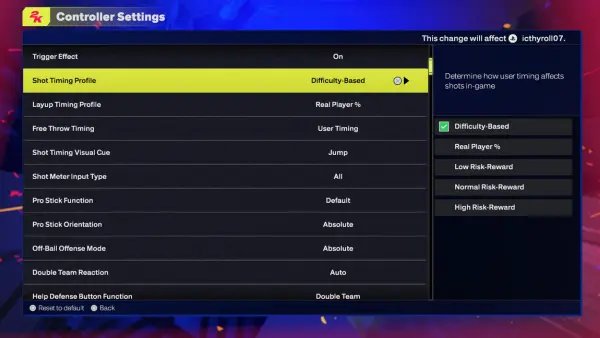
The NBA 2K25 difficulty configuration offers a range of settings from Rookie to Hall of Fame, allowing players to adjust the game’s challenge to their skill level.
Navigating the intricacies of NBA 2K25 can feel like a challenge at times, particularly when you’re not getting the right balance. Figuring out the best way to tailor your gaming experience becomes very important. We understand the need to customize the game to match your abilities.
Finding the perfect sweet spot with the NBA 2K25 difficulty configuration is key to your enjoyment. This article will offer some insight and tips on that. So stick around to know more.

NBA 2K25 Difficulty Configuration: Finding Your Perfect Game
Getting the difficulty just right in NBA 2K25 can be tricky. It’s like Goldilocks and the three bears – you don’t want it too easy, or too hard, you want it just right! NBA 2K25 offers lots of different ways to change the game’s difficulty, so you can find that sweet spot where you are challenged but still having fun. This article will guide you through all the options, helping you become an NBA 2K25 settings pro!
Understanding the Core Difficulty Settings
NBA 2K25 has some main difficulty settings that are the foundation of how the game will play. These core settings impact almost everything from how easily you make shots to how smart the computer plays defense. It’s important to understand what each setting does before diving into the more detailed options.
Rookie Difficulty
Rookie difficulty is the easiest mode. It’s perfect for brand new players or younger gamers. The computer opponents will often make mistakes, making it easy to score and get used to the controls. On this setting, you’ll have a much better chance to make shots, even if they are contested. The computer’s defense is usually not very aggressive, allowing you to practice different moves without getting stopped all the time. If you are totally new to basketball games, this is definitely the place to begin. It lets you learn without getting frustrated.
Pro Difficulty
Pro difficulty is a step up from Rookie. It’s still not very hard, but the computer plays with more purpose. They’ll make more of their shots, their defense will be tighter, and you’ll need to be a bit more strategic in your play. This level is good for people who have some experience with basketball games and are looking for a little more challenge. It also lets you practice new skills without getting overwhelmed. Think of this setting as a good next step once you feel comfortable with the basics.
All-Star Difficulty
All-Star difficulty is where the game starts to get challenging for most players. The computer plays a solid game, makes fewer mistakes, and will really push you to play well. Shots don’t fall quite as easily, and you’ll need to think about setting up plays rather than just running around. The computer’s defense gets very good at this point. All-Star mode is a good fit if you’re used to sports games and want a good level of competition. It’s neither too easy nor extremely hard, making for a really enjoyable experience for more experienced players.
Superstar Difficulty
Superstar difficulty is for more advanced NBA 2K players. The computer becomes very good, making very few mistakes, and they will play almost perfectly. You’ll need to be on your A-game to succeed on this mode. They’ll read your moves, play tight defense, and take advantage of any opening that you provide. Only the players who have a good handle on the game should play on this setting. It’s where good players can test their skills and try to make their game better. If you find All-Star too easy, this is a good place to step up.
Hall of Fame Difficulty
Hall of Fame difficulty is the most challenging setting in the game. The computer is incredibly skilled, making almost every shot. It’s like playing against the most skilled players in the NBA. They play super smart offense and very tough defense. This is for expert players only. If you don’t have a good grasp of NBA 2K25’s controls and mechanics, it’s going to be an incredibly tough ride for you. Only those with exceptional skill and a deep understanding of the game should take on this challenge. This is the ultimate test.
Customizing Difficulty with Game Sliders
The main difficulty settings are a good start, but NBA 2K25 lets you go way further. You can fine-tune the game using the game sliders. These sliders give you control over many different aspects of the game, allowing you to tweak how easily you score, how good the computer is, and so much more. This level of customization is what makes NBA 2K so flexible. Let’s explore some key areas that these sliders affect.
Offensive Sliders
The offensive sliders control your team’s ability to score and make shots. Changing these sliders can affect how easy it is to make a layup, score from three points, and drive to the basket. Here are some of the important ones:
- Inside Shot Success: This slider affects how often your players make shots near the basket. If you make it higher, players make more layups and dunk. Lower it and it’ll be tougher.
- Close Shot Success: Similar to Inside Shot Success, but this impacts shots from just a little bit farther away from the hoop.
- Mid-Range Shot Success: This slider controls how easy it is to make shots from mid-range. Move it up to make those jumpers fall more frequently.
- 3-Point Shot Success: This slider controls how often players make shots from beyond the three-point line. A higher value makes it easier, while a lower value makes it more challenging.
- Layup Success: Controls how easily you can make layups. The higher the number, the more likely your layups will fall.
- Dunk Success: This affects how likely your player is to successfully dunk the ball. Increasing this slider means more successful dunks.
- Shot Timing Impact: This changes how much your release timing impacts the success of the shot. The higher the number, the more perfect your timing needs to be.
Defensive Sliders
Defensive sliders affect how well your team and the computer defend against shots, steals, blocks, and general movement. It’s where you make adjustments if you feel the defense is either too weak or too strong.
- Steal Success: This slider controls how likely you are to successfully steal the ball. Move it up to make more steals possible.
- Block Success: This impacts how often your players can block shots. Increase it to get more blocks.
- Help Defense Strength: This affects how much the computer’s defense will come help out when you try to drive the basket. Lower it for more space, and up for tighter defense.
- On-Ball Defense Strength: This controls how effectively the defender can stay in front of the player with the ball. Increase it for better on-ball defense.
Attribute Effect Sliders
These sliders affect how much each player’s skill rating impacts their performance in the game. If you increase the impact, players with high attributes will be much more effective than players with low attributes. You can tweak these to really change how players of different skills perform in the game.
- Speed: This affects how quickly the players move around the court. Adjusting this slider can make a big difference in the pace of the game.
- Acceleration: Similar to speed, but it impacts how quickly a player reaches their top speed.
- Strength: This controls how strong and effective players are when they try to push past defenders.
- Vertical: The higher you go on this slider, the more vertical the player can jump to reach high and make those blocks, dunks and rebounds.
Tendency Sliders
These sliders affect how often the computer will do certain actions. For example, you can make the computer more likely to shoot 3-pointers or drive to the basket. You have a lot of control over how the computer acts by using these settings.
- Drive Tendency: Increase this and the AI is more likely to drive to the basket. Lower this and the AI will more likely pass the ball.
- 3-Point Tendency: This affects how often the AI will take shots from behind the 3-point line. Change this to control how much of their offense comes from 3-pointers.
- Post-Up Tendency: Controls how frequently the AI will use post-up moves. Increase it and the computer will use its big man a lot more.
Other Important Sliders
Besides the offensive and defensive sliders, there are some other important ones that can affect the overall difficulty and pacing of the game. These sliders can sometimes be forgotten, but they make a big difference.
- Game Speed: Adjust this slider to control how quickly the game progresses. Increase it to make the game faster and more hectic.
- Rebounding: This controls how easily you and the computer grab rebounds. Increase it if you are missing too many rebounds or low if the boards are coming too easily.
- Fatigue Rate: This affects how quickly players get tired during the game. Adjust this to suit your play style.
Tips for Finding the Right Difficulty
Finding the right difficulty is not just about picking a preset. It involves experimentation, patience, and a good understanding of your own skill level. Here are a few tips to guide you:
- Start with a Preset: Begin with one of the core difficulty settings (Rookie, Pro, All-Star, etc.). Play a few games, get a feel of it and see how challenging it is for you.
- Identify Problem Areas: As you play, take note of specific things that feel too easy or too hard. Are you making too many shots? Is the AI defense too difficult to penetrate? Once you have some feedback on this area then move on to the next step.
- Tweak the Sliders: Once you know the area where your game needs attention, experiment with specific sliders that affect those areas. Make one or two changes at a time, then go back and test. Don’t change too much all at once.
- Test Your Changes: Play several games with the new slider settings to see how they affect the game. Pay close attention and adjust them as necessary. It takes time to get it exactly right, so don’t rush it.
- Don’t Be Afraid to Change: It might take time to find the perfect settings, so be prepared to tweak the sliders as your skill improves. It might be helpful to keep a record of what settings worked the best for you at different times.
- Use Practice Modes: Utilize the practice modes to test out the effects of your slider changes. They allow you to experiment without the pressure of a real game.
- Read Online Discussions: Check out forums and online discussions where other players share their settings and experiences. You may find valuable tips that suit your play style.
Finding Your Perfect Balance
The key to enjoying NBA 2K25 is finding a level of difficulty that is both challenging and fun. It’s all about balance. If the game is too easy, it gets boring. If it is too hard, you get frustrated. Use the settings discussed here to find your own Goldilocks zone.
Experimentation is key. There’s no single “best” setting that works for everyone. Take the time to adjust the sliders, try different modes, and discover what makes your experience most rewarding. That’s what makes NBA 2K such a great game – you can truly make it your own.
NBA 2K25: How to Change Game Difficulty
Final Thoughts
Ultimately, finding your sweet spot in NBA 2K25 depends on your skill level and desired experience. Experimenting with the various settings provides different challenges. This allows you to fine-tune gameplay to your liking.
The diverse options within NBA 2K25 difficulty configuration empower every user. You can adjust individual sliders or choose pre-set modes. Each selection provides a unique gameplay experience.
Finding what works best for you is key. Enjoy crafting your perfect basketball game.

