
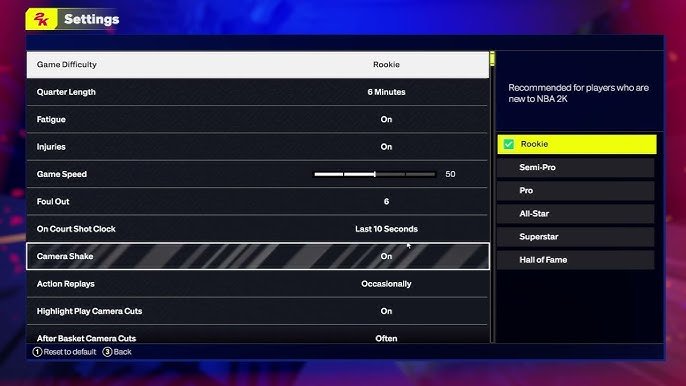
The NBA 2K25 difficulty settings range from Rookie for beginners to Hall of Fame for experienced players, each impacting gameplay significantly.
Finding the right challenge in NBA 2K25 is essential for a great gaming experience. The various NBA 2K25 difficulty settings allow players to tailor the game to their skill level. Choosing wisely influences everything from opponent AI to shooting percentages.
From casual enjoyment to hardcore simulation, there’s a setting for everyone. This control helps keep the game engaging, whether you are new to basketball games or a seasoned pro. Adjusting these options will greatly enhance your gameplay.

NBA 2K25 Difficulty Settings: Finding Your Perfect Game
Getting the right challenge in NBA 2K25 is super important. It’s the difference between having a fun, exciting game and feeling totally frustrated or bored. Luckily, NBA 2K25 has many different difficulty settings you can choose from. Let’s explore all of them so you can pick the best one for you!
Understanding the Core Difficulty Levels
NBA 2K25 doesn’t just have one way to make the game harder or easier. It offers a range of difficulty levels that change how the computer, also called the AI, plays. These changes impact things like how well the AI shoots, defends, and even how often they make mistakes. Here’s a look at the main settings you’ll see:
Rookie
This is the easiest setting, perfect for players new to basketball games or those just getting used to NBA 2K25’s controls. On Rookie, the computer players aren’t very good. They often miss shots, make bad passes, and are easy to defend. This lets you practice your moves and get comfortable with the game without too much pressure. If you’re still learning the basics of dribbling, passing, and shooting, start here.
- Easy to score and get rebounds.
- Opponents make many mistakes.
- Good for beginners and practice.
Pro
Pro is a step up from Rookie. The AI opponents are a bit smarter and more skilled. They make fewer mistakes, shoot better, and defend a little harder. This setting is good if you want a game that’s not too easy, but not too hard either. It’s a comfortable level for most players who have played basketball games before.
- Moderate challenge.
- Opponents make fewer mistakes than on Rookie.
- Good for casual gameplay and learning more complex moves.
All-Star
All-Star mode is where things start to get challenging. The AI opponents are now quite skilled. They are better at shooting, making smart passes, and playing good defense. You’ll need to really focus and play well to win consistently on this level. It tests your skills, forcing you to use all the tools at your disposal to win the match. It’s the setting most players consider the base difficulty level.
- A definite step up in challenge.
- Opponents are skilled and smart.
- A good choice for players who want a fair and engaging game.
Superstar
Superstar is for players who are ready for a real challenge. The computer players are very good and barely make any mistakes. They shoot with precision, play tough defense, and run their offenses smoothly. You need a very good understanding of basketball strategy and the game’s controls to succeed here. You’ll have to play smart, anticipate their moves, and make few mistakes to win here.
- Challenging for experienced players.
- Very few errors from the opponents.
- Good for players who want a tough test.
Hall of Fame
Hall of Fame is the highest difficulty setting in NBA 2K25. The computer players are almost perfect on this setting. They are incredibly accurate when shooting, defend very tightly, and run their offenses like a well-oiled machine. Only the best players with expert knowledge of the game can win consistently on Hall of Fame. You will need to play your best basketball and be very strategic to come out on top here. Hall of Fame difficulty setting demands a lot of concentration, and makes little room for error.
- The hardest setting.
- Opponents play almost flawlessly.
- Good for skilled players who want a hardcore challenge.
How Difficulty Settings Affect Gameplay
Changing the difficulty level in NBA 2K25 doesn’t just make the AI players better or worse overall. It tweaks lots of specific things in the game. Here’s a breakdown of some of these gameplay elements:
Shooting Percentage
On easier levels, the computer will miss many shots, especially if they’re contested. As you increase the difficulty, the AI players become much more accurate. They’ll sink open shots consistently and even make tough, contested shots more often. You’ll need to defend very well to force them to take bad shots.
Defensive Intensity
On lower settings, the AI defense will be rather lax, allowing you to drive to the basket and score easily. On higher levels, they’ll play much tighter defense, making it harder to get to the rim and force you to make more difficult shots. They’ll also be quicker to steal the ball or block your shots.
AI Offensive Playcalling
On easier difficulty, the computer players will often make simple and predictable plays on offense. On higher settings, they will run more complex offensive strategies, move the ball more efficiently, and find open teammates for easy scores. You’ll need to adjust your defensive schemes to counter these changes.
Rebounding
On easier settings, the AI will not always fight hard for rebounds. On tougher settings, they’ll aggressively crash the boards, making it harder for you to get rebounds and secure possessions for your team. You’ll need to box out and use your players’ strength and positioning skills to get the ball.
Steals and Turnovers
The AI’s ability to make steals and force turnovers increases as the difficulty level goes up. On lower settings, they make some unforced errors. On higher levels, they will be very aggressive trying to steal the ball, and will take every opportunity to take the ball from you. You’ll need to be careful with the ball and make smart passes or you will likely turn it over.
Customizing Your Experience: Sliders
Beyond the main difficulty levels, NBA 2K25 also gives you a great deal of control through sliders. Sliders are settings that let you fine-tune different aspects of the game. You can adjust things like shot percentages, speed of the game, how often the AI will foul, and much more. This allows you to personalize your experience in a way that suits your preferences. You could make the CPU’s offense stronger and your defense weaker, or fine tune the game to be exactly how you like it.
How to Find and Use Sliders
Sliders are found in the game’s settings menu. You can find them in your game mode before a match begins. The game provides many categories for the sliders, so you can make very specific changes. These settings are not available in every game mode. You should check the settings of your specific mode before starting.
Some Key Sliders You Might Want to Adjust:
- Shooting Success: Makes it easier or harder to make shots for you and the computer.
- CPU Three Point Success: Controls how often the computer makes three-point shots.
- Steal Success: Sets how easy it is for the CPU and you to steal the ball.
- Rebounding Ability: Adjusts how many rebounds the CPU and you will get.
- Foul Frequency: Controls how often the CPU and you commit fouls.
Experiment with the sliders to find a setting that makes the game feel just right for you. Some people like a more realistic game, while others want more arcade-style gameplay with lots of scoring. It’s all up to you!
Choosing the Right Difficulty for Different Game Modes
It’s important to pick the right difficulty setting depending on what kind of game mode you’re playing. Different modes might require different approaches to difficulty. For example:
MyCAREER Mode
MyCAREER mode is where you create your own basketball player and take them through their career. Starting on lower difficulty settings (Rookie or Pro) might be good when you’re still trying to improve your player’s abilities. Once your player gets better, you’ll want to increase the difficulty (All-Star or Superstar) to get a better challenge and help your player grow.
MyTEAM Mode
MyTEAM mode allows you to build a team with different players, collect cards, and play against other teams. The difficulty level here depends on your goals. If you’re just trying to complete challenges and earn rewards, lower settings might be better. If you’re playing competitive games, you’ll want to increase the difficulty to improve your game.
Play Now Mode
Play Now mode is where you can choose any NBA team and play a quick game. The best difficulty setting depends on your experience and what you want from the game. If you’re new or want to relax, you can start at Pro or All-Star. If you want a challenge, you should select Superstar or Hall of Fame.
Tips for Adjusting Difficulty
Finding the perfect difficulty can take a little time and experimentation. Here are some tips to help you make the most of your game:
- Don’t be afraid to change the difficulty: Don’t think that you have to stick with one setting for the entire game. If you find the game is too easy, you can turn up the difficulty settings between games, and if it’s too hard, you can turn it down. It’s good to adjust the difficulty until you find a setting that is challenging but not frustrating.
- Try different sliders: Sliders let you really customize how the game feels. If you’re having trouble in one area, like shooting, you can adjust the sliders to make it easier or more challenging.
- Practice and learn: The more you play, the better you’ll get. Don’t get discouraged if you lose sometimes, especially on higher difficulties. Keep practicing and trying different things, and you’ll improve.
- Watch tutorials: There are many videos online that can help you understand the game better. These videos can show you how to improve your shooting, passing, and defense.
The difficulty settings in NBA 2K25 are very helpful. They give everyone the ability to play how they want to play. Whether you are brand new to basketball video games, or an expert, there are options to make the game enjoyable. Experimenting with the different settings will allow you to make the game fun and perfect for you. Don’t be afraid to try different things and adjust as you go, to have the best experience possible.
NBA 2K25: How to Change Game Difficulty
Final Thoughts
In summary, finding the right challenge is key to enjoying NBA 2K25. The various difficulty options offer something for every skill level, from casual players to hardcore simulation fans. Experimentation is important to find the sweet spot that makes gameplay engaging.
Adjusting NBA 2K25 difficulty settings lets you customize your experience fully. Remember to consider your own skill and desired game feel when choosing a setting. Each option impacts gameplay significantly.

