
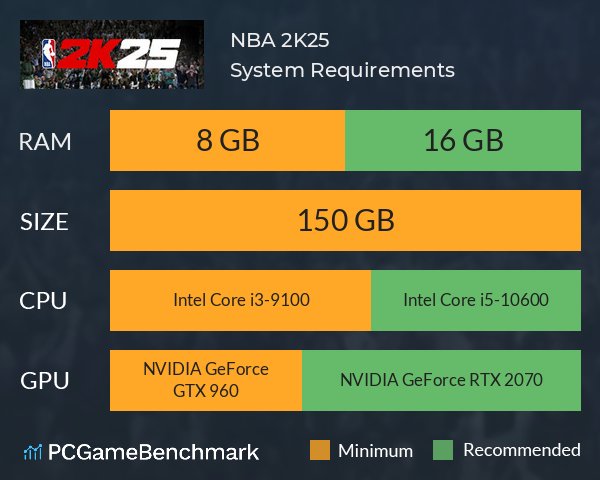
The target NBA 2K25 frame rate is 60 FPS on current-gen consoles and PC, aiming for a smooth and responsive gameplay experience.
The anticipation for NBA 2K25 is building, and one question on every gamer’s mind is about performance. Specifically, how well will it run? A stable and high NBA 2K25 frame rate is crucial for enjoying the fast-paced action of basketball.
Fluctuations in frame rate can disrupt the flow of the game. It is important for developers to focus on optimization to achieve that desired performance. Gamers are hoping for a consistent experience on all platforms.

NBA 2K25 Frame Rate: What You Need to Know
Okay, let’s talk about something super important for gamers playing NBA 2K25: frame rate. You might hear people talking about it, but what exactly is it and why should you care? Well, imagine watching a flipbook. If it has lots of pictures, the pages flip really quickly, and the animation looks smooth, right? That’s what a good frame rate does for your game. It makes the action on the court look fluid and responsive. A low frame rate, on the other hand, is like having fewer pages in your flipbook – things look choppy and jerky, and it’s not fun to play.
Understanding Frame Rate Basics
Think of frame rate like this: it’s how many pictures, or “frames,” your screen shows every second. We measure it in “frames per second,” or FPS. So, 60 FPS means your screen is showing 60 different pictures every second. The higher the FPS, the smoother the game looks and feels. When you see people talking about wanting “high frame rates” for gaming, this is what they mean. They want that smooth, seamless action!
Why Does Frame Rate Matter in NBA 2K25?
In a fast-paced game like NBA 2K25, frame rate is extra important. When you’re dribbling down the court, trying to make a quick pass, or pull off a fancy dunk, you need the game to respond right away. A low frame rate can cause delays between what you tell your controller to do and what happens on the screen. This can make it tough to time your shots, control your players, and even react to what’s happening. A higher frame rate provides a much smoother experience and allows for tighter controls. Think about those crucial moments when you’re trying to block a shot or steal the ball – a solid frame rate can be the difference between making the play and missing it completely. Simply put, better frame rate equals better gameplay.
Target Frame Rates for NBA 2K25
So, what kind of frame rates should you aim for when playing NBA 2K25? There are a few common benchmarks that are good to know:
- 30 FPS: This is often considered the bare minimum for a playable game on consoles. While it’s okay, it might not feel very smooth. You’ll notice the movements aren’t quite as fluid, and there might be some slight delays.
- 60 FPS: This is the sweet spot for most gamers. It makes the game look and feel much smoother and more responsive. Most modern consoles like the PlayStation 5 and Xbox Series X are targeted to achieve 60 FPS in NBA 2K25. This should give you a very enjoyable experience.
- 120 FPS or higher: If you have a gaming PC with a high-refresh-rate monitor (a monitor that can refresh its display multiple times per second), you might be able to push for even higher frame rates, like 120 FPS or even more. These higher frame rates offer a very smooth experience, but require powerful hardware.
Think of it like this: the more frames per second, the better the action will look, allowing you to see every move and animation in a very smooth way. While 30FPS can allow you to play the game, 60FPS is the preferred rate for most users.
Factors Affecting NBA 2K25 Frame Rate
Many things can impact your frame rate in NBA 2K25. Here are a few of the main ones:
Platform
The system you play NBA 2K25 on is a huge factor. For example:
- Consoles: PlayStation 5 and Xbox Series X/S usually aim for 60 FPS at 4K resolution. This means you will get a smooth looking game with lots of details. The older consoles like Playstation 4 and Xbox One may be locked at 30 FPS due to their hardware limitations.
- PC: PCs are a little different, as you can customize the settings. You can change them to prioritize the frame rate or detail. Depending on your computer’s parts, you could achieve very high frame rates or even struggle to get a decent 60 FPS.
Graphics Settings
The graphics settings you choose in the game have a big effect on your frame rate. Here’s what to think about:
- Resolution: Running the game at higher resolutions, like 4K, means the game needs to render more details, which can lower your frame rate. Lowering the resolution to 1080p can help you get higher frame rates.
- Texture Quality: High-quality textures make the game look better, but they also use up more resources. Turning texture quality down can boost your frame rate, but at the expense of visual quality.
- Anti-aliasing: Anti-aliasing smooths out the edges of objects to make the game look less jagged. It’s a great effect, but it also takes a toll on performance. Turning it down or off can improve frame rate.
- Shadows and Lighting: Detailed shadows and advanced lighting add to the visuals, but require more processing power. Reducing the quality of these or disabling them can also help with frame rates.
Other Programs and Processes
Sometimes other things running on your computer or console can impact game performance:
- Background Apps: On your computer, having many programs or browser windows open while playing the game can make your frame rate drop. Closing unneeded programs can free up resources and improve your frame rate.
- Overheating: If your console or PC gets too hot, it might slow down to protect itself, which can lower your frame rate. Make sure your system has enough ventilation to keep things cool.
In-Game Factors
Sometimes, things within the game itself can cause frame rate fluctuations.
For example:
- Crowd Density: Having more people in the crowd might affect the frame rate of the game because the game has to draw each individual and their movement.
- Visual Effects: Complex effects like lots of lights, smoke, or other visual effects might also affect your frame rate in the game.
Optimizing NBA 2K25 Frame Rate
Okay, so what can you do to get better frame rates in NBA 2K25? Here are a few tips to help optimize your gameplay:
Adjusting Graphics Settings
Start by experimenting with the graphics settings in the game’s menu. Here’s a checklist of items to try:
- Lower Resolution: Try changing from 4K to 1080p. If your monitor has a low resolution, lower it in the game settings to get higher frames.
- Reduce Texture Quality: Lower the level of detail for textures. The difference between high and medium settings may not be that noticeable, and you might see a huge jump in FPS.
- Turn off Anti-aliasing: You can try turning this off completely or setting it to a lower setting.
- Adjust Shadows and Lighting: Reduce the quality of shadows and lighting, or turn off some of the advanced lighting settings for a boost in performance.
Try changing each one at a time and check if you get a higher frame rate. Doing them one by one is better than changing everything at once, because it’ll allow you to see the exact performance impact of each setting you change.
PC-Specific Optimizations
If you’re playing on a PC, you have a few extra things you can do to improve frame rate:
- Update Your Graphics Drivers: Make sure your graphics card drivers are up to date. This will give you the best performance for your card.
- Close Unnecessary Programs: Make sure you close extra programs when you start playing NBA 2K25, including background programs and browser windows.
- Use Gaming Mode: If you have it, enable gaming mode on Windows. This optimizes your computer for gaming.
Console Optimizations
If you’re playing on a console, there are a few things you can try too:
- Ensure Sufficient Ventilation: Be sure that your console has plenty of space around it so that it can cool itself and not overheat.
- Restart your console: Restarting your console can clear temporary files and improve its performance.
While not as customizable as PC settings, these steps can help give you the best performance your console can offer.
Monitor Refresh Rate and Frame Rate
A quick thing to check is that your monitor’s refresh rate matches your game’s frame rate. For example, if your game is running at 60 FPS but your monitor is set to 144Hz, your computer may be doing more work than is needed, and may not be optimized for the game that you are playing. If your monitor supports G-Sync or FreeSync, enable those to match the frame rate of your game.
Testing Your Frame Rate
Many games, including NBA 2K25, include a frame rate counter.
Here is how you can display the current frame rate:
- In-Game Counter: In the NBA 2K25 menu, you can usually find an option to display the current FPS on the screen while playing. Check your game settings and look for an option to show the current frames per second.
- Third-Party Software: If you are on PC, there are also third-party applications that you can use to display the current frame rate in any game. These include programs like NVIDIA GeForce Experience or MSI Afterburner.
By keeping an eye on your FPS counter, you can see the effect of any changes that you make in the settings to find the best frame rate for your system.
Frame Rate and Game Experience
At the end of the day, a good frame rate helps the game flow. When you see the ball bounce smoothly, the players move fluidly, and everything feels responsive, it improves the immersion. It makes the game look more real and feels more enjoyable, and you are more in control of your players. Conversely, a lower frame rate can cause the game to feel laggy and unresponsive, and make the game very frustrating to play.
Aiming for the highest frame rate you can achieve will lead to the best possible experience for you. By understanding what influences frame rate and taking steps to maximize yours, you can get the most enjoyment out of NBA 2K25.
Remember to experiment with different settings to find the best balance between visual quality and frame rate for your setup. Try to aim for 60 FPS or higher to get the best possible experience!
NBA 2K25 Fix Low FPS And Stutters
Final Thoughts
In short, maintaining a consistent and high NBA 2K25 frame rate is crucial for optimal gameplay. Fluctuations impact responsiveness and visual clarity. Gamers should explore settings and hardware configurations to achieve smooth performance.
Prioritizing graphics settings is very important. A balance between visual fidelity and frame rate ensures a better experience. Consider your monitor’s capabilities to maximize the potential of NBA 2K25 frame rate.

