
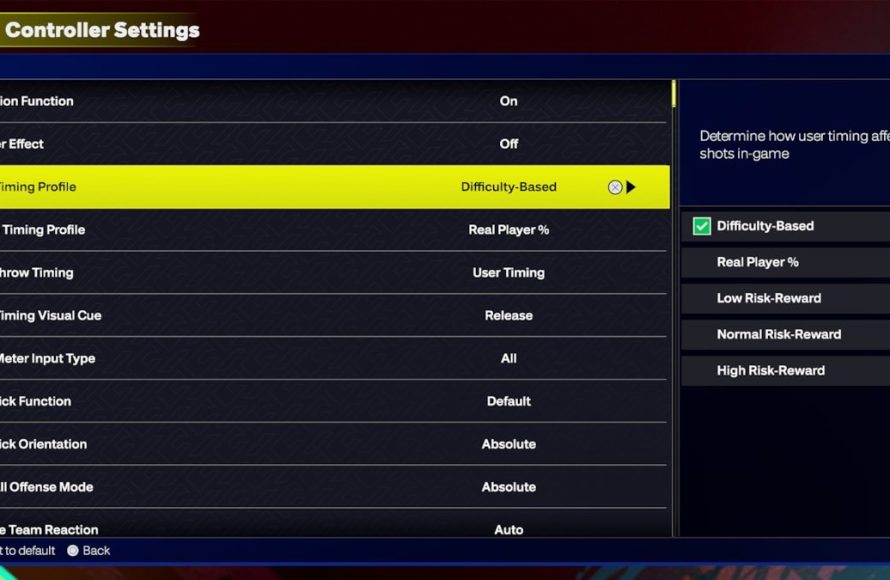
Gameplay preferences in NBA 2K25 include settings for difficulty, camera angles, controller vibration, and various visual assists.
Tuning your gameplay in the latest NBA 2K title is key to enjoying a truly custom experience. With a variety of settings, you can tailor the game to match your playstyle and skill level. Exploring all the NBA 2K25 gameplay preference options ensures that everyone can find their perfect configuration.
These game settings let you change everything from the game’s challenge to the visual feedback you receive while playing. This results in a much more engaging and personalized game session for each player. The right choice makes a big difference.

NBA 2K25 Gameplay Preference Options
Alright, basketball fans! Let’s dive deep into something super important for enjoying NBA 2K25: your gameplay preferences. This isn’t just about picking a team; it’s about making the game feel exactly how you want it to feel. Think of it like customizing your favorite pair of sneakers – you want them to fit just right, right? Well, that’s what we’re doing with NBA 2K25. We’ll go through all the different ways you can tweak the game to match your style. We’ll cover everything from how fast the game moves to how much help the computer gives you. Let’s get started!
Difficulty Settings: Finding Your Sweet Spot
One of the first things you’ll encounter is choosing a difficulty setting. This is crucial because it decides how challenging the game will be. NBA 2K25 offers several levels, and picking the right one can make a big difference in how much fun you have. Let’s break down what each setting usually means:
Rookie
Perfect for brand-new players or anyone who wants a super relaxed game.
The computer team is much easier to play against. They make more mistakes, so you have plenty of chances to score.
This mode is great for learning the basic controls and how the game works without getting too frustrated.
Pro
This is a step up from Rookie. It is still quite doable but offers a bit of a challenge for those already familiar with the basics.
The computer team plays a bit smarter and makes fewer silly mistakes, requiring more attention from you.
Good choice if you want to improve your skills without being overwhelmed.
All-Star
This is usually seen as the standard difficulty level. It provides a balanced challenge that should suit most players.
The computer AI is more competitive, making smart plays and forcing you to be sharper.
A good choice if you want a realistic experience without feeling like you are always on the brink of losing.
Superstar
Now things get really tough! This difficulty level is for seasoned players who crave a serious test of their abilities.
The computer team plays almost perfectly, with high intelligence and fewer mistakes.
You need to be good at every aspect of the game, such as shooting, passing, and defense, to win consistently here.
Hall of Fame
The hardest difficulty, often requiring great skill and knowledge of NBA 2K25’s mechanics.
The computer opponents are incredibly tough, exploiting any errors you make. Expect tight scores and intense games.
Only the most dedicated players often play at this level, as you need tons of precision and strategy to even compete.
Picking the right difficulty is very important. If you feel like you are winning all the time, maybe go up a level. If you’re getting beat often, going down a level can help you have more fun. Remember, there’s no shame in picking the level that works best for you, and you can always change it anytime.
Game Speed: Pacing Yourself
Another important area to adjust is game speed. This determines how quickly the action unfolds on the court, and finding the right pace makes a significant impact on the gameplay experience.
Slower Speeds
When you use slower game speed, it gives you more time to react to plays, set up shots, and make passes.
This mode is beneficial if you want to focus more on strategy and precision rather than fast reflexes.
Slower speeds can also make the game feel more like a real basketball game, which tends to be slower in pace.
Faster Speeds
Faster speeds inject a lot of pace to the action, which leads to more fast-break opportunities and quicker scoring.
This mode will keep you on the edge of your seat, as you will be required to make split-second decisions.
Some players might prefer this, as it gives a more action-packed experience.
Finding the game speed that works best for you is important. Experiment with different settings to find your sweet spot that matches your gameplay style and the level of intensity you prefer.
Controller Settings: Getting a Handle on Things
Your controller is your link to the court, so setting things up to your comfort is very important. NBA 2K25 provides options to customize your button layout and sensitivity to suit your preferences.
Button Mapping
Button mapping allows you to change the functions of your controller buttons.
If you do not like the default layout, you can change it so that the moves you use often are easier to perform.
For example, if you like to shoot with X instead of square or vice versa, you can easily swap them.
Sensitivity
Sensitivity settings change how responsive your controller is to your movements.
Higher sensitivity settings mean your player will react to even the slightest touch, which helps you execute quick movements and changes of direction.
Lower sensitivity will make the controls feel more relaxed, but it may not be suitable for players who need instant reactions.
Adjusting these settings will help you feel more comfortable, and it will also help you execute all the moves you want, when you want, easily. Experiment with different setups to see what feels best for you, and always keep in mind that a good controller setup can seriously affect your performance.
Gameplay Sliders: Fine-Tuning the Experience
Gameplay sliders are where you can get really specific about how the game behaves. These sliders adjust different aspects of the game mechanics, such as shooting percentages, rebounding rates, and foul frequencies. This gives you total control over the look and feel of the game.
Shooting Sliders
The shooting slider lets you change how easy or hard it is to make shots.
If you’re tired of missing open shots, you can increase the slider to make it a bit more forgiving.
If you’re a skilled player and looking for more challenge, you can lower the slider to make timing and precision matter more.
Rebounding Sliders
The rebounding sliders determine how often rebounds are contested and how likely it is that a player will get the ball.
If you want more of a struggle for boards, lowering the slider makes rebounding more challenging.
If you want less chaos in the paint, higher sliders will make the ball more predictable.
Fouls Sliders
The fouls sliders change how often the referee calls fouls during the game.
Increase it for more fouls and stricter gameplay.
If you like a less strict game, decrease it to keep the game flowing smoothly.
Other Sliders
There are many other sliders that affect player speed, steal success rate, passing accuracy, and more.
You can adjust all these sliders to your liking, so you can make your own custom game mode that suits your play style.
If you always play with friends, you can all decide on a common setup and have some fun playing the game on your terms.
Tweaking these sliders is a great way to create a custom gaming experience that fits your specific preferences, and that is why this is a great option in NBA 2K25. Take some time to experiment and find the settings that make the game feel the most fun for you.
Camera Angles: Seeing the Court Your Way
The camera angle you use can affect your gameplay in major ways. NBA 2K25 offers various camera views, each providing a different perspective on the action.
2K Cam
The default camera angle is the most commonly used.
It gives a good view of the entire court, and the perspective keeps changing while running up and down the court.
It’s a great all-around choice for most people.
Broadcast Camera
It feels like watching a real basketball game on television.
This angle can make the game feel more immersive.
This is ideal for players who prefer a more cinematic experience.
Side Camera
This puts the camera on the side of the court and allows you to see all the players.
This can help players to better understand spacing and offensive setup.
This angle helps you to anticipate movements on the court.
Other Camera Options
The game also has other options, like zoom options, and you can customize height and angles for better personalization.
Experiment with different camera settings to see what view works best for you.
You might find a new camera angle that totally improves your game.
Finding the right camera angle is a matter of personal preference, and the right one will make your gaming sessions more enjoyable and easier to manage. Try them all out and see which angle gives you the best view of the action, so that you are never left confused on the court.
Offense and Defense Settings: Tailoring Your Tactics
NBA 2K25 allows you to customize both offensive and defensive strategies. These settings help you fine-tune how your team performs on the court.
Offensive Playcalling
This is the way that the game picks the plays for your team when you are on offense.
If you like to handle everything on your own, you can change these settings, so you don’t have the playcalling pop-ups on the screen.
If you want the system to call plays for you, you can change the settings and have different types of plays being called by the system.
Defensive Assistance
You can choose how much help the computer gives you on defense.
If you like to control all of your defensive player’s actions, you can turn these settings off.
If you want more help on defense, you can turn it on, and the computer will provide you assistance in keeping up with the opponent player.
By fine-tuning these settings, you can make sure the game is playing exactly the way you like. You will be able to create your custom setup and style for both offense and defense, so you can implement your game plan.
MyCAREER Customization: Making Your Mark
MyCAREER is a popular mode, and NBA 2K25 allows you to customize the experience in many ways. From player builds to difficulty settings within the mode, there’s a lot to explore.
Player Builds
This is where you get to make your custom player in the game.
You can choose your position, height, weight, and skill sets to create a custom character that matches your play style.
You have a lot of freedom here. For example, you can create a tall player that can shoot from far, or a smaller player that is very athletic and can easily drive to the rim.
Difficulty Adjustments
You can also adjust the difficulty level in MyCAREER.
You might want a more challenging experience when playing NBA teams, or you might want to keep it easy when playing in parks.
This will help you make the MyCAREER mode exactly how you want to experience it, on your own terms.
Badges
You also get to choose what badges you want to use.
These badges allow you to improve your character’s attributes and abilities.
With various combinations, this will enhance your gameplay experience.
By customizing all these aspects of the MyCAREER mode, you will be able to fully immerse yourself in the game and live your virtual basketball dream.
Accessibility Options: For Everyone
NBA 2K25 also includes several accessibility options that make the game better to play for everyone. These settings are designed to assist players with different needs.
Colorblind Mode
This feature changes the colors in the game to make it easier for people who have colorblindness to see everything more clearly.
This helps them to see things as intended and will help them have a better gaming experience overall.
Audio Options
You can adjust audio levels for different game sounds, such as crowds, commentary, and in-game effects.
This lets you make sure you hear what you need to hear, and you can adjust things according to your own needs and preferences.
Subtitles and Text Options
You can turn on subtitles for commentary and other in-game dialogue.
You can also adjust the text size so it’s easier to read on your screen.
Making these options available makes NBA 2K25 more inclusive, and it allows all players to enjoy the game, and they are a very good inclusion by the game developer.
So, there you have it! NBA 2K25 is packed with options that let you fine-tune almost every part of the game. From choosing the right difficulty and speed to adjusting camera angles and controller settings, you have all the tools to make the game perfectly suited to your preferences. Remember, there’s no single “right” way to play—it’s all about discovering what works best for you. Don’t be afraid to explore the settings, experiment, and find the combination that makes you want to keep coming back for more. Now go out there and dominate the court, your way!
BEST DEFENSIVE SETTINGS & HOW TO SAVE THEM IN NBA 2K25!
Final Thoughts
Ultimately, your enjoyment hinges on tailoring the game. Experiment with various sliders and settings to find your sweet spot. NBA 2K25 gameplay preference options offer significant control.
Adjusting the difficulty, speed, and player tendencies affects the experience greatly. This customization lets players create a personalized simulation. These choices contribute immensely to the feel.
Don’t be afraid to make frequent adjustments. Understanding these preferences is key to getting the most out of NBA 2K25.

