
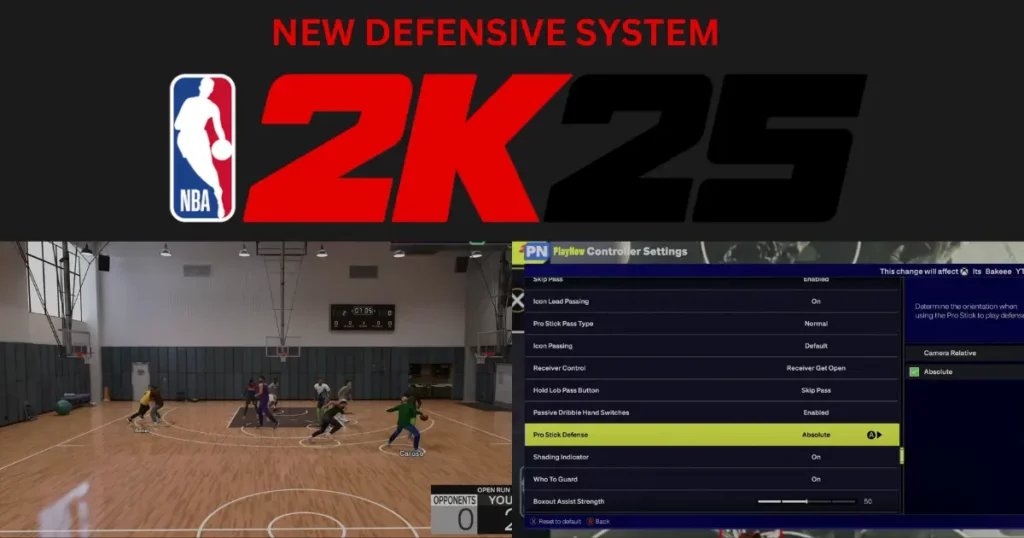
The NBA 2K25 in game assistance system provides players with real-time tips and guidance on controls, strategies, and game mechanics, helping both newcomers and experienced players improve their gameplay.
Ever felt lost on the virtual court, wishing for a little guidance? NBA 2K25 in game assistance system is designed to provide just that. It’s like having a coach whispering tips right into your ears.
This system offers help with everything from basic dribbling to complex offensive strategies. So, players of all skill levels benefit from this new and improved system. It allows a smoother learning experience for every player.

NBA 2K25 In-Game Assistance System: Your Guide to Basketball Brilliance
Okay, so you’re excited about NBA 2K25, right? You’re probably dreaming about making those amazing dunks, nailing those three-pointers, and leading your team to victory. But sometimes, things on the virtual court can get a bit tricky. That’s where the in-game assistance system steps in, like a friendly coach always ready to give you a hand. It’s designed to help both newbies and seasoned players have a more enjoyable and successful experience.
What is In-Game Assistance?
Imagine you’re learning to ride a bike. At first, you might need training wheels to keep you steady, right? Think of in-game assistance as those training wheels for NBA 2K25. It’s a set of features and tools built into the game to help you understand the controls, improve your gameplay, and become a better digital basketball player. These assists can affect everything from how your player moves to how you shoot, pass, and defend.
Types of Assistance Available
The assistance system isn’t just one big switch; it’s made up of lots of different helpful tools. Let’s look at some of the most important ones:
- Shot Aiming: This helps you shoot with better accuracy. You can choose to have the game give you a visual cue or even adjust the timing of your shots for you.
- Pass Assistance: This is all about making sure your passes go where you want them to go. It can help you choose the right player and make sure the ball gets there.
- Movement Assistance: It can make it easier to control your player on the court. This can include things like auto-sprint and automatic dribbling moves.
- Defensive Assistance: It can help you stay in front of your opponents and even steal the ball.
- On-Screen Display Tips: The game also uses text tips and visual cues on the screen to guide you. This can range from suggestions about offensive play calls to pointing out open teammates.
How Assistance Affects Your Gameplay
The cool thing about the assistance system is that it’s not one size fits all. You can adjust each type of assistance to suit your own skill level and playstyle. If you’re new to the game, you might choose to turn on all the assists to get you comfortable. As you get better, you can start turning some of them off to give yourself more control over the action.
Assistance Levels: Finding Your Sweet Spot
Most of the different assistance features come with adjustable levels like low, medium, and high. This allows you to fine-tune how much help you get. If you’re feeling like a basketball pro, you can lower assistance levels, but if you’re just starting, you might want to keep them higher until you get a feel for the game.
Detailed Look at Specific Assistance Features
Shot Aiming in Depth
Let’s take a closer look at shot aiming. The system often gives you a timing bar to help you know when to release the shot button to achieve the best accuracy. When the meter is full you’ll have a higher chance of making your shot. Some players find this system very useful, while others prefer to shoot purely based on their own rhythm. NBA 2K25 lets you switch to a setting where your success depends on timing and your player’s skill stats. You can practice your shot timing using the practice modes provided by the game. These modes allow you to fine-tune your shooting mechanics.
Pass Assistance: A Closer Inspection
Pass assistance is more than just pointing the stick in a direction. It can help you choose the optimal pass type and lead your teammate. High-level pass assist will automatically choose the best recipient of your pass and anticipate where you need to send the ball to put your teammate in the position to score. Lower levels will give you more freedom to choose your passing lanes, which will give you an increased amount of control. This can be perfect for advanced players who know where they want the ball to go, and how to get it there.
Movement Assistance: Fine-Tuning Your Court Control
When we talk about movement assistance, we’re talking about how the game can help you move and dribble effectively. Here’s a breakdown of the primary features within this category:
- Auto-Sprint: This feature allows your player to move at a constant running speed without you having to continuously press the sprint button. This can be quite handy for beginners who find it hard to keep a steady pace.
- Auto-Dribble Moves: This assistance enables your player to perform dribbling moves automatically. You will still need to point the stick in a direction, but some moves will be performed automatically by the game to help you navigate the defense.
- Contextual Movement: This is a more complex type of movement assistance which lets your player move more intuitively with the ball in their hands, and perform moves based on where you’re on the court, in relation to other players.
The key here is to find a balance between assistance and control. If you use too much assistance, you could feel like you’re not in charge, and might find that the game is making decisions you wouldn’t have. If you turn assistance off too soon, you might find yourself unable to keep up with the opposition and lose the ball too often.
Defensive Assistance: Making a Stop
On the defensive end, assistance comes in handy to help you stay in front of the ball handler, and attempt to make a steal. The defensive assistance system can do a couple of important things:
- Automatic Positioning: The system can automatically move your player so they’re in a good position to guard the player with the ball. It can help you stay close to the opposing player and keep them from making a driving move to the basket.
- Steal Attempts: The game can also assist with stealing, by performing steal attempts when you’re in a good position to do so, without you having to press the steal button.
Again, balancing these assists is key. Too much assistance may not give you the opportunities you need to get your hands on the ball. Less assistance may find you on the wrong side of the opposition.
Why Use In-Game Assistance?
So, why should you even bother with the in-game assistance system? Here are a few compelling reasons:
- Learning the Ropes: If you’re new to basketball games or even just new to the NBA 2K series, assistance can be like having a personal tutor, guiding you through the different controls and gameplay mechanics.
- Improving Your Skills: Assistance can help you focus on key parts of the game, so you can learn to improve.
- Enjoying the Game More: Let’s face it; losing all the time can get frustrating. Assistance can level the playing field, allowing you to have more fun.
- Adapting to New Challenges: Sometimes, you might want a more relaxed gameplay experience. Assistance allows you to enjoy the game even when you’re not playing at your best.
Customizing Your Assistance Settings
The best part about the assistance system is its customizability. You can dive into the game’s settings and adjust each feature to your liking. Here’s how you can get the most out of it:
- Experiment: Don’t be afraid to try different settings. Turn on some assists, turn off others, and see how it affects your gameplay.
- Start High, Go Low: If you’re unsure where to begin, turn on most assists at the highest level, then gradually lower them as you gain experience.
- Focus on Weaknesses: If you struggle with shooting, focus on the shot assistance settings. If passing is your weakness, work on those settings.
- Adjust Often: Your settings shouldn’t be set in stone. As you get better, keep tweaking the settings to match your growing skills.
The Long-Term Benefits of Using Assistance Features
While you may think using assistance features is only for beginners, the truth is that using these features smartly can benefit you in the long run. Here’s how:
- Deeper Understanding of the Game: By initially relying on assistance features, you can gain a solid understanding of the underlying mechanics of the game. This will help you develop a deeper appreciation for timing, spacing, and player roles.
- Faster Improvement: You will improve quicker when you don’t have to focus on every single aspect of the game at the same time. You can use the assistance features as a crutch initially, and then slowly fine-tune them until you’re in control of all elements of gameplay.
- Ability to Compete at Higher Levels: By mastering the basic mechanics through assistance features, you can move on to more advanced strategies and playstyles, which will allow you to compete at higher levels.
Assistance: A Tool, Not a Crutch
It’s important to remember that in-game assistance features should be seen as a tool, not a crutch. They’re there to help you learn, improve, and enjoy the game more. You don’t have to rely on them forever. As you grow your skills, you can always decide to turn them off and rely purely on your own ability. The game gives you the freedom to make this decision at any point in your player journey.
The Future of In-Game Assistance
As video game technology continues to improve, we can expect to see even more ways that in-game assistance can be implemented. Perhaps we’ll see AI-powered coaching systems, that will learn your individual weaknesses and provide you with customized drills to help you improve. We can also expect a more refined game experience, that will offer even greater flexibility in the level of assistance provided by the game.
How to Find Your Perfect Assistance Setup
Finding your perfect assistance setup is like finding the perfect pair of shoes – it takes a little trial and error. Here are some simple guidelines to help you get started:
- Start with the Basics: Begin by enabling all the basic assists. This is particularly useful if you’re a brand new player.
- Adjust Gradually: Once you’re comfortable, gradually reduce the assistance on features that you feel you’re ready to master without help.
- Pay Attention to Feedback: Take the time to observe how the game responds to your control inputs, and how effective the different assistance features are.
- Practice in Different Modes: Experiment with different assistance levels in various game modes, such as the practice mode and quick play options.
In the end, the in-game assistance system in NBA 2K25 is designed to make the game more accessible and enjoyable for everyone, no matter your skill level. It’s a great tool for both new players and veterans, allowing you to fine-tune your playing experience. By experimenting with the different settings, you’ll find the perfect balance of challenge and support to get the most out of your virtual basketball adventure. It’s all about finding what works best for you and having fun on the court.
5 SECRET Settings That You NEED To Use In NBA 2K25
Final Thoughts
The improvements to the ‘NBA 2K25 in game assistance system’ provide a more intuitive and user-friendly experience. Players will find help with play calling and various gameplay mechanics. The system offers real-time tips, making it easier to adapt to game situations. This guidance allows both new and experienced players to maximize their potential.
The system aims to make the game more accessible by offering a good learning curve. New features in ‘NBA 2K25 in game assistance system’ include better training modes. Overall, it supports players who want to improve their gameplay.

