
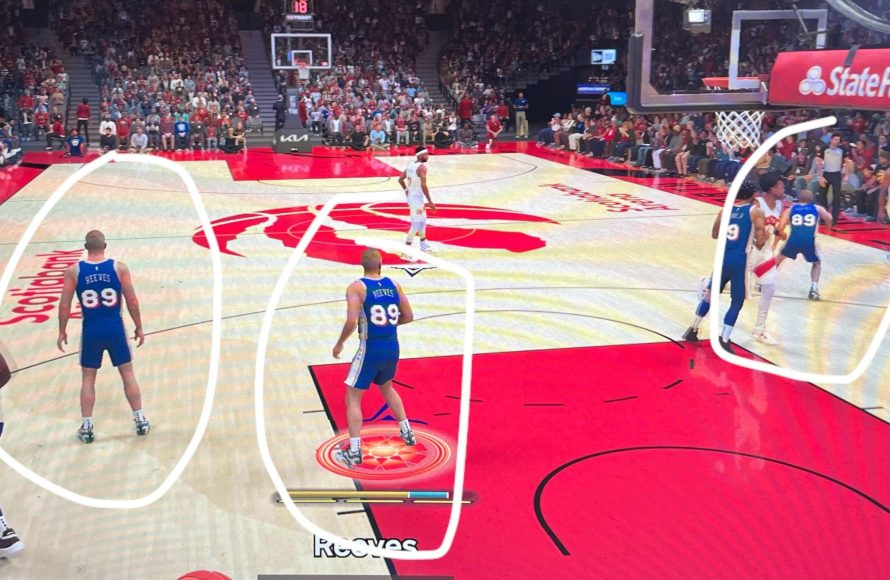
Report NBA 2K25 issues directly through the in-game support system or the 2K support website, providing detailed descriptions and screenshots/videos if possible.
Experiencing glitches or bugs in the latest NBA 2K installment is frustrating, but it’s important to know how to properly report them. This helps developers fix problems quickly. Knowing the correct process for NBA 2K25 issue reporting can save you and other players time.
The quicker you provide precise details, the faster 2K can address these issues in future patches. Let’s make the game better by making reporting clear and effective for everyone.

NBA 2K25 Issue Reporting: Your Guide to a Smoother Game
Alright, hoops fans! We all love sinking those three-pointers and making highlight-reel dunks in NBA 2K. But sometimes, things don’t go as smoothly as we’d like. Maybe your player gets stuck in the middle of the court, or the game freezes right before you’re about to win. That’s where issue reporting comes in. It’s how we tell the game developers, 2K, about the problems so they can fix them and make the game better for everyone. This article is your go-to guide for understanding how to report issues in NBA 2K25, ensuring a better gaming experience for everyone.
Why Reporting Issues is Super Important
Think of issue reporting like being a detective. When you spot something wrong in the game, you’re giving the game makers clues to find the problem. These clues help them find out what’s causing these glitches and hiccups. Without these reports, it’s tough for 2K to know what needs fixing. Reporting bugs is vital for several reasons:
- Fixes Problems: By letting the developers know about issues, they can create patches and updates that will fix them for everyone.
- Improves the Game: Reporting issues means that, over time, NBA 2K25 will become a more enjoyable and playable experience.
- Helps the Community: You’re not just helping yourself. Your reports help other players who might be facing the same problems.
- Faster Solutions: When more people report similar issues, 2K can better prioritize what needs immediate attention.
Types of Issues You Might Encounter
NBA 2K25, just like any game, can sometimes have problems. It’s good to know what kinds of issues you might come across. Here are some of the common ones:
Gameplay Glitches
These are problems that happen while you’re playing the game itself. They can be really annoying and affect your ability to play properly. Examples include:
- Players getting stuck in animations or on the court
- The ball passing through players or objects
- Unexpected actions by AI players
- Incorrect referee calls or violations
- Issues with dribbling or shooting mechanics
Visual Bugs
These are issues that affect how the game looks. They might not make the game unplayable, but they can still be frustrating. Common visual bugs are:
- Textures that don’t load properly
- Graphics flickering or glitching
- Characters looking distorted or weird
- Problems with lighting or shadows
- User interface elements disappearing or overlapping
Connectivity Problems
If you play online, you might face connectivity problems that stop you from playing or connecting with other players. Some examples include:
- Getting disconnected from online matches
- Difficulty connecting to the game servers
- High ping or lag during gameplay
- Problems with matchmaking and finding games
- Errors when trying to join a party or invite friends
Audio Issues
Sound problems can be just as frustrating as visual bugs. You might experience the following:
- Sound effects missing or distorted
- Music not playing correctly
- Commentary not synching with the game
- Audio cutting out or being too loud or quiet
- Problems with voice chat or communication with other players
Game Crashes and Freezes
Perhaps one of the most annoying issues is when the game crashes or freezes. This can happen at any time, and can be quite upsetting. It’s important to report these so 2K can fix the causes. Here are some symptoms:
- The game suddenly closing without warning
- The game freezing and not responding to commands
- Error messages appearing that stop the game
- The game getting stuck on a loading screen
MyCAREER or MyTEAM Issues
If you’re big on MyCAREER or MyTEAM, you might run into specific issues in those modes. These could include:
- Problems with earning or spending Virtual Currency (VC)
- Bugs in the MyCAREER story or progression
- Issues with buying and selling players in MyTEAM
- Problems with challenges or rewards not working
- Glitchy or broken menus in the mode
How to Report an Issue in NBA 2K25
Alright, so you’ve spotted an issue – what do you do next? Reporting problems in NBA 2K25 is typically done through the game’s support system or dedicated reporting channels. Here’s a breakdown of how you can do it:
Using the In-Game Support System
Many times, NBA 2K games will have an option built right into the game to report issues. This is often the easiest way to send information directly to 2K. Here’s what to typically look for:
- Open the Main Menu: Start your game and go to the main menu screen.
- Find the Support or Options Section: Look for settings, options, or support section in the menu. It might be labelled as ‘Support’, ‘Help’, ‘Settings’, or something similar.
- Locate the Issue Reporting Option: Inside this section, you should see an option related to reporting issues or submitting tickets.
- Fill out the Form: When you click this, you’ll probably see a form or an interface to report the problem. You will need to provide details.
Here’s what to include when filling out the issue report:
- Platform: (e.g., PlayStation 5, Xbox Series X/S, PC).
- Game Mode: Which game mode were you playing when the problem happened? (e.g., MyCAREER, MyTEAM, Play Now)
- Description of the Problem: Describe what happened. Be as detailed as possible.
- Steps to Reproduce: If you know what actions caused the issue, explain them clearly. This will help the developers re-create the issue.
- Screenshots or Videos: If possible, include screenshots or video recordings of the issue. These will be much helpful for the development team.
Using the 2K Support Website
If you can’t find an in-game option, you can always go directly to the 2K Support website. Here’s how:
- Go to the 2K Support Website: Open your browser and go to the official 2K Support website. You can find the link easily by searching “2K Support” on Google or any search engine you prefer.
- Find the NBA 2K Section: Locate the section for NBA 2K25 within the support area.
- Submit a Ticket: Look for the option to “Submit a Ticket” or “Contact Us.”
- Fill out the Form: Fill out all details with as much information as possible, including all details that were given in the section above on ‘Using the In-Game Support System’.
The 2K support site will often have a ticketing system that allows you to track the status of the issue you reported. This can be very useful because you can receive email notifications regarding any updates.
Using Social Media Channels
While it’s not the best official method to report an issue, letting 2K know on social media can sometimes be helpful. You can do this by:
- Tweeting to 2K Support: Use Twitter and tag the official NBA 2K Support account. Explain your issue and maybe include a screenshot or video.
- Posting on Forums: Go to the official NBA 2K forums. Look for the section for bug reporting or technical support. There will often be an area where you can post your issues.
- Checking Reddit Communities: There are some Reddit communities for NBA 2K, like r/NBA2K. You can see if others are experiencing your issue or have reported it already.
Keep in mind that while social media and forums can be useful for getting attention, it may not be as effective as using the official in-game support or the 2K support website. The official channels are typically the best way to ensure your issue is properly logged and resolved.
Important Things to Keep in Mind When Reporting
When you report an issue, there are some things you should remember to make the process more effective. Keeping these things in mind helps everyone get the problems fixed quicker.
Be Clear and Specific
When describing the issue, try to be as clear and specific as possible. Don’t just say “the game is glitchy.” Try to explain exactly what you were doing, where the problem happened, and what you saw. For example, instead of saying “the game lagged”, say “My player lagged when dribbling on the right side of the court in the MyCareer mode, making it impossible to make a crossover move.”
Provide Details
The more details you give, the better. Things like your platform, game mode, date and time when it happened, and all these details can really help 2K in fixing problems. If you know the steps to recreate the issue, write them out. The developers often try to repeat the steps exactly to find the issue.
Be Polite and Patient
It’s good to be patient when dealing with any support team. 2K developers are working hard to fix problems. Being polite and respectful will likely help them understand your problem and address it faster. Try not to write in all caps or use rude language, as this will not be helpful.
Include Media If You Can
If you can, take screenshots or videos of the issue. These visual aids will be helpful for the developers to see what the problem looks like, making it easier to understand. If it’s an animation problem, they will see exactly what animation is glitching. You can usually attach media files when you report a problem on the official support website or during the in-game reporting system.
Check for Updates First
Before you go through the process of reporting an issue, it’s always a good idea to check to see if there are any updates for NBA 2K25. Sometimes, developers fix problems in updates. If the issue has already been addressed in an update, you won’t need to report it. Make sure you update your game to the most recent version.
Search for Similar Issues
Before you report an issue, it is worth searching to see if anyone else has reported the same problem. You may be able to find a solution or workaround already or you might find a similar report that you can add more information to.
What Happens After You Report an Issue?
After you report an issue, you’re likely wondering what will happen next. While the exact process can vary, here’s a general idea of what to expect:
Ticket Confirmation
After you submit a report, you’ll usually receive some sort of confirmation. It might be a confirmation number, an email, or an in-game message. Keep this ticket or confirmation number. It will help you keep track of your issue. It’s also useful if you need to contact support again about the same problem.
Investigation
The 2K team will review the reports that are submitted. If your report is clear and well-documented, it can help developers quickly understand the issue. Depending on the severity and how many people are reporting it, they will classify the issue to solve it. If the problem is severe, the development team will likely try to fix it quickly.
Patch and Updates
Once they’ve identified the cause, the 2K team will work on creating a fix for it. The solution is usually part of a patch, update or in future versions of the game. When a patch is released, make sure you update your game as soon as possible to fix the issue.
Follow-Up
Sometimes, support agents will follow-up with you. This could be through email or a message. They might need more information or they may ask if the issue is resolved after a patch is released. It is important to keep an eye out for these communications.
Community Feedback
2K developers do read and use feedback from the community. If your issue is something that a lot of people are facing, they might make an official announcement about it, like on social media. They may also communicate updates to the fix, like when it is expected to be released.
Working Together
NBA 2K25 can be more enjoyable when we all work together to improve it. Reporting issues isn’t just about pointing out flaws, it’s about making the game better for the whole community. By reporting issues effectively, you’re helping developers squash bugs, resolve glitches, and ensure that everyone can enjoy the game at its best.
Remember, your voice matters. Each report, whether it’s a minor visual glitch or a game-breaking bug, contributes to a better NBA 2K experience. So, when you run into an issue, take a moment to report it. Your efforts will not only benefit yourself but also your fellow gamers.
How To Report Player & Get Them Banned NBA 2K25
Final Thoughts
Report game issues promptly through proper channels. Providing detailed information helps developers fix problems quickly. Accurate descriptions and, when possible, visual evidence greatly improve the effectiveness of issue reporting. NBA 2K25 issue reporting is essential to ensure a better gameplay experience.
Your participation improves the game for everyone. Use official forums or the designated support system. Remember every bug report is a step towards improved performance of NBA 2K25.

