
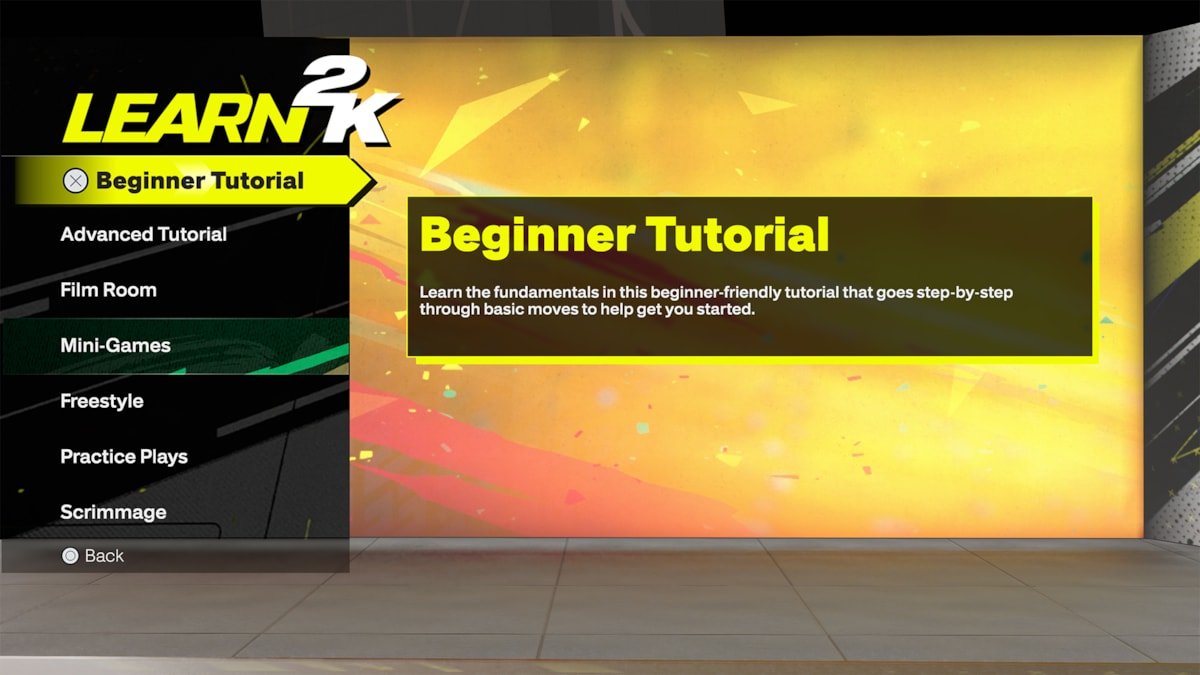
The NBA 2K25 menu system provides easy access to game modes, settings, and player customization through a redesigned, intuitive interface.
Navigating the game is essential, and the NBA 2K25 menu system overview is key to understanding your options. The developers have made some changes this year, aiming for a more user-friendly experience. It focuses on clarity and quick access.
You can expect to find all your favorite modes, like MyCareer and MyTeam, presented in a way that’s both visually appealing and easy to understand. Customizing your player and teams has also been made more straightforward. The changes aim for an efficient and enjoyable time within the game.

NBA 2K25 Menu System Overview
Alright, basketball fans! Let’s dive deep into the heart of NBA 2K25 – the menu system. Think of the menus as your control center, the place where you navigate everything from starting a quick game to building your very own basketball legend. It’s a lot to take in, so we’re going to break it down piece by piece, making sure you know exactly where to find everything. We’ll explore each section, from the main menu to the game modes, settings, and customization options. This isn’t just about clicking buttons; it’s about understanding the flow of the game and making the most of what NBA 2K25 has to offer.
The Main Menu: Your Launchpad
When you first fire up NBA 2K25, you’ll be greeted by the main menu. This is where your journey begins. It’s designed to be user-friendly, so you won’t get lost. Think of it as your home base. Here’s a quick rundown of what you’ll typically find:
- Play Now: This is the quickest way to jump into a game. You can choose a classic matchup between NBA teams, play online with friends, or participate in various quick play scenarios.
- MyCAREER: Ready to become an NBA superstar? This is where you create your player, navigate their career path, build your skills, and play games. It’s a deep story mode where your actions shape your destiny.
- MyTEAM: Card collecting fans, rejoice! This mode lets you build your dream team using player cards, and compete in challenges, and tournaments. It’s a strategy-focused mode with constant updates and new content.
- MyNBA: This area is for serious franchise players. You can manage teams, simulate seasons, control the roster, draft players, and many more. This is as close as you can get to being a real NBA GM.
- The W: This mode focuses on women’s basketball and allows you to create your own WNBA player, experiencing their professional journey.
- Options/Settings: This section is essential! Here, you can adjust gameplay settings, controller options, audio, visuals, and more to make the game feel just right for you.
- Features: This is where you’ll usually find extra modes or additional content that might come with game updates.
Each section has its own sub-menus, which we’ll explore further in the next segments. The main menu is all about getting you where you want to be quickly and efficiently.
Diving into the Game Modes
Let’s take a closer look at those exciting game modes. Each one offers a unique experience, so it’s worth knowing what each is all about.
Play Now
The ‘Play Now’ section is perfect for a quick basketball fix. No long-term commitments, just instant action. You’ll find a few different ways to jump in:
- Quick Game: Pick two NBA teams and get straight into the action. Choose your difficulty, customize the rules, and get ready to play!
- Online Quick Match: Test your skills against other players around the world. This is a great way to experience the thrill of competition and see how you measure up.
- Play with Friends: This lets you invite friends online or play with them in same room and battle it out.
MyCAREER: Living the NBA Dream
MyCAREER is where you take a custom-made player from obscurity to NBA stardom. It’s not just about playing games; it’s about building a character, making choices, and experiencing the highs and lows of a professional basketball career. The menu system within MyCAREER will lead you through your progress and make sure that you’re not missing anything.
- The City/Neighborhood: This is your central hub in MyCAREER. Here you will find quests, activities, stores, training areas and many more. Think of it as a bustling city that is full of life.
- MyPLAYER Menu: Everything about your player is here. You can upgrade your player stats, change your appearance, buy clothes and animations and check your progress.
- Quests: These are like story missions. They will drive your narrative and give you various rewards, and it’s essential to navigate the MyCAREER story.
- Social: You can keep track of your friends, find teammates for The City games, and receive the latest news.
MyTEAM: Building Your Dream Team
MyTEAM is the ultimate card-collecting mode. Here, you can acquire player cards, assemble your ultimate squad, and compete in different games. It’s a mode that rewards strategy, resource management, and skill. The MyTEAM menu system is complex, but it is made in a way that it’s easy to understand once you spend some time in it.
- Packs and Market: This is where you acquire new players, either by buying packs or from the auction market.
- Challenges: Complete various challenges and objectives to earn rewards like MT (MyTEAM Points), cards, and other items.
- Game Modes: MyTEAM has many ways to play. Play single-player matches, compete online, or participate in limited-time tournaments.
MyNBA: Taking Control of a Franchise
If you like the idea of being a General Manager, MyNBA is for you. This mode gives you complete control over an NBA team, allowing you to manage everything from player trades to team finances. This is a mode where you can take a team to success or completely destroy everything that they have. Menu system is very complex but it lets you navigate every aspect of NBA management.
- Team Management: This is the most important area of the mode. Here you’ll find things such as rosters, player contracts, trades, and so on.
- Season and Schedule: Here you manage your team’s schedule, see the standings, and progress through seasons.
- Draft: Scout college players, participate in the NBA Draft, and find future superstars for your team.
- League Settings: Adjust rules, difficulty, and other settings to create your ideal league experience.
The W: The WNBA Experience
The W is a specific mode that centers around the WNBA. This mode allows you to create a WNBA player, build a career, and experience the world of women’s basketball. The W’s menu lets you navigate this career easily.
- MyPLAYER: You can build your own WNBA player in this menu, improving attributes, and changing appearances.
- Career Progression: Manage your career, and track your progress, with this menu.
- League Play: Compete with other WNBA teams in exciting league games.
Options and Settings: Making It Your Own
The ‘Options/Settings’ area is where you fine-tune the game to match your preferences. This is the place to change anything from visual settings to the game settings.
Gameplay Settings
These settings have a direct impact on how the game feels. Experiment with these to find what works best for you. Here is what you can usually expect:
- Difficulty: Adjust the challenge of the game. Start with easier settings as you learn the game, then crank them up as you improve.
- Game Speed: Change the pace of the game to make it faster or slower.
- Camera Settings: Choose from a variety of camera angles. Finding the right view can make a big difference in your enjoyment.
- Controller Settings: Change button layouts. If you don’t like default settings, you can change everything here.
Visual Settings
These settings are all about how the game looks. You can tailor the visuals to fit your system’s capabilities and your visual tastes.
- Resolution: Pick the resolution that works best with your monitor or TV.
- Graphics Quality: Change the level of detail in the game. High settings make the game look great, but it can reduce performance, so choose what is best for your setup.
- Brightness: Adjust the brightness for visibility.
Audio Settings
Customize the game’s sound to your liking. Here are things you can control:
- Music Volume: Turn up or down the in-game music.
- Sound Effects Volume: Adjust the sound effects levels.
- Commentary Volume: Change the volume of the in-game commentary.
Customization Options: Adding Your Personal Touch
Beyond the main settings, NBA 2K25 also provides various customization options that allow you to add your own personal touch to the game. Here’s where you get to personalize and get creative.
Creating Your MyPLAYER
In MyCAREER, you get to build your very own basketball player. You can choose your player’s looks, attributes, and skills. This is a very personal journey for you, so make sure you choose wisely.
- Appearance: Choose the height, weight, hair style, facial features, and many other appearance settings.
- Archetype: Pick a specific playstyle for your player, such as a point guard, power forward, or center.
- Attributes: Improve your player’s skills, like shooting, dribbling, and defense.
Customizing Your MyTEAM
MyTEAM is all about building your dream team, and here are the ways that you can customize it.
- Team Branding: Choose your team’s logo, colors, and name.
- Player Cards: Collect your favorite NBA players and create your own dream team.
- Badges: Equip your players with badges to improve their gameplay.
Other Customization Features
The game provides even more ways to make things your own. Here are a couple of options that you can control.
- Controller Layout: Change the controller button mapping to your preferences.
- Presentation: Customize the way the game is presented, such as choosing different intro videos and camera angles.
This detailed look at the NBA 2K25 menu system should equip you to navigate the game confidently. The game’s menus are organized in a way that makes it easy for anyone to understand, allowing for a more enjoyable gaming experience. Now, get out there, explore all the menus, and start playing! You are now equipped with the basic knowledge and you’ll become better at it as you go.
NBA 2K25 is So Realistic😮💨
Final Thoughts
In conclusion, navigating the updated NBA 2K25 menu system appears straightforward with a focus on intuitive access. Players will find core modes and customization options quickly.
The menu prioritizes user-friendliness. Its design aims for less clutter and faster navigation. This improves the overall gaming experience.
Ultimately, the NBA 2K25 menu system overview provides a user-friendly design. It ensures a seamless experience for players to enjoy their gameplay.

