
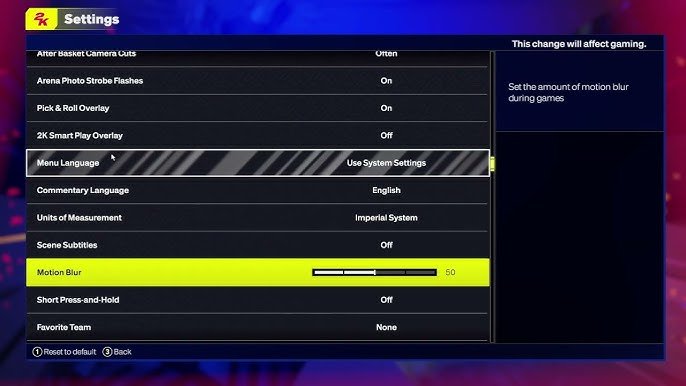
The NBA 2K25 menu system features a redesigned interface with improved navigation, making it easier to access game modes, settings, and online features.
Navigating through the menus of a sports game can sometimes feel like a chore, but not in NBA 2K25! The team has clearly put thought into making things more user-friendly. The NBA 2K25 menu system is one aspect that received a noticeable upgrade.
It feels quite intuitive now, making jumping between playing a quick match and fine-tuning player settings smoother than ever. It really gets you in the game faster.

NBA 2K25 Menu System: Your Gateway to the Game
The menu system in NBA 2K25 is like the control panel of a spaceship – it’s where you go to do pretty much everything! Whether you’re a seasoned pro or just starting your basketball journey, getting comfortable with the menus is super important. Think of it as your home base. From here, you can jump into a game, build your dream team, customize your player, and so much more. Let’s take a deep dive into all the things this menu system lets you do!
Main Menu: Your Starting Point
When you first start up NBA 2K25, you’ll be greeted by the main menu. This is the central hub that connects you to all areas of the game. It’s organized to make navigation easy, so you can quickly find what you’re looking for. Here’s a closer look at some of the key parts:
Play Now
Want to jump into a quick game? “Play Now” is your spot! It’s perfect for a casual game with friends on the couch, or if you want to practice your skills against the computer. It’s straightforward; pick your teams and get right into the action. You can choose from regular NBA teams or even classic squads featuring legendary players. This part is great when you want a simple pick up game.
MyCAREER
This is where your own unique basketball story unfolds. “MyCAREER” lets you create your own player, guiding him or her from a rookie to a superstar. You’ll manage your player’s career, play games, develop skills, and even make important choices off the court. It’s like stepping into the shoes of a real NBA player. You’ll see options to customize your player’s look, skill points, and even decide on endorsements and off-court activities. This part provides a very personalized experience.
MyTEAM
If you love building fantasy teams, then “MyTEAM” is for you! It allows you to collect player cards and create your ultimate dream squad. You can play games with your custom team and compete against other players online. There are different card packs to find, and you can even upgrade the cards of your favorite players. The challenge of creating the best team is very exciting and rewarding. This mode also has challenges and events that keep you engaged.
MyNBA
Are you a strategy master? “MyNBA” is where you control an entire franchise, not just one player. You act as the general manager, handling everything from trading players to making draft picks, and everything in between. You can try different approaches and see how they impact the team’s success. This is the mode for you if you are a dedicated NBA fan who enjoys strategy and building a team over many seasons.
The W
“The W” is a mode that focuses on the WNBA. You can create a player and experience the world of women’s professional basketball. This part gives you a chance to play in the WNBA, building your player’s career and trying to win championships, just like in MyCareer but for WNBA. It’s an important mode because it shines a light on talented female athletes, and it allows you to try a different basketball dynamic.
Online
If you’re looking to test your abilities against other players, the “Online” section is the place to be. You can engage in quick matches or dive into leagues where you can face off against opponents from all over the world. This is perfect for when you’re ready to show off your skills and compete in a global environment.
Settings Menu: Customize Your Game
The Settings menu is like your personal toolkit. It gives you options to tweak different parts of the game so it feels and plays exactly how you want it to. From audio to gameplay, there are lots of things to adjust.
Gameplay Settings
Here, you can fine-tune the way the game feels. You can change things like difficulty level, game speed, and even adjust the rules to fit your preferences. If you want a faster game, you can raise the game speed. If you are finding the game too easy, you can increase the difficulty. These settings let you customize your game to your liking and your level of expertise. There are settings for controller vibrations, shot aiming, and so much more.
Controller Settings
This area is all about how you use your controller. You can change button layouts, adjust analog stick sensitivity, and customize other controls. This helps you create a control scheme that suits your play style, whether you are an experienced gamer or a new player. It’s really useful to experiment to see what setup is most comfortable for you.
Audio Settings
The audio can be a big part of enjoying the game. In this section, you can turn the music up or down, adjust the sounds of the crowd, and set the volume of the commentators. If you want to focus more on the in-game action, you can lower the music. If you love the roar of the crowd, crank that volume up. There are lots of different parts to customize to make the audio feel right for you.
Video Settings
If you’re on a PC or a console, this section lets you optimize the visuals. You can adjust resolution, brightness, and other visual settings to achieve the best image for your screen. Finding the right balance can improve your game experience, especially if your screen is not optimized for games. It allows you to get the best graphics and performance from your hardware.
Accessibility Settings
These settings are here to make the game more enjoyable for everyone. There are different options such as text-to-speech, colorblind modes, and controller remapping to ensure all players can enjoy the game. It is great that the game includes settings to make it accessible for a wide range of people, with a wide range of needs.
Navigating the Menus: Tips and Tricks
Now that we have covered some of the main parts of the menu system, here are a few tips to make navigation easier:
- Use the Quick Menu: NBA 2K25 has a quick menu that allows you to jump to your most used parts of the game, instead of going to the main menu each time. It is really useful when you are playing and you need to go to other areas of the game fast.
- Learn the Shortcuts: Many menus have shortcuts you can use on the controller. For example, you might be able to quickly jump from one menu to another by pressing a certain button.
- Explore: Don’t be afraid to click around! The menu system is designed to be user-friendly, and you won’t break anything by exploring all the different options.
- Use the Search Function: Some menus have a search bar that can be very useful for finding specific settings or modes.
Why Understanding the Menu System is Important
Getting comfortable with the NBA 2K25 menu system is more than just about finding different game modes. It’s about being able to adjust the game to your exact liking. It’s about making your experience your own.
- Personalization: Knowing the menu system helps you tailor the game to your style, from the difficulty to the controls.
- Efficiency: You’ll save time and frustration by quickly accessing the modes and settings you need.
- Enjoyment: Ultimately, understanding the menus lets you fully engage with all of the exciting features NBA 2K25 has to offer.
Visual Examples: A Walkthrough
To help further explain things, let’s give you an idea of what the menus might look like (this may change slightly depending on the game).
Imagine you’re on the main menu. You’ll likely see a large, clear layout. Buttons for Play Now, MyCAREER, MyTEAM, and others will be big and easy to click on. You will see a visual representation for each game mode.
In MyCAREER, you might see a screen where your player is standing at the center, with menu options around them. You might see your stats, skill points, and even your social media feed, all in one place. The menu is designed to make it seem like a realistic, real-life experience.
In the Settings menu, you’ll likely find different categories neatly organized. For example, you might find gameplay options on the left, controller options in the middle, and audio/visual settings on the right. Each section is clearly labeled.
The Evolution of NBA 2K Menus
If you’ve played past NBA 2K games, you might notice that the menu system has improved over time. With each new version of the game, developers make the menus more user-friendly and intuitive. The goal is to make navigation as easy as possible so you can spend less time figuring things out and more time enjoying the game.
The menus have become less clunky and more streamlined. Older versions of NBA 2K may have had menus that felt crowded and confusing, while newer versions are designed to be clean, clear, and responsive. The developers are trying to make the whole game a more fun and accessible experience.
Newer versions of the game have also introduced things like the quick menu to make it faster to move around the menus. They listen to players’ feedback and consistently try to make the game more enjoyable through menu design.
Understanding the NBA 2K25 menu system is a key part of getting the most out of the game. By taking some time to get familiar with each part, you’ll be able to customize the game to your preferences and have a more enjoyable experience, every time you play. The main menu is your starting point, and the settings menu lets you make adjustments. Always remember the menus are your friend, making sure your game works the way you want it to.
5 SECRET Settings That You NEED To Use In NBA 2K25
Final Thoughts
Ultimately, the NBA 2K25 menu system offers a central hub for navigating the game. It grants easy access to various modes and settings. Players find a familiar layout with some potential improvements.
The design aims for efficient navigation. Users can quickly jump between game options. The experience, while mostly good, still has some space for adjustments. The NBA 2K25 menu system seems solid for the most part.

