
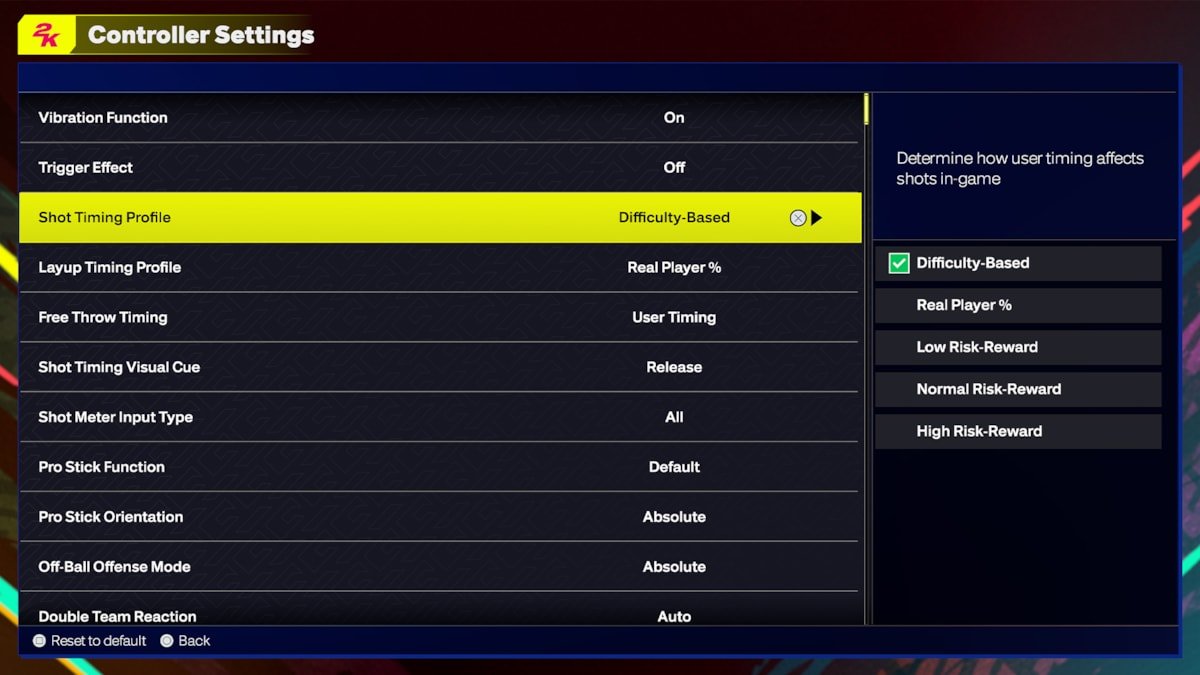
The NBA 2K25 user setting system allows players to customize gameplay, graphics, and audio options to suit their preferences, including difficulty levels and controller configurations.
Getting ready for the next big basketball season in your favorite game? Many players will soon want to understand the NBA 2K25 user setting system. This system gives you control over your gaming experience.
You can change how the game plays, looks, and sounds. Want a harder challenge? Change the difficulty. Need a different button layout? Adjust the controller settings.
The system provides detailed settings for a personalized game. It allows players to get the most enjoyment out of each session.

NBA 2K25 User Setting System
The world of NBA 2K is huge, and getting the game to feel just right for you is super important. That’s where the user setting system comes in. It’s like having a control panel that lets you tweak almost everything about how the game looks, sounds, and feels. NBA 2K25 builds upon previous games, offering more ways to personalize your experience. This year, the user setting system is all about giving players more choices and control, so everyone can play their best basketball. Let’s dive deep into what this system offers.
Customizing Your Gameplay Experience
NBA 2K25 offers a wide range of options to fine-tune your gameplay. This means you’re not stuck with a single way to play. You can change things to fit your style, whether you’re a casual player or a hardcore pro.
Difficulty Levels
First, let’s talk about difficulty levels. NBA 2K25 has several levels, ranging from very easy to incredibly challenging. If you’re new to the game, you might start with Rookie, where the computer opponents are easier to beat. As you get better, you can increase the challenge with Pro, All-Star, Superstar, or even Hall of Fame difficulty. The higher the difficulty, the smarter the computer players become, making it a real test of your skills. Choosing the correct difficulty setting is a must for enjoyable game sessions.
Game Speed
Another key setting is game speed. This controls how fast the players move on the court and how quickly the game flows. You can slow things down for a more realistic feel or speed it up for a fast-paced, action-packed game. Adjusting the game speed can have a large impact on how you approach the gameplay and how much you get from the game experience. A slower pace can be more strategic, whereas a faster pace is more frantic and requires quick reactions.
Controller Settings
How your controller responds is also customizable. NBA 2K25 lets you change which buttons do what. You can adjust dribble moves, shooting controls, passing options, and defensive actions. For example, if you prefer to shoot with the right stick instead of the square button, you can change that. This type of control helps you play more comfortably. You can also adjust the intensity of the controller’s vibrations. Some players prefer a very strong feedback, while others like less vibration.
Here are some examples of common controller customizations:
- Switch shooting controls from button to right stick.
- Change the buttons for specific dribble moves.
- Adjust sensitivity of analogue sticks for different precision.
- Customize defensive actions like steal or block.
Camera Angles
The camera angle plays a big part in how you see the game. NBA 2K25 comes with many different camera options, including broadcast-style views, sideline views, and even a close-up behind-the-player view. You can try them all and find the one that gives you the best view of the court. The right camera angle can greatly improve your visibility on the court and help you with precision and timing of your moves. Some camera angles might help with shooting, while others are better for defensive plays.
Visual Settings and Presentation
NBA 2K25 is not just about gameplay; it’s also about how the game looks. The visual settings can be adjusted to fit your system and your personal preferences.
Graphics Options
If you have a powerful gaming PC or console, you can crank up the graphics settings for the best visuals. This can involve details like higher resolution, better texture quality, and advanced lighting. However, if you have a less powerful system, you might need to lower the graphics settings to keep the game running smoothly. You can adjust shadows, reflections, antialiasing, and many other visual effects.
Here’s a quick breakdown of common graphics options:
- Resolution: The level of detail of the game. Higher resolution equals more crisp images, but requires a better hardware.
- Texture Quality: How detailed the surface of in-game objects appear.
- Shadows: The quality and detail of the shadows in the game.
- Anti-aliasing: Makes the edges of objects smoother.
- Lighting effects: How light interacts with objects.
Audio Settings
The sound in NBA 2K25 is more than background noise. It adds to the atmosphere of the game, from the roar of the crowd to the squeak of shoes on the court. You can adjust different sound levels to suit your taste. For example, you can turn up the crowd noise to make it feel like you are at a live game or lower it if you find it distracting. You can also adjust the volume of commentators, on-court sounds, and background music. If you have a high-quality sound system, it’s worth trying these settings to get the best audio experience.
Commentary Options
Speaking of commentators, you also have control over who you want to hear during the game. You can choose different commentator teams, or turn off commentary completely if you prefer the sounds of the game to be the focus. Some players prefer to listen to the commentators, who often add humor and insights, while other players like a more quiet gaming session, without the talking.
Presentation Settings
NBA 2K25 allows to fine-tune the game’s presentation. This involves things like the size of on-screen menus, the appearance of overlays, and how replays are displayed. You can decide what information you want to see on the screen during the game. Some might like to have lots of stats and graphics on screen, while others like a more clean interface. All these are adjustable under presentation settings. You can also adjust the brightness of your display for a comfortable gaming session.
MyCareer Customization
MyCareer mode is where you create your player and guide them to NBA stardom. You can personalize various aspects of your player, from how they look to how they play. The setting system plays a big part in this mode.
Player Appearance
You have a large number of options to make your player look unique. You can change their hairstyle, facial features, tattoos, and accessories. NBA 2K25 adds even more customization options this year, so you can really make your player stand out. The depth of customization options is something many players enjoy, because it lets players have a persona in the game. You can even make a caricature of yourself.
Player Badges
Badges add to your player’s abilities in specific areas. There are badges for shooting, dribbling, defending, and more. You can choose which badges your player should have, and as you play, you can get more. The way you spend your badge points has an impact on how your player will develop in career mode. Different badges can create different play styles, from being a dominant scorer to being a lock-down defender.
Player Archetype
When you create your player, you also pick their archetype, which determines their strengths and weaknesses. For example, you can choose to be a sharpshooter, a playmaking guard, or a defensive specialist. Your archetype has a major impact on how you approach the game and what positions you play effectively on the court. This is another important setting to consider when creating your MyCareer player.
Accessibility Settings
Accessibility is also a key part of the user setting system. NBA 2K25 makes sure that players of all abilities can have a good time.
Colorblind Mode
The game has settings for players who are colorblind, making it easier to distinguish colors on the court. This can help people who struggle to see different colors and makes the game more inclusive.
Subtitles
If you struggle to hear the game audio, you can use the subtitle settings to see the dialogue written on the screen. This can help especially with the commentary during the games and can help you understand what people are saying during your career cutscenes.
Button Remapping
If you have problems using the standard button layout, you can remap buttons to better fit your needs. This option lets you adapt the controls so you can enjoy the game in a way you find comfortable.
Advanced Settings
For the more experienced NBA 2K player, there are advanced setting options that can help fine-tune the game.
Controller Dead Zones
The controller dead zones setting allows you to adjust how sensitive your analog sticks are. This setting lets you customize how much you have to move the sticks before the game registers the movement. This setting can be helpful if you notice any drifting issues or if you want more precision in your controls.
Shot Meter Customization
You can adjust the shot meter to make shooting easier or more challenging. You can change the size, color, and position of the shot meter, which changes how you perceive it. You can also turn off the shot meter completely, if you want to rely on your own timing and skill instead.
AI Difficulty Sliders
For users who want to micro-manage their gameplay experience, AI Difficulty sliders offer a lot of control. These sliders allows you to tweak how well the AI operates in certain areas, such as their shooting ability, their defensive ability, and their playmaking tendencies. These sliders make it possible to customize the gameplay exactly to your preference, making the game either more challenging or more forgiving.
Saving and Sharing Settings
The game also has settings to manage your customized user settings.
Profile Settings
NBA 2K25 allows you to save multiple profiles for different setting configurations. This can be useful if you have multiple players who use the same system or if you like to switch between different kinds of game settings.
Cloud Saves
Your user settings are saved in the cloud, so you can access them from any console or PC where you are logged in to the game. This ensures you never lose your preferred settings, even if you change platforms or game systems.
The user setting system in NBA 2K25 is a powerful tool that gives players a lot of control over their experience. By exploring and adjusting these settings, you can make the game feel just right for you. The options allow for a diverse range of playstyles and ensures that NBA 2K25 is fun for everyone. Whether you are looking for the best possible graphics, easy to use controls, or want to make the game as challenging as possible, the user setting system offers a myriad of options. You can personalize everything from controller inputs to visuals. The wide-ranging customizations allow you to feel like your playing your style of basketball. You can make it your own. And with the ability to save and load setting profiles, you can switch between them on the fly. The settings system in NBA 2K25 is all about giving you the power to create the perfect basketball experience.
The comprehensive nature of these options guarantees that every player, no matter their skill level or personal preferences, can find a setup that maximizes their enjoyment of the game. It allows NBA 2K25 to be accessible and enjoyable for a wider range of players, and adds depth to the replay value of the game. Players can spend time experimenting with all the different settings to find what suits them best and keep coming back for more. The developers at 2K have certainly done a good job in offering such a wealth of options in their settings menu.
5 SECRET Settings That You NEED To Use In NBA 2K25
Final Thoughts
In short, the NBA 2K25 user setting system allows players to personalize their game. You can fine-tune various aspects to fit your play style. This level of customization can greatly enhance the overall experience.
Experimenting with different options is key to finding what works best for you. The game’s settings offer a significant advantage to those who take the time to explore them. This powerful system is a crucial part of NBA 2K25.

