
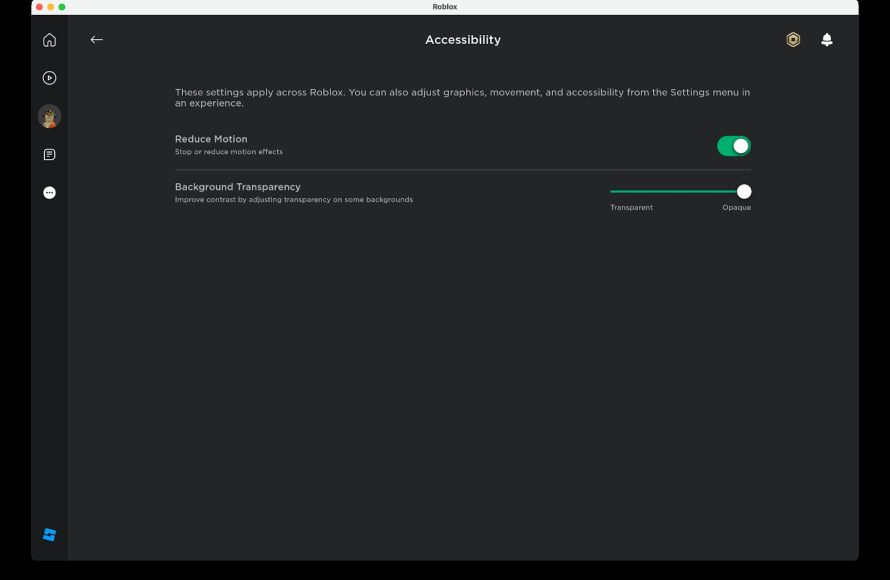
Roblox accessibility options for games
include features like adjustable text size, colorblind filters, and keyboard navigation to ensure a more inclusive gaming experience.
Do you ever wonder how everyone can enjoy the vibrant worlds of Roblox? It’s not just about the games themselves, but the tools that make them accessible to all. Roblox provides various ways to adapt gameplay for different needs.
These options make games easier to use for players with varying vision, hearing, or motor skill capabilities. Exploring these settings gives a chance for more players to enjoy. This makes the platform more welcoming and fun for everyone.

Roblox Accessibility Options for Games
Playing games is super fun, right? It’s even more fun when everyone can join in! Roblox is a place where you can create and play all kinds of amazing games. But what if some people find it tricky to see, hear, or use the controls the same way as others? That’s where accessibility options come in. These are special settings that help make games easier and more enjoyable for everyone. Let’s take a deep dive into how Roblox is working to make sure their platform is inclusive and caters to the diverse needs of its players.
Understanding Accessibility in Roblox
Accessibility means making sure that everyone, no matter their abilities, can use something. Think about it like this: if a playground has only really high swings, it’s not very accessible for kids who can’t reach them. The same idea applies to games. If a game is too hard for someone to see or control, it isn’t very accessible. Roblox has started to pay attention to this, and is constantly adding more features to help everyone have a good time. These features are not just helpful for people with disabilities. They are for anyone who has difficulties playing the game in its default state. That is why understanding the various accessibility features will be beneficial for everyone.
Why Accessibility Matters
Why should we care about making Roblox games accessible? It’s important because:
- It’s fair: Everyone should have the chance to play and have fun. Games shouldn’t leave anyone out.
- It’s more fun for everyone: When games are easier to use, more people can play, and that makes for bigger and more vibrant communities.
- It’s innovative: Thinking about accessibility can lead to new and better ways of designing games.
Roblox’s Built-in Accessibility Features
Roblox has some features baked right into the platform to help make gameplay more accommodating. These features can be found within the settings menu of the Roblox app or on the Roblox website. It’s always a good idea to become familiar with these global accessibility settings as these are available in every game that you play on the platform, regardless of the individual game. Let’s check out some of the most important ones:
Text Size and Scaling
Do you sometimes squint to read the words on the screen? That can be tiring! Roblox has options to change the size of the text in the game. You can make it bigger so it’s easier to see. This is important for people with visual difficulties and for playing on smaller screens.
Screen Reader Compatibility
A screen reader is a tool that reads the text on a computer or device out loud. This is super helpful for people who have trouble seeing the screen. Roblox is working to make sure that its interfaces and menus work well with screen readers. They are not perfectly compatible yet but the development team is constantly looking into improving it.
Keyboard Navigation
Some players may find it difficult to use a mouse or touch screen for navigation. Roblox lets you move and control things using just your keyboard. This helps players who may have limited mobility or other control-related difficulties. This is a critical feature for accessibility, and having an option for keyboard-only control can make a world of a difference.
Chat Filtering and Reporting
Roblox wants to make sure that players feel comfortable and secure. The platform has chat filters that prevent bad language and inappropriate messages from being displayed to younger players. They also provide an easy way for players to report other players who are not behaving appropriately. This kind of feature is important because it provides a safe online environment. It also contributes to the overall accessibility by creating an environment where everyone can participate without fear of being harassed.
Game-Specific Accessibility Features
While Roblox offers general accessibility options, game developers also play a big role in making their individual games accessible. Let’s take a look at some common features game creators can include:
Customizable Controls
Every game has its own control scheme, and sometimes these can be hard to use for some players. Game creators have the ability to allow players to customize their controls. They can change which keys do what. This feature can make the game more adaptable to individual player needs.
- Re-bindable keys: Changing the keys you press to jump, move, or use items.
- Adjustable sensitivities: Speeding up or slowing down how fast you move or turn.
Visual Aids and Options
Seeing is important in games, but games shouldn’t make it too difficult to see. Developers should think about players with different types of vision. Here are a few common accessibility adjustments:
- Colorblind Mode: Different color palettes are available for players who have trouble telling certain colors apart.
- High Contrast Options: Makes important things on the screen pop out more, so they’re easier to see.
- UI Scaling: Allows players to increase the size of the user interface (buttons, menus) so that the elements are easier to see.
- Reduced Visual Effects: Turns down the flashing lights and other distracting visual effects that can be hard to process.
Audio Options
Audio is a big part of the gaming experience. When it comes to players who cannot hear, or who have difficulty processing the game’s audio, game creators should try to make accommodations as follows:
- Subtitles and Captions: Puts the spoken words from the game in text form.
- Sound Effects Volume Control: Allows players to control the volume of certain sounds, such as music and dialogue.
- Visual Sound Indicators: This makes important sounds have a visual representation on screen for players with hearing difficulties.
Difficulty Settings
Games can be too easy or too hard. By adding difficulty options, game developers can create a range of game difficulty that appeals to various types of players.
- Easy mode: For players who just want to experience the story or enjoy the world.
- Normal mode: The intended challenge for the game.
- Hard mode: Provides an extra challenge for experienced players.
How to Find Accessibility Options in Roblox Games
Finding accessibility options can be a little different for each game, since they are often developed by different creators. Here are some tips on where to look:
- The Settings Menu: Look for a gear or settings icon. It’s usually in the corner of the game screen or in the main menu.
- Options or Preferences: In the settings, you’ll usually find a specific menu related to options or preferences. Accessibility will often be in here.
- Look for common words: When searching for accessibility options, look for keywords such as “accessibility,” “controls,” “audio,” or “visuals.”
Examples of Accessible Roblox Games
Some game creators in Roblox have gone the extra mile to make their games accessible. Let’s look at a few that have done a good job of this.
- Games with detailed tutorials: These games explain how to play the game clearly with text and pictures that can help players understand the game mechanics.
- Games with configurable controls: These games let players rebind keys and adjust sensitivity for movement and looking around.
- Games with various difficulty settings: These games give players a choice of difficulty, making sure that the challenge is appropriate to their playing style.
These examples show that thinking about accessibility can make for more enjoyable games for all players.
The Future of Accessibility in Roblox
Roblox is constantly evolving. More and more game creators are starting to understand the importance of accessibility and are making it a priority. Roblox is also investing resources in improving the accessibility of its platform. Here are some future enhancements we may be seeing:
- Better Screen Reader Support: More improvements in how screen readers interact with Roblox menus and in-game elements.
- More Customizable Settings: Even more options for controls, visuals, and audio, to fit a wider range of needs.
- Tools for Creators: Roblox providing more in-game tools that make it easier for game creators to build in accessibility options.
- Community Awareness: More information and support to encourage developers to create accessible games.
Why It’s Important to Advocate for Accessibility
Making games more accessible is a shared responsibility. As players, we can encourage game developers to include these options in their games by providing feedback and suggesting improvements. By spreading awareness and showing support for accessibility, we make the Roblox platform better for all players. We can all make a difference by:
- Giving feedback: If a game is hard to play, politely tell the developer why and offer suggestions.
- Supporting inclusive games: When you find a game that has good accessibility, show it some love.
- Being patient and understanding: Remember, creators are often working hard to make their games better.
When everyone does their part, we can make Roblox a more welcoming and fun space for everyone. The ultimate goal of accessibility is to provide every player with an equal opportunity to enjoy the games on the platform. By providing these options and showing support for accessibility, we can make playing games more enjoyable for everyone.
Ultimately, accessibility in Roblox games is about inclusion, fun, and opportunity. It’s about ensuring that everyone, regardless of their abilities, can participate in the virtual worlds that Roblox has to offer. By understanding and using the available accessibility options, you’re helping to make gaming more inclusive and enjoyable for everyone. Remember, a more accessible game is a better game for all.
Fix Roblox "This Experience is Unavailable Due to Your Account Settings" Error
Final Thoughts
In conclusion, utilizing Roblox accessibility options for games significantly enhances the experience for all players. Developers should prioritize implementing these features. This ensures everyone can enjoy the platform. These options level the playing field.
Considering things such as colorblind modes, text scaling, and audio cues, makes a big difference. This helps many users with various needs. Therefore, the proper application of Roblox accessibility options for games is essential.

