
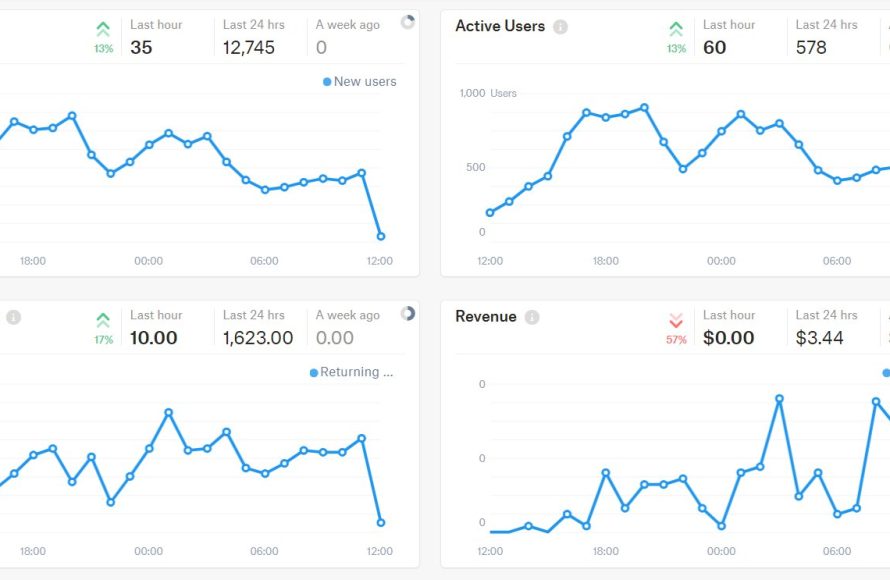
Using Roblox analytics lets game developers understand player behavior, optimize game design, and improve monetization strategies.
Want to build a popular game on Roblox? Understanding player engagement is crucial, and that’s where robust data comes in. Roblox analytics for game developers gives you the insights needed to make informed decisions.
You can track player activity, identify popular features, and spot areas that need improvement. Analyzing this data empowers developers to create a better game experience for everyone, ultimately increasing player retention and game success.

Roblox Analytics for Game Developers
Okay, so you’ve poured your heart and soul into creating an amazing Roblox game. You’ve got cool characters, challenging levels, and maybe even a catchy soundtrack. But how do you know if people are actually enjoying it? Are they getting stuck on a certain part? Are they playing as long as you hoped? That’s where Roblox analytics comes in! Think of analytics like a detective for your game – it gives you clues to understand what’s working and what’s not. It’s not as scary as it sounds; it’s actually super useful, and we’ll break it down into simple pieces so you can become an analytics pro.
Understanding the Basics of Roblox Analytics
Before we dive deep, let’s talk about the key things we need to track. These are the building blocks of understanding how players are interacting with your game. Here are some of the most important metrics:
Play Sessions and Player Count
This tells you how many times players are hopping into your game. It’s like counting how many people walk through the door of your shop. Play sessions refers to each time a player starts playing your game. A player can have multiple sessions in a day. Player count indicates how many players are in your game at any given moment or over a period. If the player count is high, that’s generally a good sign – it means people are interested in your creation! If this number is too low, you need to work to attract players to your game. For tracking these figures, Roblox provides developer stats page on their website.
- Daily Active Users (DAU): How many different people played your game today.
- Monthly Active Users (MAU): How many different people played your game this month.
- Concurrent Users: The number of players in your game at the same time. Knowing your peak concurrent player count can help you optimize your servers.
Average Session Length
This is how much time players are spending in your game during each session. A longer average session length usually means your game is engaging and enjoyable. Imagine your game is a fun puzzle. A longer session shows that players are enjoying working through the puzzle! If the number is low, that might be a sign that the game is too difficult, not entertaining or may be something is not working properly. Let’s look at this in detail:
- A long session time tells you that players are getting hooked on your game.
- A short session time tells you that players are leaving very quickly. This could be because the game is too difficult, confusing or not what the player wanted.
Retention Rate
This metric helps you see if players are coming back to play your game again. It measures how many players are returning after their first session, or after a set time. A good retention rate shows that your game is so fun that they want to play it repeatedly. Let’s look at this in detail:
- Day 1 Retention: How many players return to your game the day after their first play.
- Day 7 Retention: How many players return to your game after a week of their first play.
- Day 30 Retention: How many players return to your game after a month of their first play.
Low retention rates suggest that something is not compelling enough about your game, you need to make it better. High rates indicate that your game is very engaging and enjoyable.
Monetization Metrics
If your game uses in-game purchases, this is a super important thing to track. These metrics can tell you whether or not you are making money from your game. If players don’t pay for items or game passes, there might be some changes you need to make. Important things to check for monetization are :
- Revenue per User (RPU): How much money your game is making on average per player.
- Average Transaction Value: The average amount spent by players in a single transaction.
- Conversion Rate: Percentage of players who make at least one purchase.
Digging Deeper: Advanced Analytics
Now that we’ve covered the basics, let’s go a bit deeper. These advanced analytics can show you a more detailed picture of how players are experiencing your game. It helps you to fine tune the gaming experience. So let’s start digging.
Funnel Analysis
Think of a funnel as the path a player takes through your game. They start at the beginning and go through various stages, like levels or tutorials. With funnel analysis, you can see where players might be “falling out” of that funnel, like if they quit after a particular level. It can help you identify pain points in the game. You can also use this to determine if your new feature or update is having the impact you desired or not. Here’s how it can help:
- It helps to find where the player leaves the game.
- It helps find if the player is struggling with some particular level.
- It also helps to find if your game design is good or not.
Heatmaps
Imagine a map of your game. A heatmap uses colors to show where players spend the most time or take the most actions (like fighting or building). This can highlight areas that are popular or confusing. You can see, where players most spend time, what part of your game do they like the most, or is there a part where they struggle a lot and quit. This will help you understand better, where you can improve your game. Let’s see some of the use cases for heatmaps:
- It helps you find what areas of the game are most popular and least popular
- It helps you find areas where players are facing difficulties
- It helps you find out if the player is skipping some parts of the game intentionally
A/B Testing
A/B testing is like a science experiment for your game. You create two different versions of something (like a new interface or power-up) and show them to different groups of players. By looking at the analytics, you can figure out which version works better. A/B testing is a very powerful tool that helps to decide which option is more player-friendly and fun. For example, you might test two different ways of giving rewards to players and determine which one encourages more gameplay. It’s like having two flavors of ice cream and finding out which one people love more.
- It can help to choose what type of game design suits the player.
- It can help you choose which feature of the game is more fun.
- It can help to know, what type of reward system keeps players engaged.
User Segmentation
Not all players are the same! Some might be new, some might be super experienced, and some might like a specific game style. User segmentation lets you break down your players into groups based on things like play time, their in-game purchases, or levels completed. This way you can customize and cater to specific groups instead of just making changes for all your players.
- It helps to personalize the player experience.
- It helps to create the game for all types of players.
- It helps to understand the player behaviour on a deeper level.
Tools and Platforms for Roblox Analytics
So, how do you collect and see all this data? Thankfully, you don’t have to do everything yourself! Roblox offers tools and there are also third-party platforms that can help you with the job. Let’s take a look at them.
Roblox Developer Stats
The first place to look for basic analytics is Roblox’s own Developer Stats page. This area will give you all the basics we’ve already discussed, like the number of players, average session length, and revenue information. It is easy to use and you can find it inside the Roblox developer hub on the Roblox website. Let’s see the advantages of using the Roblox developer stats:
- It is easy to access.
- It is free to use.
- It provides the basic metrics for the game.
Third-Party Analytics Platforms
For more in-depth analysis, you might consider using third-party platforms. These tools can offer more detailed data, custom reports, heatmaps, and funnels, among others. Many of these are more advanced and provide all the data you can think of. If you want to go to next level in game development, this might be for you. Here are some of the common third party analytics platforms:
- GameAnalytics
- PlayFab
- Firebase Analytics
These tools offer a wide range of features, often more advanced than the basic Roblox stats page. They might come with a cost, but they can be very helpful for serious game developers who want to understand their games on a deeper level.
Using Analytics to Improve Your Game
Okay, you have all this data, now what? The point is not just to collect data but to use it to improve your game! Here are some things you can do with it:
Identifying Problems
Are players quitting at a specific spot? Are they not spending enough time in a particular level? Analytics can show you where players are struggling or losing interest, so you can fix it. For example, if you find that players are leaving the game after a certain level, you might want to make that level easier, or find new creative ways to motivate them.
- Look for high drop-off points in your game’s funnel.
- Observe heatmaps to spot unpopular areas.
- Pay close attention to areas where players fail or get stuck repeatedly.
Making Design Decisions
Use analytics to guide your design changes. If a certain game feature is not used as much, you can remove that feature or change that feature. And if you are testing some different ideas, you can use the analytical data to check what design works the best for your game.
- Prioritize the game features that players love.
- Make changes or completely remove unpopular game features.
- Make a design that is friendly to all players.
Creating Better Game Loops
Game loops are the core cycle of gameplay. For example, in an adventure game, a typical game loop might be: explore -> fight -> get loot -> repeat. By using analytics, you can refine these loops. If players aren’t returning after their first game session, you might need to improve your early game experience to ensure the game is fun. And if they are not making purchases, you can change the shop menu or prices.
- Use session length to find how engaging your game loops are.
- Increase the rewards to keep players engaged.
- Make your game easier and easier to understand.
Personalizing the Player Experience
User segmentation helps you to find different player groups. And when you know your different players, you can make the game as friendly as you can. You can offer specific rewards, or challenges for different groups. This way players will feel more connected to the game. If you can do this well, the player will feel like they’re playing a game that’s built just for them. This level of personalization can boost player enjoyment and retention.
- Offer challenges for advanced players.
- Guide new players so that they don’t feel overwhelmed.
- Provide rewards according to player’s in-game activities.
Staying Ethical and Responsible
While analytics are very useful, it’s important to use them ethically. Remember to always put your players first and use the data to make games more fun and enjoyable for them. Don’t track data that is personal or sensitive to the player. Here are some points to consider:
- Always use the data to improve the game.
- Don’t use the data to manipulate the player.
- Don’t share any personal information about your players.
Analytics are not just about numbers; they are a tool for making your game the best it can be, while keeping your players’ experience in mind.
In short, Roblox analytics is the key to understanding your players and making your game as fun as possible. It might seem a little difficult, but once you get the hang of it, it can help your game grow and flourish. Remember to start with the basics, keep learning, and always try to make your game the most amazing experience for your players!
📈 How To Use Your Game Analytics [💻Roblox Developers]
Final Thoughts
In conclusion, developers using game analytics gain crucial insights to improve player engagement. Tracking metrics like playtime and retention reveals areas needing attention. These data points help developers make informed decisions about design and updates. Roblox analytics for game developers is essential for crafting better experiences. Therefore, developers must actively utilize this feedback to optimize their games.

