
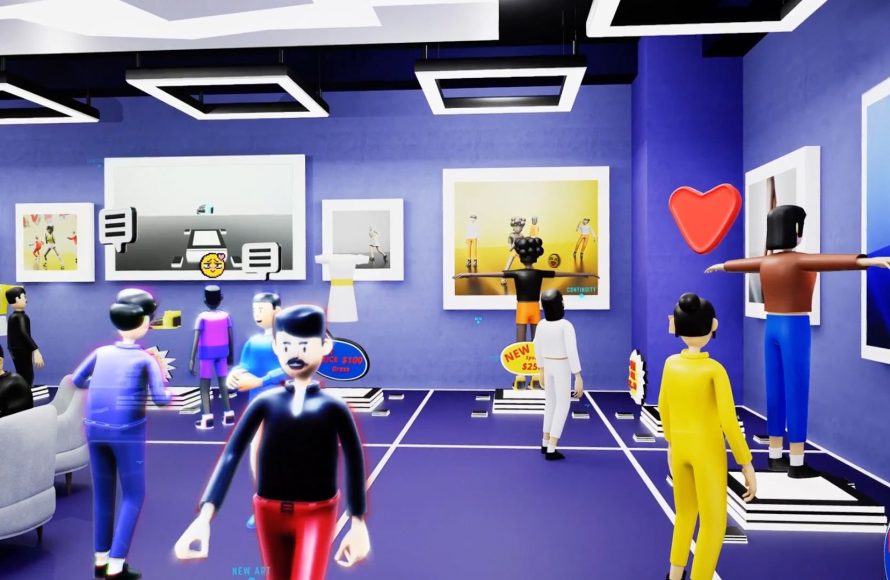
Roblox avatar interaction design focuses on creating engaging ways for players to communicate and express themselves through their avatars, utilizing animations, emotes, and customizable features.
Have you ever wondered how players in Roblox connect so well? It all boils down to how their avatars interact. The fascinating world of Roblox avatar interaction design plays a huge role in building these connections.
These design choices help players show emotions and build relationships. The subtle movements and expressive customizations allow for a rich social experience within the game.

Roblox Avatar Interaction Design: Making Your Digital Self Feel Real
Have you ever played a Roblox game and wished you could give your friend a high-five, or maybe point out something cool you found? That’s where avatar interaction design comes in! It’s all about how your Roblox character moves and interacts with the world and other players. It’s like giving your avatar a personality, making it feel less like a digital doll and more like you in the game.
Why Avatar Interaction Matters
Imagine a game where your avatar just slides around like a ghost. No arm movements, no facial expressions, just a silent, floating figure. It wouldn’t be very engaging, would it? Good avatar interaction design is super important because:
- It helps you connect with other players. Think about it: waving hello, giving a thumbs up, or even just a simple head nod can make a big difference in how you feel connected to the people you’re playing with.
- It makes the game more fun and immersive. When your avatar reacts to the environment and other players realistically, it makes the game feel more alive and believable. It’s like you’re really there!
- It allows for creative expression. Through different emotes, gestures, and movements, you can show off your personality and even tell stories through your avatar.
Basically, it’s about making your avatar more than just a skin; it’s about making it a way to express yourself and interact meaningfully with the digital world.
Basic Types of Avatar Interactions
Let’s explore some of the ways avatars interact in Roblox. There are many types of interactions, and you’ll see these in different games. Below are some of the common interaction types:
Movement and Locomotion
This is the most fundamental way avatars interact with the game world. It includes:
- Walking and Running: How your avatar moves across the ground. Is it a normal walk, or something more stylish?
- Jumping: How high can your avatar jump? Does it have a little bounce or is it more of a leap?
- Swimming: If water is involved, how does your avatar swim? Does it swim like a normal person, or like a fish?
- Climbing: Can your avatar climb ladders or walls? If so, how does it look?
These movements aren’t just about getting around, they are about how your character feels in the game world.
Emotes and Gestures
These are actions your avatar can perform to express themselves. Think of them as your avatar’s “body language.”
- Waving: A simple hello or goodbye, one of the most common interactions.
- Dancing: Shows off a bit of style or celebration!
- Pointing: Great for highlighting something or directing attention.
- Thumbs Up/Down: A quick way to show agreement or disagreement.
- Clapping: Expresses appreciation or excitement.
- Laughing/Crying: Shows emotions without having to speak.
Emotes make the game more fun and they let you communicate with other players without text!
Interaction with Objects
This is how avatars interact with items in the game.
- Picking Up Items: How does your avatar grab objects? Is it a simple reach or something more complex?
- Using Tools: How your avatar holds a tool like a sword or a shovel.
- Interacting with Doors/Levers: Opening doors, flipping switches, or pulling levers are all interactions.
- Sitting/Lying Down: How your avatar sits on a chair or lies down on the ground.
These interactions make the game world come alive and make the player feel like they are really interacting with the environment.
Interactions with Other Avatars
This is how avatars interact with each other, and this is often what makes online games so engaging.
- High-Fives/Hugs: Physical touch between avatars.
- Trading/Exchanging Items: Sharing items with other players.
- Following/Leading: Avatars following or leading each other.
- Carrying/Pulling: Some games allow avatars to carry or pull others or objects.
These interactions help to build friendships and a sense of community among players.
The Art of Good Avatar Interaction Design
It’s not enough to just have interactions. They need to feel good and look right. Here are some things that game developers think about when they design avatar interactions:
Responsiveness
When a player does something, the avatar should respond instantly and smoothly. If it takes a while to see your character move, the game can feel clunky. Responsiveness ensures your actions feel connected and immediate. There should be no delay. if you push forward in the controller your character should start moving forward immediately.
Visual Feedback
The game should provide clear visual cues when an avatar interacts with something. For example, if you pick up an item, you should see your character’s arm reach out and grab it. Visual feedback makes the interactions clear and understandable to the player. The visual queues should be clear.
Intuitive Controls
The controls for different interactions should be easy to learn and use. Players shouldn’t need a instruction manual to figure out how to dance or wave. Simple and straightforward controls allow players to focus on enjoying the game rather than struggling with confusing button combinations. The controls should be intuitive.
Context-Awareness
The way an avatar interacts should depend on the context. For example, the avatar should move differently when walking on a slippery surface versus a normal one. This context helps to make the game feel more realistic and believable. The game world needs to affect the avatar in a realistic way, or it will feel artificial.
Natural Movement
The way an avatar moves should look and feel natural, like real human or character. The movements should be smooth and realistic. If the avatar moves jerky or awkwardly, it can take away from the experience. Smooth and fluid animations go a long way to making interactions feel natural and fun.
How to Improve Your Avatar Interaction in Roblox
Whether you are a player or a game creator, there are things you can do to make avatar interactions even better:
If you’re a Player:
- Experiment with Different Emotes: Try using different emotes to express how you feel, or even tell a little story.
- Pay Attention to the Environment: How does your avatar move in different parts of the game? Notice how your avatar changes and moves in response to different situations.
- Interact with Others: Use gestures and emotes to communicate with other players and create fun moments together.
If you’re a Game Creator:
- Test Your Interactions: Get others to test your game and see how they experience the avatar interactions. Are they easy to use and understand?
- Observe How Players Interact: Pay attention to what kinds of interactions players enjoy and what kinds they struggle with.
- Iterate and Improve: Be willing to change and improve your avatar interactions based on the feedback you receive. Don’t be afraid to make changes if they improve the game.
- Keep it Consistent: Keep the interaction style consistent through out the game. Players will learn the controls much easily and enjoy the game more.
- Keep it Simple: Always try to keep the interaction simple. So every player is able to easily understand the interactions. If the controls are difficult then players will not enjoy the game.
Designing good avatar interactions is all about making the game more fun, engaging, and meaningful. It’s about creating a sense of connection, presence, and shared experience in the game.
Advanced Concepts in Roblox Avatar Interaction Design
Now that we’ve covered the basics, let’s peek at some more advanced concepts used in avatar interaction design in Roblox:
Inverse Kinematics (IK)
Inverse Kinematics is a method used to animate characters more realistically. Instead of animating each joint individually, you define the target for a hand or a foot, and the game calculates how the rest of the limb should move. This results in more natural interactions. For example, when a character picks up an object, the hand should reach towards the object in a way that feels natural and realistic. IK makes sure that the hand movements look realistic even if the position of the object changes.
Facial Animations
Adding facial animations to avatars is a big step in making them expressive. When a character is happy, they might smile. If they are sad, they might frown. These expressions can help to convey the character’s feelings and make them more relatable. Facial expressions can range from simple emotions to more detailed and dynamic reactions, like blinking or talking animations. This adds more depth to the character.
Body Language
Body language is not just about emotes; it is also about how the avatar moves and holds itself. A character might stand straight with their chest up if they are confident, or they might slouch if they are sad. Even small movements, such as slight head nods or hand gestures while talking, can have a big impact on how a character is perceived. Subtle details of body language can greatly improve the immersion of the game.
Procedural Animations
Procedural animations are animations that are generated by the computer in real-time, instead of being pre-recorded. This makes the character move dynamically in response to the environment. For example, if the character is moving on a slope, their body may lean into it. Or, if they bump into a wall, their walk may stagger. Procedural animation helps the characters feel more connected to the game world, as they are reacting directly to changes around them. This helps the character move more naturally.
Contextual Interactions
Contextual interactions change depending on the situation. For example, a character’s interaction with a sword is different from their interaction with a door. How a character interacts with a door should change depending on the type of door it is. These types of interactions make the game more interesting and more realistic. Contextual interactions allow players to use the same animation for multiple situations but in different context.
Audio and Haptic Feedback
Audio and haptic feedback are important parts of a good interaction design. Sound effects add extra dimension to avatar actions, like the sound of footsteps, a door opening, or a sword clashing, making the interaction more believable and engaging. Haptic feedback, like slight vibrations in the controller, can make interaction feel more tangible. Audio and haptic feedback combined, add extra immersion to the game.
By using these advanced concepts, game developers in Roblox can create really cool and engaging avatars that can truly become extensions of the players themselves. These technologies make interaction in a video game become as real as life.
In the end, creating great avatar interactions is a balancing act between usability, expression, and technical feasibility. It’s about making sure that every interaction is enjoyable, meaningful, and helps make a better game.
By understanding the core principles and exploring the more advanced techniques, anyone can help create a more engaging and immersive Roblox experience for everyone.
Banned Roblox Avatars.. 😰❌ #robloxshorts
Final Thoughts
Effective Roblox avatar interaction design prioritizes clear communication and ease of use. Players should easily understand how to engage with each other. Simple gestures and emotes encourage positive social behavior.
Thoughtful design makes avatar interactions feel natural and intuitive. A smooth user experience keeps players engaged in the game world. This encourages a better sense of connection.
Ultimately, strong Roblox avatar interaction design enhances the social dynamics and enjoyment within the platform. Consider these principles to build more engaging and collaborative experiences.

