
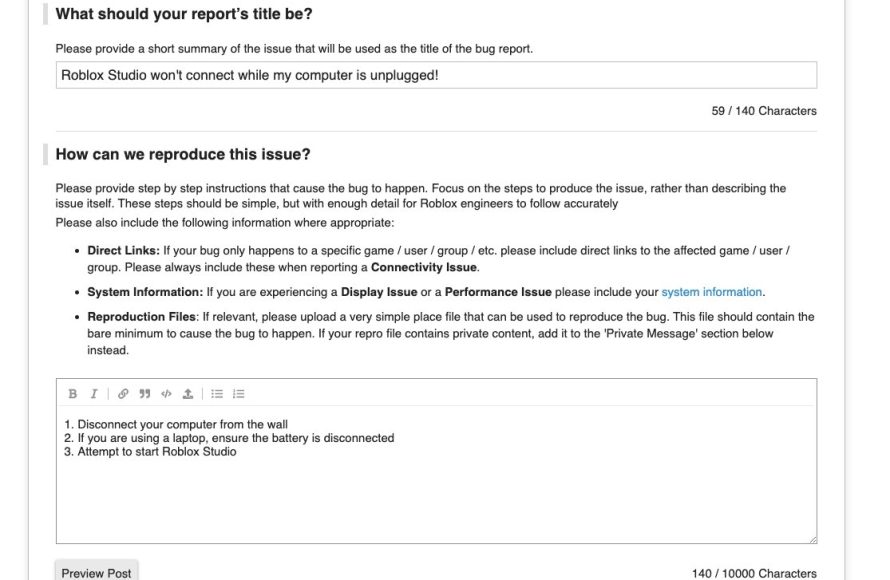
Roblox bug reporting procedures require users to submit detailed reports through the official channels, usually involving specific information about the bug, platform, and steps to reproduce it.
Ever encountered a glitch in your favorite Roblox game? It’s frustrating, right? Understanding how to report these issues effectively helps developers fix them quicker. This is where knowing proper roblox bug reporting procedures becomes important.
Knowing the steps ensures your report is clear and actionable. This makes a big difference to the overall gaming experience for everyone. Let’s delve into the process.

Roblox Bug Reporting Procedures: A Complete Guide
Hey Roblox fans! Ever found a glitch that made your game weird, or something just wasn’t working right? Don’t worry, it happens! Roblox is a huge place with lots of moving parts, and sometimes things go a bit wonky. That’s where bug reporting comes in! Learning how to report bugs helps keep Roblox awesome for everyone. This guide will teach you all about the process, so you can become a super bug reporter!
Why is Reporting Bugs Important?
Think of Roblox like a giant playground. If something is broken, like a swing with a missing chain, someone needs to tell the grown-ups so they can fix it. Reporting bugs in Roblox is kind of like that. When you tell Roblox about a problem, it helps them make the game better, safer, and more fun. It means less frustration for you and all your friends playing! Here’s why reporting bugs is a big deal:
- Helps Fix Problems: Bugs can make games unplayable or cause other issues. By telling Roblox about them, they can find the problem and fix it.
- Improves Gameplay: When bugs get fixed, it makes everyone’s experience smoother and more enjoyable.
- Keeps Roblox Safe: Some bugs might let people cheat or do things they shouldn’t. Reporting them helps keep the game fair for everyone.
- Shows You Care: By reporting bugs, you’re helping make Roblox a great place for everyone to play and have fun.
What Exactly is a Bug?
Before we dive into reporting, let’s make sure we’re on the same page about what a “bug” actually is. A bug is basically a mistake in the game’s code that causes it to do something it wasn’t meant to do. Here are some examples of bugs you might see in Roblox:
- Visual Glitches: Things might appear stretched, misplaced, or even disappear. For instance, a character might be walking through a wall.
- Functional Problems: Something that should work doesn’t. Maybe a door won’t open or you can’t collect a specific item.
- Game Crashes: The game suddenly stops and closes.
- Error Messages: You see a weird message you don’t understand, and it prevents you from playing properly.
- Exploits: People finding ways to cheat or gain unfair advantages.
- Sound Issues: Sound effects missing or playing incorrectly.
How to Identify a Bug
Sometimes it might be tricky to tell if something is a bug or just a regular part of the game. If you’re unsure, consider this:
- Is it Expected?: Does the game usually behave this way? If you’ve seen it before but it worked fine, then it’s probably a bug.
- Is it Consistent?: Does the same thing happen every time you do something or does it seem random? Consistent issues are more likely bugs.
- Ask a Friend: See if other players are having the same issue. If so, it’s more likely a bug affecting the whole game.
When you find something that looks like a bug, take note of the details! The more info you provide, the easier it is for Roblox to fix it.
Where to Report Roblox Bugs
Roblox provides a couple of different places where you can tell them about bugs. It’s important to use the right method for the type of problem you are experiencing. Here are the places you can go:
Roblox Support Website
This is the best place to report general game bugs, technical issues, and problems with your account. You can find the Roblox Support website by going to the Help section of the Roblox site, which can be found under the three dots on the left hand side of the screen, when you are logged into your Roblox account.
Bug Report Forums
For specific game-related bugs, the Roblox Developer Forum has a designated category for bug reports. This is more geared towards developers of the games, but it’s still a helpful spot for community reporting. Remember to be respectful and follow the community rules when posting on the forums.
Step-by-Step: Reporting a Bug Through the Support Website
Let’s go through the process step-by-step, using the Roblox Support website. This is the main way you will be reporting most bugs you find.
Step 1: Go to the Support Page
First, open your web browser and go to the Roblox website. If you are logged into your Roblox account, on the left hand side of the screen, you will find three dots. Click these and then go down and select the help menu, this will open the support page. You can also simply search in the browser “Roblox support” and click on the official roblox link, this will lead you to the Roblox support page.
Step 2: Choose “Support Form”
Once on the support page, you might see lots of articles. Instead, look for the ‘Support Form’ button, usually at the top or bottom of the page, or on the side, depending on the device you are using. Click this button. This will take you to the support form, where you can report the bug you’ve found.
Step 3: Fill Out the Form
The support form will have a few sections you need to fill in. This is where the details really matter!
Personal Details
- Username: Enter your Roblox username.
- Email Address: Type in your email, so Roblox can contact you if they have any questions. (Make sure it’s an email you can check!)
- Parent Email (If Applicable): If you’re under 13, you will need a parent or guardian’s email address here.
Issue Details
- Category: Use the dropdown to choose the general area your bug fits in. For example, is it a problem in a game? Or is it an issue with your account?
- Description: This is the most important part! Be as clear as possible.
- What happened? Describe the bug. Tell Roblox exactly what was going wrong.
- When did it happen? Did it happen at a certain time? Or in a certain game?
- How to make it happen again? If you know how to make the bug happen, tell Roblox step-by-step. (This helps a lot!)
- Where did it happen? Is it in a specific Roblox game? If so, mention the game’s name.
- Any error messages? If there was an error message, type it out exactly how it appears.
- Screenshots or videos? These are super helpful! Take a picture or video of the bug, if you can. The more evidence you provide the better it is for Roblox!
Step 4: Submit the Form
Once you’ve double-checked all the information, hit the “Submit” button. You will get a confirmation message, and Roblox will look at your report. Be patient! They get a lot of reports, so it may take some time for them to get back to you, or fix the bug.
Reporting Bugs on the Roblox Developer Forum
If you find a bug in a specific game and it seems like it’s a widespread problem (affecting many people in the same game), the Developer Forum might be the way to go. This is a little different from the main support, because it is geared more towards developers.
Step 1: Create a Forum Account
To post on the Developer Forum, you’ll need a forum account. If you already have one, skip this step. Go to the Roblox Developer Forum website, and register. This account is connected to your main Roblox account.
Step 2: Find the “Bug Reports” Category
Once you’re logged into the forum, find the category titled “Bug Reports” or something similar. These are usually clearly labeled.
Step 3: Create a New Post
Click the button to create a new thread or a new post. Give your thread a clear title that describes the bug.
Step 4: Describe the Bug
In your post, explain the bug in detail, just like you did for the support form. Include all the important information:
- What the bug is
- When it happened
- Steps to reproduce it
- What game it is in
- Screenshots or videos if possible
Step 5: Check for Existing Reports
Before posting, check to see if anyone else has reported the same bug. If so, add your information to that existing thread. This keeps things organized and helps Roblox see the problem is common.
Step 6: Be Respectful
When using the forum, be respectful and follow the community rules. This makes for a much more pleasant place to contribute. Remember, people are there to help, so be kind and helpful too!
Step 7: Submit the Post
Once you are happy with what you wrote, submit the post. Roblox and other developers will be able to see your report, and begin to work on it.
Tips for Writing a Great Bug Report
Want to make your bug reports even better? Here are some tips to help you be a superstar bug reporter!:
- Be Specific: Vague reports are hard to understand. Give as many details as you can. For example, instead of saying “My game is broken,” say, “When I try to open the treasure chest, the game freezes in [specific game name]”.
- Be Clear: Write in a way that’s easy to understand, even for someone who hasn’t played the game you are having the bug in. Use proper grammar and spelling.
- Include Details: The more details you provide, the better. Mention the game, specific areas, what you were doing, and anything else that you can think of.
- Screenshots and Videos: Pictures are worth a thousand words! If you can capture the bug visually, do it! It’s much easier for the Roblox team to see the problem when you show them.
- Test Before Reporting: Try to reproduce the bug more than once. This helps you make sure it’s a real bug, and you can tell Roblox how to make it happen again.
- Be Patient: Remember, Roblox gets a lot of bug reports. They can’t fix everything right away, but they do work hard to make things better.
- Don’t Spam: Reporting the same bug multiple times doesn’t help. Be patient, and wait for Roblox to address the issue.
What Happens After You Report a Bug?
After you submit your bug report, what happens? Here’s a general idea:
- Roblox Receives Your Report: The support team gets your message.
- They Look Into It: They read through your information and try to understand the problem.
- They Might Ask Questions: If they need more details, they will likely email you, so be sure to check your inbox.
- They Try to Fix It: Once they understand the bug, Roblox developers will work to correct it.
- The Fix is Released: When the fix is ready, it’s added into a game update and the bug should be gone!
- They Might Not Reply: Because of the large volume of reports they receive, they might not be able to reply to every single report. But be assured, your report will be seen.
Remember, fixing bugs can take time, depending on how hard they are to find and correct. So be patient, and keep on playing!
Common Mistakes to Avoid When Reporting Bugs
Let’s look at a few common errors people make when submitting bug reports, so you can avoid them:
- Not providing enough detail: Saying “something is broken” is not very helpful. Be specific about the issue.
- Using an incorrect category: Make sure the category you choose matches the bug you are reporting.
- Submitting duplicate reports: Always check to see if others have reported the bug, before posting a duplicate.
- Using disrespectful language: Being polite and respectful is very important. The Roblox staff is always trying to help you.
- Not including screenshots: Adding visuals of the bug can help a lot, it is always better to include some visuals.
- Failing to check your email: Roblox may try to reach you regarding your report. Make sure you check your email regularly.
By avoiding these common mistakes, you will help make the bug reporting process more efficient and effective!
Reporting bugs may not always be the most fun thing to do while playing games, but it is something that really can help make Roblox a better place for everyone. You play an important role in helping keep things running smoothly, and having a good time on the platform!
When you get banned… #roblox #robloxedit #shorts
Final Thoughts
Effective Roblox bug reporting helps developers fix issues quickly. Players should gather detailed information, including steps to reproduce the bug. Submit reports through the official channels provided by Roblox. Understanding roblox bug reporting procedures ensures a better overall gaming experience. Following these guidelines directly assists the improvement of the platform.

