
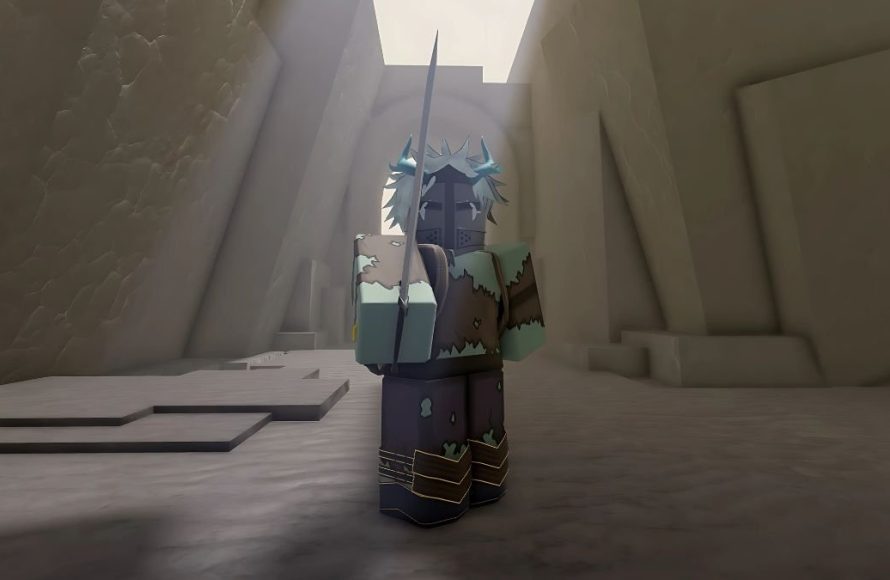
Creating a compelling Roblox character involves defining their appearance, personality, and backstory, which helps players connect with them in unique ways.
Want your Roblox avatar to stand out? The roblox character development guide is your starting point. It’s more than just picking a face and clothes. It’s about crafting a persona that makes your character memorable.
A well-developed character can add so much depth to your game experience. It makes playing more enjoyable and meaningful for you and others. This is why thinking about your character is important before jumping in.

Roblox Character Development Guide: Creating Your Unique Avatar
Welcome, Roblox adventurers! Have you ever looked at another player’s character and thought, “Wow, that’s awesome! I wish my avatar was that cool?” Well, you’ve come to the right place. This guide will take you through all the steps needed to craft a Roblox character that truly represents you and stands out from the crowd. We’re not just talking about slapping on random clothes; we’re diving deep into the art of character development. Think of your Roblox avatar as a blank canvas, and we’re about to become amazing artists!
Understanding the Basics of Roblox Avatars
Before we get into the fun stuff, let’s cover the foundation of Roblox characters. Every avatar, no matter how intricate, is made up of several key parts:
- Head: This is the starting point! You can choose from different shapes, sizes, and even add fun accessories to it.
- Torso: The body’s core. There are various styles to choose from, affecting how your avatar looks and moves.
- Arms and Legs: These limbs influence how your character walks, runs, and interacts with the Roblox world. You can change their shape and design.
- Accessories: These are the extra additions – hats, glasses, wings, backpacks, and so much more. Accessories add personality and unique flair.
- Clothing: This is a big one! You can select from a wide variety of shirts, pants, and outfits to express your style.
- Skin Tone: Your avatar’s base color, from light to dark and even fantastical colors.
These basic elements can be combined and customized in countless ways. The possibilities are truly endless, and we’re going to explore many of them. It’s time to move beyond the default avatar and create something truly special.
Finding Your Character’s Style
Now comes the exciting part! Figuring out what kind of vibe your character should have. Do you want to be a brave knight, a stylish space explorer, or a goofy cartoon character? This is all about what appeals to you. Let’s explore some tips for finding your style:
Consider Your Favorite Games
What games do you love playing on Roblox? If you spend hours in adventure games, maybe a character with armor and weapons would be perfect for you. If you’re into roleplaying, a character with a detailed backstory would be a good idea. Your game preferences can give you great direction.
Think About Your Personal Style
Do you like bright colors or prefer darker tones? Do you like sporty outfits, or do you prefer something more elegant? Your real-life style can influence the kind of avatar you want. For example, if you love wearing hoodies, maybe your Roblox avatar should have one too!
Experiment With Different Looks
Don’t be afraid to try things out! The Roblox avatar editor lets you test out different combinations. Mix and match different items to see what fits your taste. You might be surprised at what you come up with! It’s ok if the first few attempts aren’t perfect; experimentation is key.
Get Inspired By Others
Take a look at other players’ avatars. What do you like about them? You might find inspiration for your own character. Don’t copy their look directly, but take elements that you admire and see how you can make them your own. Roblox is a community, and we learn from each other.
Diving Deep into Customization Options
Now that you have a general idea of your style, let’s explore the different ways you can customize your avatar. Roblox provides lots of tools to make your character look exactly how you want it.
The Avatar Editor
The central hub for all things avatar-related is the Avatar Editor. You can find it on the Roblox website or app. It’s where you make changes to everything – from clothing to body parts. Get comfortable navigating this space as you’ll be spending a lot of time here!
Mixing and Matching Clothing
Clothing is a huge part of character development. Here’s what to consider:
- Shirts: From simple t-shirts to fancy jackets, the options are abundant. Pay attention to colors and patterns that fit your character’s personality.
- Pants: Jeans, shorts, skirts, or even armor leggings – the choice is yours! Select pants that match your shirt for a cohesive look.
- Outfits: If you don’t want to mix and match items individually, you can use pre-made outfits. These are quick and easy ways to style your character.
Choosing Body Parts and Accessories
Beyond clothes, the body parts and accessories you pick really change your avatar’s personality. Here’s a look:
- Heads: Classic square heads, round heads, animal heads – there’s a head type for every character.
- Torsos, Arms, and Legs: Experiment with different shapes and sizes. You could use blocky parts for a retro look or smoother limbs for a more modern style.
- Hats: There are thousands of hats. From cool baseball caps to fancy crowns, a hat can add a lot to an outfit.
- Face Accessories: Glasses, masks, and face paint can give your character expression and make them stand out more.
- Back Accessories: Wings, backpacks, capes, and swords – all add cool effects to your character’s appearance.
Using the Roblox Marketplace
The Roblox Marketplace is where you get most of your avatar items. You can buy clothes, accessories, and other items using Robux, the in-game currency. It’s a great place to find unique items that you can’t find in the regular avatar editor.
Here’s a pro-tip: you can often find deals in the marketplace. Keep an eye out for sales and discounts on items you like. You can also use the search function to quickly find specific items.
Creating a Theme for Your Character
Having a theme for your character can help you make a unique, cohesive avatar that really stands out. It’s like giving your avatar a story and a purpose, making it more than just a random collection of items. Here’s how you can create a theme:
Character Concept
Start with an idea for your character. This could be an occupation (like a doctor or an adventurer), a fantasy creature (like a dragon or fairy), or even based on a personal interest (like sports or music). Having a base concept will guide your customization process.
Color Palettes
Choose a color palette that fits your character. A knight might use silvers and blacks, while a fairy might use pastels. Using consistent colors makes your avatar visually appealing and shows you put some thought into your design.
Consistent Style
Make sure your accessories, clothing, and body parts have a consistent style. For instance, if you want a futuristic character, don’t mix it with items that look old-fashioned. Stay within your chosen theme and it will look much better.
Examples of Themes
To help you brainstorm, here are some theme ideas:
- The Space Explorer: Futuristic clothes, helmet, and a backpack that looks like a jetpack.
- The Medieval Knight: Armor, a sword, and maybe a helmet with a plume.
- The Cartoon Character: Bright colors, big accessories, and a playful expression.
- The Natural Adventurer: Earthy colors, a hat for sun protection, and a backpack filled with supplies.
- The Casual Gamer: T-shirt, jeans, sneakers, and maybe a gaming headset.
These are just examples; the possibilities are truly endless! Let your creativity flow and have fun coming up with your own unique theme.
Advanced Tips for Character Development
Ready to take your character development to the next level? Here are some advanced techniques to make your avatar even better:
Layering Clothing
Roblox lets you layer clothing items. For example, you can put a jacket over a shirt or a cloak over another item. This can add depth and complexity to your avatar’s appearance. Experiment to find cool combinations.
Using Multiple Accessories
Don’t limit yourself to just one or two accessories. Try adding multiple hats, glasses, or back items to create a unique look. But be careful not to overdo it; too many items can make your avatar look cluttered.
Animated Items
Some accessories are animated! You can find hats that bob, wings that flap, or even capes that flow with movement. Animated items can give your character extra flair and make them more dynamic. These can be found in the marketplace.
Custom Body Parts
Beyond the basic body types, you can find custom body parts in the marketplace. These can include unique shapes, sizes, and designs that can really make your avatar stand out. Look for items that fit your desired style.
Creating Roleplay Avatars
If you enjoy roleplaying games on Roblox, you’ll want an avatar that fits the part. Here are some tips for creating engaging roleplay avatars:
Backstory
Give your character a backstory! Where do they come from? What are their dreams and motivations? This will influence the look you choose for them.
Personality
Think about your character’s personality. Are they funny, serious, kind, or mischievous? Use clothing and accessories to convey these traits.
Interactions
Choose items that allow your avatar to interact appropriately in the roleplay world. For example, a chef might have a cooking pot, while a fighter might carry weapons.
Maintaining Your Avatar
Your avatar isn’t set in stone. As your style changes, or as new items become available, you can always update your character! Here are some tips for maintaining your avatar:
Regularly Check for New Items
The Roblox Marketplace constantly updates with new items. Make it a habit to browse and see if there’s anything new that catches your eye. Maybe a new hat or shirt perfectly fits your current character’s style.
Don’t be Afraid to Change
It’s ok to change your avatar from time to time. You don’t have to stick with the same look forever. Trying new styles and experimenting with different combinations is part of the fun.
Keep an Eye on Your Budget
If you’re using Robux to buy items, be mindful of your budget. You don’t need to buy everything you see. Choose items carefully and consider how they fit into your overall character theme.
Get Feedback From Friends
Ask your friends what they think of your avatar. They might have suggestions you hadn’t considered, or they might point out areas where you could improve.
Character development on Roblox is a journey, not a destination. It takes time, experimentation, and creativity to create a character that you truly love. Don’t be afraid to try new things, push your creative boundaries, and have fun with the process. Your avatar is your digital representation, so make it one you are proud of! Use the tools, follow this guide, and you’ll be amazed at what you can create!
How Roblox avatars are now:
Final Thoughts
A good character needs a strong concept, compelling backstory and consistent personality. Experiment with different avatar customizations that reflect your character’s inner world. Focus on how your character interacts with others to establish their role.
Remember, this ‘roblox character development guide,’ emphasizes thoughtful creation, not just aesthetics. Develop a detailed history for richer roleplaying. The more you think about your character, the more genuine they feel.

