
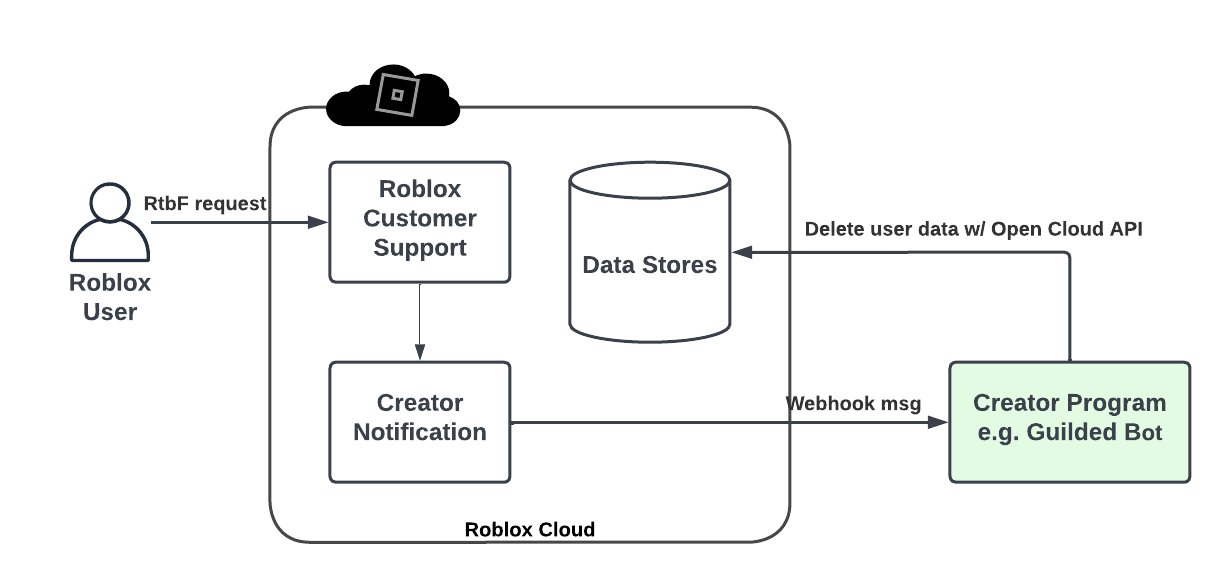
Roblox cloud services integration allows developers to use external services for storing data, managing game state, and enabling features beyond the core Roblox platform.
Have you ever wished your Roblox games could do more, interact with external data, or track player progress across different sessions? Well, that is now possible! Roblox cloud services integration opens up a world of possibilities for game creators. It allows the creation of complex game mechanics and improved player experiences. This means more engaging gameplay for everyone.

Roblox Cloud Services Integration
Okay, let’s talk about something really cool in Roblox: Cloud Services! Imagine you’re building an awesome game. You’ve got players running around, collecting coins, and maybe even battling monsters. But what if you want to save all that progress? Or maybe create a leaderboard showing who’s the best player? That’s where Cloud Services come in. They help your Roblox game do things that are too hard or too big to handle just on a player’s computer or phone. They’re like extra helpers living on the internet, always ready to lend a hand to your game.
What are Roblox Cloud Services?
Think of Cloud Services like a giant storage and processing area for your game. They don’t run on someone’s personal computer. Instead, they are on powerful computers that Roblox provides, which are connected to the internet all the time. These special computers can do several jobs to make your game even more fun and complex. Cloud Services are a special part of Roblox that game developers use to do a bunch of neat things, like:
- Saving Player Data: Think of it as an online notebook for each player. It keeps track of how many coins they have, what level they are on, and all the items they collected. That way when someone comes back to the game, they start right where they left off!
- Leaderboards: Everyone loves a good competition! Cloud Services help to track high scores and display the best players on a leaderboard so everyone can see how they are doing.
- Sending Messages: Imagine a game where a message pops up for everyone saying, “The race is about to start!”. Cloud services enable messages to be sent to all players in real-time.
- Server Communication: Cloud services make it easier for the game server to send info to the game client, which results in smoother gameplay.
- Dynamic Updates: If you make changes to the game, cloud services allow the game to update in real time, without the player having to install updates manually.
So basically, Cloud Services let you build games with a whole lot more functionality than if your game was on its own. It’s like adding an extra layer of awesomeness!
Why Use Cloud Services in Your Roblox Game?
Using Roblox Cloud Services is like giving your game superpowers. Here are a few reasons why you should consider using them:
1. Persistence and Saving Player Progress
This is a big one! Without Cloud Services, your players’ progress would disappear every time they closed the game. Cloud Services enable the player data to be saved securely. With Cloud Services, players can keep all the things they have worked hard to achieve in the game. That leads to happier players who will keep coming back to play your game again and again!
2. Creating Engaging Social Experiences
Cloud Services can turn your game into a social hub. Here is how it does:
- Leaderboards: Lets players see how they rank against their friends. This can add a lot of fun competition to a game.
- In-Game Messages: Allows developers to communicate with players within the game. This can be used for announcements or even custom events.
- Multiplayer Features: Cloud Services can help you make sure all players in a multiplayer game are seeing the same thing at the same time, which is super important for a great experience.
3. Handling Complex Game Logic
Some games get pretty complicated. They might have a lot of items, a lot of rules, or even a whole lot of players. Cloud Services can help handle these big things without slowing down your game. By handling this information in the cloud, your player’s computer or phone does not need to do all the heavy lifting. This results in a smoother, faster gaming experience.
4. Dynamic Content Updates
Imagine your game has a special holiday event. Without Cloud Services, you would have to release a whole new update for everyone. With Cloud Services, you can add new things and features to your game without forcing the players to download anything new. It makes your game much more dynamic.
- You can add new items.
- You can change game rules.
- You can start or end events.
5. Better Security
When you keep sensitive game data on a player’s device, it can be easier for people to cheat. When you store the important data on Cloud Services servers, it is much safer and harder for someone to mess with. This way you make sure that everyone is having a fair and good time.
How Do Roblox Cloud Services Actually Work?
Let’s break down how Cloud Services operate in a Roblox game, using simpler terms. Think of a cloud service like a team of helpers that are always on duty to help your game. They do different tasks like:
- Player Actions Trigger Events: A player does something in the game, like collecting a coin.
- Data is Sent to the Cloud: The game then sends a message to the Cloud Service, saying “Player X collected a coin!”
- Cloud Processing Happens: The Cloud Service then updates the player’s coin count. It might also update leaderboards or send messages about the player doing so.
- Results Sent Back: Cloud Services then send the updated information back to the player’s game. Now everyone in the game can see the updated info.
- Everything Stays in Sync: All of this back-and-forth happens in the background very quickly. This way, every player sees the correct data.
The Role of API’s
The way the game and the cloud communicate is done with Application Programming Interfaces, or APIs for short. An API is like a set of rules that everyone follows to make sure they know how to talk to one another. Roblox provides you with these APIs, so you do not have to worry about writing all this code from scratch.
- You use the APIs to send instructions to the Cloud Services.
- The cloud responds using the same API.
Using APIs is like using a walkie-talkie – you press a button (the API function) and say something (send data), and someone on the other end (Cloud Service) hears you and responds.
Key Roblox Cloud Services
Roblox has many Cloud Services available for game developers. Each one has a special job. Here are a few key ones:
- DataStoreService: This is for saving and loading player data. It stores things like items collected, level progress, and anything else you want to save. It is like your game’s personal notebook that is saved on the cloud.
- MessagingService: This is for sending messages to all the servers in your game. This can be used for game events, or for when you want to alert all the players about important stuff. Think of it as an in-game shout-out system.
- TeleportService: This is for moving players between different places in Roblox. This allows players to be moved between different games or different levels of the same game. It’s like a teleportation system built right into Roblox.
- HttpService: This is for sending requests to external websites. This can be useful if you need to get data from sources outside of Roblox, such as updating item prices from a database, or accessing an external API.
DataStoreService in Detail
The DataStoreService is a crucial part of many Roblox games. It makes sure all the progress a player makes is never lost. Here are some things to remember when working with the DataStoreService:
- Key-Value Pairs: It works by storing data as pairs of “keys” and “values.” The “key” is like a label, and the “value” is the data you want to save. Think of this as a filing cabinet, where each folder (key) holds important papers (value).
- Saving Data: To save data, you would use the
SetAsyncfunction of theDataStoreService. This function takes a “key” and the “value” you want to save. You can save most types of data, from numbers to text to even more complex tables. - Loading Data: To load data, you would use the
GetAsyncfunction of theDataStoreService. This takes the “key” and then gives you back the “value” you saved. - Error Handling: Always make sure you plan for errors. Sometimes cloud service may not be able to save or load data, and you need to have code in place to handle these issues.
MessagingService in Detail
The MessagingService is a great tool for in-game communication. It helps keep every player in the loop. Some cool things you can use it for are:
- Sending Messages: You use the
PublishAsyncfunction to send a message. You also have to specify the topic of the message, so the right people get the message. - Receiving Messages: The game uses the
SubscribeAsyncfunction to listen for any messages that have the same topic. - Real-Time Updates: Because the messages are sent instantly, this can be used for real-time alerts.
- Centralized System: It’s very efficient for sending messages to all the players at once, rather than needing to send the same message multiple times.
TeleportService in Detail
The TeleportService is essential if your game has different areas or connects to other Roblox experiences. It helps move players from one place to another smoothly. Key points are:
- Teleporting Players: You can use the
TeleportAsyncfunction to send the player to another location in your current game or another game entirely. - Using Teleport Options: You can even tell the game how it should move the player by sending additional options as parameters.
- Loading Screens: You can customize the loading screens that players see while they are being moved.
HttpService in Detail
The HttpService is for sending information back and forth with other websites. It can be a bit more complicated than the other services, but here are some common uses:
- Sending Requests: You can send requests with the
RequestAsyncfunction. You can send all different kinds of requests with different data and format. - External Data: You can use the function to get information from a website, such as an API that has a database of game data.
- Webhooks: You can use this to send info out to other websites, for example, if you want to update stats in a forum or on a separate website.
Implementing Cloud Services: A Simple Example
Let’s look at a super simple example of how you might use Cloud Services to save player data. Let’s assume that a player has collected coins in a game.
        -- Get the DataStoreService
        local DataStoreService = game:GetService("DataStoreService")

        -- Name your data store
        local coinDataStore = DataStoreService:GetDataStore("CoinData")

        -- Function to save the player's coin amount
        local function saveCoinAmount(player, coins)
        local success, errorMessage = pcall(function()
            coinDataStore:SetAsync(player.UserId, coins)
            end)

            if not success then
                warn("Failed to save data: ", errorMessage)
            end
        end

        -- Function to load the player's coin amount
        local function loadCoinAmount(player)
        local success, coinData, errorMessage = pcall(function()
            return coinDataStore:GetAsync(player.UserId)
             end)
            if success then
                if coinData then
                return coinData
                else
                  return 0
                 end
            else
                warn("Failed to load data:", errorMessage)
                return 0
            end
        end

         -- Example usage when a player joins
        game.Players.PlayerAdded:Connect(function(player)
            local coinAmount = loadCoinAmount(player)
            print(player.Name .. " has " .. coinAmount .. " coins")
        end)

         -- Example usage when the player earns a coin
         local function playerEarnedCoin(player, earnedCoinCount)
             local coinAmount = loadCoinAmount(player)
             local newCoinAmount = coinAmount + earnedCoinCount
             saveCoinAmount(player, newCoinAmount)
         end
This is a very basic example, and real-world games will have much more complex data to save. However, it shows you how easy it is to save the player data using DataStoreService.
Best Practices for Using Roblox Cloud Services
While Cloud Services are powerful, it’s important to use them wisely. Here are some things to keep in mind:
- Handle Errors: Always make sure your code is able to deal with errors. The cloud might not be available sometimes, or your data might not load correctly. If your code has errors, it will not work as intended.
- Keep Data Small: If you try to save lots of data at the same time, it can slow down your game. Try to only save what is needed, and break your data up if it is too large.
- Test Thoroughly: Test your cloud service code a lot! See what happens under all the circumstances to make sure that nothing is broken. It is very important to make sure that data saving and loading is working as intended, to avoid losing any progress of your players.
- Security First: Do not expose sensitive data to players and make sure your data is secure. Keep anything that should not be seen by the players server-side.
Following these best practices will help you make sure you’re using Cloud Services correctly and make your games better.
Common Pitfalls to Avoid
There are some common mistakes that developers sometimes make when they use Cloud Services. Here are some of the more common things to avoid:
- Overloading the System: Do not try to save too often. This can result in the system slowing down, and your game might run poorly.
- Not Handling Errors: If you do not have code to handle errors, things can go wrong, and your game will not be able to save correctly.
- Saving Sensitive Data Client-Side: Make sure all sensitive data is saved server-side. If you leave the sensitive data on the client side, it can be changed by players, causing problems in your game.
Avoiding these pitfalls can help you create great experiences for your players.
Cloud Services are very powerful tools that can be used to take your game to the next level. By using them, you can add tons of great features that will make your game more fun and engaging for your players. With a bit of effort, you can make your game amazing using Roblox Cloud Services!
Unlock Your Productivity with Roblox's Open Cloud | RDC 2021
Final Thoughts
Roblox cloud services integration offers great potential for developers. This integration allows access to powerful server-side capabilities. Developers can build more complex and scalable experiences using these services. It opens up new creative possibilities.
Integrating these cloud features is must for games wanting advanced functionality. With efficient data management and processing, your games will operate smoothly. Embrace roblox cloud services integration to improve your game’s reach and sophistication.

