
To avoid Roblox copyright infringement, create original content, seek permission for copyrighted material, and use Roblox’s provided assets or royalty-free sources.
Navigating the world of Roblox development can be exciting, but it’s crucial to understand copyright. Many creators unknowingly stumble into issues when using existing elements. This is why knowing about Roblox copyright infringement tips becomes very important for all aspiring game makers.
Failing to respect intellectual property can lead to takedowns and account penalties. Taking the time to learn best practices protects your work and keeps you in good standing. We’ll guide you with some essentials to remain compliant.

Roblox Copyright Infringement Tips: Playing it Safe
Creating in Roblox is super fun! You can build amazing worlds, design cool clothes, and even make exciting games. But, it’s also important to play by the rules, especially when it comes to copyright. Copyright is like a special protection for someone’s creations. Think of it like this: if you draw a picture, that picture is yours, and nobody else can just take it and say it’s theirs. The same goes for music, characters, and other things people make. In Roblox, using something that someone else created without their permission is called copyright infringement, and it can get you into trouble. Don’t worry, though! This guide will teach you how to be a responsible creator and avoid any copyright problems. Let’s explore how you can keep your Roblox adventures fun and fair!
Understanding Copyright Basics in Roblox
Before we dive into tips, let’s talk about what copyright really means in the world of Roblox. Imagine a painter creates a beautiful landscape. That painting is protected by copyright, meaning that only the painter can decide who can copy it, share it, or sell it. In Roblox, copyright works similarly. If a user creates an original model, audio clip, texture, or even a game design, they own the copyright to it. You can’t just grab their work and use it in your own game without their say-so. It’s about respecting the hard work and creativity of others. Think of it as digital respect – it’s just as important as being nice in real life.
What is Protected by Copyright on Roblox?
Lots of things in Roblox are protected by copyright. This includes:
- Models and 3D Assets: These are things like buildings, characters, or tools. If someone makes an original 3D model, they own the rights to it.
- Audio: Songs, sound effects, and any kind of recorded audio that someone else created is protected. Using copyrighted music without permission is a common mistake.
- Images and Textures: This covers images that you use as decals on your creations, as well as the textures that make objects look a certain way.
- Game Scripts and Code: Even the game scripts and code someone has written to make things work in their game are covered by copyright.
- Game Designs and Concepts: A unique game idea or concept can also be subject to copyright, although proving infringement of a general concept can be tricky. It’s generally safer to make your own version of something unique, rather than a direct copy.
What is Not Protected by Copyright?
Now, it’s important to know what isn’t protected by copyright, which means you may not need permission to use it. These include:
- Generic Ideas: General game ideas like a capture-the-flag game or a racing game, are not protected. You can create a game with this kind of concept without it being a copyright issue, but you need to make your version unique.
- Facts: Factual information is not protected. For example, you can’t copyright the fact that the sky is blue.
- Short Phrases: Short phrases or titles are usually not covered by copyright.
- Public Domain Material: Works in the public domain that are no longer protected by copyright. These may be very old books or music, for example. It’s always best to double-check if material is truly in the public domain.
Common Copyright Infringement Mistakes on Roblox
It’s easy to accidentally step into copyright trouble on Roblox. Here are some common mistakes players make that lead to issues:
- Using Music Without Permission: This is probably the most frequent copyright problem. You can’t just use your favorite song in your Roblox game without the music owner’s agreement. You’ll need to have the right to use it, either directly from the rights owner, or from a source that is allowed to provide licensing for use.
- Copying Game Assets: Grabbing someone else’s 3D model, texture, or audio and using it in your own game is definitely a copyright issue. Make sure you create your own assets or use those you have rights to.
- Using Characters From Other Games/Movies: If you try to recreate a character from a popular TV show or game and put them in your Roblox game, it’s a copyright violation unless you have permission. These characters usually have strong copyright protection.
- Replicating Entire Games: Just because you like how someone else has made a game doesn’t mean you can make a duplicate. Copying someone else’s game mechanics and map can lead to copyright problems.
- Ignoring Roblox’s Asset Library Rules: Even when Roblox provides some models and assets, it’s important to make sure you’re using them in the way they are intended. Don’t use other players’ assets you found in the library without their permission unless they are specifically made for reuse.
How to Avoid Copyright Infringement
Alright, now that you know what to watch out for, let’s talk about how to stay safe and avoid copyright issues on Roblox. Here are some key tips to follow:
Creating Original Content
The best way to avoid copyright problems is to create your own original stuff. That means building your own models, drawing your own textures, making your own music, and writing your own game code. When you create something yourself, you don’t have to worry about infringing on someone else’s copyright. It’s also way more rewarding and makes your game stand out!
Utilizing the Roblox Asset Library Responsibly
Roblox has a library of assets you can use in your games, but you need to do so carefully.
- Understand License Terms: When using assets from the library, make sure you understand the terms of use. Some creators allow reuse, while others don’t. Check the details carefully and only use assets allowed for reuse.
- Use Free Assets Wisely: When using free items, make sure the creator has not infringed on someone else’s rights. It may be hard to tell, but be cautious, if a popular character or a famous song is available for free, it is usually a bad sign.
- Attribution Where Possible: If an asset requires attribution (giving credit to the original creator), make sure to do so in your game or its description. Be accurate with the creator’s information.
Seeking Permission When Needed
If you absolutely want to use something that you didn’t create yourself, and it’s not available for free reuse, the best way is to ask the creator for permission.
- Contact the Creator Directly: Try to reach out to the creator via Roblox messages or other platforms if they have their contact info listed.
- Explain Clearly: Explain how you intend to use their creation and be polite and respectful in your request.
- Keep Proof of Permission: If they grant you permission, make sure to save a copy of the conversation or agreement as proof.
Understanding Creative Commons Licenses
Sometimes, creators use Creative Commons licenses. These licenses let you use their work as long as you follow certain conditions. For example, some licenses require that you give credit, and some might limit how you can use the work. It’s important to understand the specific terms of each license before using something.
- Check for the License: Always check if the asset you want to use has a creative commons license. There are different types, and each has its own rules.
- Attribution Required: Many licenses require you to give credit to the original author, make sure you do it correctly.
- Non-Commercial use: Some licenses limit use to non-commercial projects, this means you cannot use the work in games that will make you profit.
Using Royalty-Free Music and Sound Effects
If you want to use music or sound effects in your game, you can use royalty-free sources, which have assets that are available with a license to use them. This means you only need to buy the asset once, rather than paying every time it is used.
- Find Reputable Sources: Search for trusted websites that offer royalty-free music and sounds. There are many different services for this, so choose one you like and are happy with the offering.
- Verify License: Make sure to check the license of each asset and make sure they are usable for your project. Always verify if they are useable in video games.
- Avoid using Unlicensed Music: Never use music you find online that is not specifically listed as free to use or royalty-free unless you get explicit permission.
What Happens if You Infringe Copyright on Roblox?
It’s never a good idea to infringe copyright on Roblox. If you are caught, there can be consequences.
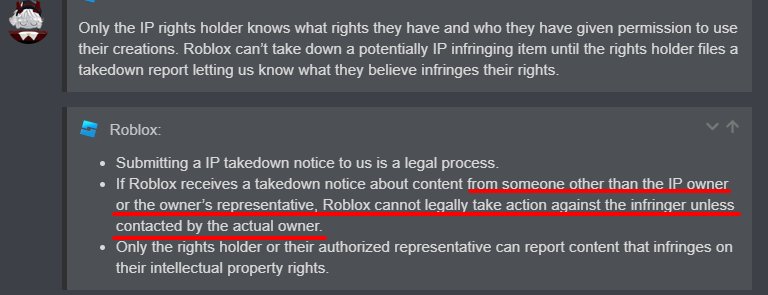
- Takedown Notices: If the copyright owner finds out you are using their work without permission, they can send a takedown notice to Roblox. Roblox then has a process to remove the infringing content.
- Account Suspension or Ban: Repeated copyright violations may result in temporary or even permanent suspension from Roblox.
- Legal Issues: In some cases, copyright owners might decide to pursue legal action if the infringement is severe or you repeatedly abuse the system.
It’s much better to play it safe and avoid any copyright problems in the first place.
Tips for Handling Copyright Claims
Even if you try your best to avoid it, you may receive a copyright claim by mistake. Here are some steps to follow if that happens:
- Don’t Panic: First, stay calm and carefully read the details of the claim.
- Review the Claim: Check if the claim is accurate. If you think the content is indeed copyrighted material you do not have permission to use, remove it immediately.
- Contact Roblox Support: If you believe the claim is incorrect, then you can contact Roblox support for assistance. Provide as much information as you can to prove why your content doesn’t breach any copyright.
Best Practices for Staying Copyright Safe on Roblox
To really keep things safe and fun, adopt these best practices as your standard way of creating things in Roblox:
- Document Your Work: Keep records of when and how you created your original assets. This can help you if you need to defend your own copyright.
- Educate Yourself: Keep learning about copyright laws and Roblox’s policies. Knowing the rules is important for staying compliant.
- Be Respectful: Always respect other people’s work. Treat other people’s assets as if they were your own creations.
- Regularly Audit Your Game: Occasionally review your game to make sure it does not contain copyrighted material that has been accidentally added.
Making Roblox a Safe and Creative Place
Following these tips helps you enjoy creating on Roblox and also makes Roblox a more creative space for everyone. By respecting the work of others, you are contributing to a more positive and fun community. By knowing the ins and outs of copyright, you are now equipped to make your creations your own, in a fair, safe and legal manner. Keep having fun and creating awesome games!
By understanding copyright, taking the right steps, and respecting others’ work, you can contribute to a safe and vibrant Roblox community where everyone can create and play without fear of copyright infringement. It is essential to create using legal assets that you have permission to use, and always respect the intellectual property of others. Remember, playing fair makes playing fun!
The BEST WAY to Remove a YouTube Copyright Claim
Final Thoughts
Always create original content. Use only your own assets or those you have explicit permission to utilize. Avoid copying designs, sounds, or characters from other sources.
Report any suspected violations you encounter. Review Roblox’s terms to stay updated on policies. Doing this helps protect both you and the community. Remember these roblox copyright infringement tips.

