
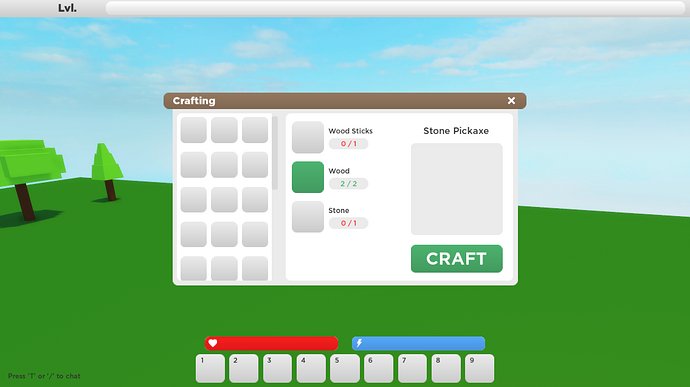
Roblox crafting system design involves carefully selecting items, combining them via a user interface, and generating new items based on predetermined recipes.
Creating a compelling experience with a roblox crafting system design is key to engaging players. It requires intuitive interfaces, clear progression, and a satisfying sense of accomplishment. A well-made system keeps players coming back, experimenting and building within your game.
A good crafting loop should feel rewarding, not frustrating. Think about the items, the recipes, and the journey players will undertake. This will help to increase the appeal of your roblox crafting system design and encourage interaction within your game.

Roblox Crafting System Design
Let’s talk about crafting in Roblox! It’s like being a super cool chef, but instead of making food, you’re making awesome items for your game. Designing a good crafting system can make your Roblox game way more fun. Think about games like Minecraft where you gather resources and make tools or buildings – that’s what we’re aiming for, but in the world of Roblox. A great crafting system keeps players engaged, gives them a sense of accomplishment, and adds a whole new level of gameplay.
The Core Ingredients of a Crafting System
Every good recipe, or in this case, every good crafting system, needs some key ingredients. These are the basic building blocks that make crafting work:
Resources
These are the things players need to collect to craft. They could be anything from wood and stone to magical crystals or even bits and pieces from defeated enemies. How you design your resources really shapes the game. Think about these things when you are designing them:
- Variety: Having different kinds of resources keeps things interesting. Maybe you have common resources like rocks and rare resources like dragon scales.
- Rarity: Some resources should be harder to find than others. This gives players a goal to work towards, like trying to find a super rare flower that only grows in a spooky forest.
- How players get them: Will players need to mine for resources? Will they get them by defeating monsters? Will they need to buy them from other players? This affects how the game feels.
Let’s see some examples:
| Resource | How to Obtain | Rarity | Uses |
|---|---|---|---|
| Oak Wood | Chopping oak trees | Common | Basic tools, buildings |
| Iron Ore | Mining in caves | Uncommon | Stronger tools, some weapons |
| Dragon Scale | Defeating the Dragon boss | Very Rare | High-level armor, special items |
| Sunpetal Flower | Found in sunny meadows | Rare | Potions, magical items |
Crafting Recipes
Crafting recipes tell players what resources they need and what they will get. This is where you decide what combinations of items create new things. You need to think about what items are useful to the player and what makes sense. Here’s some things to consider:
- Complexity: Simple recipes are good for beginners, but you also need more complex recipes for late-game. Start with easy crafts that help new players, and then introduce more challenging recipes that reward hard work.
- The Visual Representation: How do you show the recipes to the players? Will you use an easy-to-understand grid, or a list that shows required ingredients?
- The cost: How many of each resource will be needed? Don’t make recipes too cheap or they won’t feel special. But don’t make them too hard, or players might get frustrated.
- Progression: As players move through the game, they need to unlock new and more exciting recipes. This keeps them interested and gives them something to aim for.
Crafting Interface
The crafting interface is how players interact with the crafting system. It needs to be easy to use and understand. A clunky interface can make a game feel very annoying. A good interface should be:
- Clear: The interface needs to clearly show what resources a player has, what recipes are available, and how to craft items. Use icons and labels that are easy to understand.
- Simple: Don’t make the interface too complicated. Players shouldn’t have to spend ages figuring out how to craft a simple item.
- Organized: Organize the crafting recipes so players can easily find what they are looking for. You can use categories like “Tools,” “Armor,” and “Potions.”
- Interactive: Allow players to see a preview of the item that will be crafted. Players like to see exactly what they are going to get.
Types of Crafting Systems
There are many ways you can set up a crafting system. Here are some of the most common types:
Grid-Based Crafting
This type of crafting is similar to what you see in Minecraft. Players have a grid where they need to place resources in specific patterns to craft items. This is good for complex recipes and makes crafting feel more like a puzzle. A simple item like an axe, might be wood at the bottom of the grid and iron on top. Some games might require specific colors at specific position on the grid, depending on the game design.
List-Based Crafting
In a list-based system, players select a recipe from a list. As long as they have the needed resources, they can click to create the item. This is simpler than grid-based crafting and is better for games where you want crafting to be quick and easy. This works well for games that focus more on adventuring or building and less on the crafting process itself.
Workbench Crafting
With workbench crafting, players need to find a special place (a workbench) in the game world to craft. This can add a layer of exploration to the game, since players have to find the crafting location. For example, some games require players to find a “forge” to create tools, or an “alchemy table” to create potions. Workbenches can be upgraded, allowing players to craft better items.
Skill-Based Crafting
In this system, players level up their crafting skills by crafting items. As they get better at crafting, they unlock more advanced recipes and may even be able to craft better quality items. This adds a progression system and makes players feel like they are learning and getting better at the game.
Making Your Crafting System Engaging
Now that we have covered the basics, let’s look at how to make your crafting system really interesting and something players will love. Here are some tips that can make the crafting experience more engaging:
Meaningful Items
Make sure the items that players craft are actually useful. If the items do not matter, players will lose interest in crafting. The crafted item needs to help them progress in the game, battle stronger enemies, or build more creative things. For example:
- Tools: If players craft an axe they should be able to cut down trees faster. If they craft a pickaxe, they should be able to mine better ore.
- Armor: Armor should allow players to take less damage, so they can survive better in the game.
- Weapons: Weapons should make players stronger so they can take down bosses and stronger enemies.
- Consumables: Potions can give players temporary buffs or heal them during a battle.
- Building Materials: Crafting materials to build better bases and creative structures.
Rare and Special Items
Include rare items that require difficult-to-find resources or multiple steps to craft. These items should be more powerful or offer special benefits. Having these rare and special items makes players want to explore the game and find all the resources.
Crafting Challenges
Add challenges that involve crafting. For example, maybe there are challenges that involve crafting a certain number of items or crafting something with limited resources. Maybe you might need to craft a special item that will let you enter a difficult area in the game. These challenges create a different and more exciting reason to craft.
User Experience (UX) Matters
User experience is a fancy way of saying how easy and enjoyable the crafting system is to use. A poor user experience can make players not want to interact with the crafting system. Make sure the crafting interface is:
- Easy to Understand: Players should not have to read a huge guide to understand how to craft items. Use clear language and icons.
- Easy to Navigate: Players need to easily find the items they want to craft. Categories and filters can help with this.
- Responsive: The interface should react smoothly. No one likes a game where the crafting is slow and clunky.
Scripting Your Crafting System
Crafting in Roblox requires a bit of coding. This section is for those who are ready to jump in and make their system come to life. Here are some essential scripting considerations:
Storing Resources
You will need to create variables to keep track of what resources a player has. These variables must be stored somewhere that is easy to access and that stays with the player, even when they leave the game and come back. This is normally done through a “DataStore” which is Roblox’s method of storing player data. For example, you might have a table (which is a way of storing data) with the player’s resources:
lua
local playerData = {
[“Wood”] = 10,
[“Stone”] = 5,
[“Iron”] = 0
}
Creating the UI
You need to make buttons and labels that display the player’s items, recipes, and allow them to craft items. This can be done by creating a GUI(graphical user interface) using Roblox’s Studio tools. You will need to write Lua scripts to handle what happens when the player interacts with the UI.
Crafting Logic
The most important part is scripting the crafting logic. This includes:
- Checking if the player has enough resources.
- Subtracting the resources from the player’s inventory.
- Giving the player the crafted item.
- Updating the UI to reflect the changes.
Here’s a basic example in Lua, the programming language of Roblox:
lua
— Function to handle crafting
function craftItem(itemName)
local recipe = Recipes[itemName] — Get the recipe from the recipe table
if not recipe then
return print(“Recipe not found.”)
end
local hasResources = true
for resource, amount in pairs(recipe) do
if playerData[resource] < amount then
hasResources = false
print("Not enough " .. resource .. " to craft " .. itemName)
break
end
end
if hasResources then
-- Deduct resources
for resource, amount in pairs(recipe) do
playerData[resource] = playerData[resource] - amount
end
-- Give item to player
print(itemName .. " crafted!")
-- Here, you can give the player an item into their inventory,
-- and update the game world with a new crafted object.
else
-- Tell the player that they don’t have the resources required.
end
end
Making it Secure
Make sure to protect your crafting system from exploits. This might involve checking the server to make sure that players can not cheat to get crafted items. Roblox can sometimes be a difficult platform to keep secure. So, don’t trust the client, and validate everything on the server.
Testing and Balancing
Before releasing your crafting system, it is very important to test it and balance it correctly. That means you need to make sure:
- Everything works as expected: Do all the recipes work? Does the UI work correctly? Is there any way to cause glitches?
- Crafting is not too easy or too hard: Does it take too long to get the resources required? Are the recipes way too easy?
- The items are useful: Are the crafted items worth the effort? Are there items that need to be adjusted or re-thought?
- Players enjoy it: Ask players for feedback. Get them to try it out and tell you what they think.
You might need to tweak the crafting recipes or the resource drops to make it just right. Don’t be afraid to try out different options to see what works best for your game.
Designing a great crafting system in Roblox takes a bit of work but it’s worth it! By carefully considering the resources, recipes, interface, and player experience, you can create a fun and engaging system that will have your players crafting for hours.
Building Better Crafting Systems
Final Thoughts
In essence, effective roblox crafting system design requires thoughtful consideration of resource acquisition, recipe complexity, and user interface. Clear visual cues help players understand crafting options and progress. Balancing effort with reward is crucial for player engagement.
Good system design also encourages experimentation and provides a sense of accomplishment. It’s important to offer a variety of crafting possibilities that enhance gameplay. The key is a smooth and intuitive design process.

