
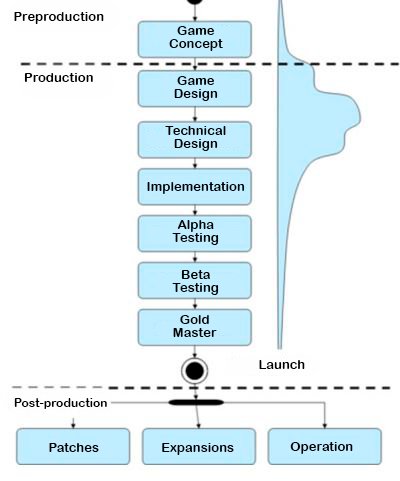
The typical Roblox game development workflow includes planning, scripting, building, testing, and publishing, often iterating on each step for improvement.
Thinking about creating a game on Roblox? The process, known as roblox game development workflow, requires a good plan.
It involves several key steps, starting with an idea and moving through building and coding. Finally, it goes through testing before you share it.

Roblox Game Development Workflow: A Step-by-Step Guide
Making a Roblox game can seem like a big puzzle, but it’s really about following a good plan. This plan is called a workflow. A solid workflow helps you organize your ideas, build your game piece by piece, and make sure it’s fun for everyone to play. Let’s explore what a typical game development workflow looks like for Roblox.
Idea and Planning
Every great game starts with an idea! What kind of game do you want to make? Is it an adventure game, a racing game, or maybe a fun role-playing game? Start by thinking about the main concept.
Brainstorming and Concept Creation
Grab a notebook or open a document and start writing down your ideas. Don’t worry about making them perfect yet. Think about the core gameplay – what will players do in your game? What makes it different or exciting? This phase is about getting all the ideas out.
Consider who your target audience is for your game. Are you making something for younger players, or something more challenging for older ones? This will affect the design choices you make later on.
Defining Game Mechanics
Game mechanics are the rules and systems that make your game work. This includes things like how players move, interact with objects, or score points. Writing these down helps you build the game’s engine. Think about the key actions players will take, and how they will work in your game.
Creating a Game Design Document (GDD)
A Game Design Document, or GDD, is like the blueprint for your game. It’s a place to put all of your ideas, game mechanics, and goals for your project. This document helps keep you on track. The GDD can also be shared if you are working in a team, keeping everyone on the same page.
Include details about your game’s story, characters (if any), levels, and any special rules. The more details, the better, because it guides the process of your game development. Consider adding sketches or visual inspiration for your game.
Asset Creation
Once you have a solid plan, you start creating the assets for your game. Assets are the models, sounds, and pictures that make up your game. This is where your game starts to come to life visually.
3D Modeling
Many Roblox games use custom 3D models. This is where you make the objects that players see and interact with. Think of things like buildings, characters, or vehicles. You can use Roblox Studio’s built-in tools, or external software like Blender.
For creating these models, you will have to understand how 3d models work. Start with simple shapes and slowly add detail to them. Remember to keep your models optimized to avoid any lag issues. Good modeling skills are important in any game development.
Texturing and Material Application
Once your models are built, you add colors and patterns using textures. Textures can make the models look like they’re made of wood, metal, or any other material. Texturing is important to make your objects and world more realistic. You can use images for your textures, or create custom textures directly.
Experiment with different materials to get the look that you want. Consider how light will interact with different materials to give your game a richer look.
Audio Design
Sound is a really important part of a game. It sets the mood and gives players feedback about what’s happening. Adding music and sound effects makes your game more immersive. You can find free sound effects and music online, or you can create your own.
Consider the timing and placement of your sound effects. The right sound at the right moment can add a lot to the game experience. Make sure sound effects do not overpower the game or be too distracting for the user.
Game Development in Roblox Studio
Roblox Studio is the main tool you use to build and test your game. It’s where you put all of your assets together and make the game work.
Setting Up the Workspace
When you start a new project, you begin by setting up your workspace. This includes creating the environment for your game, like the terrain and the sky. Place the important objects, like the spawning points and any required building blocks, in your workspace. You have to be organized with your workspace to avoid any confusion later on.
You can customize the look and feel of your game environment. This is very important to set the tone for the whole game. Make sure the environment matches your game’s overall theme.
Scripting with Lua
Lua is the programming language used in Roblox. Scripting allows you to add interactions, rules, and logic to your game. For example, if you want something to happen when a player touches a button, you will need a script. Learning the basics of Lua will give you a huge advantage in your Roblox Game development.
Start with simple scripts, and then move on to more complicated ones as you learn. There are many free tutorials online that you can use to learn scripting. It is essential to learn scripting to take your game to the next level. You can also add special effects with the use of scripting.
Building User Interfaces (UI)
A user interface, or UI, is what players use to interact with your game’s features. Think about menus, buttons, and scoreboards. UI is very important to allow the users to understand your game better. A good UI is vital to keep your player engaged. You can create these elements in Roblox Studio using different tools.
Consider the placement and style of the UI elements. Make sure they are easy to use and fit well with your game’s design. A well-designed UI can improve user experience greatly.
Level Design
Level design is about how you arrange your game world. Think of this as creating the maps where your players will play. A good level design needs to be both fun and engaging. Consider the different areas and challenges in each level. Make sure your level is optimized for different device performances.
Start with simple layouts and slowly add more details as you develop. Balance the challenges with opportunities for fun and rewards for the player. Level design is a crucial factor in keeping the user engaged for a longer period.
Testing and Iteration
Testing is a really important part of game development. You need to play your game to make sure it works well and is fun. This is where you find problems and fix them.
Playtesting
Get other people to play your game. Watching others play can help you see problems you might not notice yourself. Observe their game play and take notes on what they have said. Ask them for their feedback on your game.
Pay attention to how players interact with your game and see if they enjoy it. Playtesting helps you identify areas that need improvement. Try to be open to criticism, as that will make your game even better.
Bug Fixing and Optimization
Bugs are errors in your game that can prevent it from working as expected. Fixing these bugs is an important task. You should always look for ways to make your game run better. Optimize models and script for better performance to prevent lagging.
Regularly check your game for problems and fix them to give users a smooth experience. Debugging is a major part of development, and you should prepare for it. Optimization will help your game run smoothly on all devices.
Gathering Feedback
Listen to what players are saying about your game. Their feedback can help you make your game better. Join the Roblox developer community and look at what people are saying about your games. Ask players for feedback on specific parts of your game.
Use feedback to make informed decisions on the future of your game. Player feedback is one of the most important things that make your game great.
Publishing Your Game
After you’ve tested and refined your game, it’s time to share it with the world. Publishing your game is how other players can find and play it.
Setting Up the Game Page
Your game needs a page with a good description and a catchy title. The title and description should be very clear and help users understand your game. You should add a thumbnail for your game page that attracts the user to click on it. This information will help players find your game easily.
Make sure your game icon and title are creative and relevant to the game. Add tags so the user can find your game easily. A good game page will get you more players and keep them engaged for a longer time.
Configuring Game Settings
Set up the proper settings for your game, like how many players can join at once and if the game is public or not. Configure privacy settings if you don’t want users to have access to your game. Make sure your game is set up correctly before you publish it. You should always keep the game settings in check to avoid unwanted players in your game.
You also have to set up the game monetization if you are planning to earn from your game. Be very careful with the game settings, as it determines how users interact with your game.
Ongoing Updates and Support
After your game is published, it’s important to keep it updated. Games need regular updates with new features and improvements. Keeping your game updated will keep your players happy. Provide good customer support if any player has an issue with the game. Also, remember to listen to your user’s feedback and try to implement the required changes.
Respond to comments and reviews that users leave, and take any criticism positively. Remember, game development is not a sprint, it is a marathon. It requires lots of patience and time.
Creating a game on Roblox is a journey that requires planning, creativity, and hard work. By following a structured game development workflow, you can make the process easier and create amazing gaming experiences that players will love. Remember, every step is important in making the perfect game. This journey can be very rewarding if you enjoy the process. Happy game making!
10 Stages of Roblox Game Development
Final Thoughts
Effective Roblox game development workflow involves careful planning, consistent iteration, and testing. Developers should create clear design documents, break tasks into smaller pieces, and test often. This approach leads to more efficient development.
Using version control and collaborating is key. A structured approach to building assets and scripting speeds up the overall process. Proper workflow directly affects the game quality and speed of development.

