
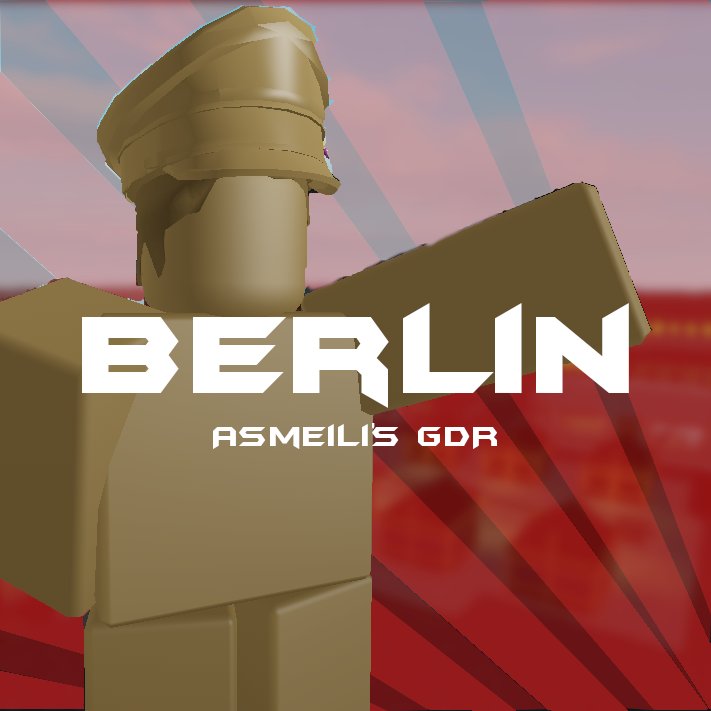
Bold, vibrant visuals and clear, concise text are key for effective Roblox game icon design tips.
Creating a captivating Roblox game starts with its first impression – the icon. This small square is your game’s face to the world, and it needs to grab attention instantly. Thinking about how to make a great one?
Understanding basic design principles can drastically improve how your game appears. A well-designed icon can attract more players than you think. Simple strategies, like choosing bright colors or readable fonts, can help immensely. Let’s explore practical Roblox game icon design tips to make your game stand out.

Roblox Game Icon Design Tips
Creating a great Roblox game is only half the battle. You also need a fantastic game icon to grab players’ attention! Think of your game icon as the first handshake with a potential player. A good icon can make someone click and explore your game, while a bad one might send them scrolling past. Let’s explore some tips to make your game icon shine.
Understanding the Importance of a Good Game Icon
Before we dive into the design specifics, let’s understand why game icons matter so much. Imagine you’re browsing through thousands of Roblox games. What makes you stop and click? It’s often the icon! Your game icon serves as a visual representation of your game. It needs to:
- Make a Strong First Impression: It’s the first thing players see, so make it memorable.
- Communicate Your Game’s Theme: Players should get a feel for what your game is about just by looking at the icon.
- Stand Out from the Crowd: There are millions of games, make sure yours doesn’t blend in.
- Attract Your Target Audience: A well-designed icon can draw in the players you want.
Basic Principles of Effective Icon Design
Great game icons follow some core design principles. Here are some important elements to keep in mind:
Clarity and Simplicity
Avoid cluttering your icon with too many details. A simple design is often more impactful and easier to understand, especially at small sizes. Imagine seeing your icon on a phone screen – can you still see what’s going on?
- Focus on a Single Key Element: Choose one main thing to be the focal point.
- Reduce Unnecessary Details: Remove extra parts that don’t add value.
- Use Strong Shapes: Simple shapes create a bold look.
Color Psychology and Use
Colors evoke emotions and associations. Think about the mood you want your icon to create.
- Bright and Vibrant Colors: Often work well for action or adventure games.
- Cooler Colors (Blue, Green): Can suggest calmness, mystery or fantasy.
- Warm Colors (Red, Yellow, Orange): Can convey excitement, urgency, or danger.
- Use a Limited Color Palette: Two to three main colors are usually plenty. Don’t use too many different shades!
- Ensure Contrast: Make sure your text and main elements stand out against the background.
Typography and Text
If you’re including text in your icon (like the game’s name), make sure it’s readable! Bad text can ruin a great design.
- Choose a Clear Font: Avoid overly fancy or hard-to-read fonts.
- Keep the Text Size Large Enough: Make sure text is visible even when the icon is small.
- Avoid Overly Long Text: Short, punchy titles usually work best, maybe just your game’s initial if it’s catchy enough.
Visual Hierarchy
Visual hierarchy is like guiding the eye through your icon. It’s about arranging elements so the most important parts are seen first. The most important part of your game icon must be noticeable.
- Use Size and Scale: Larger elements naturally attract attention.
- Placement Matters: Position the most important part of your image near the center.
- Use Contrast: High contrast creates visual emphasis.
Consistency in Design
If you create several games, try to develop a style for your icons. This makes your games recognizable and develops your brand on Roblox. Having a consistent brand can help your players remember your name.
- Same Colors and Fonts: Using the same colors and fonts in all of your icons will help with brand recognition.
- Similar Style: Maintain the same art style in all icons, whether using the same characters, a similar background design, or similar visual effects.
- Builds Recognition: A consistent look makes your games easily recognizable.
Practical Tips for Designing Roblox Game Icons
Use High-Quality Assets
Avoid low-resolution images or blurry graphics. Your icon needs to look crisp and professional. Invest in good graphic design programs or use free tools effectively.
- Avoid Blurry or Pixelated Images: Make sure all your images are in high resolution.
- Use High-Quality Textures and Models: Good quality assets will make your icon look professional.
- Consider Professional Graphic Design: If needed, consider hiring a professional game icon designer to get best results.
Showcase Your Gameplay
A glimpse of the actual game can be very powerful. You can show a key character, environment, or activity to help players understand the game. You can also use an animation in your icon.
- Show Key Characters: Feature a main character or a unique avatar design.
- Highlight Interesting Locations: Show off beautiful areas of your game.
- Depict Key Actions: What do players actually do in your game? Show them.
Use Rendered 3D Models
Rendered 3D models often look much more professional than just screenshots from your game. You can use software like Blender to create professional renderings.
- Create Clean 3D Models: 3D models are often more professional than other options.
- Use Software Like Blender: Software that helps create high-quality 3D renders.
- Show Off Unique Features: Showcase the unique features in your character or game assets.
Consider Different Platforms
Keep in mind that your icon will be viewed on various devices. So, check your design on computer, mobile phones and tablets to see if it looks good on each platform. Don’t just design on your main platform.
- Test on Mobile Devices: Ensure your design looks good on smaller screens.
- Check on Different Computers: Ensure that it looks good on larger screens as well.
- Adjust as Necessary: Modify as needed for different platforms to maintain the quality and clarity of your designs.
Stay Updated with Roblox Trends
Keep an eye on popular game icons and styles on Roblox. However, don’t copy, try to get inspiration. A little inspiration goes a long way. You want to be different but also follow some of the trends to keep your game relevant.
- Research Top Games: What makes their icons successful?
- Adapt Trends: Update your icon as trends change.
- Keep Your Icon Fresh: Make sure your game icon is relevant.
Tools and Resources for Roblox Game Icon Design
Free Design Tools
You don’t always need to spend a lot of money to design great game icons. Some great free tools are readily available. Here are a few that are available to use:
- Canva: This user-friendly tool is great for beginners. It has pre-made templates, graphics, and font selections, perfect for making quick icons. You can also design all your social media graphics with it.
- GIMP (GNU Image Manipulation Program): This is a free open source photo editing software, similar to Photoshop. This tool allows more advanced editing features.
- Pixlr: A browser-based photo editor, great for people that are wanting to use a photo editor right away.
Paid Design Software
If you are planning on taking your Roblox development seriously, or are wanting to start a career as a graphic designer, you might want to invest in some professional software.
- Adobe Photoshop: Industry-standard for photo editing and graphic design. It has an incredible suite of tools to make your icon as awesome as possible.
- Adobe Illustrator: This is ideal for creating vector graphics, perfect for scalable and professional-looking icons.
- Affinity Designer: A less expensive alternative to Illustrator, also excellent for vector design.
Roblox Studio
You can use Roblox Studio itself to design your icons, particularly for in-game elements. You can use this as a 3D background. Make sure to make your icons at the correct resolution.
Community Resources
There are tons of online communities of Roblox developers that are willing to help you with all of your design questions. You can reach out and get help from your own community.
- Roblox Developer Forums: A great place to ask questions and get feedback.
- Discord Servers: Join communities dedicated to Roblox development to ask for tips and help with your icon.
- YouTube Tutorials: There are many video tutorials about game icon design for beginners.
Testing and Getting Feedback
Test Your Icon
Before you publish your game, always test your icon! Test how it looks on different devices and screen sizes. You want to make sure it looks good on every platform.
Ask for Feedback
Ask other Roblox players and developers for honest feedback on your icon. Their perspectives can be very valuable, especially people who are your target audience.
- Show Your Friends: Have your friends check it out to see if it looks appealing.
- Ask in Online Communities: Get feedback from other Roblox developers.
- Make Adjustments: Adjust your design based on feedback to make it as great as possible.
Creating an awesome game icon for your Roblox game takes a lot of effort. It requires you to blend creativity, technical skills and knowledge of what makes a good game icon. By focusing on clarity, good colors, readable fonts and proper placement, you can make your game icon more eye-catching, memorable, and it can also help you attract your target audience. Don’t forget to use the community for feedback and continue learning. With the right effort and approach, you can have an icon that gives the best first impression for your game!
How I Make My Thumbnails For A Roblox Bedwars YouTuber 😳 #shorts
Final Thoughts
Effective game icons use bright colors and clear visuals. They should represent your game’s core concept. A good icon is memorable and stands out on the Roblox platform. Remember, clarity is key for attracting players.
Consider incorporating your game’s main characters or objects. Use contrasting colors to grab attention. Test different designs and get feedback. This approach helps make excellent Roblox game icon design tips.

