
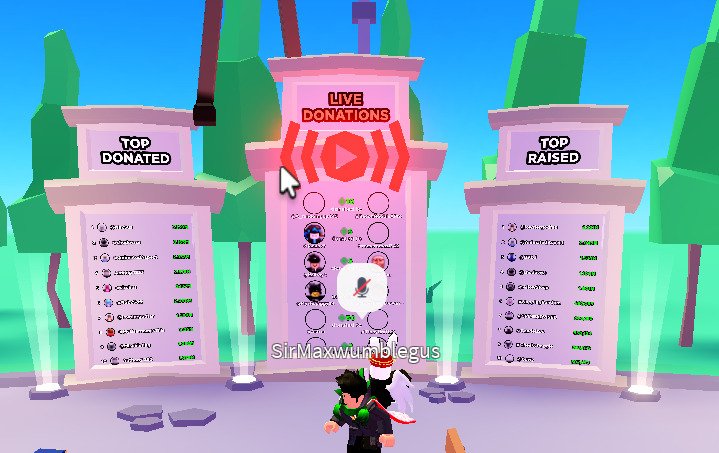
Effective Roblox leaderboard design requires clear ranking, easily readable player names, and relevant data points displayed in a user-friendly format.
Ever wonder how to make your game’s competition truly shine? A well-crafted leaderboard is essential for motivating players and displaying success. The impact of good roblox leaderboard design can be immense, boosting engagement. It’s not just about showing scores; it’s about creating a compelling experience. Players should immediately grasp their position and see who they need to surpass. We will explore ways to make your leaderboard stand out.

Roblox Leaderboard Design: Creating Engaging and Effective Scoreboards
Ever played a Roblox game and felt that rush of excitement seeing your name climb the leaderboard? That’s the power of a well-designed leaderboard! It’s not just about showing numbers; it’s about creating a competitive, engaging, and fun experience for players. Let’s dive into the nitty-gritty of making awesome leaderboards for your Roblox games.
Understanding the Purpose of a Roblox Leaderboard
Before we start designing, it’s important to understand why leaderboards are so important in Roblox games. They are more than just a list of top scores; they serve several key purposes:
- Motivation: Leaderboards encourage players to improve their skills and scores. Seeing other players ahead can spark a desire to climb higher.
- Engagement: They provide a sense of competition and keep players coming back to try again. A visible goal can be a powerful motivator.
- Community: Leaderboards foster a sense of community and friendly competition. Players often discuss strategies and compare their progress with others.
- Progression: They clearly show players their progress within the game. Seeing their rank improve provides a tangible sense of achievement.
- Recognition: They give players a sense of recognition for their efforts. It’s satisfying to see your name among the best.
Knowing these purposes helps us make design choices that are intentional and effective. A well-designed leaderboard isn’t just a bunch of numbers; it’s a tool that increases player enjoyment and stickiness to your game.
Essential Elements of a Good Roblox Leaderboard
A great leaderboard has several key parts that work together to create a positive player experience. Here are the must-have components you should consider:
Player Information
This is where your players’ identities and scores are displayed. The key elements include:
- Player Name: This is the most important part – without it, you wouldn’t know who’s who! It should be clear, easy to read, and ideally use their Roblox username.
- Player Score/Stat: This is the value being ranked on the leaderboard (e.g., points, kills, time, level). Make sure this stat is directly related to the core gameplay and is displayed in a clear and understandable format.
- Player Ranking: Showing the player’s position in the overall list adds that vital competitive layer. Don’t just show the score – show where they stand!
- Player Icon/Avatar (Optional): Showing a small icon or avatar next to the name can add a visual dimension to the leaderboard. This helps with player identification and makes the list more engaging.
Visual Presentation
The way your leaderboard looks is just as important as the data it presents. It needs to be easy to read and visually appealing. Consider these design elements:
- Clarity and Legibility: Choose a font that is easy to read, even at smaller sizes. The text and numbers should be clear and not cluttered. Ensure contrast between the text and background is high.
- Layout: A logical layout will make your leaderboard easy to understand and navigate. A simple, vertical list usually works best. Keep things organized and consistent.
- Color Scheme: Use color to highlight important information and create visual interest. Avoid using colors that clash or make the text difficult to read. Choose a color scheme that matches your game’s overall style.
- Styling: Add design elements that enhance the aesthetics and make your leaderboard look polished. Make it fit within your game’s visual style. Some games might need a sleek modern look while others a more cartoonish or medieval theme, style accordingly!
- Scrolling (If Necessary): If you have a lot of players on your leaderboard, you might need to use a scrolling window. Ensure the scrolling is smooth and easy to use.
Accessibility
Consider that players may use various devices to play your game. The leaderboard design must be accessible to everyone.
- Responsive Design: Make sure your leaderboard looks good on various screen sizes and devices. It should adapt to different resolutions without becoming too small or cluttered.
- Clear Visuals: Use clear, easy-to-read text, and good color contrast to make your leaderboard accessible to all players, especially those with visual impairments.
- Keyboard/Controller Navigation: If players are using a gamepad or keyboard to navigate the game UI, make sure your leaderboard is easily accessible and navigable with those controls.
Different Types of Leaderboards
Not all leaderboards are created equal. The best type depends on what kind of game you’re creating and what you want to encourage.
Global Leaderboard
This is the most common type of leaderboard, showing all players ranked against each other. It encourages general competition and showcases the very best players.
Friends Leaderboard
This leaderboard shows how you compare to your friends. It adds a social element to the competition and encourages players to invite their friends to play.
Daily/Weekly/Monthly Leaderboards
These leaderboards reset periodically, offering a fresh start and a new chance to claim the top spot. This provides additional reasons for players to return to the game.
Specific Category Leaderboards
These leaderboards track stats within specific categories, like level completion time, accuracy, or resources gathered. These allow players to focus on a specific aspect of the game and compete on something more specific than just total points. For example, if you have a racing game you can have a leaderboard for each track.
Technical Aspects of Building a Roblox Leaderboard
Okay, let’s get a bit technical. Here’s a breakdown of the general steps in the development process for creating a Roblox leaderboard:
Data Management
First things first, you need to figure out how you’re going to save and retrieve players’ scores. You have a few options:
- DataStore Service: This is Roblox’s primary system for saving player data. It’s reliable and recommended for most games. You save each player’s score under their UserID so you can easily retrieve it.
- Ordered DataStore Service: This is similar to regular DataStore but allows you to sort the data by score. It’s very useful for leaderboards since it automatically keeps your entries ranked.
Tip: When using DataStores, implement error handling to ensure the game doesn’t crash if the data can’t be loaded or saved. Saving data frequently, especially after significant progress is made, is also a good idea. Use caution not to save too often as this can cause the API to throttle your save requests and can cause issues. We recommend saving only when necessary.
Retrieving and Displaying the Data
Now that you’ve stored your data, you need to fetch it and display it on the screen.
- Use a Script: You’ll need a script to load the data from the DataStore or Ordered DataStore.
- Create a User Interface (UI): Use ScreenGuis, Frames, TextLabels, and ImageLabels to display the leaderboard.
- Dynamic Creation: Instead of creating a list manually in studio, you will generally create the elements using the script. This will allow you to easily change the leaderboard and make it dynamic.
- Loop Through Data: Loop through the sorted data that you get from the DataStore, and add each entry to the GUI. Update the UI in real-time or at an interval to reflect the most recent changes.
- Handle Player Updates: When a player’s score changes, update it in the DataStore and refresh the leaderboard. This keeps it accurate and shows the dynamic progress of the players in the game.
Scripting Best Practices
Keep the following coding practices in mind when you implement your leaderboard:
- Efficient Code: Write your scripts in an organized way so that they run efficiently. Don’t perform unnecessary actions.
- Error Handling: Use error handling so that your scripts don’t break when there is an unexpected value. For example if you try to load a player who doesn’t have any saved data, add a line of code to handle that.
- Real-Time Updates: Ensure your leaderboard refreshes regularly to display the most accurate information. Use techniques like debouncing to limit updates to the UI and to avoid performance problems.
- Performance Considerations: Be mindful of the number of UI elements you’re creating. If you have too many elements, it may cause lag, especially on older devices. Consider implementing features to limit the number of entries shown or techniques to reuse UI elements to improve performance.
Making Your Leaderboard Engaging and Fun
Beyond the basics, here are some things you can do to make your leaderboard more engaging:
Visual Feedback
- Animated Transitions: Add animations when a player’s position changes, making it more visually appealing.
- Special Effects for Top Players: Add special visual effects for the top few players to make their ranking feel more special.
- Highlight the Player’s Position: Make sure the player can easily find their own position in the leaderboard.
Rewarding Achievement
- Rank-Based Rewards: Offer rewards for reaching certain ranks on the leaderboard, encouraging more competition.
- Badges and Titles: Grant special badges or titles to top-performing players, which adds an element of prestige.
- In-Game Currency: Award in-game currency for high scores, which players can spend in the game.
Customization
- Game-Theemed Designs: Customize your leaderboard to match your game’s theme, making it feel integrated.
- Avatar Support: Display the player’s avatar image beside their name, or the players custom avatar texture. This creates a more unique and personalized leaderboard.
Examples of Great Roblox Leaderboards
Let’s look at a few examples of games that have used some of these techniques successfully:
[Game Example 1]
This game has a well-designed leaderboard that shows the player’s name, score, rank, and avatar. The leaderboard’s color scheme matches the game’s overall aesthetic, and the leaderboard is easy to navigate.
[Game Example 2]
This game uses a custom themed leaderboard, with designs that match the game’s art style, creating a more integrated experience. The game’s use of categories on the leaderboard allows players to focus on specific aspects of the game they enjoy most.
[Game Example 3]
This game does a great job of showing daily and weekly leaderboards. This encourages players to come back regularly for a new chance to get to the top. It also includes animated transitions when a player’s ranking changes.
Testing and Iteration
Creating a leaderboard isn’t a one-time project. You will need to regularly test and make changes based on player feedback.
- Gather Feedback: Pay attention to what your players are saying in your game’s chat or Discord. Ask for their thoughts about the leaderboard to make improvements.
- A/B Testing: Test different designs and layouts to see which ones players like best. Compare designs using player engagement metrics.
- Iterate: Improve your design based on the results of your testing and feedback. Leaderboards need to improve over time like any other game feature.
By continually making improvements, you’ll make your leaderboard a powerful tool that makes the game more engaging and competitive.
Designing a good leaderboard for your Roblox game takes time and careful planning. By remembering the basic principles and incorporating some of the techniques mentioned above, you can create a feature that increases motivation, engages your players, and keeps them playing. The core components such as score data, user interface and technical backend need to be solid. And the best leaderboards will often include unique designs and rewards systems to further enhance player engagement. By testing and iterating your design, you will continue to improve the player’s experience. So go ahead, start building, and watch your players climb those ranks!
ROBLOX – HOW TO MAKE LEADERBOARDS
Final Thoughts
Effective Roblox leaderboard design enhances player engagement by clearly displaying rankings and achievements. Developers should prioritize user experience, keeping the interface clean and intuitive.
Consider using visually appealing elements that align with your game’s theme for the Roblox leaderboard design. Data should be presented clearly, making it easy to understand player progress.
A well-designed leaderboard motivates competition and keeps players coming back for more. Careful consideration of these design aspects can significantly improve game appeal.

