
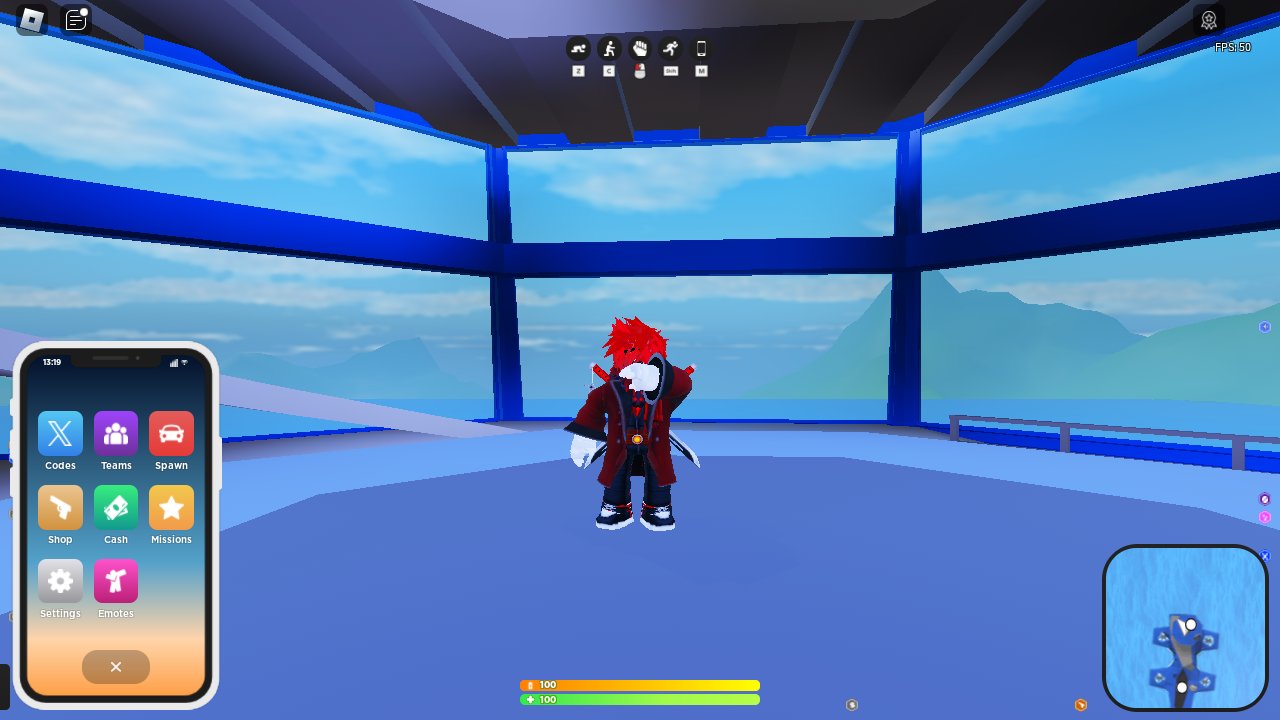
Creating engaging Roblox mobile games design requires simplified controls, optimized performance for various devices, and intuitive user interfaces tailored to touchscreens.
Have you ever wondered what makes some Roblox mobile games so addictive while others just fall flat? The key often lies in the careful consideration of roblox mobile games design. We will explore the essential elements that make a great game on phones, focusing on simple controls and good performance. Considering how people play on mobile is critical for success.

Roblox Mobile Games Design: A Deep Dive
Making a fun game on Roblox for phones and tablets is different from making one for computers. Phones have smaller screens and use touch instead of a mouse. This means you have to think differently about how players will see and use your game. Let’s explore all the cool things that go into creating awesome Roblox mobile games!
Understanding the Mobile Player
Before we jump into creating, let’s consider who we’re designing for. Mobile players often play in short bursts. They might be waiting for the bus, during a short break, or before bed. This impacts the kind of game that works best. Here are a few things to keep in mind:
- Short Play Sessions: Mobile games need to be fun and engaging quickly. Long tutorials or drawn-out gameplay might not work well.
- Touch Controls: Players will use their fingers to interact with your game. Buttons and menus need to be easy to tap.
- Distractions: Mobile players are often in noisy and distracting environments. Visual cues and easy-to-understand mechanics are important.
- Varying Devices: Roblox games need to work well on different phones and tablets, from smaller older devices to large new ones.
Keeping these ideas in mind will help you build a game that’s enjoyable for everyone.
The Importance of Simple Controls
Touch controls are the heart of mobile gaming. If your controls are hard to use, players will get frustrated and might not play your game. Let’s look at some different control methods you can use and discuss how to make them work well:
Basic Movement
The most common control type is a virtual joystick. Think of it like a gamepad on your screen.
- Static Joysticks: These stay in one place. They are easy to use but can take up screen space.
- Floating Joysticks: These appear where you touch the screen. They are out of the way but might feel less precise to use.
You can also consider simple tap-to-move mechanics for games where precise movement isn’t necessary.
Action Buttons
For actions like jumping, shooting, or using items, use easy-to-tap buttons. Here’s how to make them effective:
- Big and Clear Buttons: Make sure your buttons are large enough for fingers and have clear icons.
- Spacing Buttons Correctly: Don’t put buttons too close together, or players will tap the wrong ones.
- Feedback: Give players feedback when they tap a button, like a small change in color or size. This lets them know that their action has registered in the game.
Contextual Controls
Sometimes, controls only appear when needed. For example, an interact button might show up only when a player gets close to an object. This keeps the screen clear when you don’t need the controls.
Screen Layout and User Interface (UI)
A good screen layout is really important for mobile games. You need to fit everything on a smaller screen in a way that’s not cluttered or hard to use. Here’s what to think about when creating your game’s user interface:
Keeping it Clean
A clean screen is easy to see. Here are some tricks to keep things tidy:
- Less is More: Try not to have too many things on the screen at once. Prioritize key elements.
- Clear Fonts: Use easy-to-read fonts. The font size must be large enough for the player to read without squinting.
- Whitespace: Use blank spaces between buttons and text. This makes everything less crowded.
Placement of Important Elements
Think about where you put important things on the screen:
- Heads-Up Display (HUD): Put important info like health, score, and time near the edges of the screen. Don’t hide them with your hands!
- Menus: Keep menus simple and easy to navigate. You might use icons to help players find what they need quickly.
- Game Elements: Place game objects like enemies, items, or obstacles where players can easily see and interact with them.
Adapting to Different Screen Sizes
Roblox games should adjust to different screen sizes. You want the game to look good on any phone or tablet.
- Anchor Points: Use anchor points to position UI elements correctly on all devices. This makes sure they stay in the right spot.
- Scaling UI: Scale your UI elements so they appear in appropriate sizes on large and small screens.
- Testing: Always test your game on different devices to make sure it looks right.
Performance Optimization
Mobile devices don’t have the same power as computers. To make your game run smoothly, you need to optimize performance. If the game lags or is too slow, people won’t want to play it.
Keeping it Light
Think of your game like a car. The more weight it has, the slower it goes. Here’s how to keep your game ‘light’:
- Reduce Model Complexity: Use fewer polygons on your 3D models. Simple shapes use less power to display.
- Efficient Textures: Use optimized textures. Large or too many high-resolution textures will slow the device.
- Smart Scripts: Write scripts that don’t use too much power. Check your scripts to remove unused code.
Level of Detail (LOD)
LOD is a clever trick. You show simple models when objects are far away, and detailed models when they are close. This makes the game run faster without losing detail.
- Far Away Objects: Use simpler shapes and lower-resolution textures.
- Close Objects: Show more detail when the player is near.
Culling
Culling means only showing objects that are in the player’s view. If something is behind a wall or off-screen, your game doesn’t need to draw it. This saves a lot of processing power.
- Camera Culling: Only draw what the camera can see.
- Occlusion Culling: Don’t draw objects that are hidden behind other objects.
User Experience (UX) and Onboarding
User experience is how people feel when they play your game. A good UX means players can understand the game quickly and have fun. Onboarding is how you help players learn how to play your game. It should be easy and quick to understand.
Clear Instructions
Don’t assume players know how to play your game. Explain it simply:
- Short and Simple Tutorials: Keep your tutorials short and to the point. Players want to play, not read long instructions.
- Visual Cues: Use arrows or glowing objects to show players where to go or what to do.
- Tooltips: Use small text boxes to explain items or actions.
Intuitive Design
Make sure the game is easy to understand without needing instructions:
- Clear Goals: Make it easy for players to understand what they need to do.
- Immediate Feedback: When players take an action, give them a response. If they get an item or beat an enemy, show it to them.
- Easy Navigation: Let the player move around without a hassle. Make the levels easy to navigate and understand.
Positive Reinforcement
Make players feel good when they play your game:
- Rewards: Give rewards for completing tasks or reaching goals. This motivates them to keep playing.
- Positive Feedback: Let players know when they are doing a good job. Sounds or messages can motivate players.
- Progression: Players want to improve over time, make the game progression clear.
Monetization (If Applicable)
If you want to make money with your game, think about how you will do it. But be careful not to ruin the game for players. Nobody likes a game that makes you pay too much to play.
In-App Purchases
This is when players buy things in your game:
- Cosmetics: Sell things like skins or outfits that change how a player looks. This doesn’t make the game unfair.
- Boosts: Sell items that help players. Be careful not to make the game unfair for people who don’t pay.
- Avoid Pay-to-Win: Never sell things that give players a big advantage over others.
Ads
You can also show ads in your game:
- Non-Intrusive Ads: Show ads that are not too annoying. Don’t make players watch long ads when they are in the middle of playing.
- Reward Ads: Let players watch ads to get a reward. This makes the ads feel less annoying.
Balance
Always remember to balance the game. A game where you need to pay to progress is not enjoyable. Make sure the game is fun for everyone, even those who don’t pay.
- Fair Play: Make sure everyone has a chance to win, whether they pay or not.
- Fun First: Never put profit above fun. If your game is fun, people will want to play it even without paying.
Testing and Iteration
Making a great game is a process of testing and changing. You need to watch how people play your game and make changes to make it better. Here is what this involves:
Playtesting
This means watching real people play your game. You can see where they have trouble or what they like.
- Invite Friends: Ask your friends to play your game and give you feedback.
- Watch Gameplay: Pay attention to how players interact with your game. Do they understand the controls and objectives?
- Collect Feedback: Ask players what they liked and didn’t like about your game.
Making Changes
Use the information from playtesting to make your game better:
- Fix Issues: Fix problems that players have reported.
- Adjust Balance: Adjust the difficulty of the game to make it more fun and fair.
- Improve UI: Make the user interface easier to use if players are having trouble.
Iterating
This means making changes and then testing again. You keep doing this until your game is great:
- Small Changes: Make small changes and test them one at a time.
- Test Often: Test your game frequently to make sure it is working.
- Keep Improving: Making a game is a process that you never stop, so keep working to make your game the best it can be.
Creating a mobile Roblox game is a journey filled with cool challenges and many exciting opportunities. By keeping in mind how mobile players interact with games, focusing on simple controls, designing a user-friendly interface, optimizing performance, thinking about the user experience, and testing everything often, you can create a fun mobile game that people really love to play. Remember that great mobile games are easy to pick up and enjoy, engaging, and can adapt to different devices. Keep on creating and building amazing experiences for mobile players!
How To MAKE a ROBLOX GAME on MOBILE…
Final Thoughts
Designing successful Roblox mobile games requires careful attention to touch controls and screen space optimization. User interface elements must remain clear and intuitive on smaller devices. Performance is also key; optimize game assets and code to run smoothly.
These considerations lead to enjoyable mobile gameplay. Prioritizing these aspects will help you create engaging experiences for all players. Effective Roblox mobile games design balances fun and accessibility for the mobile platform.

