
Roblox parental controls in games allow parents to restrict chat features, set spending limits, and control game access based on age appropriateness.
Worried about your child’s online experiences in the world of Roblox? Many parents are. Understanding how to manage their gameplay safely is important. The platform offers several features for setting boundaries. Knowing what these are and how to use them will help create a safer environment. This blog will help you navigate the available Roblox parental controls in games.

Roblox Parental Controls in Games
Roblox is like a giant playground where kids can create their own games, play games made by others, and hang out with friends. It’s a lot of fun! But, like any playground, sometimes parents want to make sure things stay safe and appropriate. That’s where Roblox parental controls come in. These tools help you manage what your child can see, who they can talk to, and how much they can spend. Let’s take a good look at how these controls work and how you can use them to help your child have a great and safe experience on Roblox.
Understanding the Basics of Roblox Parental Controls
Before we jump into the nitty-gritty, let’s talk about the main things these controls can do. Think of them as a set of rules you can put in place for your child’s Roblox account. These controls allow you to do things like:
- Control who can chat with your child: You can limit communication to friends, everyone, or even turn off chat altogether.
- Restrict what games your child can play: You can set age-appropriate game filters.
- Manage spending: You can control how much money your child can spend on Robux, the game’s virtual currency.
- Monitor your child’s activity: You can check recent games played, friend requests, and chat logs.
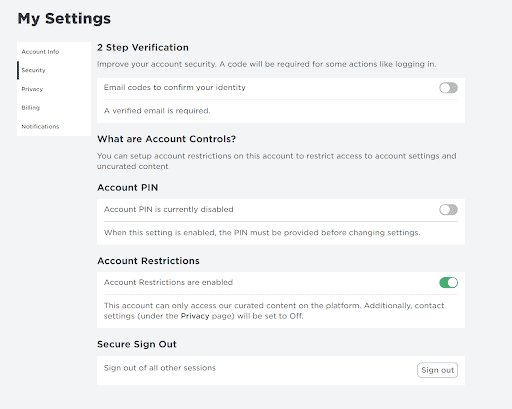
- Set an account PIN: This prevents your child from changing the settings without your permission.
These are the key elements that make Roblox a safer space for kids. It’s not about blocking all the fun, it’s about finding the right balance so your child can play and learn safely.
Accessing and Setting Up Parental Controls
Now, let’s get into how you actually find and use these controls. Don’t worry, it’s not too tricky! Here’s how you can access them:
Step-by-Step Guide:
- Log in to the Roblox Account: Using a web browser, go to Roblox.com and sign in using your child’s username and password. If you don’t know their password, you will need to help them reset it.
- Navigate to Settings: Once logged in, look for the settings icon. It usually looks like a gear or cog. Click on it. This is typically located in the top-right or left-hand corner of the page.
- Select ‘Parental Controls’: In the settings menu, you should see an option that says “Parental Controls” or “Privacy”. Click on that.
- Configure Your Settings: This is where you can adjust various settings, as we discussed earlier. We’ll go into specifics in the next section.
- Create a PIN: Make sure to create a PIN to prevent children from changing any of these settings. Keep this PIN safe and secret.
It’s important to do this with your child, if they are old enough to understand, this gives you a chance to talk about online safety with them. Let them know why these controls are in place and how they can contribute to a safe online gaming experience. This open communication can make a big difference.
Detailed Look at Each Parental Control Feature
Let’s dive deeper into each of the specific controls that Roblox offers. Understanding how each one works will help you tailor the settings to best suit your child’s needs.
Account Restrictions: Age and Game Filters
One of the first things you’ll see is options regarding account restrictions. Roblox automatically assigns an age category to accounts based on the birthdate entered during account creation. Based on this, the content will be filtered, Roblox automatically restricts access to experiences that are deemed inappropriate based on user’s age. It uses age-appropriateness guidelines to restrict game access. For example, games with violent content or mature themes would be filtered out for younger users.
You can further customize these filters by manually selecting age-appropriate game categories. For example, you can choose to allow games in the “all ages” category, or only those appropriate for a certain level, for example 9+. It’s a good idea to review the types of experiences your child is interested in to be sure that the settings are appropriate for them.
Communication Controls: Who Can Chat?
Roblox has a chat function, enabling players to communicate with each other. However, this can be a source of risk if not managed properly. The parental controls allow you to manage who your child can interact with:
- Friends Only: Your child can only chat with people they’ve added as friends on Roblox.
- Friends and Following: Your child can chat with people they are friends with and people they choose to follow.
- Everyone: Your child can chat with anyone on Roblox.
- No one: All chat functions are turned off.
If you’re unsure, start with “Friends Only” and talk to your child about adding only people they know in real life. You may adjust as they grow. This setting only covers the direct chat window in the Roblox app and does not include game-specific text chat, where settings are based on the game itself. It’s important to check the settings of each game.
Spending Controls: Managing Robux
Robux is the virtual currency used on Roblox. You can use real money to buy Robux which can be used by children to buy game passes, items for their avatar, or for in-game spending. If you want to have more control over your child’s spending, you can set monthly limits. This is important to avoid unintended or excessive charges.
Here is how you can control the Robux spend:
- Spending Limits: You can set limits on how much Robux your child can spend in a month.
- Purchase History: You can see exactly where the Robux was spent.
- Disable Purchasing: You can turn off the ability to spend any Robux.
Discussing budgets and responsible spending with your child is essential. You can teach them about saving Robux and using it wisely. It also allows you to have an idea of how they utilize digital assets, which is an important topic to cover in the digital age.
Account Activity Monitoring: Keeping an Eye on Things
The parental control feature is not only for setting boundaries, but it also helps you keep an eye on your child’s Roblox experience:
- Recent Activity: You can check the games your child has recently played.
- Friends List: See who your child has added as friends. This allows you to cross check with their real-life relationships to ensure they are not interacting with strangers.
- Chat History: You can view chat logs. If you see something you’re not comfortable with, take the time to discuss it with your child.
Regularly monitoring activity can give you insight into your child’s experience. It can help you to detect any potential issues or problems early. It also provides opportunities to have conversations about online safety and behavior. Remember, it’s not about distrust, but about ensuring their safety.
Account PIN: Preventing Unauthorized Changes
The PIN is a very important part of Roblox parental controls. It adds an extra layer of security, making it impossible for your child to change the settings you’ve put in place. With it, kids cannot change settings and potentially turn off safety controls.
Here are some of the important points about PIN:
- Creating a PIN: When you set up parental controls, you should create a 4-digit PIN to secure the settings.
- Keeping the PIN Secret: Never share the PIN with your child or anyone else.
- Changing the PIN: If you think your child has figured out your PIN, it’s a good idea to change it.
The PIN is the gatekeeper to the parental controls. It ensures that your settings stay secure and your child’s experience remains appropriate. Treat the PIN as you would a password for an important account.
Setting Realistic Expectations and Rules
Roblox is designed to be fun and engaging. While parental controls are essential for safety, they shouldn’t completely overshadow the fun aspect. Here are a few considerations:
Open Communication
Talk with your child about why these controls are in place. Explain the importance of online safety and appropriate online behavior. When they understand, they are more likely to follow the rules. Having an open and honest discussion can encourage them to be responsible users. Regular conversations about their online activities are just as important as implementing controls. This allows them to share any concerns and it teaches them to be more aware of potential risks.
Flexibility
As your child grows and shows responsibility, you can adjust the controls. The goal is not to restrict them all the time but to prepare them to be responsible online citizens. If they consistently demonstrate they can make smart choices, some settings can be relaxed. However, always keep in mind the online environment can change, and it may be wise to tighten them again if you notice questionable behavior.
Balance
Find a balance between safety and allowing your child to explore and express themselves. Too many restrictions can lead to frustration, but too few can be risky. The best approach is a balanced one, where safety is a priority, but fun and creativity are not completely compromised.
Addressing Common Concerns
Parents often have similar questions and concerns when it comes to Roblox and parental controls. Let’s address some of these:
“Can my child bypass the controls?”
The PIN is designed to prevent changes, but like with anything, children may sometimes try to find workarounds. Regularly check the settings, and if you have any suspicions, change the PIN immediately. Educate your child about the consequences of trying to bypass the controls. Remind them that these controls are in place to keep them safe. If you suspect your child has found a way to bypass the settings, you need to revisit the reasons behind the safety measures. Make sure they understand the importance of following the rules that you set up.
“What if my child is being bullied or harassed?”
Roblox has a reporting system to deal with such situations. Teach your child how to report inappropriate behavior. You can also review their chat history to see if any of these situations have happened. Let your child know that it’s okay to come to you if they have any issues. In addition, you can report a user by going to their profile and clicking the report button. Remember, your child should not feel afraid to seek assistance from you. Creating a safe space for them to speak up helps them feel secure in their digital interactions.
“Are all games on Roblox safe?”
While Roblox has filters in place, not all user-created games are suitable for every child. This is another reason to use the age-appropriate filters, as mentioned previously. Always check games together with your child initially. Read reviews and look for potential red flags. Encourage your child to use critical thinking when deciding on games. It’s important to show them that not all online content is appropriate. Review new experiences with them before allowing them to continue playing.
“Can my child accidentally spend money?”
The spending controls are a useful tool, but accidental purchases can still happen if the spending limits are too high. Review these settings regularly. Make sure your card information is not saved on the platform. To prevent accidental purchases, you may disable Robux spending altogether and allow it when it is discussed in advance. Set rules about making purchases with your child. It can help them develop a good financial approach in their early years.
“What if my child doesn’t like the restrictions?”
It’s natural for kids to want more freedom, but it’s also important to keep them safe. It’s a conversation. Explain your reasoning to them and come up with a plan that works for both of you. Reassure them that you can revisit the settings over time as they get older. Find a middle ground that respects their desire for independence but also keeps safety a priority. It’s all about communication and collaboration. This way the rules are not perceived as punitive, and you can teach them how to navigate the digital world with the correct mindset.
Using Roblox parental controls is a way to help your child enjoy this digital playground safely. It’s about creating an environment where they can play, learn, and connect, while also being protected from potential risks. Remember to communicate with your child and make sure that you work together to find a great balance.
“PARENTAL CONTROLS” Are NOW on ROBLOX! 😱
Final Thoughts
Effectively using Roblox parental controls in games empowers parents to create a safer gaming space for their children. These tools allow for management of chat features, spending, and game accessibility. Parents must understand and use these settings to best protect kids.
Careful adjustment of ‘Roblox parental controls in games’ greatly influences a child’s experience on the platform. These features help prevent exposure to inappropriate content and interactions. Proper parental oversight remains vital for a positive gaming environment.

