
Collecting Roblox player feedback involves utilizing in-game surveys, social media channels, and community forums to gather player opinions and suggestions.
Ever wondered how game creators on Roblox know what players want? The answer lies in effective Roblox player feedback collection. Developers use various methods to understand player experiences and improve their games. It’s a vital step for creating successful and enjoyable content on the platform.
Getting feedback lets developers fix bugs and make design adjustments that resonate with their audience. This data-driven approach is how many Roblox games grow and adapt. So, understanding the methods for collecting feedback provides a crucial insight into game development itself.

Roblox Player Feedback Collection: Building Better Games Together
Making awesome Roblox games is all about teamwork, right? But that team isn’t just the developers; it also includes all the players jumping into your world! Getting player feedback is super important. It’s like having a secret code to make your game even better. Think of it as players telling you what they like, what they don’t, and what amazing things you could add to make their experience the best. Let’s dive into how you can collect player feedback on Roblox and turn it into game-changing improvements.
Why is Roblox Player Feedback So Important?
Imagine building a LEGO castle without ever seeing a picture of a real castle. It might be cool, but it could also be missing some really important parts! That’s kind of like developing a Roblox game without player feedback. You might think it’s perfect, but players could be noticing problems you haven’t even thought about. Here’s why listening to your players is crucial:
- Spotting Bugs and Glitches: Players are often the first to find those pesky bugs that can ruin the fun. They’ll encounter things you might not while testing and they can report them.
- Improving Game Balance: Is something too easy or too hard? Players can tell you if the difficulty is just right or if things need some adjusting. Balancing is key to keeping everyone engaged.
- Finding What Players Love: Feedback helps you learn which parts of your game are a huge hit and what you should focus on. Knowing this helps you make more of what people enjoy.
- Identifying Missing Features: Sometimes players have amazing ideas that you haven’t thought of! They might suggest features that could make your game even better and add more depth.
- Boosting Player Engagement: Showing players that you listen to them builds trust and makes them feel like part of the game’s development. When they feel heard, they’re more likely to stay engaged and tell their friends about your game.
Different Methods for Collecting Player Feedback
Now that we know how important feedback is, let’s talk about the different ways you can collect it. There’s no one-size-fits-all approach; you should try different methods and see which work best for you and your game.
In-Game Feedback Systems
Making it easy for players to give feedback without leaving the game is a great start. Here are some in-game methods:
- Buttons or Icons: Add a small button or icon somewhere on the screen that players can click to provide feedback. This is easy and always available for players during the gameplay.
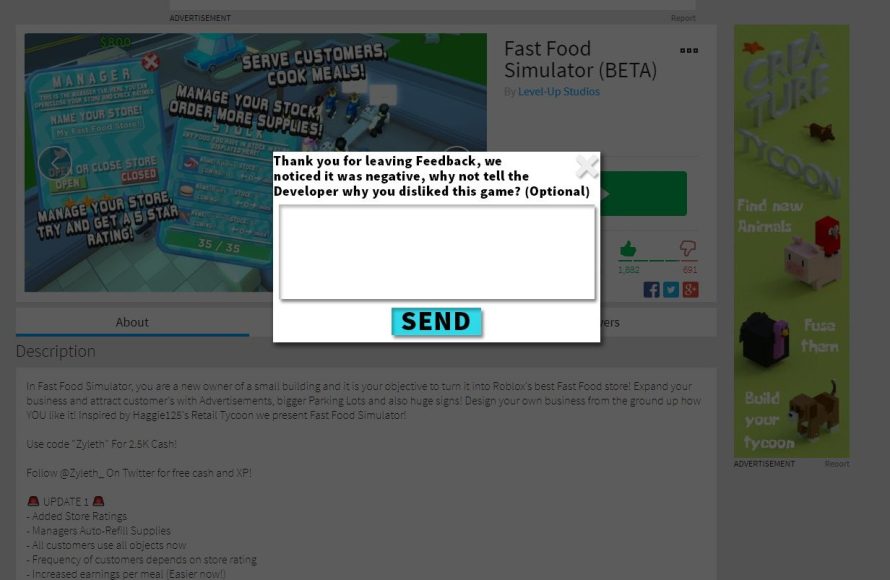
- Pop-Up Surveys: You can create small surveys that pop up after a player finishes a level or after a specific amount of play time. Make sure you keep these surveys quick and easy to complete.
- Text Input Boxes: Allow players to type in their feedback directly. This lets them give more detailed information about what they are experiencing.
- Rating Systems: Let players rate different parts of the game with a star rating. This offers a quick way to see what players liked or disliked.
Example of an In-Game Text Box Setup:
Imagine a simple UI that is brought up by pressing a button on the top left of the screen, or from a menu. The box would have a short message like “Tell us about your experience!” followed by a text input box where they can type. You could also include a button to send their message. This helps the player to quickly report the problem or share any ideas they have without needing to leave the game.
Using the Roblox Developer Forum
The Roblox Developer Forum is an awesome place to connect with other developers and players. This is also an excellent place for getting deeper feedback about your game. It can be a really helpful place for more detailed thoughts and issues.
- Dedicated Threads: Create a specific thread in the forum for your game. This is where players can ask questions, share their thoughts, and report bugs. Be sure to check this thread often to keep up with the feedback.
- Engage in Discussions: Don’t just read the feedback; jump into the conversations. Asking follow-up questions can really help you understand what players are thinking and feeling.
- Announce Updates: Let players know when you make changes based on their feedback. This makes them feel like their voice matters. It also gives them something new to explore and provide feedback on.
Social Media & Discord
Many players love to chat and share their experiences on social media and Discord. Having a presence on these platforms can help you gather a lot of player feedback.
- Set Up a Discord Server: Creating a dedicated Discord server for your game is a great way for players to chat, share screenshots, and give real-time feedback.
- Run Polls: Discord is perfect for running polls and asking questions directly to your community. This provides instant insight into what players think about specific ideas.
- Monitor Social Media: Keep an eye on social media platforms like Twitter or X. Players might post about your game, and you don’t want to miss out on any useful information.
- Respond to Comments and Messages: Let players know that you are listening by replying to their messages and questions. This can make them feel appreciated and motivated to give even more feedback.
Direct Communication: Email and Private Messages
While not as common as the above methods, direct communication can sometimes be very effective for getting in-depth feedback, especially from specific players.
- Dedicated Email Address: Set up a special email address just for player feedback. This lets players send longer and more detailed messages directly to you.
- Private Messages: If you have a community or players with whom you frequently communicate, use private messages to ask them questions or for direct feedback.
What Makes Good Feedback?
When you start collecting player feedback, you’ll get all sorts of responses. Some of it will be great and super helpful, but some might not be. Knowing how to tell good feedback from not-so-good feedback is a key skill for developers.
The Characteristics of Helpful Feedback
- Specific: Instead of saying “This game is bad”, good feedback will say things like “The jumping is too floaty” or “The level is too easy after level 5”.
- Constructive: Good feedback tells you not just what is wrong but also suggests ways that it could be improved. For example, “I think it would be better if the characters moved faster” rather than just “It’s too slow”.
- Actionable: The feedback should be something you can actually fix or change. If someone says “The game should have magic unicorns”, that might be fun, but if you are not working on magic, this is not very actionable!
- Polite and Respectful: Even if a player is not happy with a game, it’s still helpful for the feedback to be delivered respectfully. Rude or hateful feedback might not be helpful to take action on.
Examples of good and not so good feedback:
| Good Feedback | Not-So-Good Feedback |
|---|---|
| “The level is too hard. The enemies in the third room move too fast and spawn too quickly. Maybe reducing the number of enemies or slowing them down would help.” | “This game is impossible! It sucks.” |
| “I really like the new map, but the trees make it hard to see the enemies in the forest area. Can you make them a bit smaller or add some more open spaces?” | “The graphics are bad!” |
| “The controls are difficult to use. Maybe adding a tutorial to explain how to use different actions would be helpful.” | “I don’t know how to play, the game is confusing” |
How to Use Player Feedback Effectively
Collecting feedback is only half the battle; using it effectively is what truly makes a difference. Here’s how you can turn player comments into real improvements for your game:
Analyze and Prioritize Feedback
- Group Feedback: Try grouping similar pieces of feedback together. If many players complain about the same issue, it is probably the most important to fix.
- Prioritize Based on Impact: Fix the issues that affect the most players first. Things that break the game, or make it hard to play, should take priority over smaller aesthetic suggestions.
- Don’t Ignore Smaller Issues: Even small things can cause problems. If players consistently complain about something, take time to see if it’s affecting the overall experience of the game.
Implement Changes and Track Results
- Make Changes: Based on what you learned from player feedback, make the changes to your game. Do not rush this step as it’s important to make sure the new changes will actually help.
- Release Updates: Share an update with all the players when you have made the changes. This is a good time to announce what you have fixed and changed.
- Track the impact: After the update, be sure to keep an eye on how the changes are affecting the player. This is also a great time to ask more questions if there are problems or feedback.
Communicate with Your Players
- Let Players Know You Are Listening: Always acknowledge player feedback and tell players that their feedback is being heard. If there are updates, tell players what you have changed based on their comments.
- Be Transparent: Don’t be afraid to be open with the players about the game’s development. This can build trust and make players feel part of the journey.
- Ask for Continued Feedback: The journey does not end! Keep encouraging players to provide feedback on every part of the game’s experience.
Tools and Resources for Feedback Management
Managing all that player feedback can get tricky! Luckily, there are some helpful tools and resources available to make the job easier. Here are a few ideas:
Trello or Similar Tools
Trello is a great way to visually organize feedback and keep track of what you need to fix. Imagine this as a project board for your game, a digital sticky note board that helps organize each task.
- Create Boards: Make different boards for different types of feedback (e.g., Bug Reports, Feature Requests, Level Design).
- Add Cards: Put each piece of feedback on a card, along with all the details needed.
- Track Progress: Move cards through columns like “To Do”, “In Progress”, and “Done”. This allows everyone to see the status of each item.
Spreadsheets
If you like a more structured approach, you can use spreadsheets to keep track of player feedback. This is like making a digital list, where you can order all the feedback in a simple manner.
- Create Columns: Use different columns for the feedback category, the details, status, and priority.
- Sort and Filter: You can easily sort the spreadsheet by different columns to see which items need your immediate attention.
- Share with Your Team: If you are working with a team of developers, share the spreadsheet with them so they can also view the progress.
Roblox Analytics
Use Roblox’s built-in analytics tools to help understand how players use your game. This can help you find issues that players are not directly reporting. Analytics helps you see things like.
- Play times: What areas of your game do players spend the most time in?
- Engagement numbers: Where are players leaving your game and why?
- Game pass purchases: Which game passes are the most popular?
This data can help you find more areas to improve even when players are not directly reporting these issues.
By understanding what players like and dislike, you can make your game fun and enjoyable for all. So, start collecting feedback today and make your game the best it can be!
ROBLOX FACES THAT GOT BANNED FOR BEING INAPPROPRIATE! #shorts
Final Thoughts
Gathering roblox player feedback collection is essential for game improvement. Developers can use player opinions to identify bugs and desired features. This helps create a more enjoyable gaming experience.
Consistent feedback loops are vital for ongoing development. Developers should actively solicit and analyze player input. This allows them to quickly adapt to the changing needs and preferences of their community.

