
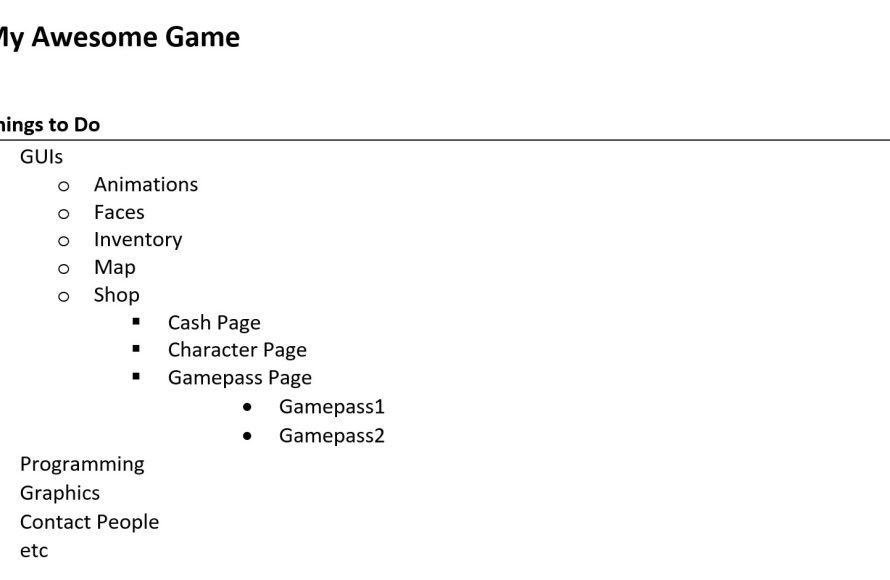
Planning your Roblox game involves defining your core idea, setting realistic goals, breaking down tasks, and creating a schedule to stay organized.
Ever dreamt of creating the next big hit on Roblox? Many aspiring developers jump straight into building, but a little forethought goes a long way. Effective Roblox project planning tips for games can dramatically increase your chances of success and prevent that feeling of being totally lost in the development process.
Proper planning helps you avoid scope creep and keeps your project on track. These tips involve breaking your big ideas into manageable tasks. Having a roadmap is key when creating your Roblox game and setting up a successful launch.

Roblox Project Planning Tips for Games
Making a super cool Roblox game is like building with LEGOs, but on a computer! It’s awesome, but it needs a plan. Just like you wouldn’t build a giant castle without thinking about where the walls and towers go, you can’t make a great game without some planning. This part of the guide will show you all the important steps to get your game idea from your head onto Roblox. We will cover ideas, goal setting, team work and more. Get ready to make your Roblox dreams come true!
Brainstorming Your Game Idea
Before you even open Roblox Studio, you need a fantastic idea. This is where the fun begins! Think about what kind of game you want to play. Do you want to build a huge world? Have players race? Maybe even solve a mystery? Here’s how to get those creative juices flowing:
What Kind of Game Do You Love?
- Adventure: Do you like exploring new places and finding hidden things? Think about creating a map with secrets and puzzles.
- Role-Playing: Do you like being someone else? You could make a game where players can be doctors, firefighters, or even space explorers.
- Tycoon: Do you love building your own business? Maybe a pizza shop or a theme park would be fun.
- Simulation: Do you like managing things? You can make a game about caring for pets, running a farm or even building a city.
- Obby: Do you like testing your jumping and climbing skills? A challenging obby could be your game!
Mix and Match Game Styles
Don’t be afraid to put together different kinds of games. What if your role-playing game had some obby parts in it? Or your tycoon game had a little bit of adventure hidden within it? Try different things and see what works! Write down all the ideas that come to mind, even if they seem silly at first.
Keep It Simple to Start
It’s great to have big ideas, but starting simple is often best. Instead of trying to make a massive city right away, maybe start with a small town. You can always add to it later! Focus on making one part of your game really great first, then move on to the next. This also helps you complete your project quicker and test your ideas, to see if they are engaging or not.
Ask for Inspiration
Look at games you already enjoy on Roblox and think about what makes them fun. Don’t copy them, but use them to find ideas for your own game. You can also get ideas from movies, books, or even things you see in the real world! Your daily walks, can be inspiration for great game ideas. So keep your eyes open for inspiration.
Setting Clear Goals for Your Roblox Project
Having a big idea is great, but knowing where you’re going makes things a lot easier. Setting goals helps you stay on track and lets you see how much you’ve done.
Short-Term Goals
Think about the small steps you can take to finish your game. These are like mini-missions within your project. For example:
- “This week, I’ll build the main building for my tycoon game.”
- “Today, I’m going to create three different obstacles for my obby.”
- “By the end of the day, I will add sounds to my game.”
These short goals make your big project seem less scary and helps you feel a sense of achievement as you complete each one.
Long-Term Goals
Think about your game as a whole. What do you want it to look like when it’s done? This is your big picture goal. For example:
- “I want to have a fully working role-playing game with multiple careers.”
- “I want to create a challenging adventure game with a boss battle at the end.”
- “My goal is to have a tycoon game with five different types of buildings.”
These goals help you keep your big vision in mind and guide all of your smaller goals.
Write Down Your Goals
It’s important to write down all your goals. You can do this in a notebook, on your computer, or even on a whiteboard. When you write them down, it makes them more real and helps you remember what you’re working towards.
Review Your Goals Often
Look at your goals regularly. Are you making good progress? Do you need to change anything? It’s okay to adjust your goals as you work on your game. Maybe you have new ideas, or maybe something is taking longer than you thought. Be flexible and always keep the goals in mind.
Planning Your Roblox Game’s Core Mechanics
Core mechanics are the rules and systems that make your game work. They are the basic things players will do over and over. Thinking about this early will help make your game fun.
Basic Movement
How will players move around? Will they walk, run, jump, or fly? Think about how this will feel in your game. It’s important that basic movement feels easy and natural to players. The basic movement should be the main focus in your games, because if a player is not comfortable moving then they will leave.
Interactions
What can players do in your game? Can they pick things up? Can they talk to other players? Can they use special tools? Think about how players will interact with the world and each other. If a player has some form of interaction they feel more involved in the game and keep playing.
Challenges and Rewards
What will players try to achieve in your game? What do they get when they succeed? Will there be quests, puzzles, or battles? Having a clear path to a reward keeps players engaged and wanting to play more. Rewards don’t need to be in-game items, but achieving a difficult challenge is also considered a reward.
User Interface (UI)
How will players see important information like their health, score, or inventory? The UI is like the dashboard of your game. Make it easy to understand and use. Too many UI elements can confuse players, so a simple approach is often better. Plan out the UI before you start coding so you know where you want everything on the screen.
The Importance of Testing Your Roblox Game
Testing is like trying out your game before anyone else does. It’s super important because it helps you find problems and make improvements. Think of it like testing a new recipe before you make it for your friends.
Early and Often
Don’t wait until your game is completely finished to start testing. Test it often while you’re building. This way you can fix problems while they’re still small and easier to manage. Start with a simple test of your movement, to make sure you can move around in your game.
Test with Friends
Ask your friends or family to try out your game. They might see problems that you didn’t notice. Their feedback is really valuable! Watch how they play your game, see where they get stuck, or if they are having trouble with anything. These are usually good areas to improve on.
Focus on the Fun
While you test, ask yourself “Is this game fun?”. Sometimes, a game might work perfectly, but it isn’t very exciting. Make sure your game has elements that will make people want to play again.
Keep Track of Problems
Make notes about any issues you find while testing. Write down the problem and what you were doing when it happened. This helps you keep track of what needs to be fixed when you get back into your game development.
Be Open to Feedback
When your friends tell you something is confusing or not fun, don’t get upset. Use their feedback to make your game even better! It is much better to get the feedback during testing phase than when the game is live and you have a lot of players not enjoying your creation.
Teamwork Makes the Dream Work: Collaborating on Roblox Games
Making a game all by yourself is a lot of work. Sometimes, it’s more fun and easier to work with a team. Here’s how to make teamwork work for you.
Find the Right People
Look for people who are good at different things. Maybe one person is great at building, another is good at scripting, and someone else is good at designing. Having different skill sets in your team can help a lot. People you can work well with is also a great sign, if you have worked on team projects before, then you can invite them.
Set Clear Roles
Each team member should have specific jobs and responsibilities. This makes sure everyone knows what they’re supposed to be doing. Make a list of all the tasks and assign them to team members according to their skill set, or how they want to help. For example someone in the team might want to do all the scripting work.
Communicate Clearly
Talk to each other often and make sure everyone is on the same page. Use messaging apps or even voice chat. Clear communication helps to make sure that there are no misunderstandings about what to work on. Set up weekly meeting times, even for 10-20 minutes, to keep everyone on the same page.
Share Your Ideas
Let everyone in the team share their ideas and opinions. Working together means hearing what everyone has to say. You might just find a really awesome game element when brainstorming together. Make sure that no one feels left out, or doesn’t contribute.
Respect Each Other
Be kind and respectful to your team members. Remember that you’re working together towards a common goal. Respecting team members also makes sure that everyone is enjoying working together and no one feels bad working on the project.
Organizing Your Roblox Assets and Files
When you’re making a game, you’ll have lots of different things like models, scripts, and sounds. Keeping these organized makes everything easier to find and helps avoid losing work.
Create Folders
Make folders on your computer for different types of assets. For example, you can have one folder for 3D models, one for scripts, and another for audio files. This way it is easy to find the files you need for specific task. Here are some folder ideas:
- Models: This is where you keep all the 3D assets, like buildings, trees, or items in your game.
- Scripts: Here are the scripts or codes that make your game work. You should have a script for controlling things, UI, and other mechanics.
- Audio: Sounds effects, music and ambiance files can be kept in this section.
- Textures: Images and texture files that you want to apply to your game objects go in here.
- Documents: This folder contains all project related documents like, project outline, notes, and any documents that help your project.
Name Things Clearly
Give each file and folder a name that’s easy to understand. For example, instead of “Model1,” name it “RedHouse” or “WoodenChair.” Make sure to be consistent while naming your files. This way if you or other team members are trying to find specific file, they know what to search for.
Keep Backups
Save your work often. You can also make copies of your project just in case something goes wrong. It is better to keep multiple back ups, instead of just one copy. If something goes wrong, or if the file get corrupted, you will lose your game.
Use Version Control
If you are working with a team, then version control will be very helpful. Version control tracks changes to your project so you can go back to older versions if needed. There are many platforms that help manage this. You can check the free ones to help organize projects. This helps when making big changes, and you can always go back to a older version, if things go wrong.
Time Management for Your Roblox Game Development
Making a game takes time, and it’s important to manage that time well. This helps you avoid feeling overwhelmed and helps you finish your game on time.
Make a Schedule
Decide how much time you can spend each day or week on your game. Writing it down helps you stick to it. Start by looking at the week, or how much free time you have and plan accordingly. Don’t plan to work on your game during time when you have something else important to do, as it can derail your progress.
Set Realistic Deadlines
Don’t try to do too much too quickly. Break down the big goals into smaller tasks and set deadlines for each. Make sure to keep it realistic, if you think it is going to take 3 days to complete something, don’t try to finish it in 1 day. Give your self time to make the task in best possible way.
Prioritize Tasks
Figure out which tasks are most important and do those first. Sometimes it helps to make the main or basic game element first, before adding any extra things. Remember to focus on the core game mechanics first.
Take Breaks
Don’t work on your game for too long without taking a break. Step away from the computer for a while. Get some fresh air, listen to music, or even do some other fun activity. After a break, you’ll come back feeling refreshed and ready to continue the game development.
Stay Flexible
Sometimes, things take longer than you expect. It’s okay to adjust your schedule if you need to. Don’t feel bad if you get side tracked on some game element and it is taking longer than you thought it will, be flexible and make sure to finish the task before moving forward.
Planning for Game Updates and Community Engagement
Once your game is live, the fun doesn’t stop! Planning for updates and keeping your players happy is important for long term success.
Plan Regular Updates
Players like seeing new things in their favorite games. Plan to release updates with new features, items, or areas to explore. Keeping the game fresh helps your community grow. Plan out the updates, so you can work on them easily and release on time, without rushing.
Listen to Your Players
Pay attention to what your players are saying. Ask for feedback and use it to make your game better. You can use the Roblox comment section, or other messaging platform. Use the feedback to fix the issues, and add features that the players are asking for.
Engage With Your Community
Talk to your players online. Answer their questions, join their conversations, and make them feel like they’re part of the game’s development. You can even run online polls to see what they would like to see in the next update. Involving your community in your game development makes them feel more involved and helps your game grow.
Run Contests and Events
Hosting contests or special events can get players excited and more involved. It can be simple things, like a player built contest or even a scavenger hunt within the game. Plan out how the event will work and what it will offer. This is a great way to increase player base as the current players will likely invite their friends to participate.
Be Patient
Building a game community takes time. Don’t expect it to happen overnight. Stay consistent, engage with your players and you will see the community grow. The community will also grow over time when you continue to add more updates. So keep up the work.
Remember, creating a Roblox game is a journey. It’s okay to make mistakes, and it’s important to keep learning and growing. By using these planning tips, you’ll be well on your way to making a game that you and your players will enjoy!
How To PLAN your Game as a Solo Developer
Final Thoughts
Effective Roblox project planning tips for games include defining your core game loop and target audience first. Create a basic prototype to test gameplay mechanics early on. Establish a clear development timeline with milestones. Regularly review your progress and adjust plans as needed. Remember, flexible project planning prevents major issues down the line in roblox game development.

