
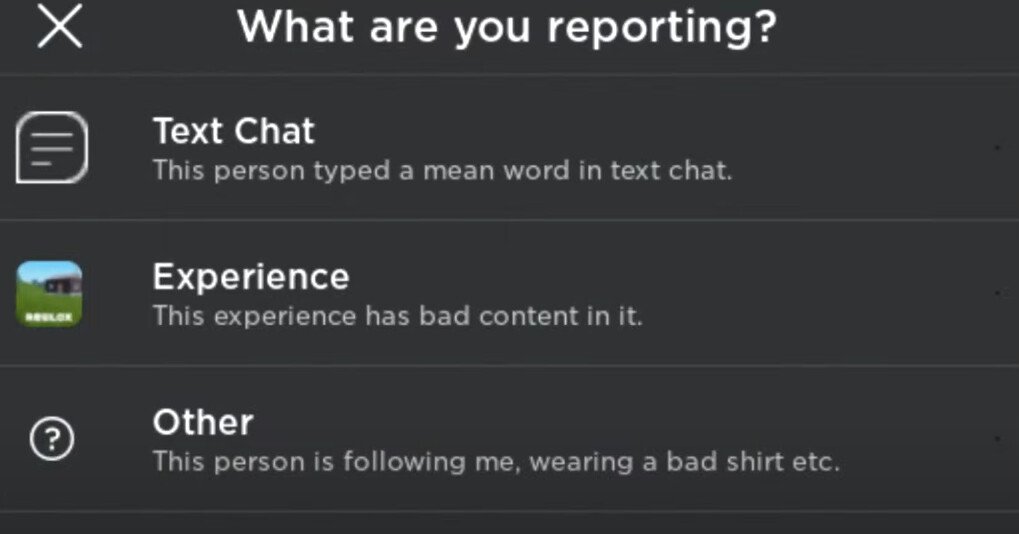
Roblox reporting systems allow users to flag inappropriate content or behavior, which is then reviewed by moderators to ensure a safe gaming environment.
Navigating the world of Roblox, it’s vital to understand how to keep it fun and secure for everyone. Roblox reporting systems play a crucial role in maintaining a positive environment. Players can use this to signal issues. This system empowers the community to help police the platform.
When something goes wrong, reporting is key. It helps moderators take action quickly. The goal is to remove content or users that break rules, ensuring everyone has a good experience on the platform.

Understanding Roblox Reporting Systems
Have you ever seen something on Roblox that just didn’t feel right? Maybe someone was being mean, using bad language, or trying to trick other players? That’s where the Roblox reporting system comes in! It’s like a superhero tool that helps keep Roblox a fun and safe place for everyone. But how does it work? Let’s take a deep dive into the different parts of this system and how you can use it to make a positive impact.
Why is Reporting Important?
Imagine a playground where no one followed the rules. It would be chaotic, right? Roblox is similar. Without a way to report bad behavior, things could get out of hand quickly. Reporting helps Roblox identify players who are breaking the rules and take action against them. This helps ensure that everyone has a good time and can play without feeling worried or uncomfortable. It’s a way for the community to help keep itself safe. Think of it like being a member of the Roblox police force, but instead of carrying badges, you’re using your ability to report!
What Kind of Things Should You Report?
Not every little thing needs to be reported, but it’s really important to report things that go against the rules. Here are some examples of behaviors you should absolutely report:
- Bullying and Harassment: If someone is making fun of you, calling you names, or trying to make you feel bad, report it! This is never okay.
- Inappropriate Language: Swearing, using offensive words, or talking about things that are not appropriate for kids. Roblox is for everyone, and that includes younger players.
- Scams and Exploitation: If someone tries to trick you into giving away your account details, robux, or items, that’s a scam! Report them immediately. Also if someone is trying to use bugs or tricks in the game to get an unfair advantage.
- Inappropriate Content: Pictures, models, or text that are not appropriate for Roblox are a no-no. It’s important to make sure Roblox doesn’t become a place where people are exposed to harmful content.
- Personal Information: Never share your real name, address, phone number, or school with anyone on Roblox. If someone asks for it, report them instantly! Sharing personal info can be dangerous.
- Impersonation: If someone is pretending to be someone else (like a Roblox staff member or another player) to trick people, this should be reported.
Remember, if you are ever unsure if something is reportable, it’s always better to be safe and report it anyway. Let Roblox decide if it violates their rules.
How to Report on Roblox: Step-by-Step
Reporting on Roblox is actually quite easy. The steps might be a little different depending on if you’re using a computer, a phone, or a tablet, but the basic process is the same. Here’s how you do it:
Reporting a Player in a Game
This is the most common type of reporting. Here’s what to do:
- Find the Player: Locate the player who is behaving badly.
- Open the Player List: You can usually do this by pressing the “Tab” key on a computer or looking for a button with multiple people on phones and tablets.
- Select the Player: Click or tap on the name of the player you want to report. This usually brings up a profile window or menu.
- Find the Report Button: Look for a button that says “Report,” “Report User,” or something similar. It usually has a little flag icon.
- Choose a Category: You’ll be given a list of reasons why you’re reporting. Choose the one that best fits what you saw. For example, “Bullying,” “Inappropriate Language,” or “Scamming.”
- Add a Description: Explain what happened in your own words. It’s helpful to be as clear and detailed as possible. Mention specific things they said or did that bothered you. The more detail you can provide, the easier it is for Roblox to investigate.
- Submit the Report: Click or tap the submit button. And that’s it! You’ve done your part.
Reporting Inappropriate Content
Sometimes, the problem isn’t a player, but a game, an item, or another kind of content. Here’s how you report it:
- Find the Content: Locate the game, item, or other content that you believe violates the rules.
- Look for the Report Button: On a game page, look for the “Report” or “Report Abuse” button that also usually has a flag icon. For items, you might find it on the item’s page, usually near the purchase button.
- Choose a Category: Select the reason that best describes the issue, like “Inappropriate Content”, “Sexual Content” or “Spam”
- Add a Description: Write a quick explanation about what’s wrong. Be as specific as you can. For example, if it’s a game, describe what makes it inappropriate. If it’s an item, what is inappropriate about it?
- Submit the Report: Click or tap the submit button. You’re all done!
Reporting from Chat or Messages
If someone sends you a mean or inappropriate message, you can report them directly from the chat:
- Find the Message: Look for the message that you want to report.
- Click on the three dots: On the right of the message, there should be three dots. Click them.
- Select Report: Select the report option.
- Choose a Category: Select the reason that best describes the issue, like “Inappropriate Chat” or “Harassment”.
- Add a Description: Add any further details that might be important for Roblox to know.
- Submit the Report: Click or tap the submit button.
What Happens After You Report?
So, you’ve reported a player or content. What now? Here’s what happens behind the scenes:
- Roblox Reviews the Report: Roblox has people working to look into each report. They check to see if the rules were actually broken. This process isn’t instant. It can sometimes take time to investigate, especially if there are many reports.
- Action is Taken: If Roblox finds that a player broke the rules, they will take action. This could mean a warning, a temporary ban (meaning they can’t play for a certain time), or a permanent ban (meaning they are not allowed to play Roblox anymore). They also may remove or censor inappropriate content.
- You Might Not Get a Personal Update: It is important to understand that Roblox doesn’t usually send a message to tell you exactly what action was taken. This is to protect everyone’s privacy and keep the reporting system fair. But know that they are working to make Roblox safe for everyone.
Understanding False Reports
It’s crucial to use the reporting system responsibly. Reporting someone when they haven’t broken the rules isn’t just unfair; it can also hurt the reporting system. Making false reports takes away time from the Roblox team to deal with actual rule breakers. It’s not cool to report someone just because you don’t like them, or if they beat you at a game. Here are a few important things to keep in mind:
- Don’t Report for No Reason: Use the report button when you see a rule being broken, not just because you are angry or upset with someone.
- Don’t Report to Get Back at Someone: If you are having a disagreement with someone in the game, you can just leave the game or mute that player. Reporting is for actions that break the rules.
- False Reports Can Have Consequences: If Roblox discovers that someone is making false reports on purpose, they can get into trouble themselves.
Remember, the reporting system is there to help everyone, and we all need to use it responsibly.
Muting and Blocking: Additional Tools
Besides reporting, Roblox gives you other tools to handle bad behavior. Muting and blocking are ways to stop unwanted interaction with other players:
Muting
Muting a player means you won’t see their messages in the chat. If someone is annoying you with too many messages, or you do not like how they are chatting, you can mute them. It’s a quick and easy way to stop seeing messages from a person that is annoying or bothering you. Here’s how:
- Open the Player List: Find the list of players in the game.
- Select the Player: Click or tap on the player’s name.
- Find the Mute Button: Look for an icon with a crossed-out speaker or a button that says “Mute.”
- Click Mute: Once you click the mute button, you won’t see messages from that player anymore.
Blocking
Blocking takes things a step further than muting. When you block someone, they can’t send you messages, join your game, or interact with you in any way. This is great for dealing with players who are persistently causing trouble or being very annoying. Here’s how to do it:
- Open the Player List: Just like muting, start by finding the list of players in the game.
- Select the Player: Select the name of the person you want to block.
- Find the Block Button: Look for an icon that is a circle with a cross or a button that says “Block.”
- Confirm the Block: When you block someone, they are blocked instantly. You won’t see or interact with them anymore.
Remember, muting and blocking are great to make your gaming experience more comfortable. You can always unblock someone later if you change your mind.
Tips for Staying Safe on Roblox
Reporting is just one part of staying safe on Roblox. Here are some extra tips to help you have the best experience possible:
- Keep Your Personal Info Safe: Never share your real name, age, address, school, or other personal details. It’s important not to give this type of information to anyone on Roblox.
- Use Strong Passwords: Pick a password that’s hard for others to guess. The more random, the better. This helps protect your account.
- Don’t Click Suspicious Links: Be very careful about clicking on links that people send you on Roblox. They might lead you to websites that try to steal your account info.
- Trust Your Gut: If something or someone makes you feel uncomfortable, it’s better to leave the game. It’s always better to be safe than sorry.
- Talk to an Adult: If you are upset or scared on Roblox, talk to a grown-up you trust. They can help you figure things out, and make sure you have a safe experience on Roblox.
The Roblox Community and You
The Roblox reporting system is really important to making sure Roblox stays fun and safe. By using it wisely and responsibly, you can help make it better for everyone. When we work together and respect the rules, everyone gets a much better experience. It’s about creating a community where everyone can enjoy playing games and making friends without worrying about bad behavior or dangers. Always remember, your actions, no matter how small, contribute to making Roblox a safe place for everyone.
By understanding the Roblox reporting system, you are not just a player, you are a protector of the game. You play an important role in keeping Roblox safe and fun for everyone. So keep up the great work of being responsible, respectful, and making Roblox the amazing place it is!
"reporting doesn't work" 💀
Final Thoughts
Roblox’s reporting tools aim to maintain a safe environment. Players can report inappropriate content or behavior they witness. These reports help moderators review and take action.
These systems are crucial for the community. They rely on user participation to flag violations. Effective use of Roblox reporting systems improves the gaming experience for everyone.

