
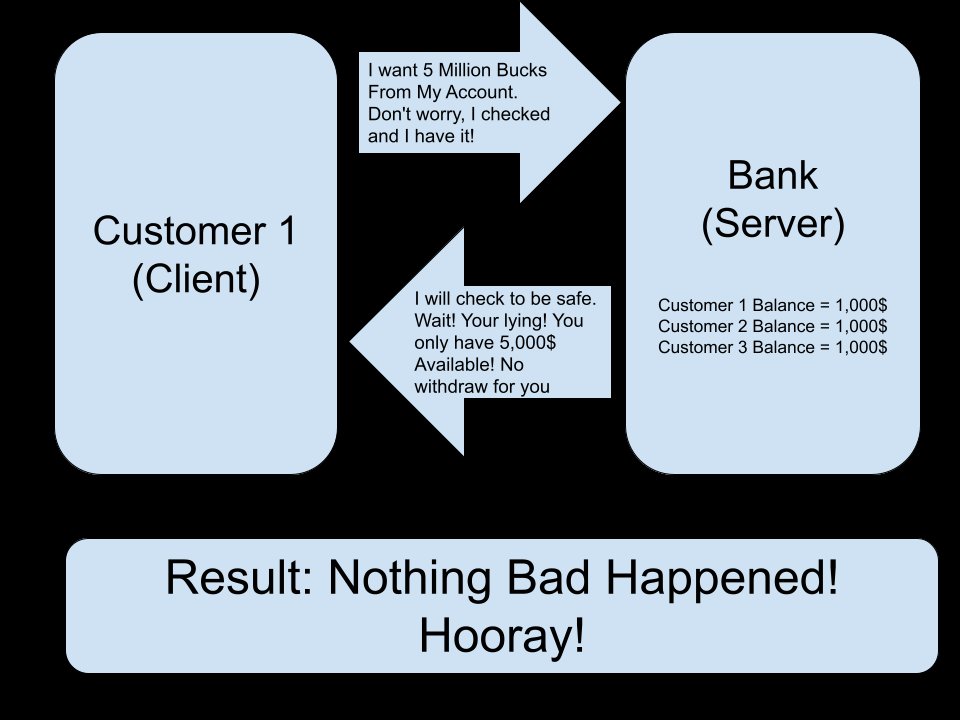
To enhance your Roblox server security, prioritize server-side validation, use secure data storage methods, and regularly update your game code.
Creating a safe and fun environment within your Roblox game requires a serious approach to security. Many developers often overlook the crucial aspects of server security which ultimately leads to issues. Following Roblox server security best practices is essential to protect your game and its players. Implement these best practices to ensure a positive and secure experience for everyone.

Roblox Server Security Best Practices
Alright, let’s dive deep into the world of Roblox server security! If you’re creating your own games or experiences on Roblox, keeping things safe is super important. Think of your server like a clubhouse – you want to make sure only the cool kids (and no troublemakers!) get in, and that everyone has a good time. We’re going to explore the best ways to do just that.
Understanding the Basics of Roblox Security
Before we get into the nitty-gritty, let’s understand what we’re protecting. A Roblox server is like a mini-world where your game lives. It’s where all the action happens – players move, things get built, and battles take place. This server is connected to the internet, which means it can be vulnerable to people trying to cause trouble.
What kind of trouble? Well, some people might try to use scripts to cheat, give themselves an unfair advantage, or even mess up the game for everyone else. These people are often called “exploiters.” So, our job is to make our servers as safe as possible from these sneaky problems.
Input Validation: The First Line of Defense
One of the best ways to stop exploiters is by using input validation. Think of it like having a bouncer at your clubhouse door. They check everyone who wants to enter and make sure they follow the rules. In our case, the rules are about what information we allow into our server.
When players interact with your game – like typing in a chat message, clicking a button, or making a move – that sends data to your server. If your server just blindly accepts this data, it could be tricked into doing things it shouldn’t.
Input validation means we carefully check this data before we use it. We ask questions like:
Is it the right type of data? For example, if we’re expecting a number, are we getting a number, or some random text?
Is it within a sensible range? If the player is supposed to pick a number between 1 and 10, is the number actually between 1 and 10?
Is it what we expected? If the player is sending a chat message, is it actually a message and not something else?
If the data passes our checks, we let it through. If it fails, we block it and stop any potential harm from happening.
Server-Side Scripting for Safety
A key element of input validation is performing these checks on the server-side. Why? Because client-side scripts, which run on the player’s computer, can be changed by exploiters. Server-side scripts, on the other hand, are secure and controlled by you.
Think of it like this: the rules in your clubhouse are written on a whiteboard that only you can access, not by anyone in the clubhouse. If someone tries to sneak in their own fake rules, they wouldn’t work because your whiteboard stays untouched. Server-side scripting makes sure that your checks for data integrity are not manipulated.
Practical Input Validation Examples
Let’s look at a few examples.
Imagine you have a button in your game that gives the player coins.
Instead of just blindly giving the player coins when they press the button, you will check to ensure they are the player who pressed that button and did not just use an exploiter.
You will also ensure that the player is only receiving the number of coins they should be. If you are giving five coins, then the player should receive five coins and not more than five.
You will check to ensure that the player can press this button. If they already claimed their coins, then you wouldn’t want them to be able to collect them again.
Let’s look at another example: chat messages.
Don’t just send the message the player sends to everyone. Check that it is not empty, contains bad language, and isn’t a command trying to trick the server.
You might want to limit the length of the message. This will help stop players from spamming.
You can also make the player wait a little bit before they send another message. This can help prevent people from flooding the chat.
Protecting Against Script Injection
Script injection is when someone tries to introduce their own code into your game. This is a major security risk because it can allow them to cheat, grief other players, or even take control of your server.
We’ve already touched on the importance of server-side scripting, and that’s a powerful tool to fight against script injection. However, there’s more to do. Think of it as having locks on the doors of your clubhouse, making it hard for unwanted guests to get in.
Remote Events and Functions: Handling Information Carefully
Roblox uses remote events and functions for communication between the server and clients. It’s like walkie-talkies – clients use them to send messages to the server, and the server uses them to send messages back.
It’s very important to be careful when handling these. Remote events and functions are a common way exploiters can try to get past your server’s defenses. They might try to send fake or malicious data, which your server might not be ready to handle if you’re not careful.
Here are some rules to follow when using remote events and functions:
Always validate input: Check the data sent by the client before you process it. Don’t just assume it’s what you’re expecting. Use the input validation techniques we already discussed.
Don’t trust the client: A client can be modified, so never trust the player’s machine to correctly and honestly send information. You must always double-check information that comes from the client.
Use secure code: Use the functions of the Roblox Studio in the correct way. Don’t just change a value because you think it works.
Using FilteringEnabled Effectively
FilteringEnabled is a Roblox setting that helps keep player chat and other forms of player-generated content clean and appropriate. Make sure this setting is always turned on for your games. It’s another layer of protection, making it harder for exploiters to send unwanted messages and actions.
When FilteringEnabled is activated, Roblox automatically checks the chat messages and other player-generated content to filter out inappropriate language or malicious code. It’s like having another helpful bouncer checking the messages before they get sent out.
Regularly Updating Your Game and Knowledge
Roblox is always updating and improving, and so are the tactics of people trying to cause trouble. This means we need to stay up-to-date too. Think of it like keeping your clubhouse in good condition and knowing what’s going on in your neighborhood.
Stay Informed About Roblox Updates
Keep an eye on the official Roblox developer forums and blogs. Roblox often posts about updates and improvements that include new features and security fixes.
New updates can sometimes bring changes that you need to be aware of. These updates may require you to change your own scripts to ensure that they work correctly and safely with the new updates. Staying informed ensures your game always uses the best and safest tools.
Learning From Other Developers
Look at what other successful Roblox developers are doing. See how they handle security in their games. Often, you can learn a lot of good ideas from others, especially from the community.
You can also learn from the mistakes of others. When you see someone struggling with a security issue, take notes and make sure you don’t make the same mistakes.
Advanced Security Practices
As you become more comfortable with the basics, you can start using some advanced security practices. Think of these as extra-strong locks and security cameras for your clubhouse. These are especially useful for complex games.
Server Authority: Make the Server the Boss
Make your server the one that decides what happens in the game. When you let the client decide things, that creates an opening for exploiters. When the server makes the final decisions, the clients will only be displaying what the server tells them to display.
For example, instead of letting the client tell the server that they got a certain number of coins, you want the server to decide how many coins to award to the player. This keeps them from lying about how many coins they have. The server should also decide whether a player can collect coins. The player should not be able to force the server to give them coins.
Using Data Stores Safely
Data stores are used to save player information, such as levels, currency, and inventory. It’s important to handle these securely.
Don’t trust the client with data store changes: The client might try to change their data and save something they shouldn’t have. Just like with anything else coming from the client, only have the server manage the data store.
Limit requests to Data Stores: If you save data every few seconds, you could hit the rate limit and prevent you from saving data for your players. Try to be careful about how often you save your player’s data.
Error handling: Your server needs to be able to handle errors that happen while using the data store. You wouldn’t want players to lose their data when your server cannot save data.
Anti-Cheat Systems
Consider using basic anti-cheat systems for your game. This might include:
Speed detection: If a player is moving too fast, it could mean they’re cheating.
No-clip detection: If a player is walking through walls, it could mean they’re cheating.
Abnormal stats: If a player suddenly has an unreasonable number of coins or other items, you will want to check that.
It’s important that these checks are done on the server-side and never the client-side. If the player checks if they are going too fast, they can change the checks so they always pass the check. You want the server to always check these things.
Code Review
If you are working with a team, have another developer or team member check your code. They might spot potential vulnerabilities that you missed.
Another developer might think of issues with your code that you did not consider. Always double-check with another person before putting out any code.
Testing and Iteration: Keep Improving
Security is not a one-time thing. It’s something you should constantly be working on. It’s like checking the locks on your clubhouse every day. You need to constantly check and improve your code.
Test your security: Try to see if there are ways that you could break your own security systems. If you can, it’s likely that others can too.
Gather feedback: Listen to your players. If they report a possible exploit, take it seriously and check it out. They can also provide great ideas on making your game better.
Refine and improve: When you find security issues, fix them quickly and make sure you are more prepared for that issue in the future.
By keeping these tips in mind, you can create a safer and more enjoyable experience for everyone playing your Roblox games. It takes work, but it’s worth it to keep your players safe and happy.
Security is an ongoing process, not a destination. You are always making your game better for you and your players. Keep learning, keep testing, and keep building safely.
ILLEGAL ROBLOX GAMES
Final Thoughts
Implementing strong access controls, regularly updating your server software, and educating your development team are crucial steps. These practices minimize risks from potential vulnerabilities. Consistent monitoring of server activity also helps quickly identify and address suspicious behavior.
Always use secure coding practices, and validate user inputs to prevent injection attacks. Adhering to these guidelines will greatly improve your Roblox server security. Employing strong passwords and limiting third-party plugin usage are also vital components of good server maintenance.

