
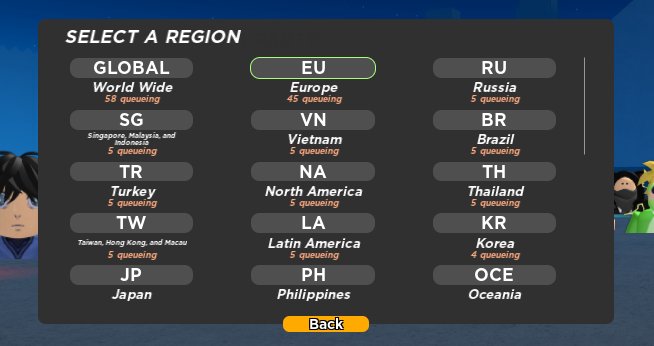
Roblox server selection happens automatically, prioritizing servers nearest to you with open spots and lower latency for optimal gameplay.
Ever wondered how Roblox places you in a specific game world? It’s all about the behind-the-scenes magic of server selection. Roblox server selection explained, makes sure you get the best possible experience. The platform’s system finds the right server for you. It considers things like your location and how busy the servers are.

Roblox Server Selection Explained
Have you ever wondered how Roblox decides which server you join? It’s not just random! Understanding how server selection works can make your Roblox experience much smoother and more fun.
What Are Roblox Servers?
Think of Roblox servers as separate rooms where players gather to play games. Each game has multiple of these rooms, so that lots of people can play at the same time. These rooms are what we call servers.
Each server runs its own copy of the game. It keeps track of who’s playing, what they’re doing, and all the game’s rules. It’s like having many mini-worlds within the big Roblox world.
Types of Roblox Servers
There are different kinds of servers you might come across in Roblox. Understanding these differences can help you choose the right server for your needs.
Public Servers
Public servers are the most common type. These are the servers that most players jump into when they hit the play button on a game. Anyone can join them.
These servers are usually filled with a mix of players. You might encounter friends, strangers, or even someone from a different country!
Private Servers
Private servers are servers created by a user. It needs Robux to make them, but they provide a more personalized experience. These are your personal game rooms, that you share with others if you choose to.
Only players invited by the server owner can join. This is awesome for playing with friends or having a smaller group experience.
VIP Servers
VIP servers are very similar to private servers. They also require Robux to create and offer the same benefits.
These are used for private play with close friends or community members. You can restrict access and keep the server just for the people you want.
How Roblox Chooses Your Server
When you click that “play” button, Roblox has to figure out which server is the best for you to join. It’s not just luck; there’s a whole system working behind the scenes!
Server Capacity
Each server has a set limit on how many players it can handle at once. This limit helps to ensure the game runs smoothly. Roblox needs to make sure servers aren’t over crowded.
Roblox looks for servers with open spots. It wants to put you in a server that isn’t already full to avoid lag and other problems.
Geographical Location
Roblox tries to connect you to a server that’s close to where you are. This is to reduce something called “latency.”
Latency is the delay between when you press a button and when it happens in the game. A server closer to your location will have less lag.
Friend Connections
If you have friends playing a certain game, Roblox will try to put you in the same server as them. It’s fun playing with friends!
This way, you can easily play together and share the experience. This makes it easier for you to play alongside your friends.
Server Health
Roblox also keeps an eye on server health. It checks to see how the server is doing.
Servers that have problems or are running poorly are avoided. You should be placed into servers that are operating correctly.
Manually Choosing a Server
Sometimes, you might want to choose your own server instead of letting Roblox pick for you. Here’s how you can try to find the right server for you.
Using the Server List
When you’re on the game page, you’ll usually see a “Servers” tab. This list shows you all the different public servers available.
You can see how many players are in each server. From here you can decide which server you want to join.
Finding a Server With Friends
You can also find servers where your friends are playing. Look for their name when browsing the server list.
This can help you easily join a game with your friends. This makes meeting up with them super easy.
Joining a Specific Server
Once you find the server you want, click the “Join” button. This will take you right into that specific server.
Sometimes you might have to click it a few times, but generally speaking it should send you to where you want to go!
Why Server Selection Matters
Picking the right server can have a big impact on your Roblox experience. Knowing more about it will help you in the future.
Reducing Lag
Joining a server that’s closer to you can help reduce lag. That is very important for many games.
This makes the game run more smoothly. Your actions will happen faster and make it more enjoyable.
Playing with Friends
Server selection lets you easily find the servers where your friends are. This makes it easier to play together.
This allows you to team up and play games with people you know. This is often more fun than playing with random people.
Better Game Experience
A good server means a better experience. You’ll be able to enjoy the game as it was designed to be played.
Servers that are healthy and have the right number of players can be a lot more fun. This allows for a great game session.
Troubleshooting Server Issues
Sometimes, things might not work perfectly. Here’s what to do if you have server-related problems.
What to do if you cannot join a game
If you can’t seem to join a game, the first step is to make sure you are connected to the internet. Also, check if the Roblox servers are working correctly.
If those are running correctly, then try a different game server. Also try restarting your Roblox or your computer.
Dealing with Lag
If you’re experiencing lag, try joining a server closer to your location. Look for a server with fewer players too.
You may also want to close other apps and programs that could be using up internet or computer resources.
When Server Issues Persist
Sometimes, the problems might be on Roblox’s side. Check their status page for server outages.
If the issues continue, contacting Roblox support might be necessary. Let them know of the problem, and see if they can help you fix the issue.
Key Takeaways of Roblox Servers
Here are some key ideas to remember about Roblox servers. These should help you in the future when playing Roblox!
- Roblox uses servers to host games for many players.
- Servers can be public, private, or VIP.
- Roblox selects a server for you using its system.
- You can use the server list to find servers.
- Location, friends and server health all impact server selection.
- There are troubleshooting methods for lag and connectivity.
Understanding how Roblox servers work can help make your gaming experience better. It helps you understand the technology that is allowing you to play games online with others. So keep these ideas in mind when you are playing Roblox in the future.
ROBLOX is DELETING private servers..
Final Thoughts
Roblox server selection explained simplifies joining games. The system automatically places you in a server. However, you can sometimes join friends or select specific servers.
You can use server lists to see player counts. Choosing a server with fewer players may reduce lag. This option gives you more control over your game experience.
Understanding ‘roblox server selection explained,’ gives you better control. Knowing how servers work lets you pick the best one for you and your friends.

